What is an item in n8n?
Updated · By Robert Breen
An item is one record of data moving through an n8n workflow, like one spreadsheet row, one email or one form submission. Each node receives a list of items and, by default, runs once for every item, so one step can handle many records without a loop.
Why it matters for a small business
Items are the idea that makes n8n click. People new to automation expect to write something like "for each row, send an email." In n8n you don't. You build the Gmail step once, and it runs once for each item that reaches it. That keeps workflows short and readable even when they handle hundreds of rows.
Items also explain the most surprising results. If a step sends 50 emails when you expected one, 50 items reached it. If a step sends nothing, no items reached it. The counts on the lines between nodes often tell you more about what went wrong than any error message.
In a real lesson: Daily Job Alerts: Email Each Tech Their Jobs from Google Sheets with n8n
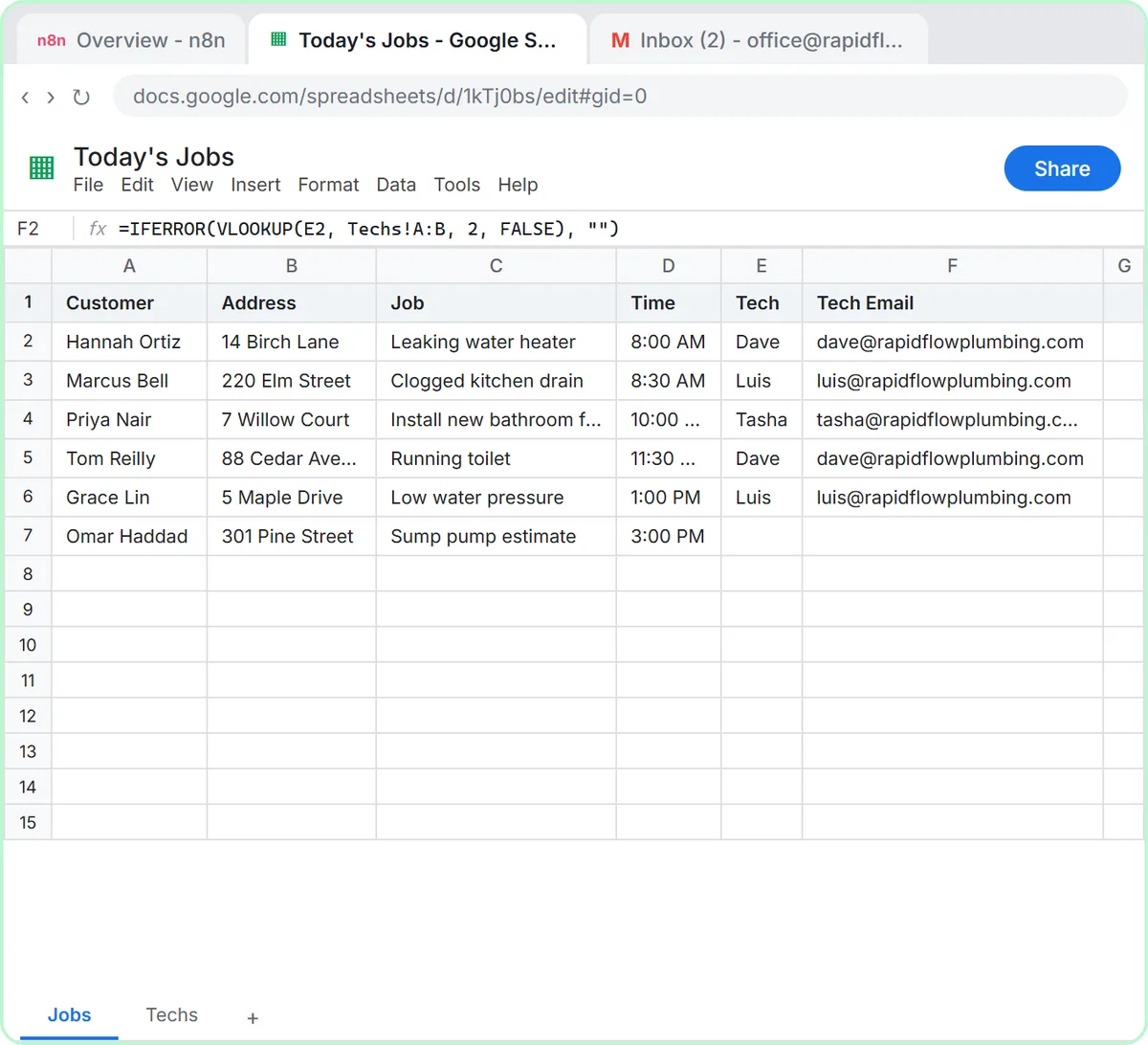
In the Daily Job Alerts lesson, Rapid Flow Plumbing, the made-up plumbing company in the lesson, keeps today's jobs in a sheet. When you click Test step on Google Sheets: Get row(s) in sheet, it returns six items, one per row, each labeled with the column names: Customer, Address, Job, Time, Tech and Tech Email.
The Filter shows the counts directly: six items in on the left, five out on the right, because the sump pump job has no tech. The Gmail: Send a message step then receives five items. You built it once, with {{ $json["Tech Email"] }} in To, and it runs five times, each time reading that item's address.
When you click Test workflow, the numbers on the lines between steps tell the story, and the office's Sent folder confirms it: two emails to Dave, two to Luis, one to Tasha, none to Kevin. The voice-over sums it up: one Gmail step ran five times, and you never wrote a loop.
Try this lesson free or read the step-by-step guide.
Common confusions
Item vs row
In this lesson they match one to one, but an item is more general. An email, a form submission or a record from an API is also one item, and an item can hold nested data, like a webhook item whose form fields sit under body.
One item holding a list vs many items
If an app returns one record that contains a list of 20 orders, n8n sees one item, not 20, until you split that list into separate items (n8n has a node for this). The count on the connection tells you which one you have.
Tips
- Read the item count on each connection while testing. It's the quickest check that a read or filter step did what you meant.
- If every email goes to the same person, you typed a fixed value where an expression belongs.
- Keep source sheets tidy. Every row that reaches a send step becomes a message.
Related terms
Where you use it: free lessons
- Daily Job Alerts: Email Each Tech Their Jobs from Google Sheets with n8n (n8n, 10 min)
- Find and Use n8n Templates (n8n, 9 min)
Frequently asked questions
- Why did one n8n step send several emails?
- Because several items reached it. n8n runs most steps once per item, so five rows in means five emails out, each filled in with that row's data.
- How do I make n8n handle only some rows?
- Reduce the items before that step, for example with a Filter that keeps only the rows you want. The send step then runs only for what's left.