n8n (said "n-eight-n", short for "nodemation") is a workflow automation tool. It connects the apps your business already uses, such as Gmail, Google Sheets, Slack, a CRM and OpenAI, and does the repeat work between them for you. You draw each job as a workflow on a canvas, step by step, and n8n runs it the same way every time it is triggered: when a form comes in, at 8am every Monday, or when an email lands. It has a hosted version, n8n Cloud, with a free trial, and a free self-hosted version. You can learn it hands-on in the free n8n for Beginners course, starting with What Is n8n? Build Your First Workflow.
This page is for office managers, operations staff and small-business owners who keep hearing about n8n and want to know, in plain words, what it is, whether it fits their business, and what it costs. The examples use made-up businesses and fake data.
What business problem does n8n solve?
Every office has jobs that are the same every time: copy the form answers into the sheet, email the client the status update, remind the team about timesheets, forward the invoice to the bookkeeper, check the inbox for anything urgent. None of them is hard. Together they take hours every week, and because a person does them from memory, some get missed.
A missed inquiry is a lost client. A late timesheet is a late invoice. A typo in a copied email address is a client nobody can reach. n8n fixes the category, not just one job: once a task is written down as "when this happens, do these steps", n8n can do it the same way every time, around the clock, and keep a record of every run.
What do businesses use n8n for?
Real examples of the kind of work n8n takes over:
- A bookkeeping firm puts an n8n form on its website. Every inquiry lands in one Google Sheet with a summary line, instead of in five different inboxes. (Form to Google Sheets lesson)
- A consulting firm sends the team a timesheet reminder every Monday at 8am, so invoices go out on time. (Schedule Trigger lesson)
- An accounts team writes one reminder for every overdue invoice from a list, with the client's name, days late and late fee filled in. (Items and expressions lesson)
- A shared inbox gets a one-sentence AI summary and a suggested next step for every customer email, so the urgent ones are answered first. (OpenAI lesson)
- A marketing agency sends each client a weekly status email drafted from its project tracker, for a person to check and send.
How does n8n work?
Five ideas explain almost everything you see in the n8n editor.
Workflows and nodes. A workflow is a chain of steps called nodes, drawn left to right on a canvas. Each node does one thing: read a sheet, send an email, call an API, ask an AI model, make a decision.
Triggers and actions. The first node is the trigger, the event that starts the workflow. n8n's trigger menu offers Trigger manually (a button), On a schedule, On form submission (a form n8n hosts for you), On webhook call (another app sends data), On app event (a new email, a new row) and On chat message. Every node after the trigger is an action.
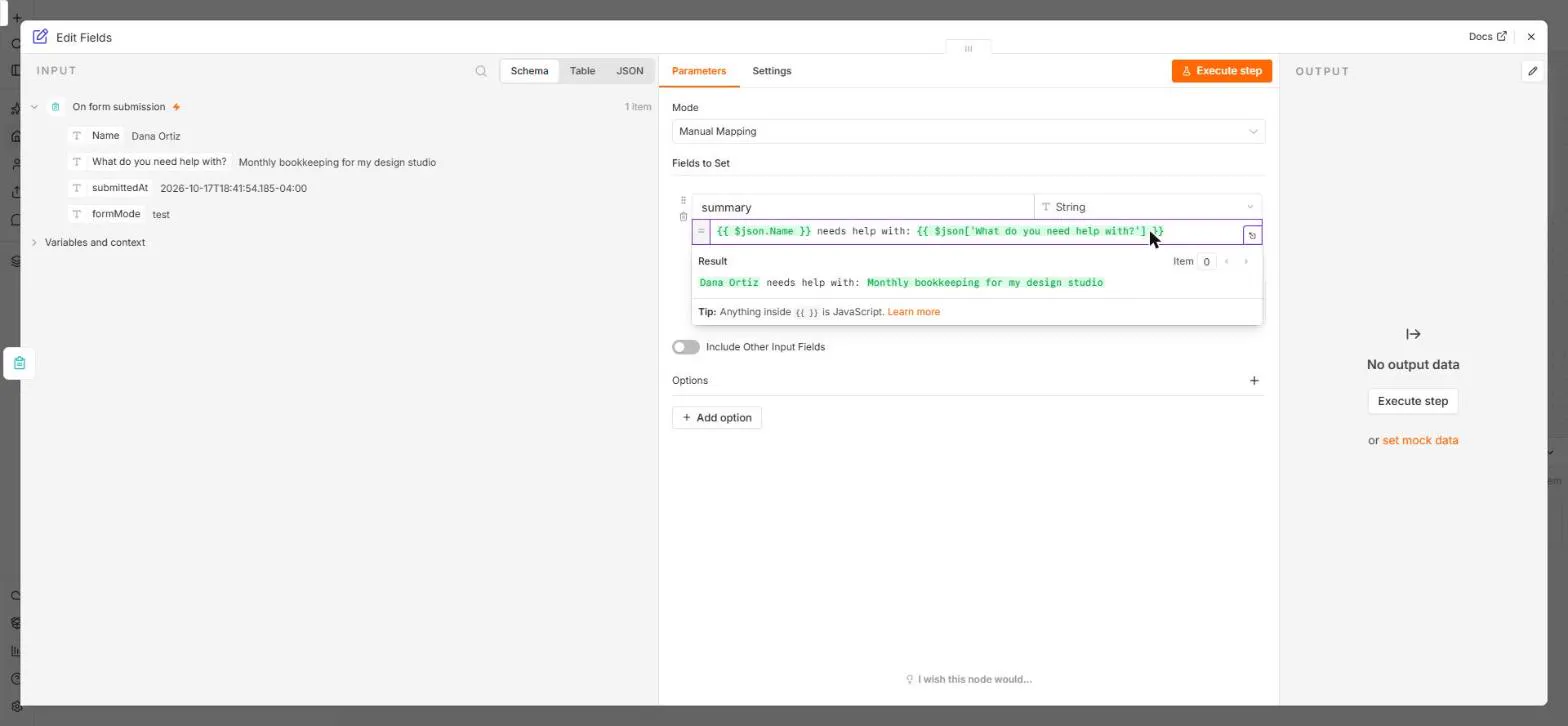
Items. Data moves from node to node as items, one per record. Five invoices are five items; one form submission is one item. Most nodes run once for every item they receive, so a workflow built for one record already works for a hundred. You can read items as a schema, a table or raw JSON.
Expressions. An expression in double curly brackets fills in a value from the current item. {{ $json.email }} means "this item's email". You make one by dragging a field from the INPUT panel onto a box, so no code is needed.
Test runs and publishing. You build with test runs: Execute step runs one node, and the Execute button under the canvas runs the whole workflow once. Nothing runs by itself until you click Publish. Forms and webhooks have a Test URL that only listens while you test and a Production URL that works once the workflow is published; see Test URL vs Production URL. Every run is saved under Executions.
n8n Cloud or self-hosted?
n8n Cloud is hosted by n8n. You sign up, open the editor in a browser and build. Updates, backups and uptime are n8n's job. This is the right start for nearly every small business.
Self-hosted n8n is the same editor running on your own server. The Community Edition is free software, so you pay only for the server, but someone has to install it, update it, secure it and back it up. It suits teams with technical help, strict data rules, or very high volumes. The full comparison is in n8n Cloud vs self-hosted n8n.
What does n8n cost?
As listed on n8n's pricing page in October 2026:
| Plan | Price | Workflow runs included | Hosted by |
|---|---|---|---|
| Free trial | Free, no credit card | Trial allowance | n8n |
| Starter | $20 a month, billed annually | 2,500 a month | n8n |
| Pro | $50 a month, billed annually | 10,000 a month | n8n |
| Business | $800 a month, billed annually | 40,000 a month | You (self-hosted) |
| Community Edition | Free software | No plan limit | You |
The key difference from other tools: n8n counts one execution per whole workflow run, however many steps it has. A ten-step workflow that runs once is one execution. Apps you connect bill separately for what you use; an OpenAI summary of one email, for example, costs a fraction of a cent on your own OpenAI account.
How does n8n compare to Zapier and Make?
Zapier is the quickest way to connect two or three apps and has the biggest app directory, but it charges per action, so long or busy workflows get expensive. Make is visual and inexpensive per operation, and strong at moving and reshaping data between apps. n8n is the strongest of the three for long workflows, AI steps and agents, charges per whole run, and is the only one you can host yourself; in exchange it asks you to understand items and expressions a little sooner. Side-by-side tables with October 2026 prices: n8n vs Zapier, n8n vs Make and Zapier vs Make vs n8n.
How do you start learning n8n?
Start with the ideas, then build small. The free n8n for Beginners course goes in this order, and every module was clicked through in the real n8n editor:
- What Is n8n? Build Your First Workflow: triggers, nodes and a first form.
- Items, JSON and Expressions: the part most beginners get stuck on.
- Execute step, Execute workflow and Publish: testing versus going live.
- Run a Workflow on a Schedule: every Monday at 8am.
- Send Form Answers Straight to Google Sheets: forms and credentials.
- Find and Use n8n Templates and Talk to Your Google Sheets.
- IF and Switch: rules that route work.
- Summarize Customer Emails with OpenAI: a first AI step.
After that, n8n Intermediate covers APIs, webhooks, AI steps a person approves and error handling.
Key takeaways
- n8n connects your apps and runs repeat jobs as workflows: a trigger, then actions.
- Data moves as items, one per record; expressions fill in each item's own values.
- Build with test runs, then Publish. Schedules and Production URLs only work after Publish.
- n8n Cloud starts with a free trial, then $20 a month billed annually for 2,500 runs; self-hosting is free software you maintain.
- Pick n8n over Zapier or Make for longer workflows, AI steps and high volume; pick Zapier for the quickest simple automations.
Frequently asked questions
Is n8n free? The self-hosted Community Edition is free software. n8n Cloud has a free trial with no credit card, then paid plans from $20 a month billed annually.
Do I need to code to use n8n? No. Workflows are built by clicking and dragging. Expressions look like code, but you make them by dragging fields. A Code node exists for people who want it.
Is n8n safe for business data? Credentials (your app logins and API keys) are stored encrypted, and you choose which data each workflow touches. On Cloud, n8n hosts and secures the service; self-hosting puts security in your hands. Keep a person reviewing anything AI writes before it goes to a client.
How long does it take to learn n8n? The basics in the n8n for Beginners course take about an afternoon of practice. Most people build their first useful workflow the same week.
Sources
- n8n: Plans and pricing (checked October 17, 2026)
- n8n Docs: Workflows, nodes and data
- n8n Docs: Expressions
- n8n Docs: n8n Form Trigger
- n8n on GitHub (Community Edition)
- The n8n Cloud editor itself, used to build every lesson linked here on October 17, 2026