Updated . Built against the tool’s current screens and checked step by step. How we check this lesson
Copier, software and service contracts often renew themselves for another year unless you send notice weeks before the end, in exactly the way the contract says. Most offices find that clause after the deadline has passed. In this free, interactive lesson you upload a three-page vendor contract to a ChatGPT Temporary Chat, get every key term in one table with section numbers, check the non-renewal deadline yourself, and have ChatGPT draft the letter and a mailing checklist. The contract and the companies are made up, so you can download it and try the same prompts in your own ChatGPT.
At a glance
| Question | Answer |
|---|---|
| What you build | Upload a vendor contract to a Temporary Chat, get every key term in one table with section numbers, check the non-renewal deadline yourself, and draft the letter the contract asks for. |
| Tools | ChatGPT |
| Time | About 10 minutes, 19 steps in 4 parts |
| Level | Beginner, no coding needed |
| Cost | Free |
| Ways to learn it | Practice it step by step |
The 4 parts, in short
- Open a Temporary Chat: Look at the contract first, Turn on Temporary chat, Open the + menu, Add photos & files, and 2 more steps.
- Ask for the key terms: Click the message box, Ask for the key terms and the deadline, Send it, Read the deadline.
- Check the dates yourself: Find how notice must be sent, See what cancelling early costs, Check the math.
- Draft the non-renewal letter: Click the message box, Ask for the letter and a mailing checklist, Send it, Check the letter, and 2 more steps.
Start here first: Summarize a Meeting Transcript with ChatGPT (module 1 of ChatGPT for Everyday Work)
In the course: Part 3 · ChatGPT for Everyday Work (Module 30 of the full course)
Part of: Master ChatGPT for Work (step 8 of 14). Next up: Analyze a Spreadsheet with ChatGPT: Upload a CSV, Get a Chart and Three Takeaways
Part of: AI for Operations Teams (step 33 of 36). Next up: Compare Vendor Quotes Side by Side using ChatGPT
Part of: AI for Finance Teams (step 19 of 22). Next up: Compare Vendor Quotes Side by Side using ChatGPT
Part of: AI Back Office for Small Business (step 14 of 18). Next up: Compare Vendor Quotes Side by Side using ChatGPT
The business case: what a missed renewal costs
An auto-renewal clause keeps a contract running unless someone acts in time. For the vendor that is a feature. For a small office it is a trap: the notice window is usually 30 to 90 days before the end of the term, the notice often has to go by certified mail, and an email to your sales rep does not count.
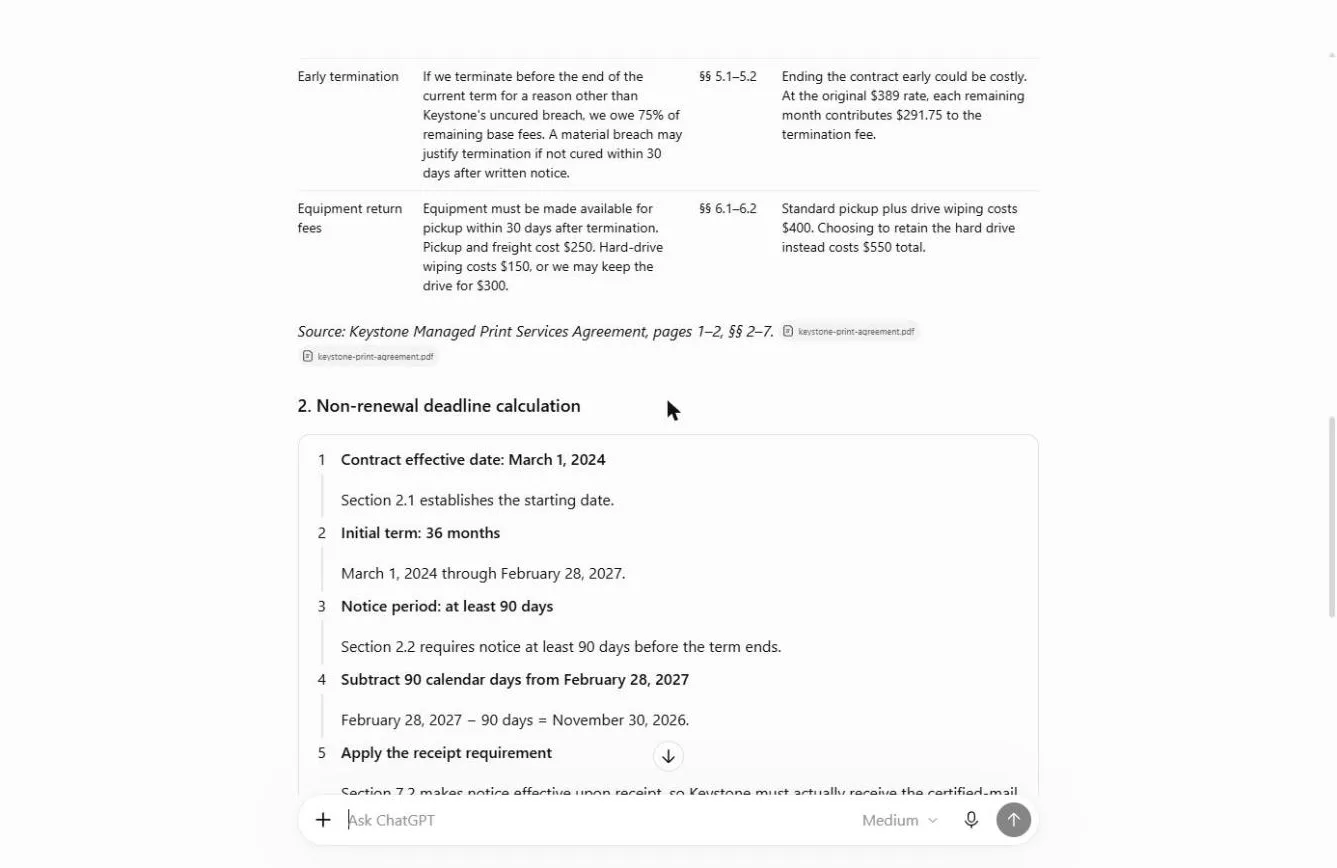
Miss it and you pay for another full term of something you meant to replace, or you pay an early termination fee to get out. In the example contract that fee is 75% of the remaining base fees, so the renewal date is the only cheap exit.
What changes: ChatGPT reads the whole contract in under a minute and lists the clauses that matter with their section numbers. You spend your time checking the two or three that decide the outcome, putting the dates in your calendar and getting the letter out.
The example: Brightline Painting's copier contract
Brightline Painting (made up) leases a copier from Keystone Office Systems (also made up) for $389 a month. The agreement started March 1, 2024 for 36 months and renews for 12 months at a time unless Keystone receives written notice at least 90 days before the term ends. Notice must go by certified mail; email does not count. Prices can rise up to 7% a year, and ending early costs 75% of the remaining base fees.
Download the sample and follow along: [keystone-print-agreement.pdf](/content/files/chatgpt-vendor-contract-key-terms/keystone-print-agreement.pdf). It is three pages and every name is made up, so it's safe to upload anywhere.
Who this lesson is for
Office managers, operations and finance staff and small-business owners who sign or manage vendor contracts: copiers, phones, software, cleaning, IT support. No legal background is needed. It is a module in [Master ChatGPT for Work](/courses/master-chatgpt-for-work), right after Catch Made-Up Facts, and it is also listed in AI Back Office, AI for Operations Teams and AI for Finance Teams.
What ChatGPT produced in the real run
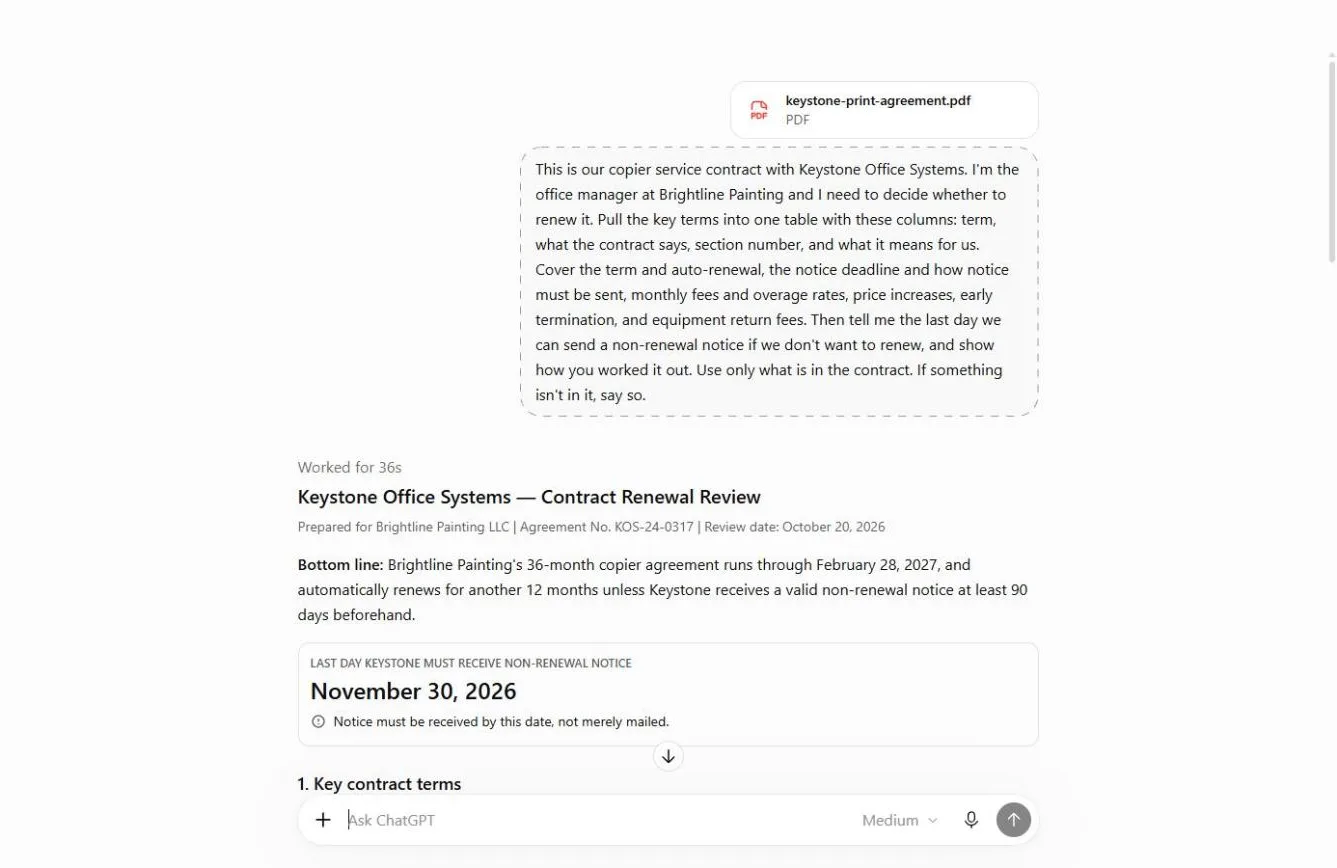
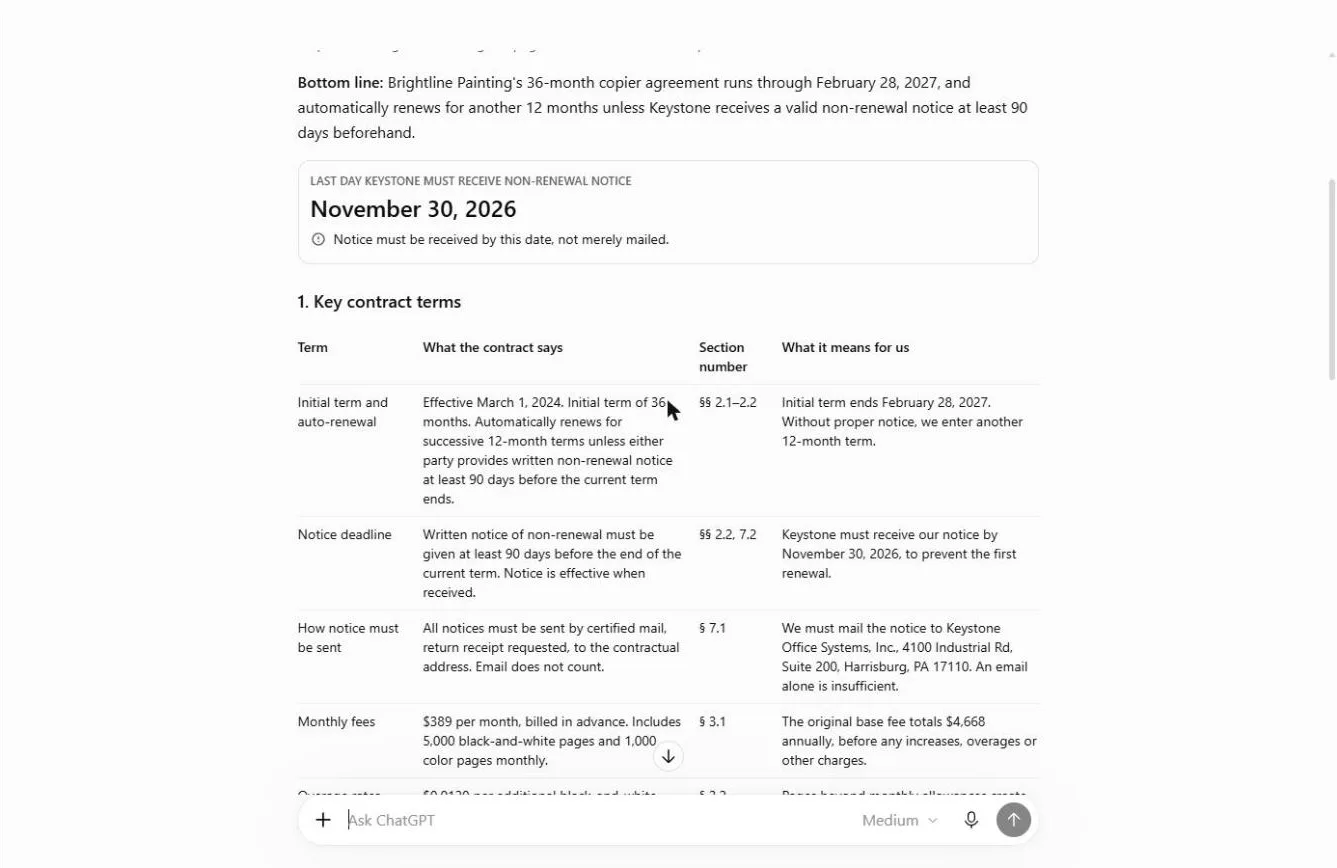
It worked for 36 seconds and returned a titled review with a bottom line, a deadline callout, an eight-row key-terms table with section numbers, a five-step deadline calculation, and a short list of what the contract does not say (the current price after increases, renewal pricing, how early to mail). Every number matched the contract.
It noticed something many people miss: under Section 7.2 notice counts when it is received, not when it is mailed, so it treated November 30 as the arrival deadline and suggested mailing two weeks earlier, over Thanksgiving week.
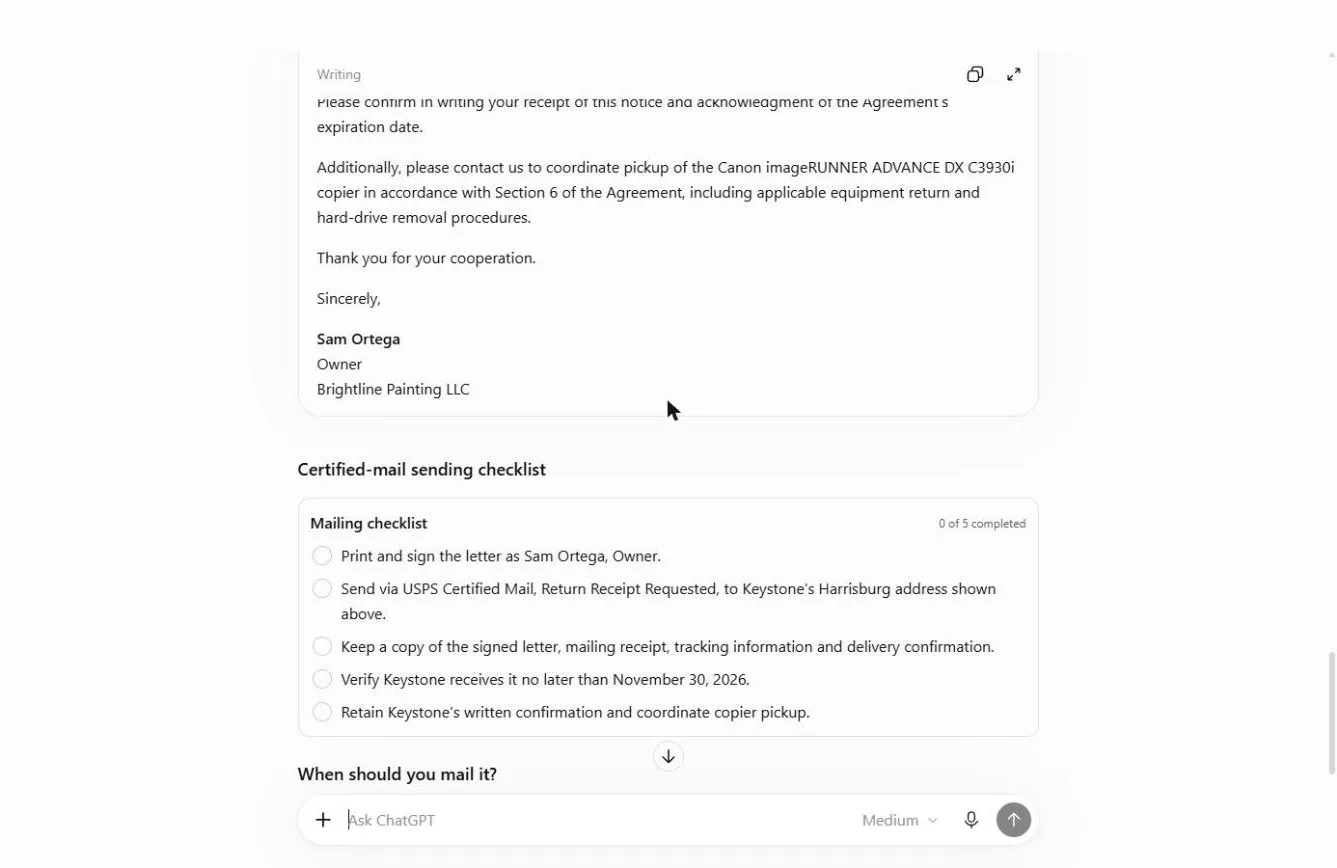
The letter came back in a Writing card with a copy button, ready to paste onto letterhead. Nothing was sent from ChatGPT.
What this saves you
- Money: one missed renewal on this contract is a year of fees you did not want, about $4,668 at the starting price.
- Time: three pages of fine print become one table in under a minute, with the section to check next to every line.
- A paper trail: the letter, the mailing checklist and the dates are ready the same day you decide.
- What it does not replace: reading the clauses ChatGPT quotes, your calendar reminder, and a lawyer when the contract is large or unusual. This is general information, not legal advice.
Gotchas
- Ask for section numbers. They turn "trust me" into "check § 7.1", and they make a made-up clause easy to spot.
- Received is not sent. If the contract says notice is effective on receipt, mail it well before the deadline and keep the return receipt.
- Email rarely counts. Many contracts require certified mail to a specific address. Your account manager's inbox is not that address.
- Use a Temporary Chat or a business plan for real contracts, and check your ChatGPT data controls. Remove anything the task doesn't need, such as bank details.
Next business case
Next in Master ChatGPT for Work: Analyze a Spreadsheet with ChatGPT. Turn a messy export into answers and a chart. Later in the course, Compare Vendor Quotes Side by Side helps you choose the replacement.
Try it yourself, free
Reading the steps is a start. Doing them is how it sticks. The interactive module walks you through every click in a practice copy of ChatGPT, checks each step, and never touches your real accounts.
Start “Never Miss a Contract Renewal Deadline using ChatGPT”Step by step: Never Miss a Contract Renewal Deadline using ChatGPT
All 19 steps of the interactive module, in order. In the module you watch each one, then do it yourself in a practice copy that checks your work.
1. Open a Temporary Chat
- Look at the contract first. This is the contract: Keystone Office Systems’ copier agreement with Brightline Painting, three pages. Somewhere in it is a clause that renews it for a year unless Keystone receives a letter in time. Scroll through it, then click ✕ to close it.
Here's the contract. Brightline Painting's copier agreement. Three pages of fine print. Somewhere in here is a clause that renews it for another year, unless the vendor gets a letter in time. Have a look, then close it.
- Turn on Temporary chat. Contracts are business documents, so keep this one out of your chat history. In ChatGPT, click the Temporary chat icon at the top right.
Contracts are private, so keep this one out of your history.
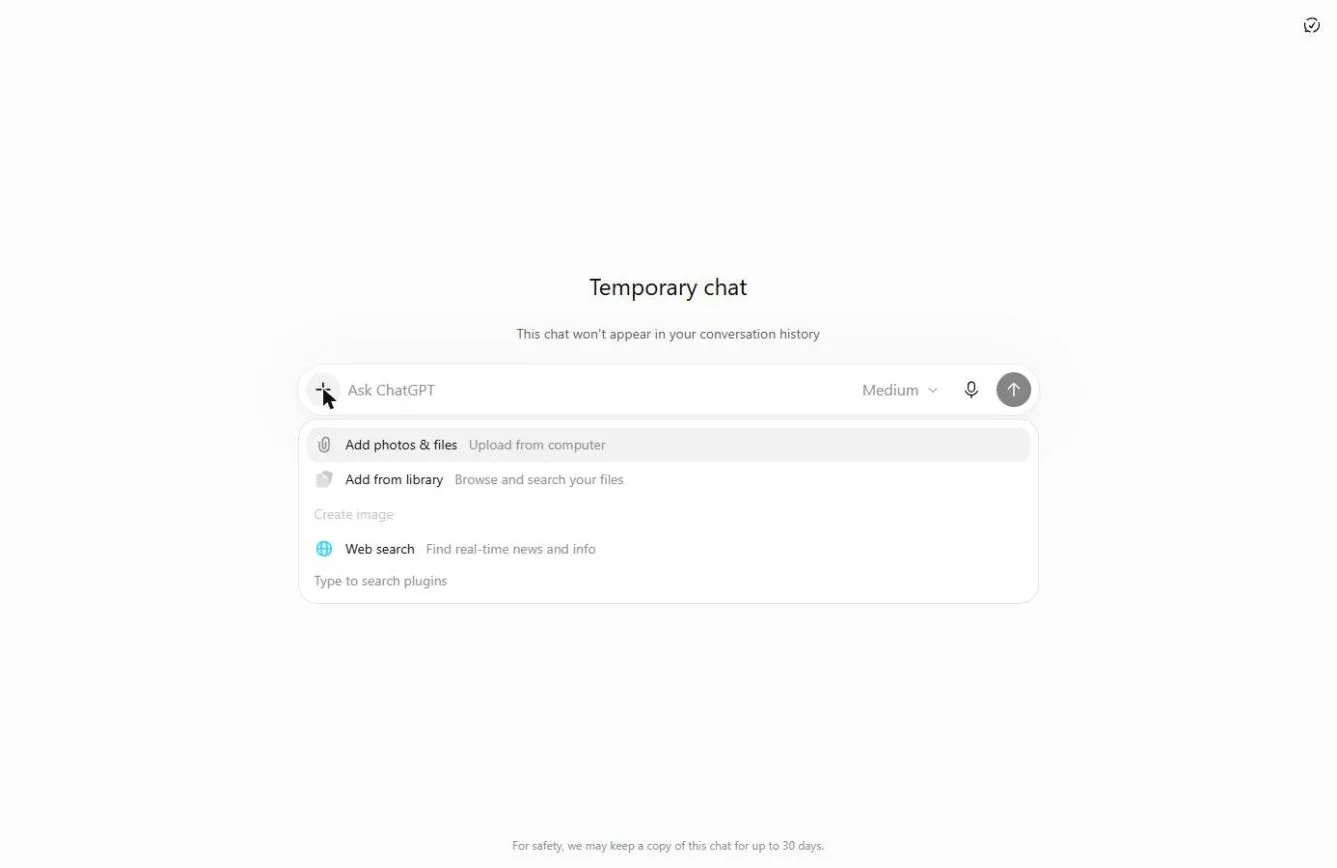
- Open the + menu. The screen now says Temporary chat: it won’t appear in your history, and OpenAI says temporary chats aren’t used to train its models. Click the + on the left of the message box.
Now it says Temporary chat. It won't show up in your history.
- Add photos & files. Click Add photos & files.
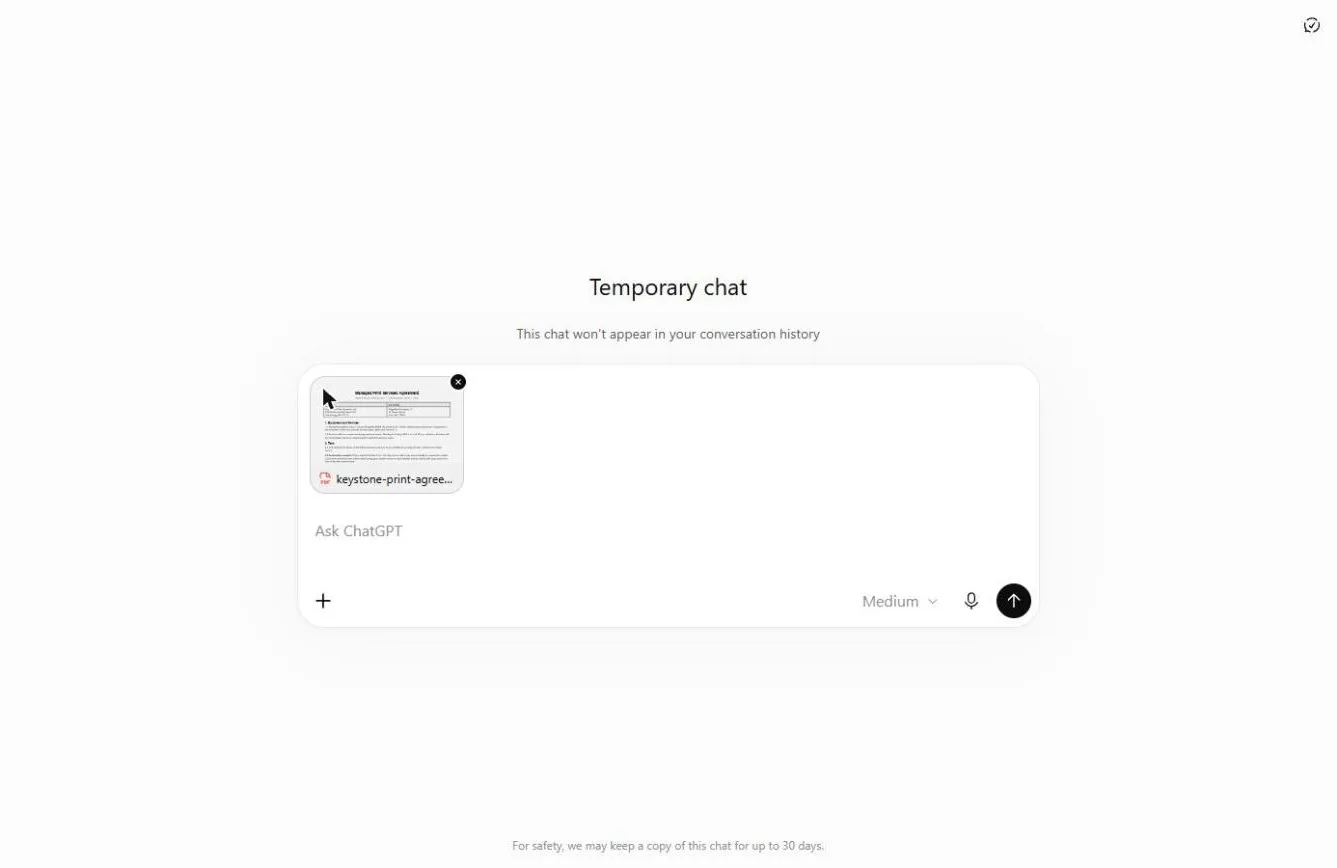
- Pick keystone-print-agreement.pdf. Pick keystone-print-agreement.pdf, the three-page contract (you can download the same made-up PDF from this lesson’s page).
Pick the Keystone agreement. It is a three page P D F.
- Open it. Click Open. The PDF sits above the message box as a small preview.
2. Ask for the key terms
- Click the message box. Don’t ask “anything I should know?”. Ask for a table with the exact columns you need, and the section number for every line, so you can check it. Click the message box.
Don't ask, is there anything I should know. Ask for a table, with the section number on every line, so you can check it.
- Ask for the key terms and the deadline. Paste in the request. It asks for one table (term, what it says, section, what it means for us), the last day to send a non-renewal notice with the working shown, and “use only what is in the contract”.
This request asks for one table of the key terms. It asks for the last day to cancel, with the math shown. And it says, use only what is in the contract.
This is our copier service contract with Keystone Office Systems. I'm the office manager at Brightline Painting and I need to decide whether to renew it. Pull the key terms into one table with these columns: term, what the contract says, section number, and what it means for us. Cover the term and auto-renewal, the notice deadline and how notice must be sent, monthly fees and overage rates, price increases, early termination, and equipment return fees. Then tell me the last day we can send a non-renewal notice if we don't want to renew, and show how you worked it out. Use only what is in the contract. If something isn't in it, say so.
- Send it. Click Send (the arrow on the right).
- Read the deadline. ChatGPT worked for about 36 seconds and put the answer at the top: November 30, 2026, and the note “Notice must be received by this date, not merely mailed.” Click the date.
Here is the answer, right at the top. November thirtieth, twenty twenty-six. And note the warning: it must be received by then, not just mailed.
3. Check the dates yourself
- Find how notice must be sent. In the table, find How notice must be sent (§ 7.1): certified mail, return receipt requested, and email does not count. A quick email to your rep would not stop the renewal. Click that row.
Now check how the notice has to be sent. Certified mail, return receipt. Email does not count. So a quick email to your sales rep wouldn't stop anything.
- See what cancelling early costs. Find Early termination (§ 5.2): leaving before the term ends costs 75% of the remaining base fees. That is why the renewal date matters: it is the free exit. Click the row.
Here's why the date matters. Leaving early costs seventy-five percent of what's left on the contract. The renewal date is your free way out.
- Check the math. Never trust a date blind. Check the working: start March 1, 2024, 36 months ends February 28, 2027, minus 90 days is November 30, 2026. Count it on a calendar once. Click step 4.
Never trust a date blind. Started March first, twenty twenty-four. Thirty-six months ends February twenty-eighth, twenty twenty-seven. Ninety days before that is November thirtieth. Count it on a calendar once.
4. Draft the non-renewal letter
- Click the message box. You decided not to renew. Have ChatGPT draft the letter the contract asks for. Click the message box.
You've decided not to renew. Let's have ChatGPT write the letter.
- Ask for the letter and a mailing checklist. Paste in the request. It asks for the letter from Sam Ortega with the agreement number and section, a request to confirm in writing and book the pickup, and a safe mail-by date.
This asks for the letter, signed by the owner, with the agreement number and the section. And a safe date to mail it by.
We don't want to renew. Draft the non-renewal letter from Sam Ortega, Owner, Brightline Painting LLC, to Keystone Office Systems. Quote the agreement number and the section it relies on, say the agreement ends on February 28, 2027, ask them to confirm in writing and to schedule the copier pickup. Keep it under 200 words. Then give me a short checklist for sending it the way the contract requires, and the date I should mail it by to be safe.
- Send it. Click Send (the arrow on the right).
- Check the letter. The letter shows in a Writing card. Check three things against the contract: agreement KOS-24-0317, Section 2.2, and the end date February 28, 2027. All three match. Click the letter.
The letter comes in a writing card. Check three things. The agreement number. Section two point two. And the end date, February twenty-eighth. All three match.
- Copy the letter. Click the copy icon at the top right of the card. Paste it into your letterhead, print it and have Sam sign it. ChatGPT doesn’t send anything.
- Note the mail-by date. ChatGPT suggests mailing by Friday, November 13, 2026, two weeks before the Nov 30 receipt deadline, with Thanksgiving week in between. Put both dates in your calendar today. Click the date.
Last, the mail by date. Friday, November thirteenth. That leaves two weeks before the deadline, with Thanksgiving in between. Put both dates in your calendar today. That's a year of copier fees you just saved.
Screenshots
Frequently asked questions
- Can ChatGPT read a contract PDF?
- Yes. Click + in the message box, choose Add photos & files, pick the PDF and ask for what you need. Ask for section numbers on every point so you can check them against the contract yourself.
- How do I find the auto-renewal deadline in a contract?
- Find the term (start date and length), the renewal clause (how long each renewal lasts) and the notice period (for example 90 days before the end). The deadline is the end of the current term minus the notice period. Then check the notices clause: it may say notice only counts when received, and only by certified mail.
- Is it safe to upload a contract to ChatGPT?
- Follow your company's policy first. A Temporary Chat doesn't appear in your history, and OpenAI says temporary chats aren't used to train its models; business plans aren't used for training by default. Remove details the task doesn't need. The sample contract in this lesson is made up.
- Can ChatGPT write a non-renewal letter?
- Yes. Ask for a letter that quotes the agreement number and the renewal section, states the end date, and asks the vendor to confirm in writing. Then print it, sign it and send it the way the contract requires.
- Is this lesson free?
- Yes. Stepthrough is free and the practice copy needs no account. To do it for real you need your own ChatGPT account; file uploads have usage limits that depend on your plan.
More in ChatGPT for Everyday Work
 Summarize a Meeting Transcript with ChatGPT
Paste a long meeting transcript into ChatGPT and get the decisions, an action items table with owners and due dates, and a follow-up email ready to send.
Free · Live ~9 min Beginner
 Reply Faster: Turn a Messy Customer Email Thread into a Clear, Friendly Reply
Turn a messy customer email thread into a clear, friendly reply: give ChatGPT the thread and your facts, check every promise, fix the tone, and send it from Gmail.
Free · Live ~9 min Beginner
 ChatGPT Projects: Keep Your Brand Voice, Files and Instructions in One Place
Set up a ChatGPT Project with your brand voice instructions, your price list and your style guide, so every new chat already knows your business.
Free · Live ~9 min Beginner
 Analyze a Spreadsheet with ChatGPT: Upload a CSV, Get a Chart and Three Takeaways
Upload a CSV of sales to ChatGPT, have it check the data first, ask your questions, get a chart you can download, and finish with the three takeaways that matter.
Free · Live ~10 min Beginner
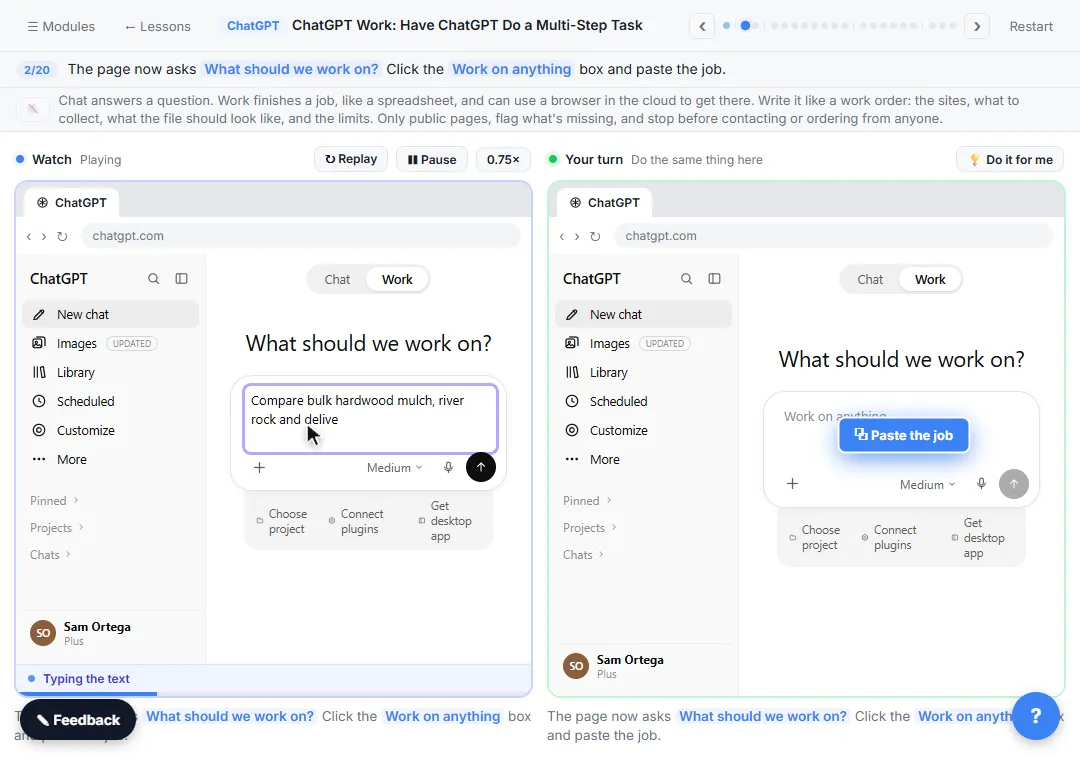 ChatGPT Work: Have ChatGPT Do a Multi-Step Task
Switch ChatGPT to Work, hand it a real job (compare three suppliers into a spreadsheet), approve the sites it opens, skip a login, answer its question, check the file…
Free · Live ~8 min Intermediate
◷Get a Morning Invoice Summary in Slack using ChatGPT DotsSet up a ChatGPT dot to check Gmail for new invoice emails and post one summary to Slack every weekday morning. A 7-step practice based on OpenAI's published screens.
Free · Live ~4 min Intermediate
All 17 modules in ChatGPT for Everyday Work
More ChatGPT tutorials
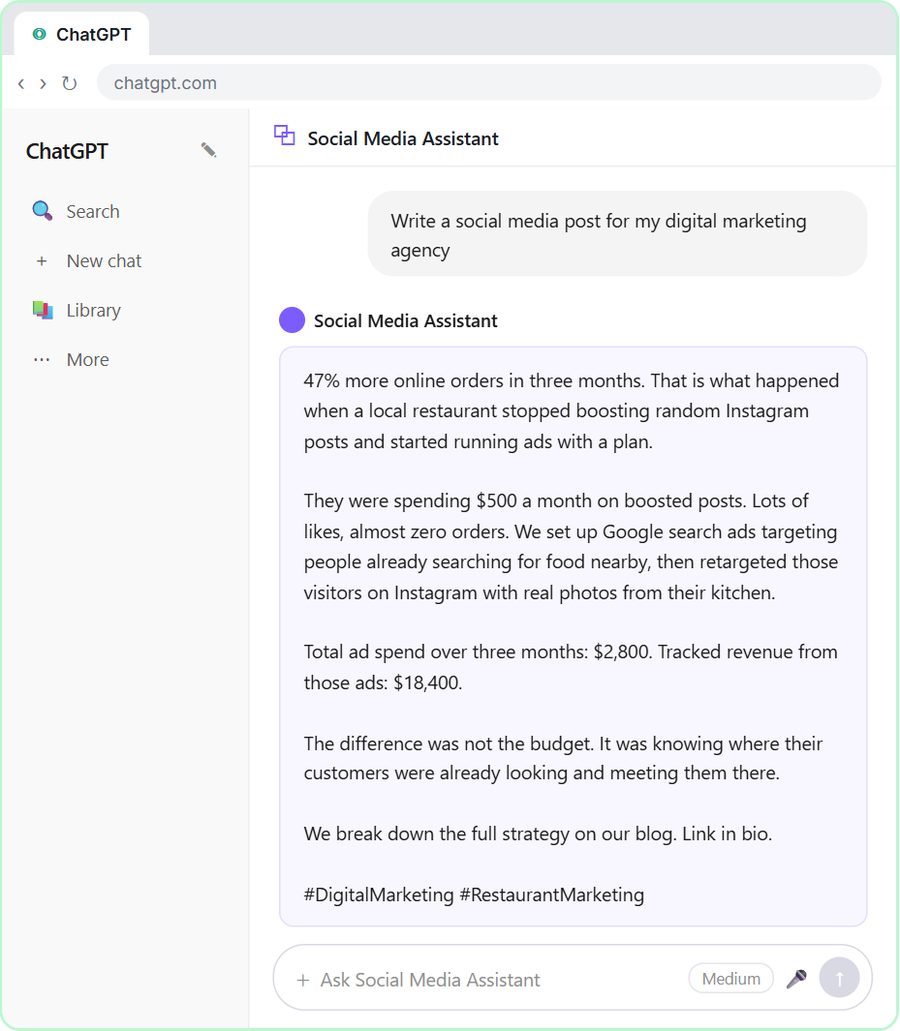 Get On-Brand Social Posts Every Time using a ChatGPT Custom GPT
See why generic prompts give generic results, then build a Custom GPT loaded with your brand voice and watch the output transform.
Free · Live ~8 min Beginner
 Prompt Writing 101: Role, Context, Task, Format
Ask ChatGPT for the same customer email twice, once vaguely and once with a four-part prompt, and see exactly why structure gets a better answer.
Free · Live ~8 min Beginner
◷Send a Same-Day Follow-up After Every Discovery Call using ChatGPTTurn a discovery call transcript into the decisions, the next steps with owners and dates, deal notes for your CRM, and a follow-up email the prospect gets the same…
Free · Live ~7 min Beginner
◷Hold Your Price When a Prospect Asks for a Discount using ChatGPTA prospect wants 30% off and a free month to sign this week. Give ChatGPT the thread and your pricing rules, catch the discount you can't approve, and send a reply that…
Free · Live ~9 min Beginner
 Get Your Business Recommended by ChatGPT
Ask ChatGPT who it recommends in your town, see which pages it trusts, then use it to write an FAQ page and Business Profile copy that answer real customer questions.
Free · Live ~10 min Intermediate
◷Run a Weekly Ops Review Where Every Task Has an Owner using ChatGPTTurn a weekly operations and vendor review into the decisions, the next steps with owners and dates, the risks to watch and a team recap, without turning a vendor's…
Free · Live ~7 min Beginner
Terms in this lesson
Plain-English definitions, each with an example from a free lesson.