Updated . Built against the tool’s current screens and checked step by step. How we check this lesson
When plans change, the same news goes to three people who need different things. In this free, interactive lesson you give ChatGPT one facts file about a job delay and get three ready-to-send messages in one request: an email to the client with options and a date, a Slack to the owner with the cost, and a text to the team with times and an address. Then ChatGPT checks every date, name, number and promise against the file before you send.
At a glance
| Question | Answer |
|---|---|
| What you build | Give ChatGPT the facts once and get three ready-to-send messages, each written for its reader: an email to the client, a Slack to the owner and a text to the team. Then have it check every fact. |
| Tools | ChatGPT |
| Time | About 9 minutes, 18 steps in 4 parts |
| Level | Beginner, no coding needed |
| Cost | Free |
| Ways to learn it | Practice it step by step |
The 4 parts, in short
- Start from the facts: Read the facts, Turn on Temporary chat, Open the + menu, Add photos & files, and 2 more steps.
- One request, three messages: Click the message box, Ask for three versions, Send it.
- Read each one for its reader: Read the client email, Read the owner’s Slack, Read the crew text.
- Check them against the facts: Click the message box, Ask for a fact check, Send it, Confirm no costs leaked, and 2 more steps.
Start here first: Summarize a Meeting Transcript with ChatGPT (module 1 of ChatGPT for Everyday Work)
In the course: Part 3 · ChatGPT for Everyday Work (Module 29 of the full course)
Part of: ChatGPT Jump Start (step 14 of 15). Next up: An AI Assistant for Bookkeepers using ChatGPT: Client Emails and Call Notes, with Your Firm's Rules
Part of: Master ChatGPT for Work (step 5 of 14). Next up: Summarize a Meeting Transcript with ChatGPT
Part of: AI for Consulting & Agencies (step 25 of 30). Next up: A Cited Vendor Comparison in 5 Minutes using ChatGPT Deep Research
Part of: AI for Operations Teams (step 32 of 36). Next up: Never Miss a Contract Renewal Deadline using ChatGPT
The business case: one change, three messages
A delay, a price change or a new date never goes to just one person. The client wants to know what it means for them and what to decide. The owner wants the cost and the decision. The people doing the work want when and where. Writing three versions from scratch takes half an hour, and the details drift between them.
The expensive mistake is a leak: an internal cost, a staffing problem or a margin ends up in the client email because it was in the first draft.
What changes: you write the facts once, say what goes in and what stays out for each reader, and get all three in one answer. Then you ask ChatGPT to audit its own work against the facts.
The example: a five-day delay at a dental office
Brightline Painting (made up) is repainting the lobby and two hallways at Harborview Dental (made up). The paint the client chose is backordered, so the finish date moves from Friday, Oct 23 to Wednesday, Oct 28, unless the client approves a similar in-stock paint. The extra evenings cost Brightline about $420, which the client should never see.
Download the facts file and follow along: [delay-facts.txt](/content/files/chatgpt-rewrite-for-audience/delay-facts.txt).
Who this lesson is for
Office managers, project coordinators, account managers and owners who send updates to clients, bosses and teams. It is a module in [Master ChatGPT for Work](/courses/master-chatgpt-for-work), right after Prompt Writing 101, and it is also listed in ChatGPT Jump Start, AI for Operations Teams and AI for Consulting & Agencies.
What ChatGPT produced in the real run
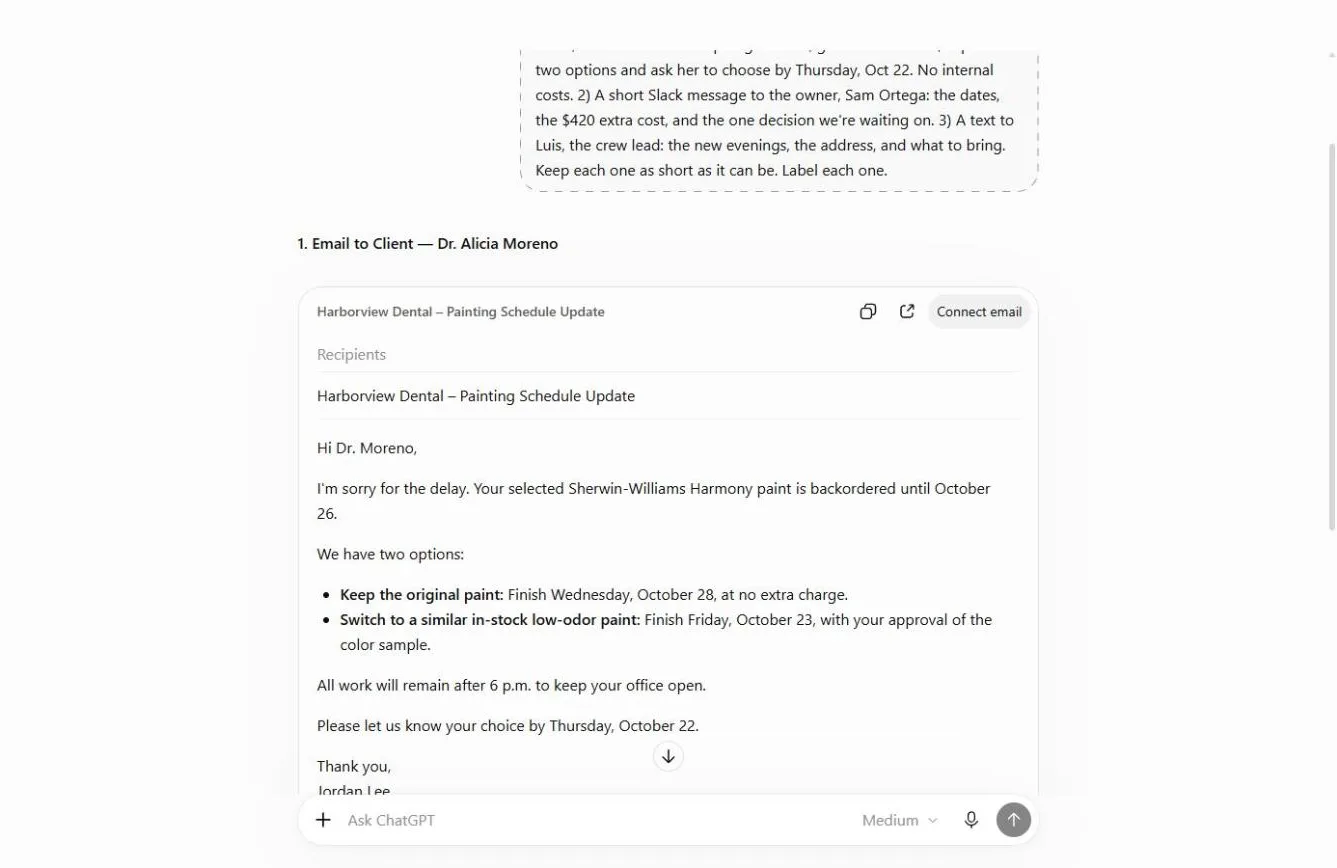
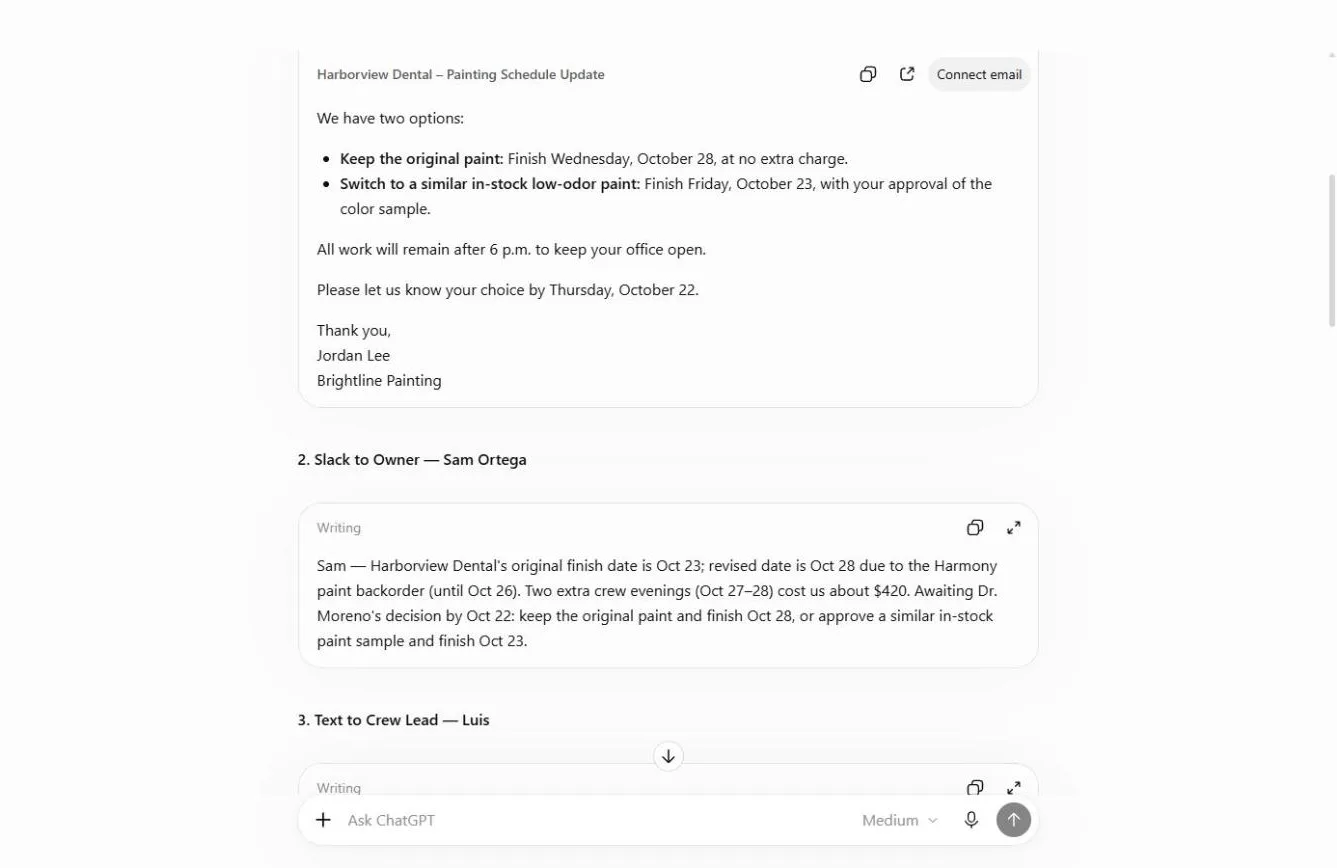
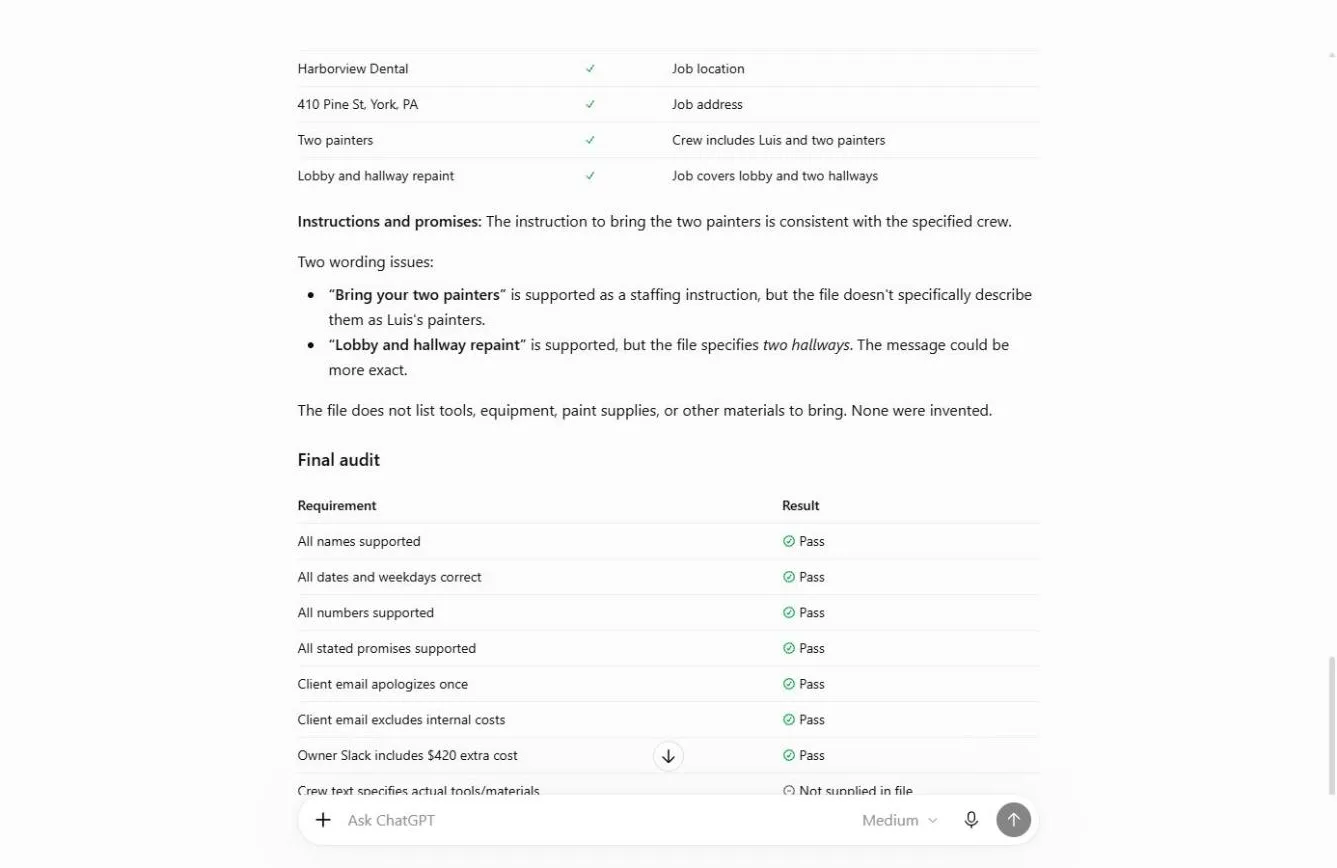
The client email came back as an Email card, the other two as Writing cards with copy buttons. All three used only the file's facts. The audit returned a check table per message and a final table with seven passes and one item marked "Not supplied in file" (what the crew should bring).
What this saves you
- Time: about half an hour per change, every time plans move.
- Fewer awkward calls: no internal cost or staffing detail in the client's inbox.
- Consistency: everyone hears the same dates, because all three come from one file.
- What it does not replace: reading each message before you send it, and adding what only you know.
Gotchas
- Say what stays out, not just what goes in. "No internal costs" is the line that protects you.
- Give it a facts file instead of a story. Short, labeled lines make every message easier to check.
- Ask for an audit. A second request that lists every date and number catches small slips like "hallway" vs "two hallways".
- Don't fill gaps silently. If the facts are missing something (what to bring), add it yourself.
- Client names and costs are private: use a Temporary Chat or a business plan.
Next business case
Next in Master ChatGPT for Work: Turn a meeting into minutes and tasks.
Try it yourself, free
Reading the steps is a start. Doing them is how it sticks. The interactive module walks you through every click in a practice copy of ChatGPT, checks each step, and never touches your real accounts.
Start “Tell the Client, the Boss and the Team in One Go using ChatGPT”Step by step: Tell the Client, the Boss and the Team in One Go using ChatGPT
All 18 steps of the interactive module, in order. In the module you watch each one, then do it yourself in a practice copy that checks your work.
1. Start from the facts
- Read the facts. One delay, three people to tell. The client needs options and a date, the owner needs the cost, the crew needs times and an address. Writing it three times takes 30 minutes, and the cost slips into the client email. Here are the facts. Read them, then click ✕.
One job is running late, and three people need to know. The client wants options. The owner wants the cost. The crew wants the address. Writing it three times takes half an hour, and that's how the internal cost ends up in the client's email. Here are the facts. Read them, then close the file.
- Turn on Temporary chat. Client names and job costs are private. Click the Temporary chat icon at the top right.
Client names and costs are private.
- Open the + menu. Click the + next to the message box.
- Add photos & files. Click Add photos & files.
- Pick delay-facts.txt. Pick delay-facts.txt.
Pick the facts file.
- Open it. Click Open. Every message will come from this one file, so the facts can’t drift.
All three messages come from this one file, so the facts can't drift.
2. One request, three messages
- Click the message box. For each reader, say what goes in and what stays out. That one line is what keeps the $420 out of the client’s inbox. Click the message box.
For each reader, say what goes in, and what stays out. That's what keeps the cost out of the client's inbox.
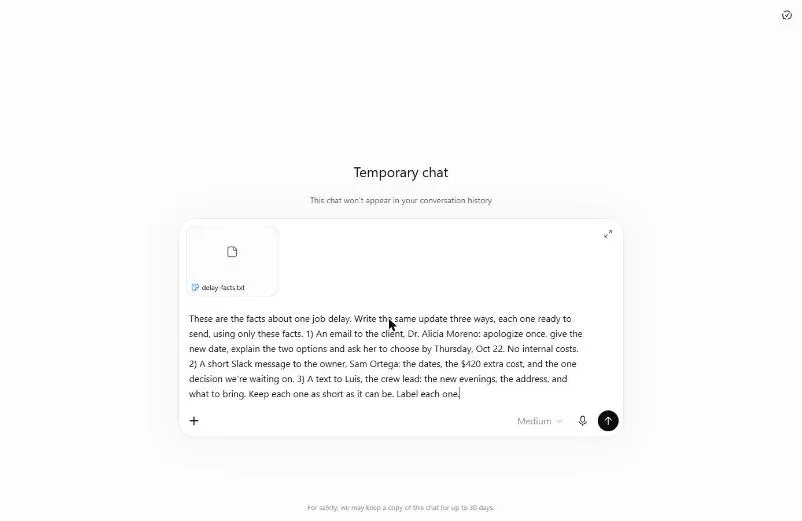
- Ask for three versions. Paste in the request: an email to the client (apologize once, two options, choose by Oct 22, no internal costs), a Slack to the owner (dates, $420, the decision), a text to the crew lead (evenings, address, what to bring).
This asks for three messages. An email to the client, with no internal costs. A Slack to the owner, with the cost. And a text to the crew lead, with the address.
These are the facts about one job delay. Write the same update three ways, each one ready to send, using only these facts. 1) An email to the client, Dr. Alicia Moreno: apologize once, give the new date, explain the two options and ask her to choose by Thursday, Oct 22. No internal costs. 2) A short Slack message to the owner, Sam Ortega: the dates, the $420 extra cost, and the one decision we're waiting on. 3) A text to Luis, the crew lead: the new evenings, the address, and what to bring. Keep each one as short as it can be. Label each one.
- Send it. Click Send (the arrow on the right).
3. Read each one for its reader
- Read the client email. The client gets one apology, the reason, two options with dates and a deadline to choose. No crew, no cost. Click the email.
The client gets one apology, the reason, two options with dates, and a deadline. No crew details, and no cost.
- Read the owner’s Slack. Sam gets the opposite: the $420 extra cost, both dates and the one decision you are waiting on. Three lines. Click the Slack message.
The owner gets the opposite. The four-twenty extra cost, both dates, and the one decision you're waiting on.
- Read the crew text. Luis gets two evenings, the time and the address. And look at the note under it: the facts didn’t say what to bring, so ChatGPT didn’t invent a list. Click the note.
The crew lead gets the evenings and the address. Now read the note. The facts didn't say what to bring, so ChatGPT didn't make up a list.
4. Check them against the facts
- Click the message box. Before anything goes out, have ChatGPT audit its own work against the file. Click the message box.
Before anything goes out, have it check its own work against the file.
- Ask for a fact check. Paste in the request. It lists every date, name, number and promise in each message, marks anything not in the file, and confirms the client email has no internal costs.
This asks it to list every date, name, number and promise, and flag anything that is not in the file.
Check all three messages against the facts file. List every date, name, number and promise in each one, and mark anything that isn't in the file. Also confirm the client email has no internal costs in it.
- Send it. Click Send (the arrow on the right).
- Confirm no costs leaked. The line that matters most: the client email does not mention the $420, the extra evenings or staffing. Click it.
Here's the line that matters most. The client email does not mention the cost, or the extra evenings.
- Fix the one small slip. It found one thing to tighten: the text says “hallway”, the file says two hallways. Small, but this is exactly the kind of slip a crew acts on. Click the wording issues.
It found one small slip. The text says hallway, but the file says two hallways. That's the kind of detail a crew acts on.
- Read the final audit. Eight checks, seven Pass, and tools marked “Not supplied in file”. Fix the hallway line, add what Luis should bring yourself, and send all three. Click the audit table.
Eight checks. Seven pass, and one says the tools weren't in the file. Fix the hallway line, add what to bring yourself, and send all three. One update, three readers, done in five minutes.
Screenshots
Frequently asked questions
- Can ChatGPT rewrite one message for different audiences?
- Yes. Give it the facts once, then list each reader with the format (email, Slack, text) and what goes in and stays out for each. Ask for all versions in one answer so they share the same facts.
- How do I stop ChatGPT from adding details I didn't give it?
- Say "using only these facts" in the request, and ask for a second pass that lists every date, name, number and promise and marks anything not in your facts.
- Is this lesson free?
- Yes. Stepthrough is free and the practice copy needs no account. To do it for real you need your own ChatGPT account.
More in ChatGPT for Everyday Work
 Summarize a Meeting Transcript with ChatGPT
Paste a long meeting transcript into ChatGPT and get the decisions, an action items table with owners and due dates, and a follow-up email ready to send.
Free · Live ~9 min Beginner
 Reply Faster: Turn a Messy Customer Email Thread into a Clear, Friendly Reply
Turn a messy customer email thread into a clear, friendly reply: give ChatGPT the thread and your facts, check every promise, fix the tone, and send it from Gmail.
Free · Live ~9 min Beginner
 ChatGPT Projects: Keep Your Brand Voice, Files and Instructions in One Place
Set up a ChatGPT Project with your brand voice instructions, your price list and your style guide, so every new chat already knows your business.
Free · Live ~9 min Beginner
 Analyze a Spreadsheet with ChatGPT: Upload a CSV, Get a Chart and Three Takeaways
Upload a CSV of sales to ChatGPT, have it check the data first, ask your questions, get a chart you can download, and finish with the three takeaways that matter.
Free · Live ~10 min Beginner
 ChatGPT Work: Have ChatGPT Do a Multi-Step Task
Switch ChatGPT to Work, hand it a real job (compare three suppliers into a spreadsheet), approve the sites it opens, skip a login, answer its question, check the file…
Free · Live ~8 min Intermediate
◷Get a Morning Invoice Summary in Slack using ChatGPT DotsSet up a ChatGPT dot to check Gmail for new invoice emails and post one summary to Slack every weekday morning. A 7-step practice based on OpenAI's published screens.
Free · Live ~4 min Intermediate
All 17 modules in ChatGPT for Everyday Work
More ChatGPT tutorials
 Get On-Brand Social Posts Every Time using a ChatGPT Custom GPT
See why generic prompts give generic results, then build a Custom GPT loaded with your brand voice and watch the output transform.
Free · Live ~8 min Beginner
 Prompt Writing 101: Role, Context, Task, Format
Ask ChatGPT for the same customer email twice, once vaguely and once with a four-part prompt, and see exactly why structure gets a better answer.
Free · Live ~8 min Beginner
◷Send a Same-Day Follow-up After Every Discovery Call using ChatGPTTurn a discovery call transcript into the decisions, the next steps with owners and dates, deal notes for your CRM, and a follow-up email the prospect gets the same…
Free · Live ~7 min Beginner
◷Hold Your Price When a Prospect Asks for a Discount using ChatGPTA prospect wants 30% off and a free month to sign this week. Give ChatGPT the thread and your pricing rules, catch the discount you can't approve, and send a reply that…
Free · Live ~9 min Beginner
 Get Your Business Recommended by ChatGPT
Ask ChatGPT who it recommends in your town, see which pages it trusts, then use it to write an FAQ page and Business Profile copy that answer real customer questions.
Free · Live ~10 min Intermediate
◷Run a Weekly Ops Review Where Every Task Has an Owner using ChatGPTTurn a weekly operations and vendor review into the decisions, the next steps with owners and dates, the risks to watch and a team recap, without turning a vendor's…
Free · Live ~7 min Beginner
Terms in this lesson
Plain-English definitions, each with an example from a free lesson.