Updated . Built against the tool’s current screens and checked step by step. How we check this lesson
Vendors write quotes their own way: one includes setup and warranty, the next adds them as extras, a third is a monthly lease. In this free, interactive lesson you give three made-up laptop quotes to a ChatGPT Temporary Chat and get one comparison table on the same basis: all 6 laptops, with setup and a 3-year warranty, over 3 years. You check the math yourself, see what each quote leaves out, and have ChatGPT draft the follow-up email to the vendor.
At a glance
| Question | Answer |
|---|---|
| What you build | Turn three quotes written three different ways into one table on the same basis, check the 3-year totals yourself, see what each vendor left out, and send the follow-up questions. |
| Tools | ChatGPT |
| Time | About 9 minutes, 18 steps in 4 parts |
| Level | Beginner, no coding needed |
| Cost | Free |
| Ways to learn it | Practice it step by step |
The 4 parts, in short
- Collect the quotes: Read the three quotes, Turn on Temporary chat, Open the + menu, Add photos & files, and 2 more steps.
- Ask for one table: Click the message box, Ask for the comparison table, Send it.
- Check the totals: Spot the hidden extras, Check one total yourself, Read the lease as a total, See what each quote leaves out.
- Ask the vendor what is missing: Click the message box, Ask for a follow-up email, Send it, Check the email, and 1 more step.
Start here first: Summarize a Meeting Transcript with ChatGPT (module 1 of ChatGPT for Everyday Work)
In the course: Part 3 · ChatGPT for Everyday Work (Module 31 of the full course)
Part of: Master ChatGPT for Work (step 10 of 14). Next up: ChatGPT Projects: Keep Your Brand Voice, Files and Instructions in One Place
Part of: AI for Operations Teams (step 34 of 36). Next up: A Cited Vendor Comparison in 5 Minutes using ChatGPT Deep Research
Part of: AI for Finance Teams (step 20 of 22). Next up: An AI Assistant for Bookkeepers using ChatGPT: Client Emails and Call Notes, with Your Firm's Rules
Part of: AI Back Office for Small Business (step 15 of 18). Next up: A Cited Vendor Comparison in 5 Minutes using ChatGPT Deep Research
The business case: comparing quotes that don't compare
Most small purchases (laptops, phones, cleaning, software) come down to two or three quotes in an inbox. They never use the same format. Comparing them properly means a spreadsheet, so most people compare the biggest number on each page and pick the lowest.
That is how you end up paying more: the "cheap" quote leaves out setup or warranty, and the lease looks small because it is monthly. The real comparison is the total for the same thing over the same time.
What changes: you tell ChatGPT what "the same basis" means, and it builds the table, shows the math and lists the gaps. You check one total, then ask the vendors what they left out.
The example: six laptops for Brightline Painting's office
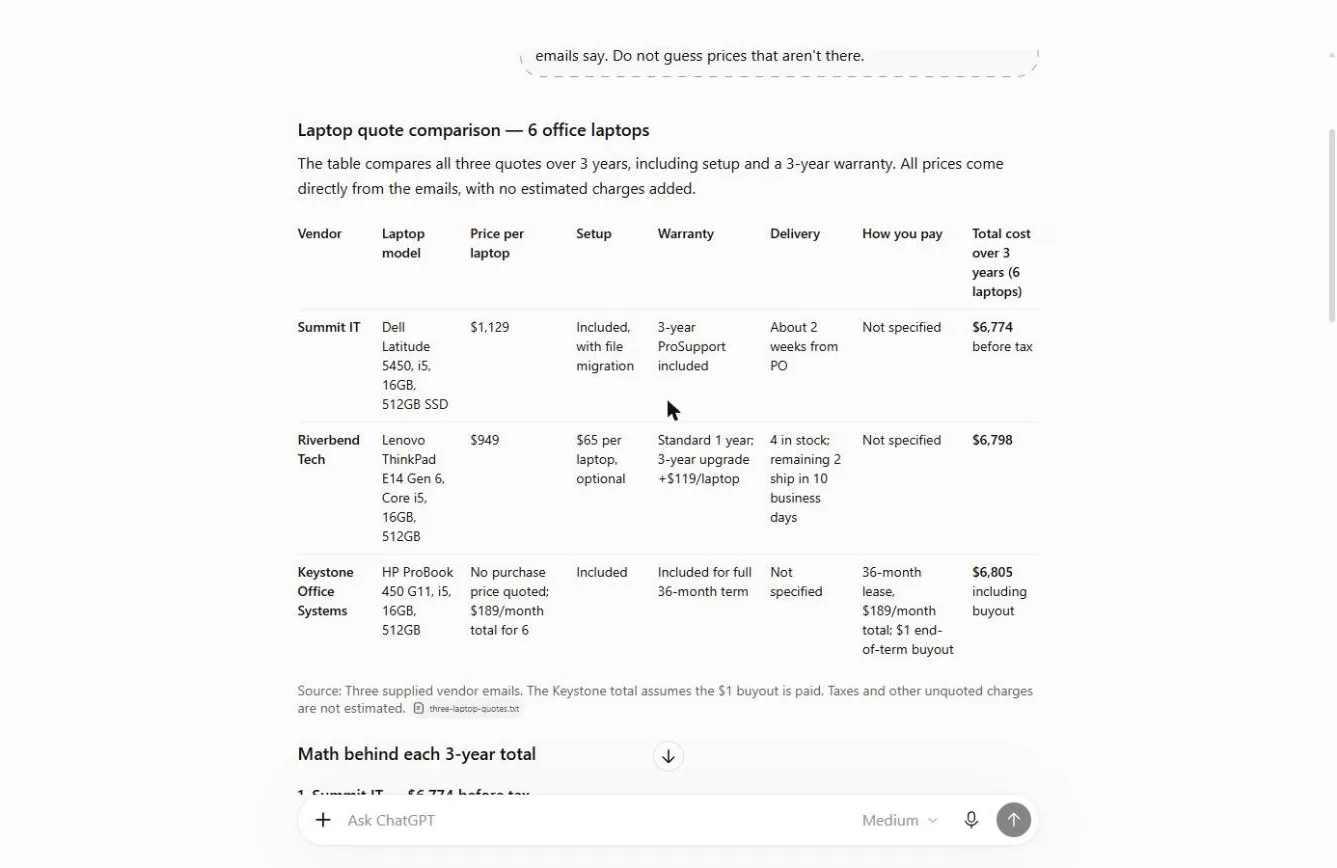
Brightline Painting (made up) needs 6 office laptops. Summit IT quotes $1,129 a laptop with setup and a 3-year warranty included. Riverbend Tech quotes $949 a laptop, plus $65 setup and $119 for a 3-year warranty, per laptop. Keystone Office Systems offers a 36-month lease at $189 a month for all six, with a $1 buyout.
On the same basis they land within $31 of each other: $6,774, $6,798 and $6,805. The cheapest-looking quote is not the cheapest.
Download the sample and follow along: [three-laptop-quotes.txt](/content/files/chatgpt-vendor-quote-table/three-laptop-quotes.txt). Every vendor, person and price is made up.
Who this lesson is for
Office managers, operations and finance staff and owners who buy equipment, software or services. No spreadsheets needed. It is a module in [Master ChatGPT for Work](/courses/master-chatgpt-for-work), right after Analyze a Spreadsheet with ChatGPT, and it is also listed in AI Back Office, AI for Operations Teams and AI for Finance Teams.
What ChatGPT produced in the real run
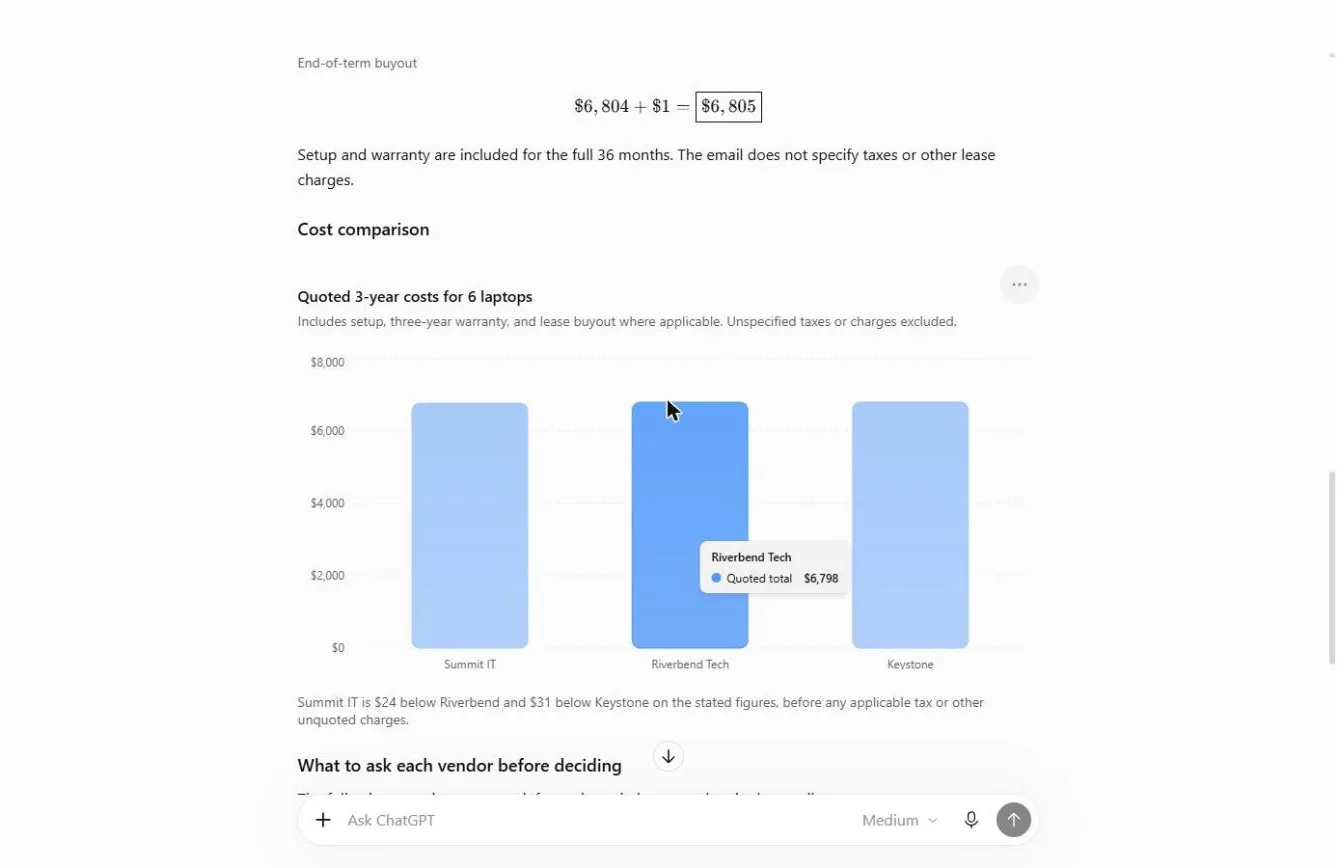
A comparison table with one row per vendor and the eight asked-for columns, "Not specified" wherever a quote was silent, the math for each total, a bar chart of the three totals, and a "What to ask each vendor" table. Its bottom line: Summit IT is lowest at $6,774 before tax, but the differences are small and could change once tax, shipping and payment terms are known.
It did not invent anything: delivery for the lease and payment terms for two vendors were marked "Not specified" instead of guessed.
What this saves you
- Money: you compare the real cost, not the headline price. Here the "cheapest" quote was $24 more than the one that looked expensive.
- Time: no comparison spreadsheet; one request and one check.
- Better questions: the gaps in each quote become a short email instead of a surprise on the invoice.
- What it does not replace: a final price in writing, the vendor's terms and your judgment on who will support you best.
Gotchas
- Define the basis. "Compare these" gets a different answer every time. "All 6, with setup and a 3-year warranty, over 3 years" gets one you can check.
- Say "do not guess". Without it, missing prices can be filled in with plausible numbers.
- Check one total by hand. If one is right, the method is right.
- A lease is not a price. Ask for the total over the term, plus what happens at the end (here a $1 buyout).
- Keep vendor pricing private: use a Temporary Chat or a business plan.
Next business case
Next in Master ChatGPT for Work: One home per client with ChatGPT Projects. For bigger purchases where the vendors are public, A Cited Vendor Comparison with Deep Research does the web research for you.
Try it yourself, free
Reading the steps is a start. Doing them is how it sticks. The interactive module walks you through every click in a practice copy of ChatGPT, checks each step, and never touches your real accounts.
Start “Compare Vendor Quotes Side by Side using ChatGPT”Step by step: Compare Vendor Quotes Side by Side using ChatGPT
All 18 steps of the interactive module, in order. In the module you watch each one, then do it yourself in a practice copy that checks your work.
1. Collect the quotes
- Read the three quotes. Brightline Painting needs 6 office laptops. Three vendors answered, each a different way: a price with setup and warranty, a lower price with extras, and a monthly lease. You can’t compare them as written. Read them, then click ✕ to close the file.
Brightline needs six laptops for the office. Three vendors replied, and each one wrote it differently. One includes everything. One looks cheaper, but adds extras. One is a lease. You can't compare them as written. Read them, then close the file.
- Turn on Temporary chat. Vendor pricing is business information, so keep it out of your history: click the Temporary chat icon at the top right.
Vendor pricing is private, so click the Temporary chat icon at the top right.
- Open the + menu. Click the + on the left of the message box.
- Add photos & files. Click Add photos & files.
- Pick three-laptop-quotes.txt. Pick three-laptop-quotes.txt, the three emails pasted into one text file.
Pick the quotes file. It is the three emails pasted into one text file.
- Open it. Click Open.
2. Ask for one table
- Click the message box. The trick: tell ChatGPT what “the same basis” means. Here that is all 6 laptops, with setup and a 3-year warranty, over 3 years. Click the message box.
Here's the trick. Tell ChatGPT what a fair comparison means. All six laptops, with setup, and a three year warranty, over three years.
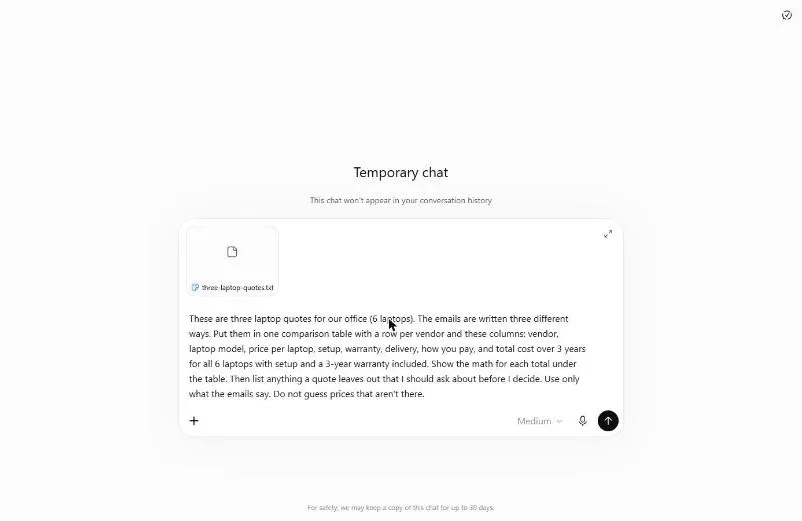
- Ask for the comparison table. Paste in the request. It names every column, the same-basis 3-year total, the math under the table, a list of what each quote leaves out, and “do not guess prices that aren’t there.”
This asks for one table, a fair three year total, the math, and what each quote leaves out. And it says, do not guess prices.
These are three laptop quotes for our office (6 laptops). The emails are written three different ways. Put them in one comparison table with a row per vendor and these columns: vendor, laptop model, price per laptop, setup, warranty, delivery, how you pay, and total cost over 3 years for all 6 laptops with setup and a 3-year warranty included. Show the math for each total under the table. Then list anything a quote leaves out that I should ask about before I decide. Use only what the emails say. Do not guess prices that aren't there.
- Send it. Click Send (the arrow on the right).
3. Check the totals
- Spot the hidden extras. Riverbend looked cheapest at $949 a laptop. But setup is $65 each and the 3-year warranty is +$119 each, so its total is $6,798, more than Summit’s $6,774. Click the Riverbend row.
Riverbend looked cheapest, at nine forty-nine a laptop. But setup and the warranty are extra. Once you add them, it's sixty-seven ninety-eight. More than Summit.
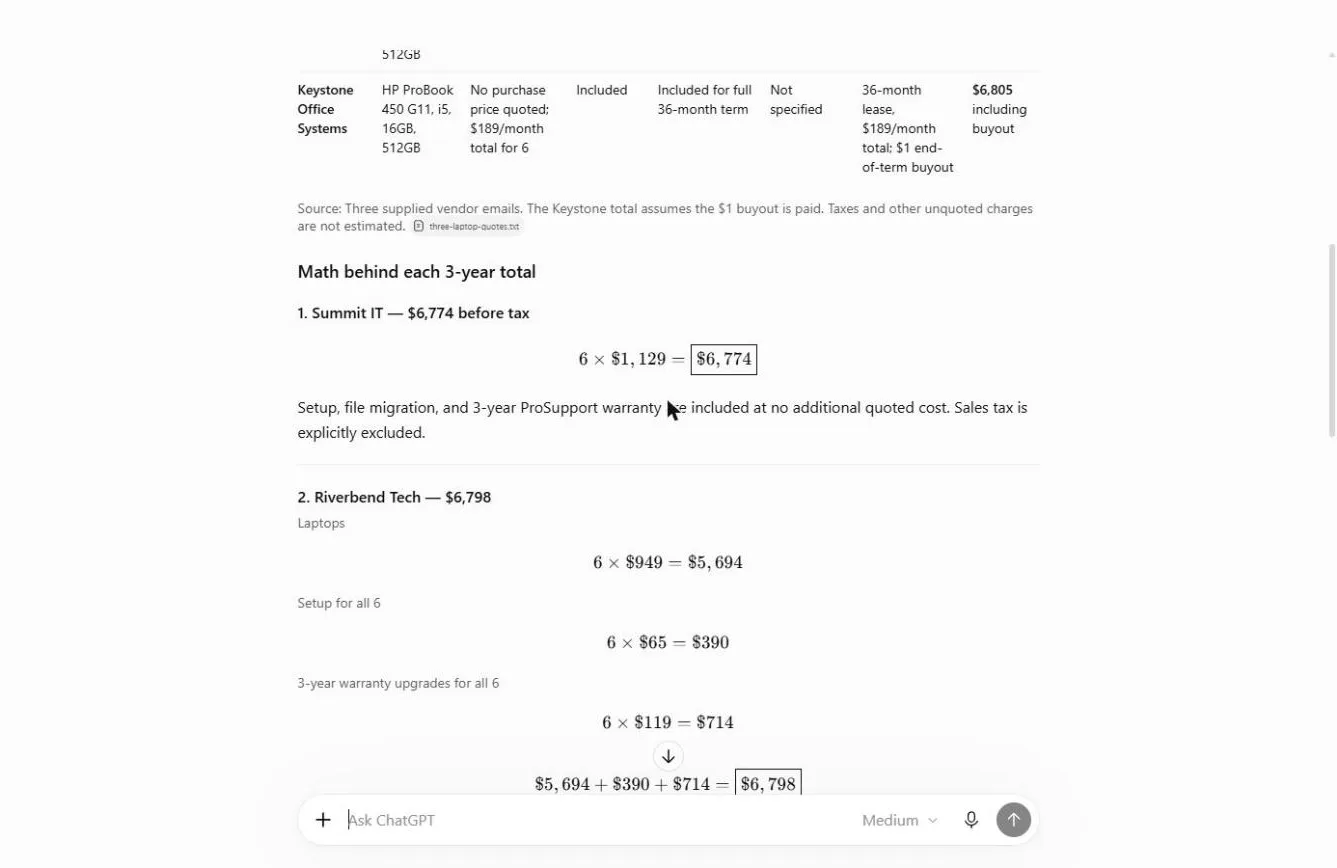
- Check one total yourself. Check the math once: 6 × $949 = $5,694, plus 6 × $65 = $390, plus 6 × $119 = $714. Total $6,798. It matches. Click the Riverbend math.
Check one total yourself. Fifty-six ninety-four, plus three ninety, plus seven fourteen. Sixty-seven ninety-eight. It matches.
- Read the lease as a total. Keystone never gave a price per laptop. ChatGPT turned the lease into a total: 36 × $189 + the $1 buyout = $6,805. Three quotes, all within $31 of each other. Click the Keystone row.
Keystone never gave a laptop price. ChatGPT turned the lease into a total. Thirty-six payments, plus a one dollar buyout. Sixty-eight oh five. All three quotes are within thirty-one dollars.
- See what each quote leaves out. When totals are this close, the gaps decide it. Payment terms, tax, shipping and file migration are missing from most quotes. Click the What to ask each vendor table.
When the totals are this close, the missing details decide it. Payment terms, tax, shipping, moving your files.
4. Ask the vendor what is missing
- Click the message box. Turn the gaps into an email. Click the message box.
Now turn those gaps into an email.
- Ask for a follow-up email. Paste in the request: a short, friendly email to Marcus at Riverbend asking the open questions and the full total in writing by Friday, Oct 30.
This asks for a short, friendly email to Riverbend, with the open questions, and the total in writing by Friday.
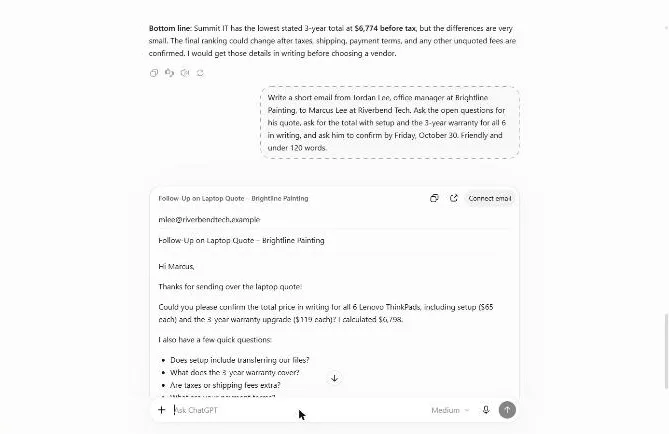
Write a short email from Jordan Lee, office manager at Brightline Painting, to Marcus Lee at Riverbend Tech. Ask the open questions for his quote, ask for the total with setup and the 3-year warranty for all 6 in writing, and ask him to confirm by Friday, October 30. Friendly and under 120 words.
- Send it. Click Send (the arrow on the right).
- Check the email. ChatGPT shows an Email card. It states $6,798, asks the six open questions and the Oct 30 deadline. Make sure nothing promises to buy. Click the email.
It comes back as an email card. Your total, six questions, and the Friday deadline. Nothing in it says you'll buy.
- Copy it. Click the copy icon on the card and paste it into your own email. Do the same for the other two vendors, then decide on the full numbers.
Do the same for the other two. Then you decide on real numbers, not on how the quote was written.
Screenshots
Frequently asked questions
- Can ChatGPT compare quotes?
- Yes. Paste or attach the quotes and tell it the basis: what is included, how many units and over how long. Ask for one table, the math under it, and a list of what each quote leaves out. Then check one total yourself.
- How do I compare a lease with a purchase?
- Turn both into a total over the same period. A 36-month lease at $189 a month is $6,804, plus any buyout, compared with the purchase price plus setup and warranty for the same 3 years.
- What should I ask a vendor before accepting a quote?
- Payment terms, tax and shipping, what setup includes, what the warranty covers, delivery dates and how long the quote is valid. ChatGPT can list the ones each quote leaves out.
- Is this lesson free?
- Yes. Stepthrough is free and the practice copy needs no account. To do it for real you need your own ChatGPT account.
More in ChatGPT for Everyday Work
 Summarize a Meeting Transcript with ChatGPT
Paste a long meeting transcript into ChatGPT and get the decisions, an action items table with owners and due dates, and a follow-up email ready to send.
Free · Live ~9 min Beginner
 Reply Faster: Turn a Messy Customer Email Thread into a Clear, Friendly Reply
Turn a messy customer email thread into a clear, friendly reply: give ChatGPT the thread and your facts, check every promise, fix the tone, and send it from Gmail.
Free · Live ~9 min Beginner
 ChatGPT Projects: Keep Your Brand Voice, Files and Instructions in One Place
Set up a ChatGPT Project with your brand voice instructions, your price list and your style guide, so every new chat already knows your business.
Free · Live ~9 min Beginner
 Analyze a Spreadsheet with ChatGPT: Upload a CSV, Get a Chart and Three Takeaways
Upload a CSV of sales to ChatGPT, have it check the data first, ask your questions, get a chart you can download, and finish with the three takeaways that matter.
Free · Live ~10 min Beginner
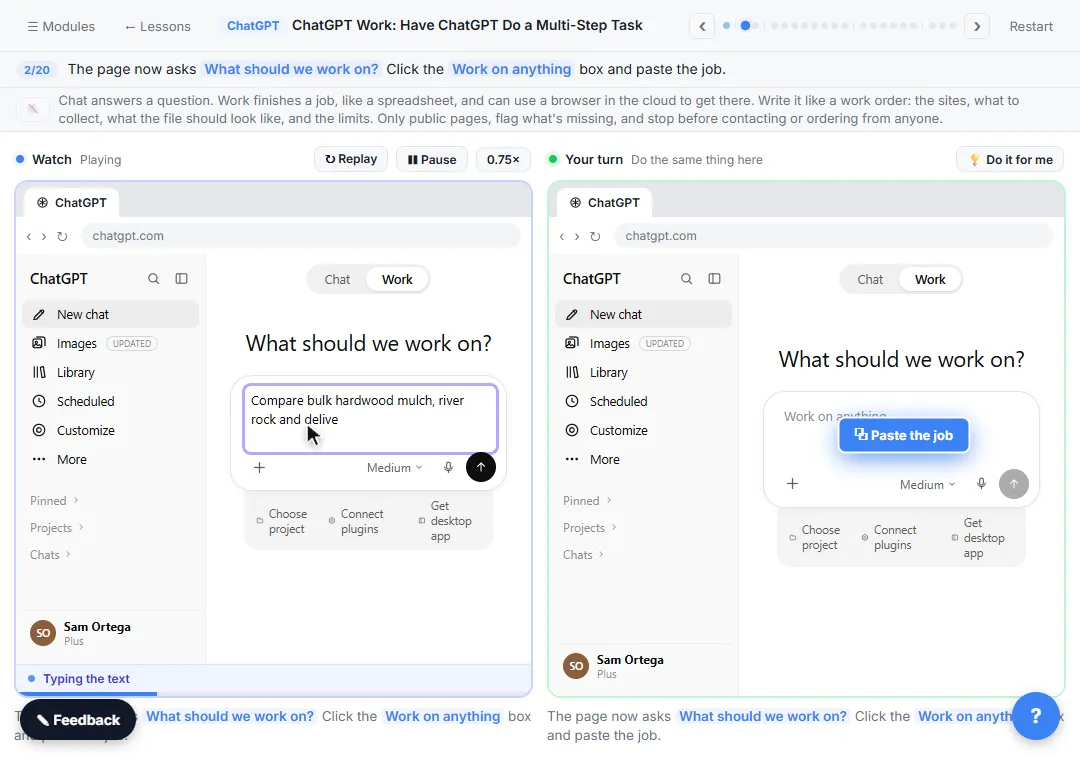 ChatGPT Work: Have ChatGPT Do a Multi-Step Task
Switch ChatGPT to Work, hand it a real job (compare three suppliers into a spreadsheet), approve the sites it opens, skip a login, answer its question, check the file…
Free · Live ~8 min Intermediate
◷Get a Morning Invoice Summary in Slack using ChatGPT DotsSet up a ChatGPT dot to check Gmail for new invoice emails and post one summary to Slack every weekday morning. A 7-step practice based on OpenAI's published screens.
Free · Live ~4 min Intermediate
All 17 modules in ChatGPT for Everyday Work
More ChatGPT tutorials
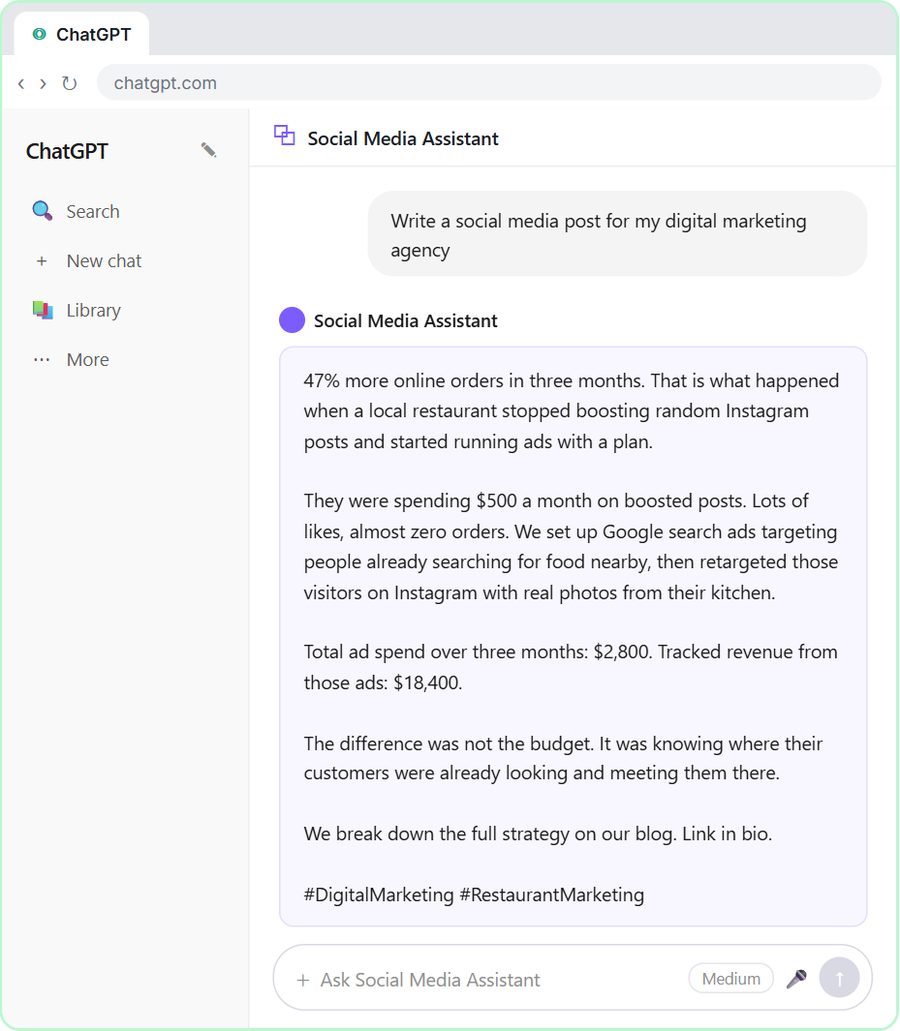 Get On-Brand Social Posts Every Time using a ChatGPT Custom GPT
See why generic prompts give generic results, then build a Custom GPT loaded with your brand voice and watch the output transform.
Free · Live ~8 min Beginner
 Prompt Writing 101: Role, Context, Task, Format
Ask ChatGPT for the same customer email twice, once vaguely and once with a four-part prompt, and see exactly why structure gets a better answer.
Free · Live ~8 min Beginner
◷Send a Same-Day Follow-up After Every Discovery Call using ChatGPTTurn a discovery call transcript into the decisions, the next steps with owners and dates, deal notes for your CRM, and a follow-up email the prospect gets the same…
Free · Live ~7 min Beginner
◷Hold Your Price When a Prospect Asks for a Discount using ChatGPTA prospect wants 30% off and a free month to sign this week. Give ChatGPT the thread and your pricing rules, catch the discount you can't approve, and send a reply that…
Free · Live ~9 min Beginner
 Get Your Business Recommended by ChatGPT
Ask ChatGPT who it recommends in your town, see which pages it trusts, then use it to write an FAQ page and Business Profile copy that answer real customer questions.
Free · Live ~10 min Intermediate
◷Run a Weekly Ops Review Where Every Task Has an Owner using ChatGPTTurn a weekly operations and vendor review into the decisions, the next steps with owners and dates, the risks to watch and a team recap, without turning a vendor's…
Free · Live ~7 min Beginner
Terms in this lesson
Plain-English definitions, each with an example from a free lesson.