Updated . Built against the tool’s current screens and checked step by step. How we check this lesson
Most processes live in somebody's head or on a messy list of notes. ChatGPT can turn those notes into a clean one-page SOP in a document that opens beside the chat, where you can edit it and ask for changes to one part at a time. In this free lesson you play the new front-desk coordinator at a made-up accounting firm: you paste rough notes, open the document, select one paragraph, use Ask for changes, and then check the words ChatGPT added, because it will add some.
At a glance
| Question | Answer |
|---|---|
| What you build | Paste your messy notes, get a clean SOP in a document you can edit beside the chat, change one paragraph at a time, and check what the AI added. |
| Tools | ChatGPT |
| Time | About 5 minutes, 9 steps in 4 parts |
| Level | Beginner, no coding needed |
| Cost | Free |
| Ways to learn it | Practice it step by step |
The 4 parts, in short
- Ask for a document: Paste your rough notes, Send it.
- Open it and read it: Open the document beside the chat.
- Change one part: Select the paragraph to change, Click Ask for changes, Describe the change, Send the change.
- Check, then save: Read what changed, Open the download menu.
Start here first: Summarize a Meeting Transcript with ChatGPT (module 1 of ChatGPT for Everyday Work)
In the course: Part 3 · ChatGPT for Everyday Work (Module 21 of the full course)
Part of: ChatGPT Jump Start (step 8 of 9). Next up: ChatGPT Work: Have ChatGPT Do a Multi-Step Task
Part of: AI for Operations Teams (step 6 of 7). Next up: Meeting to Action: Recap, Tracker Rows and a Kickoff Deck (ChatGPT, n8n, Gamma)
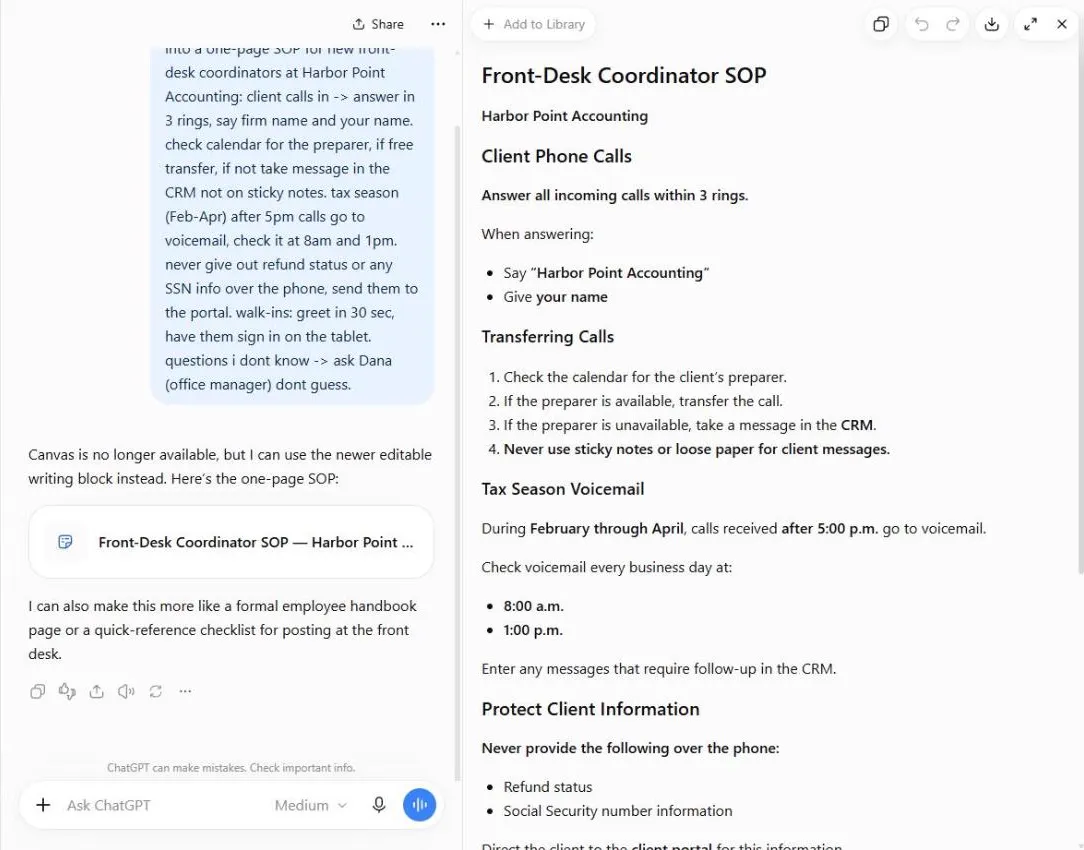
What you will do: notes in, a one-page SOP out
You are the new front-desk coordinator at Harbor Point Accounting, a made-up accounting firm. Your notes cover answering calls, transferring to a preparer, tax-season voicemail, what never to say over the phone, walk-ins and who to ask when you do not know the answer. They are typed fast, with no punctuation and a few arrows.
In the practice copy of ChatGPT you paste the notes with one sentence of instruction, open the document that appears, select the voicemail paragraph, click Ask for changes and ask for a short greeting. Then you read the part ChatGPT changed and open the download menu.
Canvas is now an editable writing block
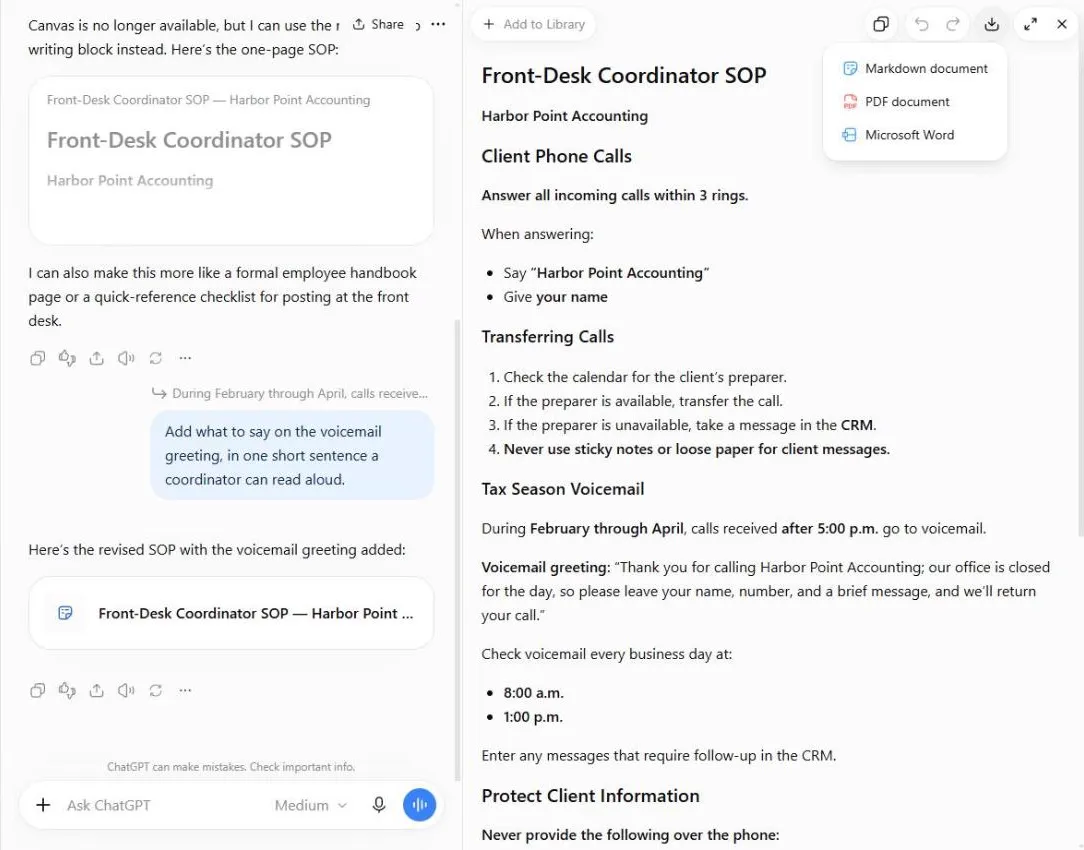
In our October 2026 test we typed use canvas, and ChatGPT answered that Canvas is no longer available and that it would use the newer editable writing block instead. It worked the same way for us: the SOP appeared as a document in the chat, and an expand icon opened it in a panel beside the chat. Many tutorials still say Canvas, so you will see both names. The panel has Add to Library, copy, undo, redo, download, expand and close controls at the top.
The behavior depends on how you ask. When we asked a second time for an editable document, not in the chat, without the word canvas, ChatGPT instead built a Word file (a .docx with a preview) and said it was reading a DOCX creation skill. That is fine if you want a Word file, but it is not the same as a document you change by selecting a paragraph. If you want the document beside the chat, say use canvas.
Change one paragraph at a time
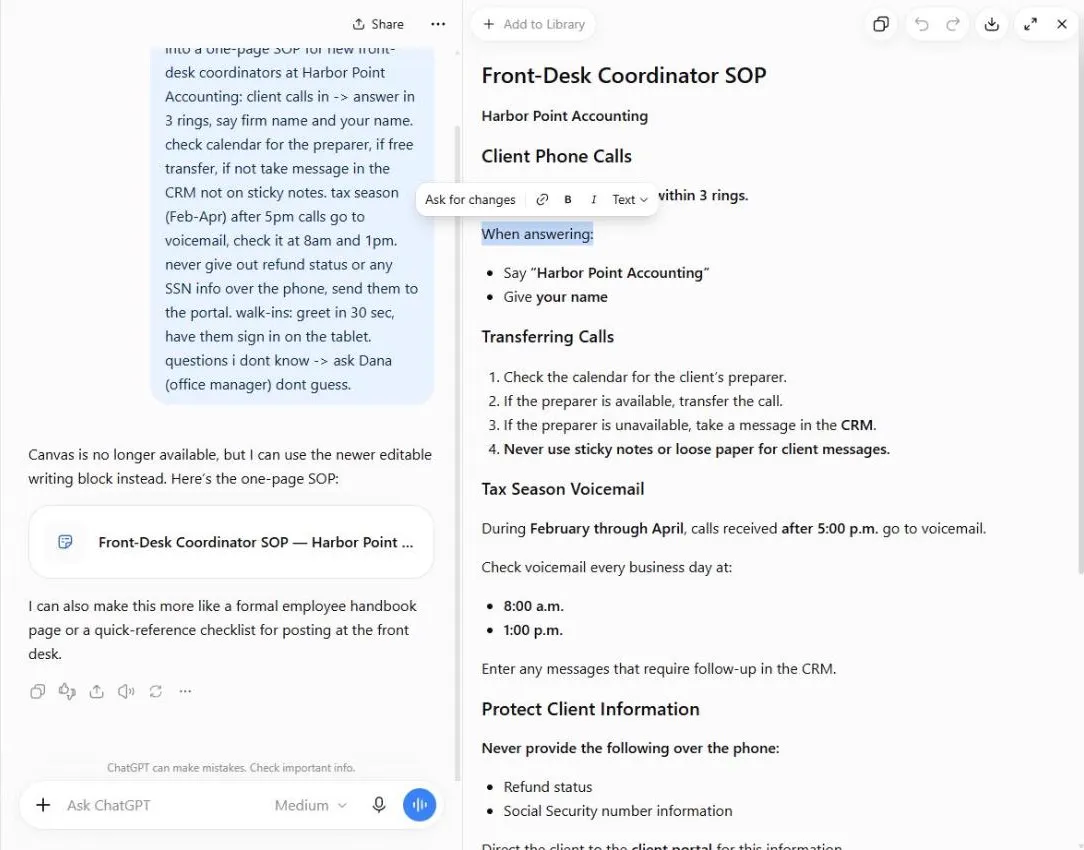
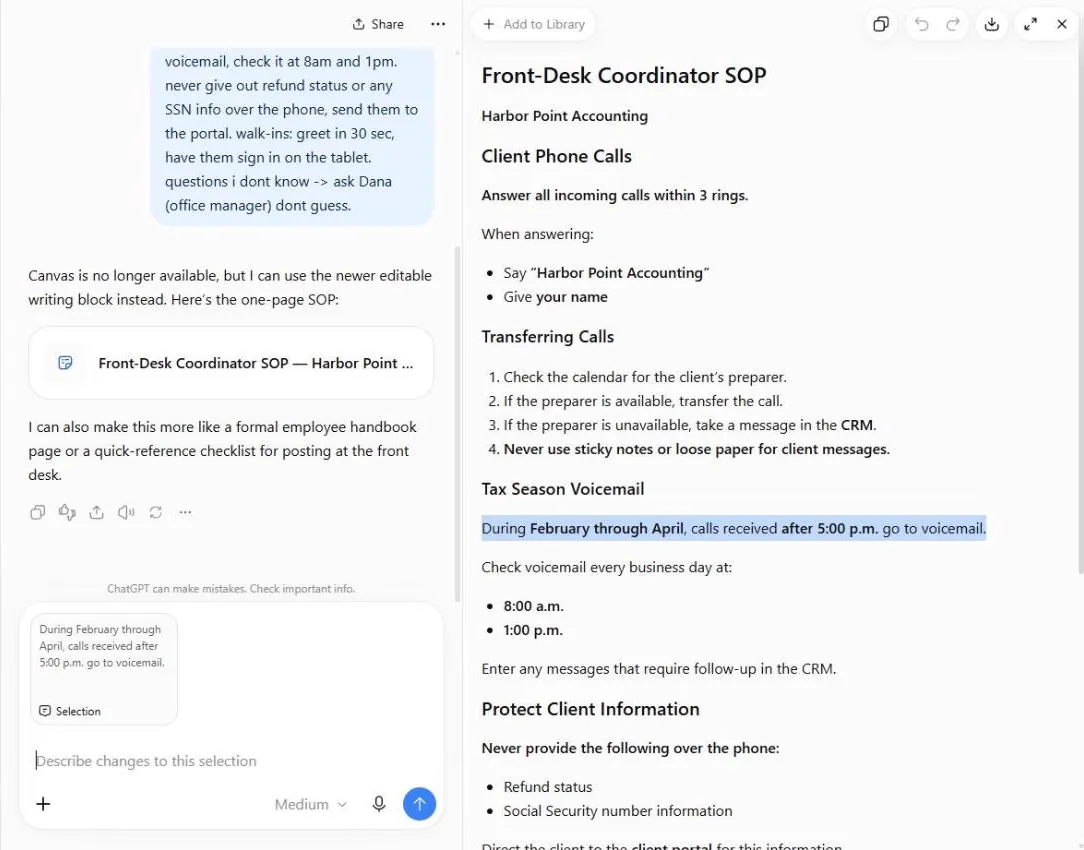
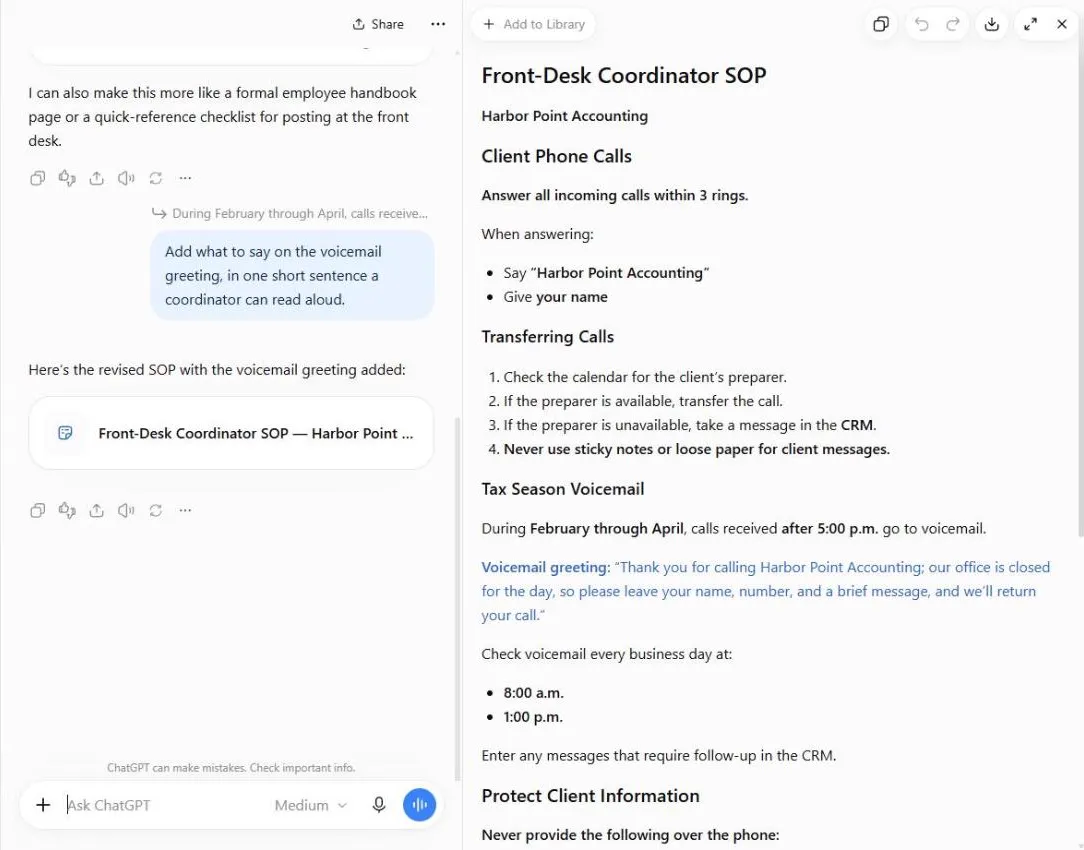
Select a line or a paragraph in the document and a small toolbar appears above it with Ask for changes, a link button, bold, italic and a text-style menu. Click Ask for changes and your selection is attached to the chat box, with the placeholder Describe changes to this selection. We asked for what to say on the voicemail greeting in one short sentence. ChatGPT changed the document, marked the new text in blue and replied that the revised SOP had the voicemail greeting added. You can also click into the document and type directly. In our test the typed words appeared at once, and the Undo and Redo arrows in the document header removed and restored them.
Asking for a change to one selected part is safer than asking ChatGPT to rewrite the whole thing. The rest of the SOP stays as you checked it, and you only have to read the new text.
Check what it added
Your notes did not give a greeting. ChatGPT wrote one, and it promised that the office would return the call. A promise like that is a decision for the firm, not for an AI. In the first draft ChatGPT also added a line that said to follow normal office procedures after a walk-in signs in, which was not in the notes. Read every line against your notes and take out or confirm anything you did not say.
For an SOP, ask the person who owns the process, here the office manager, to read it before anyone follows it. If you want fewer additions, tell ChatGPT to use only what is in your notes and to mark anything it is unsure about, and then still check.
Saving it: Markdown, PDF or Word
The download icon at the top of the panel offered Markdown document, PDF document and Microsoft Word in our test. Pick Word if someone will keep editing the SOP in Word or paste it into the firm's handbook, PDF to send it as it is, and Markdown for a plain-text version. We opened the menu but did not download anything, so check the file yourself after you save it.
Mistakes to avoid
- Pasting real client names, tax details or Social Security numbers into an SOP draft. Use the process, not the people.
- Believing the first draft. ChatGPT adds filler and wording you did not give it. Read it against your notes.
- Regenerating the whole document for a small fix. Select the part and use Ask for changes.
- Letting ChatGPT make promises for your firm, such as call-back times or refund rules.
- Skipping the owner's review. An SOP is only as good as the person who knows the real process checked it.
Plans and limits
We tested in a ChatGPT Plus account in October 2026. Features, names and limits change often, and what is available depends on your plan and your region, so check ChatGPT's own help pages for what your account includes. Follow your employer's rules on what you can put into AI tools.
Try it yourself, free
Reading the steps is a start. Doing them is how it sticks. The interactive module walks you through every click in a practice copy of ChatGPT, checks each step, and never touches your real accounts.
Start “ChatGPT: Turn Rough Notes into a One-Page SOP in an Editable Document”Step by step: ChatGPT: Turn Rough Notes into a One-Page SOP in an Editable Document
All 9 steps of the interactive module, in order. In the module you watch each one, then do it yourself in a practice copy that checks your work.
1. Ask for a document
- Paste your rough notes. In the message box, paste your rough notes and say what you want: a one-page SOP, who it is for, and "use canvas". Paste in the notes.
You're the new front-desk coordinator at Harbor Point Accounting, and you have rough notes about how the desk runs. Say who the SOP is for, how long it should be, and use canvas.
Use canvas. Turn these rough notes into a one-page SOP for new front-desk coordinators at Harbor Point Accounting: client calls in -> answer in 3 rings, say firm name and your name. check calendar for the preparer, if free transfer, if not take message in the CRM not on sticky notes. tax season (Feb-Apr) after 5pm calls go to voicemail, check it at 8am and 1pm. never give out refund status or any SSN info over the phone, send them to the portal. walk-ins: greet in 30 sec, have them sign in on the tablet. questions i dont know -> ask Dana (office manager) dont guess.
- Send it. Click the send arrow.
2. Open it and read it
- Open the document beside the chat. ChatGPT says Canvas is no longer available and uses a newer editable writing block. It is the same idea: a document you can edit, next to the chat. Click the expand icon on the document.
ChatGPT says Canvas is no longer available, and uses the newer editable writing block. Same idea. It's a document you can edit, next to the chat.
3. Change one part
- Select the paragraph to change. Read the document against your notes first. To change just one part, select it: click the Tax Season Voicemail paragraph. A small toolbar appears.
First read it against your notes. Every rule should come from you. To change one part, select it. A small toolbar appears above it.
- Click Ask for changes. Click Ask for changes. Your selection is attached to the chat box.
Your selection is attached to the chat box. ChatGPT will change only that part.
- Describe the change. Say what to add or fix, and how long it should be. Paste in the request.
Say what to change, and how long it should be. Here we want a short voicemail greeting.
- Send the change. Click the send arrow.
4. Check, then save
- Read what changed. ChatGPT marks the new text in blue. Read it. The greeting wording is ChatGPT's, not yours, and so is the promise to return the call. Check it before the office uses it. Click the blue text.
ChatGPT marks the new text in blue. Read it. The wording is ChatGPT's, not yours. It even promises to return the call. Check anything like that before the office uses it.
- Open the download menu. Click the download icon. You can save the SOP as a Markdown document, a PDF document or Microsoft Word. Word is the one to pick if someone will keep editing it.
Last, click the download icon. You can save it as Markdown, as a PDF, or as Microsoft Word. Pick Word if someone will keep editing it. Pick PDF to send it as it is. Before it goes to the team, have your office manager read it.
Screenshots
Frequently asked questions
- How does the interactive lesson work?
- Each step is shown to you first (Watch). Then you do it yourself in a practice copy that checks every click (Your turn). If you get stuck, press Do it for me. It is a practice copy, so no ChatGPT account is needed and nothing is sent to OpenAI.
- Can ChatGPT turn rough notes into an SOP?
- Yes. Paste your notes and say who the SOP is for and how long it should be. In our test ChatGPT returned a one-page SOP with headings for calls, transfers, tax-season voicemail, protecting client information, walk-ins and what to do when you do not know the answer. Read it against your notes, because it also added a few lines of its own.
- What happened to ChatGPT Canvas?
- When we typed use canvas in October 2026, ChatGPT said Canvas is no longer available and used the newer editable writing block instead. The document opened beside the chat and could be edited and changed the same way. If you ask for an editable document without the word canvas, ChatGPT may build a Word file instead.
- How do I edit part of a ChatGPT document?
- Select the line or paragraph in the document, click Ask for changes in the small toolbar that appears, describe the change in the chat box and send. ChatGPT marks the new text in blue. You can also click into the document and type your own edits.
- Can I download the SOP as Word or PDF?
- The download icon at the top of the document panel offered Markdown document, PDF document and Microsoft Word in our test. We did not download a file, so open it and check the layout after you save it.
- Is it safe to put company processes into ChatGPT?
- Use the process, not private data. Leave out client names, tax details and anything your employer says not to share with AI tools, and follow your firm's policy. Have the owner of the process review the SOP before it is used.
More in ChatGPT for Everyday Work
 Summarize a Meeting Transcript with ChatGPT
Paste a long meeting transcript into ChatGPT and get the decisions, an action items table with owners and due dates, and a follow-up email ready to send.
Free · Live ~9 min Beginner
 Reply Faster: Turn a Messy Customer Email Thread into a Clear, Friendly Reply
Turn a messy customer email thread into a clear, friendly reply: give ChatGPT the thread and your facts, check every promise, fix the tone, and send it from Gmail.
Free · Live ~9 min Beginner
 ChatGPT Projects: Keep Your Brand Voice, Files and Instructions in One Place
Set up a ChatGPT Project with your brand voice instructions, your price list and your style guide, so every new chat already knows your business.
Free · Live ~9 min Beginner
 Analyze a Spreadsheet with ChatGPT: Upload a CSV, Get a Chart and Three Takeaways
Upload a CSV of sales to ChatGPT, have it check the data first, ask your questions, get a chart you can download, and finish with the three takeaways that matter.
Free · Live ~10 min Beginner
 ChatGPT Work: Have ChatGPT Do a Multi-Step Task
Switch ChatGPT to Work, hand it a real job (compare three suppliers into a spreadsheet), approve the sites it opens, skip a login, answer its question, check the file…
Free · Live ~8 min Intermediate
 Make Images with ChatGPT for Your Business
Turn a short brief and your logo into a sale poster with ChatGPT Images, fix wrong text with a comment pin, make a Story version and get a caption to post.
Free · Live ~7 min Beginner
All 8 modules in ChatGPT for Everyday Work
More ChatGPT tutorials
 Prompt Writing 101: Role, Context, Task, Format
Ask ChatGPT for the same customer email twice, once vaguely and once with a four-part prompt, and see exactly why structure gets a better answer.
Free · Live ~8 min Beginner
 Get Your Business Recommended by ChatGPT
Ask ChatGPT who it recommends in your town, see which pages it trusts, then use it to write an FAQ page and Business Profile copy that answer real customer questions.
Free · Live ~10 min Intermediate
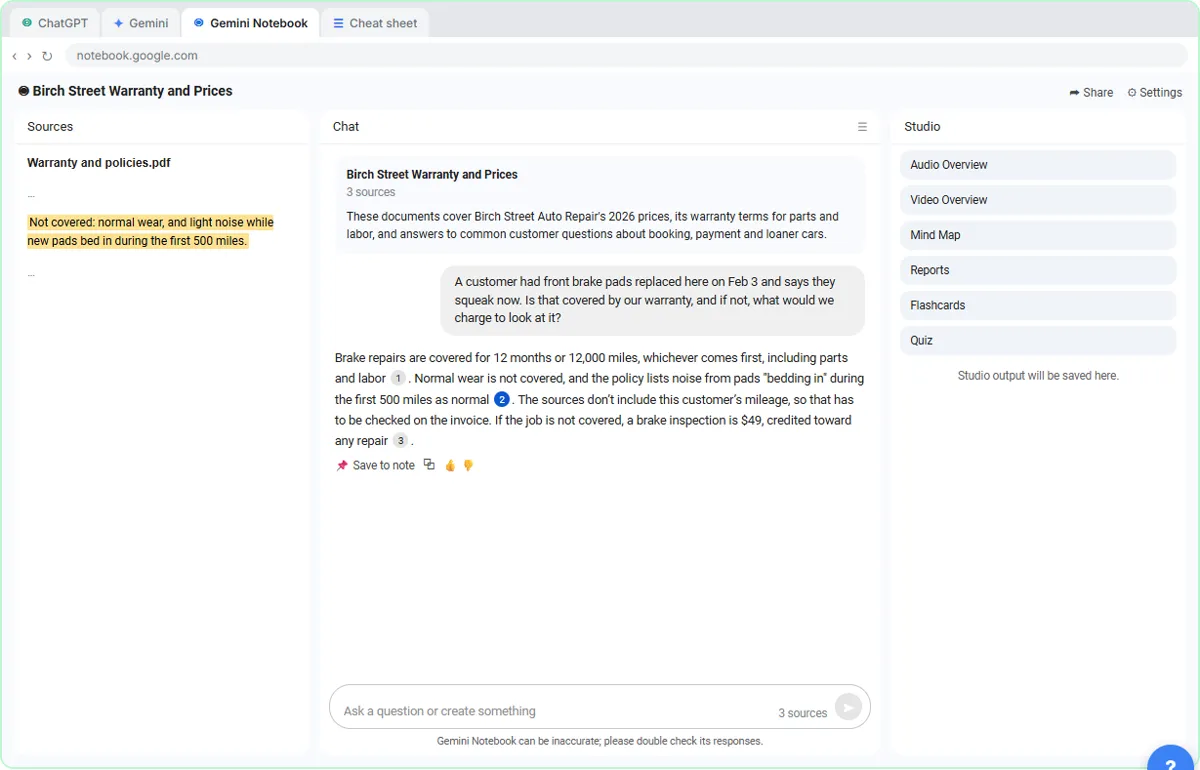 ChatGPT Projects vs Gemini Gems vs Gemini Notebook: Which to Use
Load an auto shop's price list, warranty and FAQ into a ChatGPT Project, a Gemini Gem and Gemini Notebook, ask each the same question, and see which fits which job.
Free · Live ~9 min Beginner
 Make ChatGPT Ask You Questions First: The Interview Prompt
Ask for a job posting the quick way, then with the interview prompt: ChatGPT asks what it needs, one question at a time, and writes a posting you can actually use.
Free · Live ~6 min Beginner
 Give Examples: Few-Shot Prompts That Copy Your Style
Paste three of your real past replies into ChatGPT and get new Google review replies that sound like you, not like a template.
Free · Live ~6 min Beginner
 Break Big Jobs into Steps: Prompt Chaining for a Marketing Plan
Ask ChatGPT for a whole marketing plan in one prompt, then build a better one in four small steps: customers, offers, a calendar table and the posts.
Free · Live ~7 min Beginner
Terms in this lesson
Plain-English definitions, each with an example from a free lesson.