Updated . Built against the tool’s current screens and checked step by step. How we check this lesson
Wispr Flow, Speak AI, meeting notetakers and ChatGPT meeting summaries all start with the same step: turning speech into text. In this free, hands-on explainer you follow a client call recorded by Fairbank HR Consulting, a made-up four-person firm. You see how a recording becomes a transcript, spot the kind of error speech-to-text makes on the words that matter, watch speaker diarization split the call by voice, and turn the transcript into a summary, action items and themes.
At a glance
| Question | Answer |
|---|---|
| What you build | Follow one recorded client call from sound to transcript, catch the kind of error speech-to-text makes, name the speakers, and pull out action items and themes you can trust. |
| Tools | Stepthrough |
| Time | About 6 minutes, 17 steps in 4 parts |
| Level | Beginner, no coding needed |
| Cost | Free |
| Ways to learn it | Practice it step by step |
The 4 parts, in short
- Sound to words: Start with the recording, Speech-to-text, Tidy it up, Spot the transcription error.
- Who said what: Go to speakers, How diarization works, Name the speakers, Where it slips.
- Talk into work: Turn talk into work, The summary, Action items, Themes across many calls.
- Cheat sheet: Open the cheat sheet, Dictation, Meeting notes, Live help, and 1 more step.
Start here first: Start Here: How Stepthrough Works (module 1 of AI Basics)
Part of: AI at Work: Start Here (step 12 of 20). Next up: Wispr Flow: Answer Emails and Write AI Prompts by Voice
Part of: AI for Meetings (step 3 of 13). Next up: OLVA: A Private AI Assistant on Your Client Calls
Part of: Turn Talk Into Work: Voice and Meetings AI (step 1 of 8). Next up: Wispr Flow: Answer Emails and Write AI Prompts by Voice
What you will do
You open the three steps from sound to words (record, transcribe, tidy) and find the error in the raw transcript: "the Q4 renewal" written as "the queue for renewal". Then you see how diarization groups the call into Speaker 1 and Speaker 2, name the speakers so every line updates, and learn where it slips.
Next you turn the transcript into work: a summary, action items with an owner and a date, and themes across many calls. A cheat sheet sums up four voice AI jobs (dictation, meeting notes, live help and consent before recording) and the tools for each.
Speech-to-text and diarization in plain words
Speech-to-text is a model that listens to audio in short slices and writes the most likely words, each with a timestamp, then adds punctuation. Its accuracy is measured as word error rate, the share of words it gets wrong. Clean audio, one voice at a time and a close microphone matter more than the tool.
Speaker diarization answers who spoke when. It groups stretches of speech that sound alike and labels them by number. It does not know names; you add those, and you check spots where people talked over each other.
What to check in every transcript
Errors are not spread evenly. They land on names, numbers, dates and jargon, which are the words minutes and action items depend on. Before a recap or a report goes out, fix those words, confirm the speakers, and listen to the quotes behind any theme you plan to repeat.
How the interactive lesson works
Every step is shown first in the Watch panel, then you do it yourself in Your turn on an explainer board of diagrams and transcripts. Each click is checked, and Do it for me helps if you get stuck. There is no account and no real app: Fairbank HR Consulting and the call are made up.
Try it yourself, free
Reading the steps is a start. Doing them is how it sticks. The interactive module walks you through every click in a practice copy of Stepthrough, checks each step, and never touches your real accounts.
Start “How AI Transcription Works: Speech-to-Text, Speaker Diarization and Themes”Step by step: How AI Transcription Works: Speech-to-Text, Speaker Diarization and Themes
All 17 steps of the interactive module, in order. In the module you watch each one, then do it yourself in a practice copy that checks your work.
1. Sound to words
- Start with the recording. Click Record.
Lena is an HR consultant, and she recorded a client call, with his OK. Accuracy starts here. Clean audio, one voice at a time, close to the mic.
- Speech-to-text. Click Transcribe.
Then speech to text. A model listens in short slices and writes the most likely words, each with a timestamp.
- Tidy it up. Click Tidy.
Then punctuation and capitals are added, so you get sentences, not a stream of words.
- Spot the transcription error. Click the Word error rate card.
Look at the first line. The client said the Q4 renewal, and the transcript says the queue for renewal. Errors pile up on names, numbers and jargon, the words that matter most.
2. Who said what
- Go to speakers. Click the 2 Who said what tab.
Next, who said what.
- How diarization works. Click Grouping by voice.
This is called speaker diarization. The software groups stretches of speech that sound alike. It knows there are two voices, but not whose they are.
- Name the speakers. Click Name the speakers.
So you name them once, and every line updates. Now the transcript says Marcus and Lena.
- Where it slips. Click Crosstalk and similar voices.
It slips when people talk over each other, or when two similar voices share one mic. Check the audio before you quote anyone.
3. Talk into work
- Turn talk into work. Click the 3 Talk into work tab.
A transcript is raw material. Let’s turn it into work.
- The summary. Click Summary.
First, a summary. The short version, for anyone who was not on the call.
- Action items. Click Action items.
Then action items. Who does what, by when. The owner comes from the speaker labels, and the date from the words. Check both.
- Themes across many calls. Click Themes.
And across many calls, thematic analysis. It groups what people said into themes, with real quotes as evidence. Listen to two quotes before you trust a theme.
4. Cheat sheet
- Open the cheat sheet. Click the 4 Cheat sheet tab.
Last, four voice AI jobs.
- Dictation. Click Dictation.
Dictation. You talk, and it types clean text in any app. Read it once before you send.
- Meeting notes. Click Meeting notes.
Meeting notes. After the call, a transcript becomes minutes and action items.
- Live help. Click Live help.
Live help. During the call, an assistant suggests answers from your notes. You still say the words.
- Ask before you record. Click Ask first, every time.
And before any of it, ask. Tell everyone the call is recorded, and get their OK. Some states require everyone to agree.
Frequently asked questions
- How does AI transcription work?
- A speech recognition model writes the most likely words from the audio with timestamps and adds punctuation. Speaker diarization then splits the transcript by voice, and other AI steps write summaries and action items from it.
- What is word error rate?
- The share of words a transcript gets wrong, counting wrong, missing and extra words. Five errors in a hundred words is a 5% word error rate.
- What is speaker diarization?
- The part of transcription that works out who spoke when, labelling each voice as Speaker 1, Speaker 2 and so on. You add the real names.
- How can I make AI transcripts more accurate?
- Record clean audio with a mic close to each speaker, avoid crosstalk, add custom vocabulary such as client names where your tool allows it, and check names, numbers and dates afterwards.
- Is this lesson free?
- Yes. Stepthrough is free, and this explainer needs no account and no setup.
More in AI Basics
Try the practice in under two minutes: watch a step, click, type, get unstuck with Do it for me, and finish.
Free · Live ~2 min Beginner
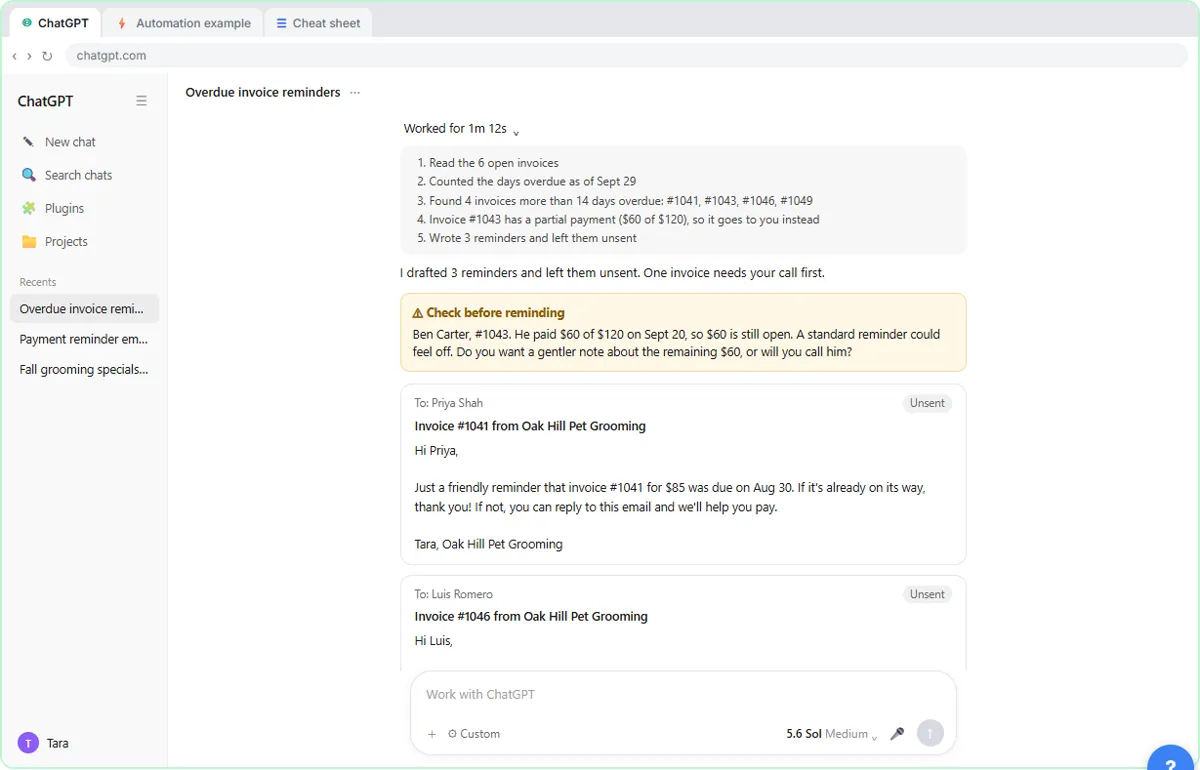 AI Agent vs Chatbot vs Automation: One Job Done Three Ways
Chase six unpaid invoices three ways: a chatbot writes a template, an automation follows a rule, and an AI agent works out the steps and flags the tricky one.
Free · Live ~7 min Beginner
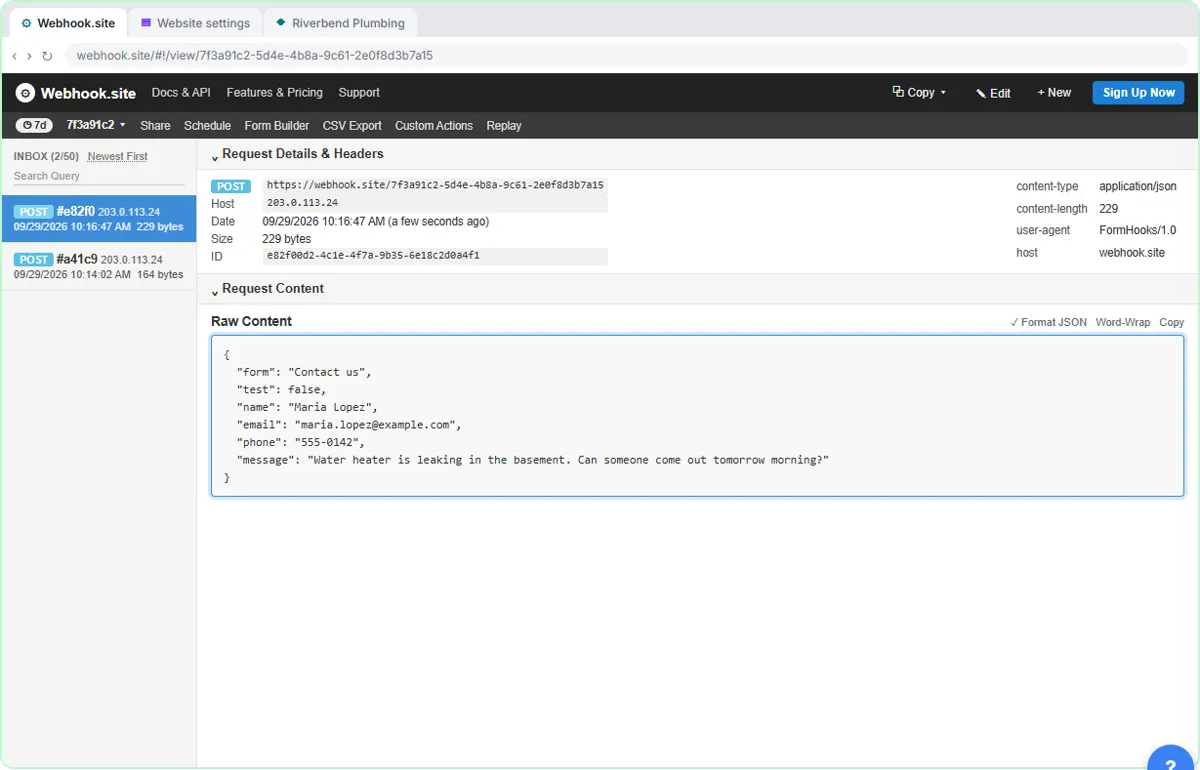 What Is a Webhook? Send a Test and Watch the Data Arrive
Point a plumber's website contact form at a free webhook tester, send a test and a real message, and watch the data arrive the moment it's sent.
Free · Live ~6 min Intermediate
◷Automation Basics: Triggers, Actions and Data MappingLearn the three ideas behind every n8n workflow, Make scenario and Zap: a trigger starts it, actions do the jobs, and data mapping carries the details. Fix the classic…
Free · Live ~6 min Beginner
◷When to Add AI to an Automation (n8n, Make or Zapier)Sort six office jobs into plain rules, AI steps and human decisions, then see the safe shape of an AI automation and how n8n, Make and Zapier each add the AI step.
Free · Live ~6 min Beginner
 Use AI at Work Without Leaking Client Data using ChatGPT
Turn off model training, strip a tenant's bank details and address out of a prompt, then catch the two promises ChatGPT made up before the reply goes out.
Free · Live ~7 min Beginner
More Stepthrough tutorials
Follow one customer question through a support bot: files cut into chunks, a search by meaning, the AI told to answer only from what it found, and a safe fallback when…
Free · Live ~7 min Beginner
◷AI Support Bot Guardrails, Fallback Answers and Human HandoffWrite the rules for an insurance agency’s website bot, run five hard test chats (advice, a trick message, an upset customer) and design a handoff to a person that…
Free · Live ~7 min Beginner
Terms in this lesson
Plain-English definitions, each with an example from a free lesson.