What is automation?
Updated · By Robert Breen
Automation means setting up software to do a repeatable task on its own: when a set event happens or a set time arrives, it gathers the data, applies your rules and sends or saves the result, with no one copying and pasting in between.
Why it matters for a small business
Most small offices run on small repeat jobs: copying today's jobs into emails, typing receipts into a sheet, answering the same three questions. Each one only takes minutes, which is why nobody fixes them, but together they eat hours every week, and every copy and paste is a chance to send the wrong address or skip a row. Automation moves that work into a workflow that runs the same way every time.
The best first candidates are boring. The task happens on a schedule or after a clear event, the data already lives somewhere (a sheet, an inbox, a form), and the rule fits in one sentence. If you can't write the rule down, automating it only makes mistakes faster. AI is optional: plenty of useful automations have none. AI earns its place when one step needs judgment, like reading a receipt photo or drafting a reply.
In a real lesson: Daily Job Alerts: Email Each Tech Their Jobs from Google Sheets with n8n
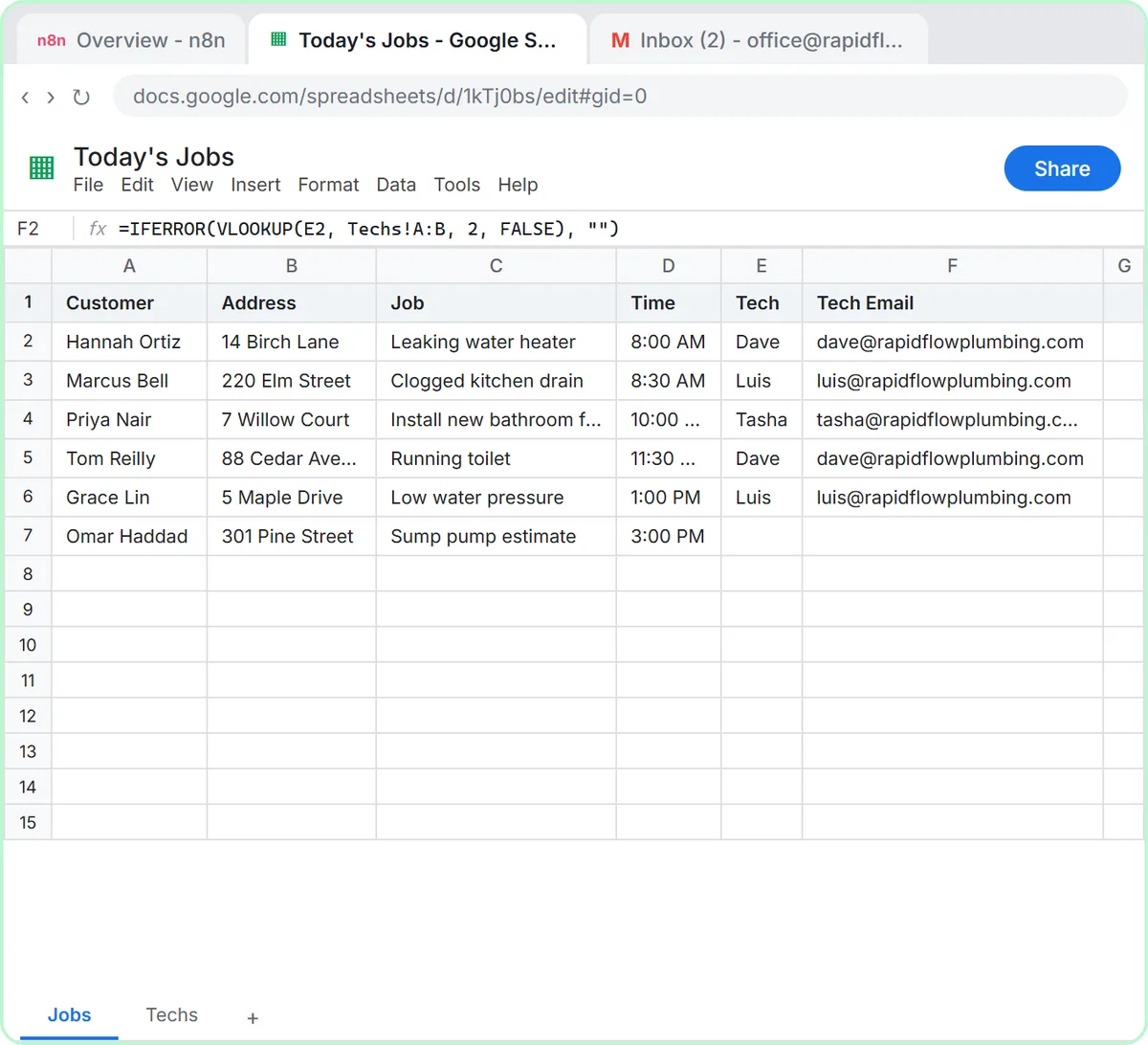
The Daily Job Alerts lesson automates a real morning chore at Rapid Flow Plumbing, the made-up plumbing company in the lesson. The office keeps today's jobs in a Google Sheet called Today's Jobs, with a Tech and a Tech Email for each job, and someone used to copy every job into an email by hand, one tech at a time.
The automation replaces that with four steps: an On a schedule trigger set to 7am, Google Sheets: Get row(s) in sheet, a Filter that drops the sump pump estimate because nobody is assigned to it yet, and Gmail: Send a message addressed to each row's Tech Email. Click Test workflow and six rows come out of the sheet, five pass the Filter, and five emails go out: two to Dave, two to Luis, one to Tasha.
After you click Publish, it runs at 7 every morning whether anyone is at a desk or not. The lesson also names the catch: it sends every assigned row, every day, so the office has to keep the sheet to today's jobs. An automation does exactly what the rules say, nothing more.
Try this lesson free or read the step-by-step guide.
Common confusions
Automation vs AI agent
An automation follows fixed steps you laid out, so the same input gives the same result. An AI agent gets a goal and some tools and decides what to do. Daily Job Alerts is pure automation. The AI Email Responder is an automation with an agent inside one of its steps.
Automation vs a macro or saved template
A spreadsheet macro or a canned email still needs a person to start it each time. An automation also handles the starting, through a trigger such as a schedule, a new email or a form submission.
Tips
- Write the rule in one sentence before you build: when X happens, take Y, skip Z, send it to W.
- Test with real data and check every place the result lands before you publish.
- Decide who notices if it stops running. A silent failure is worse than doing the task by hand.
Related terms
Where you use it: free lessons
- Daily Job Alerts: Email Each Tech Their Jobs from Google Sheets with n8n (n8n, 10 min)
- AI Email Responder: Draft Gmail Replies Automatically with n8n (n8n, 12 min)
- AI Receipt Extractor: Receipts to Google Sheets with n8n (n8n, 12 min)
More free tutorials
Prompt templates that use it
Frequently asked questions
- What should I automate first?
- Pick a task that repeats on a schedule or after a clear event, uses data you already keep, and follows a rule you can say in one sentence. Emailing each tech their jobs every morning is a good example.
- Do I need AI to automate my business?
- No. Many useful automations, like the Daily Job Alerts workflow, use no AI at all. Add AI only for steps that need reading or writing in plain language.