Updated . Built against the tool’s current screens and checked step by step. How we check this lesson
Ask ChatGPT for a job posting in one sentence and it fills the gaps with boilerplate: a degree and a certification you don't need, years of experience you never mentioned, hours you don't have and "competitive pay". In this free, interactive lesson you see that happen, then fix it with an interview prompt that tells ChatGPT to ask you up to five questions, one at a time, keep every requirement job-related, and confirm a summary before it writes. You finish with a fair posting for a real-sounding role and a reusable template. You practice on a copy of ChatGPT, so no account is needed.
At a glance
| Question | Answer |
|---|---|
| What you build | Ask ChatGPT for a front desk lead posting the quick way, then let it interview you: true must-haves only, a real pay range, the work described instead of a personality, and a posting you can use. |
| Tools | ChatGPT |
| Time | About 7 minutes, 22 steps in 5 parts |
| Level | Beginner, no coding needed |
| Cost | Free |
| Ways to learn it | Practice it step by step |
The 5 parts, in short
- Ask the usual way: Click the message box, Paste a quick prompt, Send it.
- Ask for an interview: Start a new chat, Click the message box, Paste the interview prompt, Send the interview prompt.
- Answer its questions: Answer question 1, Send answer 1, Answer question 2, Send answer 2, and 4 more steps.
- Check it, get the posting: Confirm the summary, Send your OK, Copy the posting.
- Save the template: Open the Google Docs tab, Click into the document, Add a heading, Paste the template.
Start here first: Make ChatGPT Ask You Questions First: The Interview Prompt. This Recruiting & HR version follows the same build with its own example business, Willow Bend Physical Therapy.
The example: a front desk lead at a physical therapy clinic
Willow Bend Physical Therapy is a made-up outpatient clinic in Westerville, Ohio, with three physical therapists and two PT assistants. Hannah Cole needs a Front Desk Lead: someone who checks patients in, books recurring visits, verifies insurance, answers billing questions and trains two part-time front desk staff. It's the same role the Recruiting & HR block's interview debrief module is about.
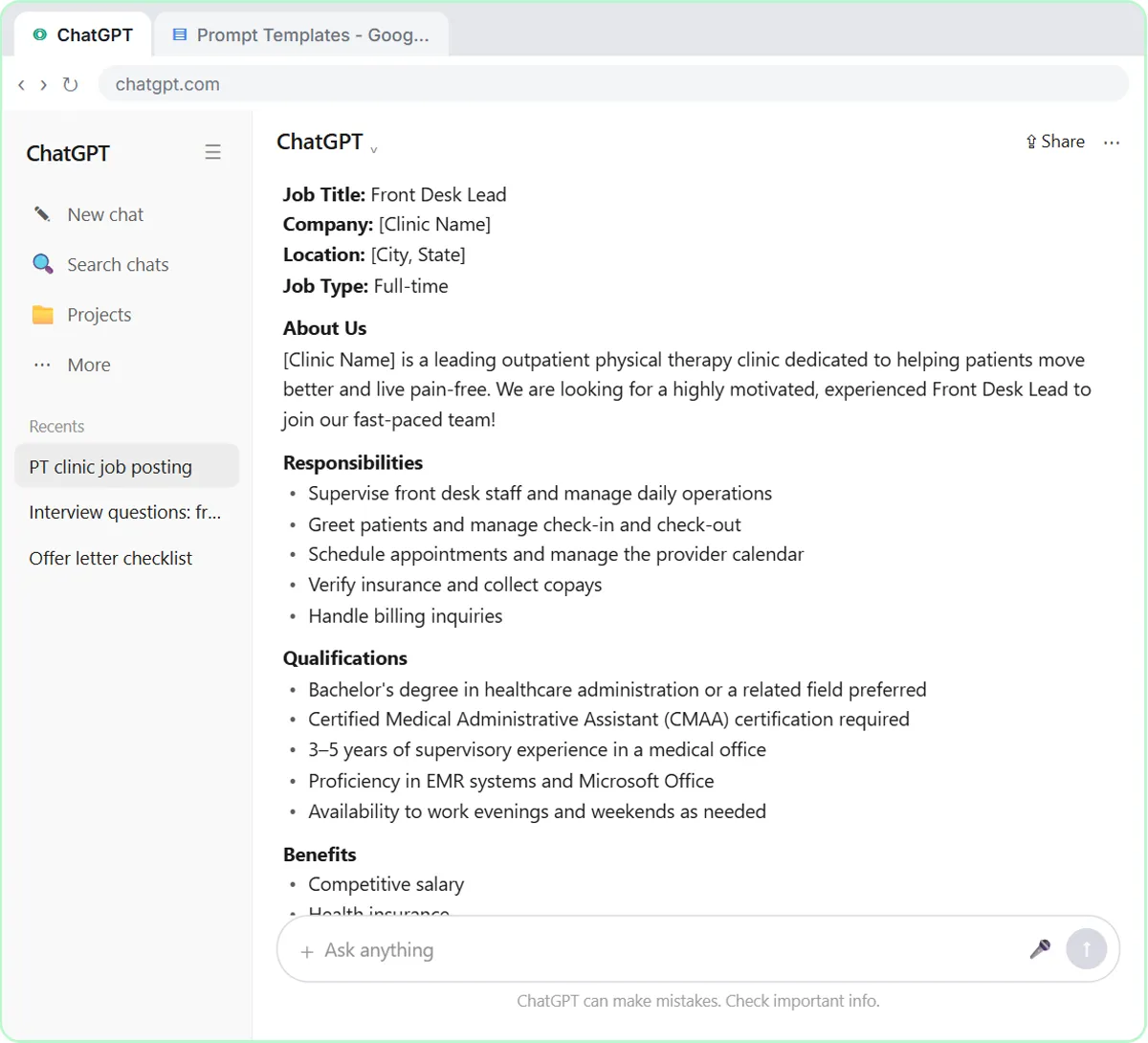
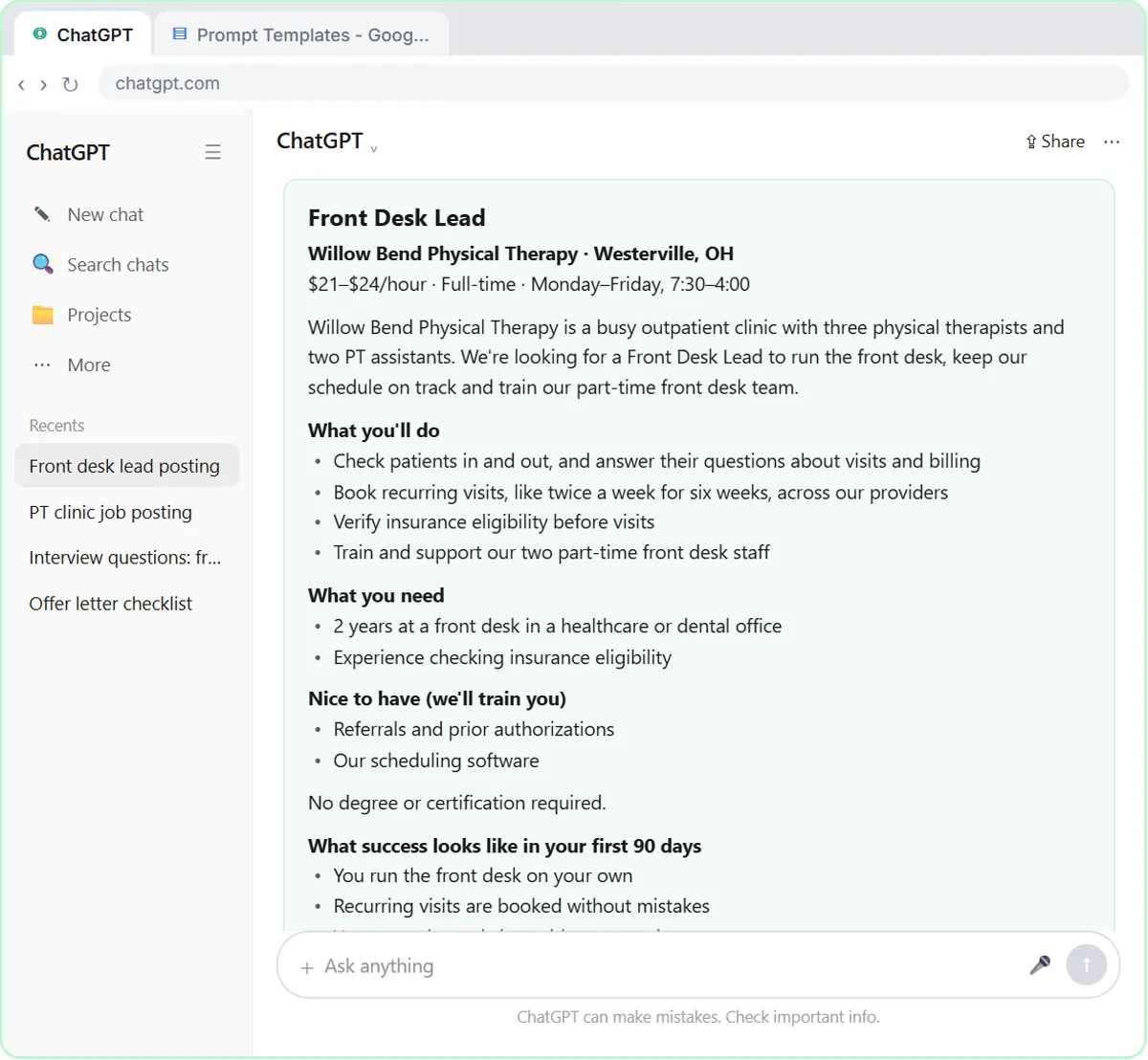
The one-line prompt produces a posting with [Clinic Name] blanks, a preferred bachelor's degree, a required CMAA certification, three to five years of supervising, evening and weekend availability and "competitive salary". The interview version ends with two true must-haves (two years at a healthcare or dental front desk, experience checking insurance eligibility), what the clinic will train (referrals and authorizations, its scheduling software), no degree or certification, $21 to $24 an hour, the real 7:30 to 4 schedule, what success looks like in 90 days, and an equal-opportunity line that ChatGPT asked about before adding.
Who this lesson is for
This is for HR generalists, recruiters, office managers and small business owners who write their own job ads. It takes about seven minutes and needs no account.
It is the second module in the AI Automation for Recruiting & HR block, and a recruiting version of the Prompt Writing module "Make ChatGPT ask you questions first", which uses the same technique for a plumbing apprentice.
What you do, step by step
- Paste the quick prompt, send it, and read what comes back: the blanks, the inflated requirements, the wrong hours and the missing pay.
- Start a new chat and paste the interview prompt. It asks for up to five questions, one at a time, no assumptions, only job-related requirements with must-haves separated from nice-to-haves, plain and inclusive language, and a summary to confirm first.
- Answer four questions: the clinic and the job; must-haves versus what you'd train; pay range, schedule and benefits; and what doing the job well looks like in 90 days, plus how to apply.
- Check the summary line by line and send your OK, including a yes to the equal-opportunity line. Copy the posting.
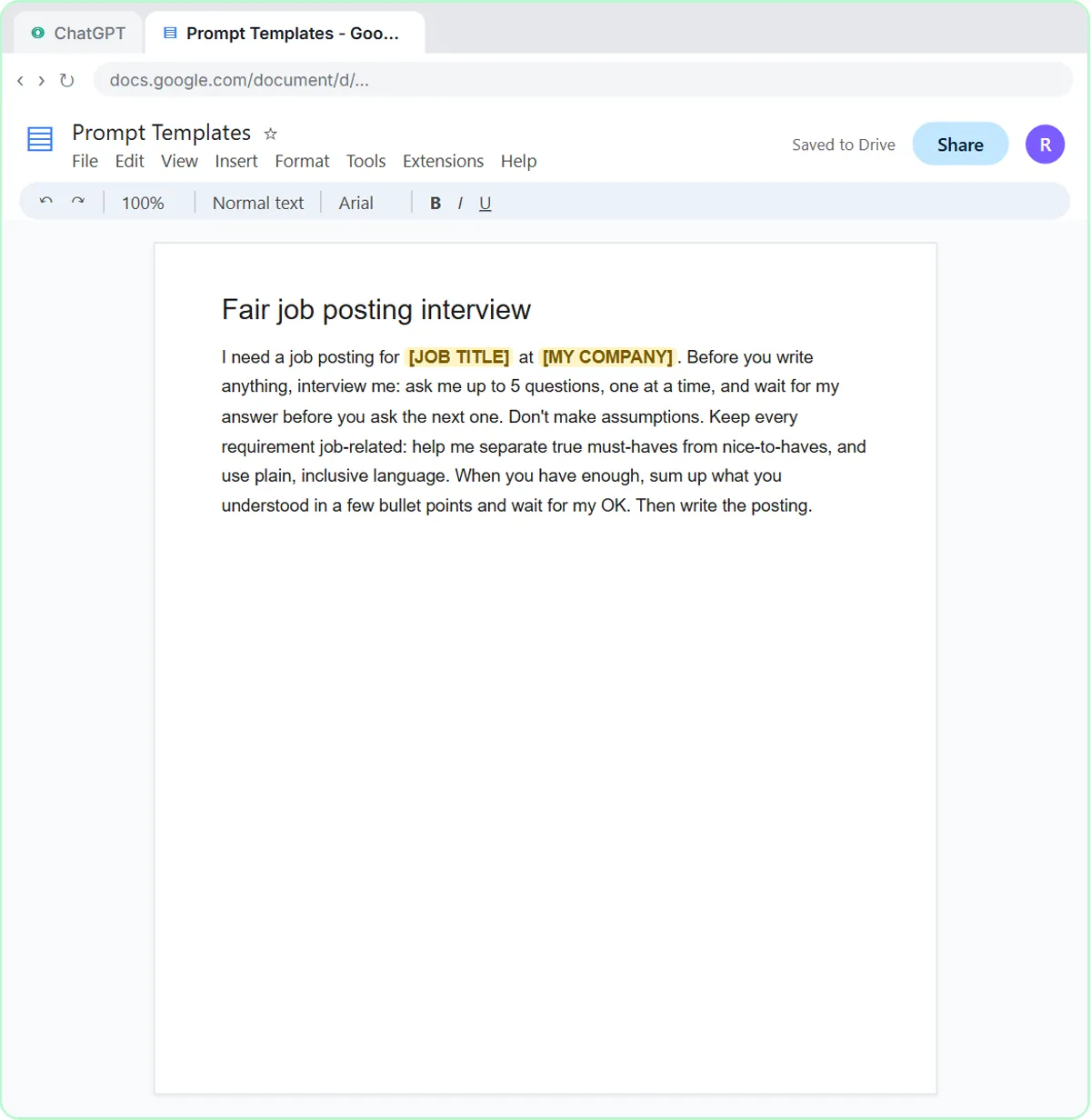
- Open the Prompt Templates Google Doc and save the prompt with two blanks, [JOB TITLE] and [MY COMPANY], so every opening gets the same questions.
Why the extra rule matters
Requirements that aren't needed for the job, such as a degree for a front desk role, quietly shrink your applicant pool and can screen out people for reasons that have nothing to do with the work. Asking ChatGPT to separate must-haves from nice-to-haves forces you to decide what the job really needs. Describing success in the first 90 days, instead of asking for a "rockstar" or a "culture fit", tells candidates exactly what the work is and keeps the posting job-related.
Before you post
Have someone read the posting before it goes live, and check the rules where you hire: several states and cities require a pay range in job postings, and the EEOC's guidance on job advertisements applies to how ads are worded. ChatGPT is a drafting tool, not an employment lawyer. Real ChatGPT may ask different questions or a different number of them; answer what it asks, and always check the summary before you say go ahead.
Try it yourself, free
Reading the steps is a start. Doing them is how it sticks. The interactive module walks you through every click in a practice copy of ChatGPT, checks each step, and never touches your real accounts.
Start “Write a Fair, Job-Related Job Posting with ChatGPT's Interview Prompt”Step by step: Write a Fair, Job-Related Job Posting with ChatGPT's Interview Prompt
All 22 steps of the interactive module, in order. In the module you watch each one, then do it yourself in a practice copy that checks your work.
1. Ask the usual way
- Click the message box. Click the message box, where it says Ask ChatGPT.
Willow Bend Physical Therapy needs a front desk lead. Let's ask ChatGPT for a job posting the way most people do: one quick sentence.
- Paste a quick prompt. Paste in the prompt to add: Write a job posting for a front desk lead at a physical therapy clinic.
Here's the quick version. It's a fair request, but ChatGPT knows nothing about your business.
- Send it. Click the Send arrow.
Send it, and let's see what comes back.
2. Ask for an interview
- Start a new chat. Read the posting: blanks like [Clinic Name], a degree, a certification and years of supervising you never asked for, evening and weekend hours you don’t have, and no real pay. Then click New chat in the sidebar.
It looks finished, but look closer. Blanks for your clinic's name. A degree, a certification and years as a supervisor, none of which the job needs. Evening and weekend hours you don't have. And no pay, just competitive salary. Requirements like those quietly screen out good candidates. This time, let ChatGPT ask you instead.
- Click the message box. Click the message box.
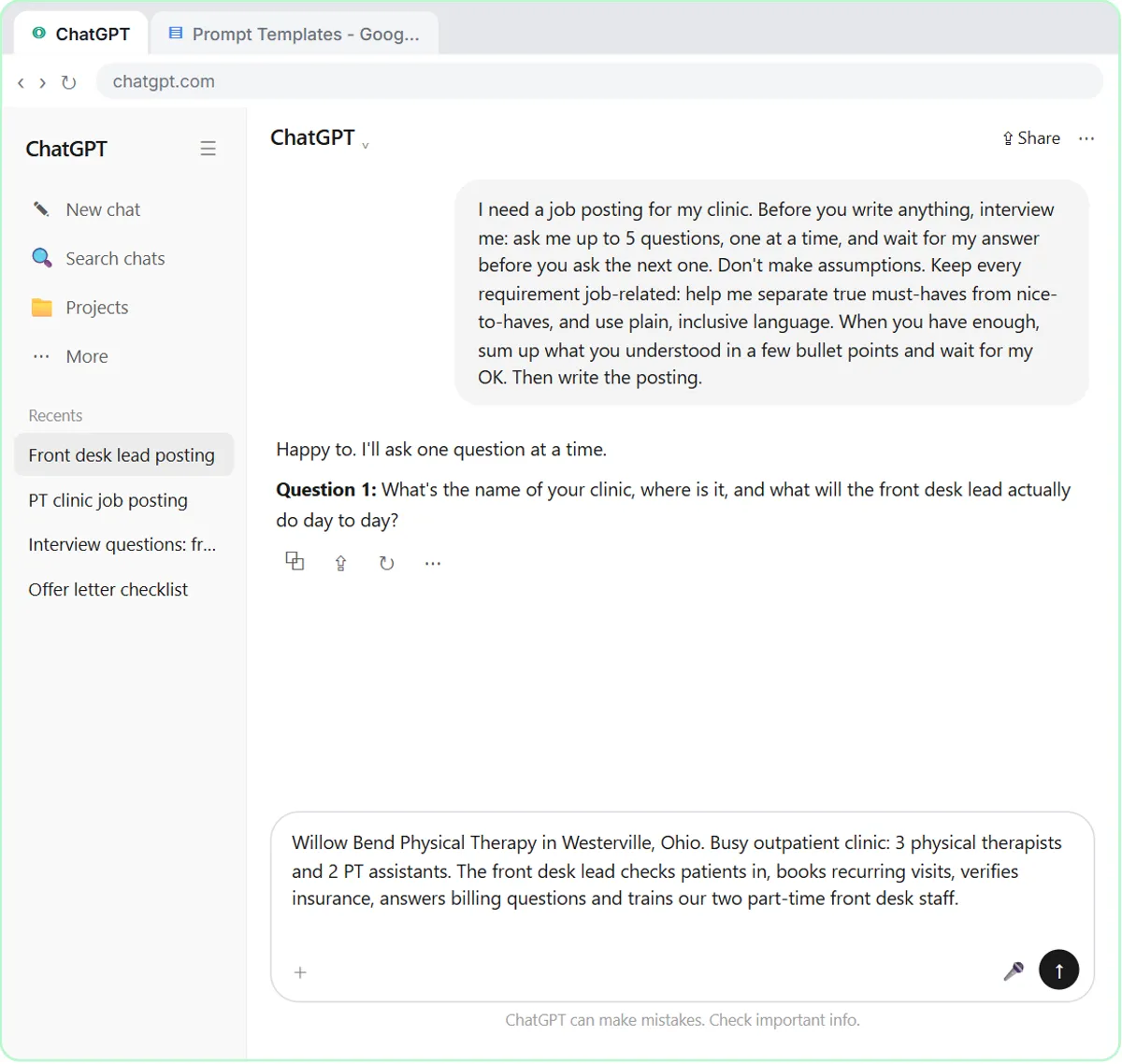
Now for the interview prompt. Instead of guessing, ChatGPT asks you what it needs to know, one question at a time.
- Paste the interview prompt. Paste in the prompt. It asks ChatGPT to interview you first: up to 5 questions, one at a time, no assumptions, only job-related requirements, then a summary to confirm before it writes.
Read what it asks for. Up to five questions, one at a time, and no assumptions. Then one extra rule for hiring: keep every requirement job-related, and separate true must-haves from nice-to-haves. And a short summary you can check before it writes anything.
I need a job posting for my clinic. Before you write anything, interview me: ask me up to 5 questions, one at a time, and wait for my answer before you ask the next one. Don't make assumptions. Keep every requirement job-related: help me separate true must-haves from nice-to-haves, and use plain, inclusive language. When you have enough, sum up what you understood in a few bullet points and wait for my OK. Then write the posting.
- Send the interview prompt. Click the Send arrow.
Send it.
3. Answer its questions
- Answer question 1. ChatGPT doesn't write yet. It asks Question 1: your clinic, where it is, and what the job involves day to day. Paste in the answer. (In real ChatGPT you just type your answer. Its questions may come in a different order or wording; answer what it asks. On some plans and modes, it shows the question as a card with choices; pick one, or type your own.)
See? No posting yet. Just one question: your clinic, where it is, and what the job really involves. Answer like you're telling a friend. Short is fine.
Willow Bend Physical Therapy in Westerville, Ohio. Busy outpatient clinic: 3 physical therapists and 2 PT assistants. The front desk lead checks patients in, books recurring visits, verifies insurance, answers billing questions and trains our two part-time front desk staff.
- Send answer 1. Click the Send arrow.
Send your answer.
- Answer question 2. Question 2 splits true must-haves from nice-to-haves you’d train, which is exactly what the first posting inflated. Paste in the answer.
Question two splits must-haves from nice-to-haves. That's exactly what the first posting inflated, with a degree and a certification you don't need.
Must-haves: 2 years at a front desk in healthcare or dental, and experience checking insurance eligibility. Nice to have: referrals and authorizations, and our scheduling software. We train on both. No degree or certification needed.
- Send answer 2. Click the Send arrow.
Send it.
- Answer question 3. Question 3 asks for the pay range, schedule and benefits. Paste in the answer.
Now the pay range, schedule and benefits. Some places require a pay range in the posting, and real numbers get you more applicants anyway.
$21 to $24 an hour. Full-time, Monday to Friday, 7:30 to 4. Health and dental insurance, 10 paid days off plus holidays, and free PT for staff.
- Send answer 3. Click the Send arrow.
Send it.
- Answer question 4. Question 4 asks what doing the job well looks like and how to apply. Paste in the answer.
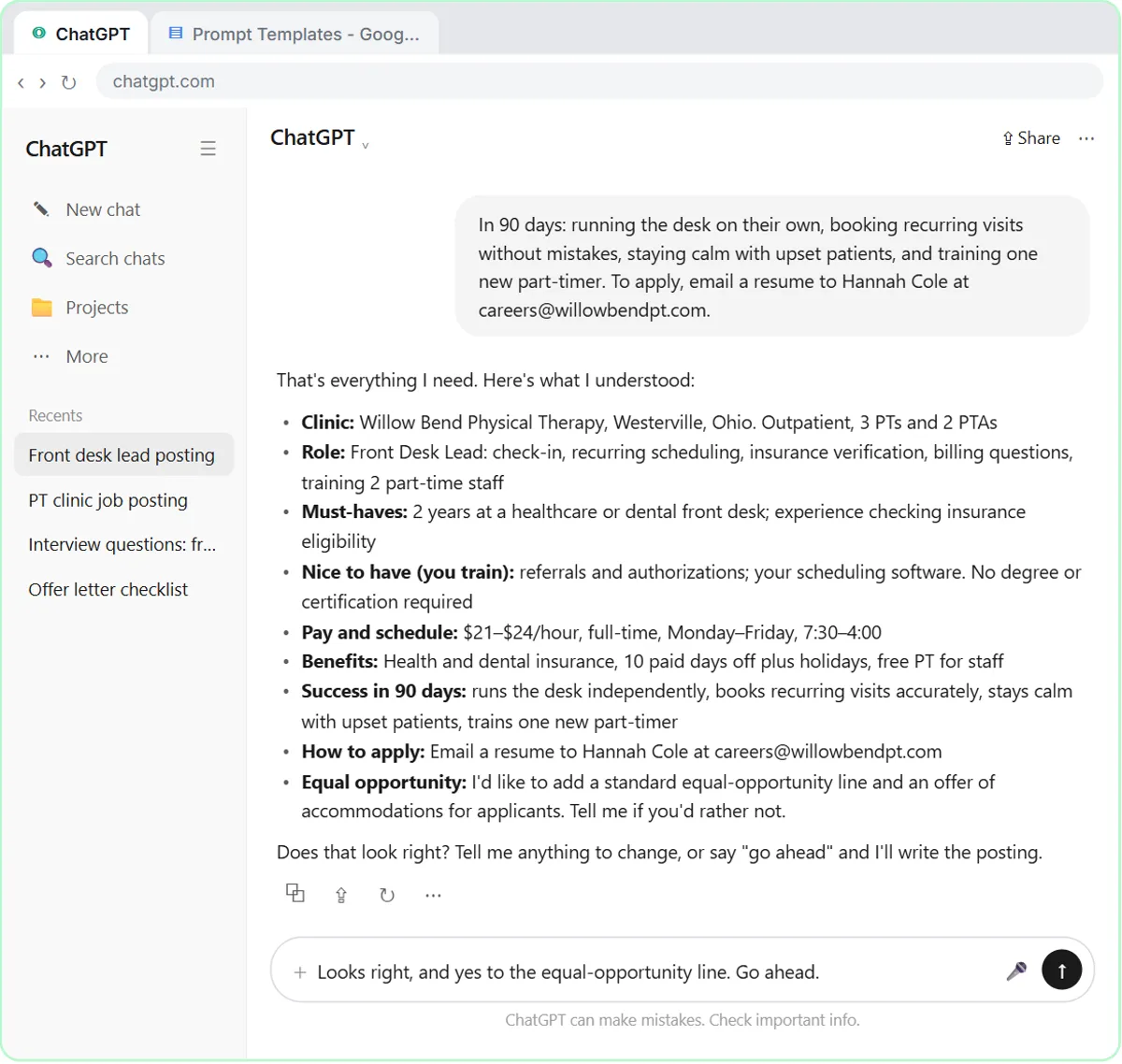
Last one: what doing the job well looks like, and how to apply. Describe the work, not a personality. It's fairer, and it tells people exactly what the job is.
In 90 days: running the desk on their own, booking recurring visits without mistakes, staying calm with upset patients, and training one new part-timer. To apply, email a resume to Hannah Cole at [email protected].
- Send answer 4. Click the Send arrow.
Send it.
4. Check it, get the posting
- Confirm the summary. ChatGPT stopped after 4 questions (you said up to 5) and summed up what it understood. Check every line. If something is wrong, say so. Everything is right here, so Paste in the reply.
Here it asked four questions, not five. You said up to five, and that's all it needed. Now it sums up what it understood and waits. This is your chance to catch a mistake before it's in the posting.
- Send your OK. Click the Send arrow.
Send it, and ChatGPT writes the posting.
- Copy the posting. Compare it with the first one: your clinic, a real pay range, only true must-haves, the 7:30 start, what success looks like, and the equal-opportunity line you approved. Click the Copy icon under the posting. (Real ChatGPT may put the posting in its own box with a copy icon at the top right; either works.)
Now compare. Your clinic, a real pay range, two true must-haves, and what you'll train. The actual schedule, what success looks like in ninety days, and the equal-opportunity line you said yes to. Still have someone read it before you post it.
5. Save the template
- Open the Google Docs tab. The posting is copied, ready for a job site or your website. Now save the prompt itself. Click the Google Docs tab at the top.
The posting is copied and ready for a job site, Facebook, or your website. But the real win is the prompt. Let's save it so you can use it for anything.
- Click into the document. This is your Prompt Templates doc. Click into the document.
This is a Google Doc called Prompt Templates, for the prompts worth keeping.
- Add a heading. Paste in the heading to add: Fair job posting interview
Give it a heading, so you can find it later.
- Paste the template. Paste in the template. It's the same interview prompt, with [JOB TITLE] and [MY COMPANY] left as blanks.
Here's the same prompt, with two blanks: the job title and your company. Use it for every opening, so each posting gets the same fair questions.
I need a job posting for [JOB TITLE] at [MY COMPANY]. Before you write anything, interview me: ask me up to 5 questions, one at a time, and wait for my answer before you ask the next one. Don't make assumptions. Keep every requirement job-related: help me separate true must-haves from nice-to-haves, and use plain, inclusive language. When you have enough, sum up what you understood in a few bullet points and wait for my OK. Then write the posting.
Screenshots
Frequently asked questions
- How do I get ChatGPT to write a better job posting?
- Don't ask in one line. Ask it to interview you first: up to five questions, one at a time, no assumptions, and a summary to confirm before it writes. Your answers replace the blanks and boilerplate.
- How do I keep an AI-written job posting fair?
- Tell it to keep every requirement job-related and to separate must-haves from nice-to-haves, describe the work rather than a personality, include a pay range, and have a person review it before posting.
- Should a job posting include the pay range?
- Several states and cities require it, and it helps everywhere: real numbers get more qualified applicants. Check the rules where you hire.
- Can I reuse the prompt for other jobs?
- Yes. Save it with two blanks, [JOB TITLE] and [MY COMPANY], and every posting you write starts with the same fair questions.
- Is this lesson free?
- Yes. Stepthrough is completely free and the practice copy needs no ChatGPT or Google account.
More ChatGPT tutorials
 Prompt Writing 101: Role, Context, Task, Format
Ask ChatGPT for the same customer email twice, once vaguely and once with a four-part prompt, and see exactly why structure gets a better answer.
Free · Live ~8 min
 Get Your Business Recommended by ChatGPT
Ask ChatGPT who it recommends in your town, see which pages it trusts, then use it to write an FAQ page and Business Profile copy that answer real customer questions.
Free · Live ~10 min
 Summarize a Meeting Transcript with ChatGPT
Paste a long meeting transcript into ChatGPT and get the decisions, an action items table with owners and due dates, and a follow-up email ready to send.
Free · Live ~9 min
 Reply Faster: Turn a Messy Customer Email Thread into a Clear, Friendly Reply
Turn a messy customer email thread into a clear, friendly reply: give ChatGPT the thread and your facts, check every promise, fix the tone, and send it from Gmail.
Free · Live ~9 min
 ChatGPT Projects: Keep Your Brand Voice, Files and Instructions in One Place
Set up a ChatGPT Project with your brand voice instructions, your price list and your style guide, so every new chat already knows your business.
Free · Live ~9 min
 Analyze a Spreadsheet with ChatGPT: Upload a CSV, Get a Chart and Three Takeaways
Upload a CSV of sales to ChatGPT, have it check the data first, ask your questions, get a chart you can download, and finish with the three takeaways that matter.
Free · Live ~10 min
Terms in this lesson
Plain-English definitions, each with an example from a free lesson.