Updated . Built against the tool’s current screens and checked step by step. How we check this lesson
An HR manager at a firm with staff in several states is supposed to keep up with each state's minimum wage. In practice the check happens when there is time, and a change found after payroll means corrections and back pay. Strawberry (strawberrybrowser.com) is a desktop browser with AI companions, and its routines run a companion on a schedule. This guide builds one that reads the U.S. Department of Labor's state minimum wage page every Monday at 8:00 for Pennsylvania, New Jersey and New York, and stops at an approval card before it saves anything. Every screen here comes from the real app: we built and ran this routine in Strawberry on Windows on 13 November 2026, including a first run that could not save and the one-line fix. It comes with a free practice lesson. This is my own guide, not an official Strawberry course. It follows lesson 1, research leads and approve every email and lesson 2, a morning inbox routine.
At a glance
| Question | Answer |
|---|---|
| What you build | Build a Strawberry routine that checks the U.S. Department of Labor minimum-wage page for your states every Monday, and stops at an approval card before it saves a single change. |
| Tools | Strawberry |
| Time | About 8 minutes, 18 steps in 5 parts |
| Level | Beginner, no coding needed |
| Cost | Free |
| Ways to learn it | Practice it step by step |
The 5 parts, in short
- Open Routines: Open Routines.
- Set up the routine: Create a routine, Create with companion, Describe the job and the schedule, Send it, and 1 more step.
- Run it once: Run it now, Open the run.
- Tune the instructions: Read the result, then go back, All routines, Open the routine, Add the new rule, and 1 more step.
- Approve the change: Run it again, Open the new run, Read the approval card, Send the approval, and 1 more step.
Part of: AI for Recruiting & HR (step 18 of 26). Next up: Buffer: Write One Post and Schedule It to Every Channel
Part of: AI Apps Worth Knowing (step 38 of 157). Next up: Preview Every Website Change Before Your Client Sees It using Kosuke
The routine instructions from the lesson
Paste the first one into Create with companion and replace the bracketed parts. Add the second one if your plan has no companion database, as happened on the Free plan in our test.
| Prompt | What it does |
|---|---|
| Every Monday at 8:00 AM: I'm the HR manager at a [size] firm with staff in [states]. Check the U.S. Department of Labor's state minimum wage page (https://www.dol.gov/agencies/whd/minimum-wage/state) for those states. Keep a table with one row per state: state, current minimum wage, next scheduled change and its date (if the page lists one), source URL and date checked. Ask me before you create it or change any row. Do not email or message anyone. End with a short summary: what changed since last week, what needs my attention, and the source link. If nothing changed, say so in one line. | The schedule, one official source, what to keep, the approval gate and a notification rule, in one message. |
| Keep the table in a Library file named "Pay-law watch.md". Before you create or change that file, show me the exact rows you want to write and ask me to approve. Do not write anything until I approve. | Moves the table to a Library file and keeps the gate: nothing is written until you approve the exact rows. |
The business case: one check, every Monday, before payroll
Picture Priya Nair, HR manager at Linden Row Design, a made-up 48-person design firm with staff in Pennsylvania, New Jersey and New York. Each state sets its own minimum wage, New Jersey has a second rate for small and seasonal employers, and New York pays differently in New York City, Long Island and Westchester than upstate. Priya checks by hand before each quarter's pay review, when she remembers.
A routine turns that into a habit that does not depend on a quiet week. It reads the same official page every Monday, compares it with last week, and tells Priya what changed and what needs her. It does not touch payroll and it does not save anything until she approves the exact rows. That is human in the loop for pay data.
Step 1: set it up with Create with companion
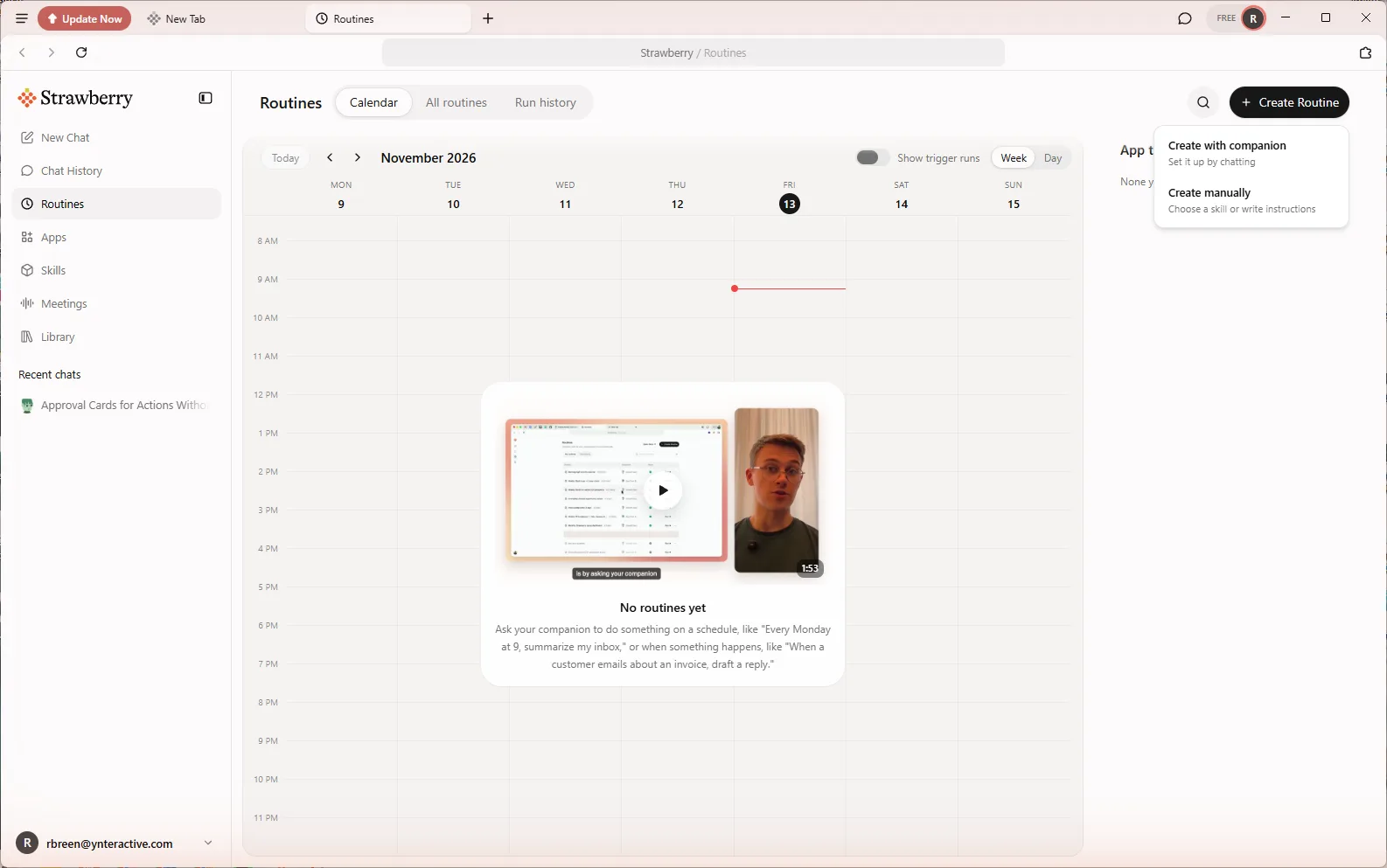
Click Routines in the sidebar. The page opens on Calendar, with All routines and Run history beside it and an App triggers panel. Click Create Routine. It offers Create with companion (set it up by chatting) and Create manually (choose a skill or write instructions). In our test on 13 November 2026 the manual dialog would not save: it showed Choose a companion to run it. with no companion picker in the dialog. Create with companion worked, so the lesson uses it.
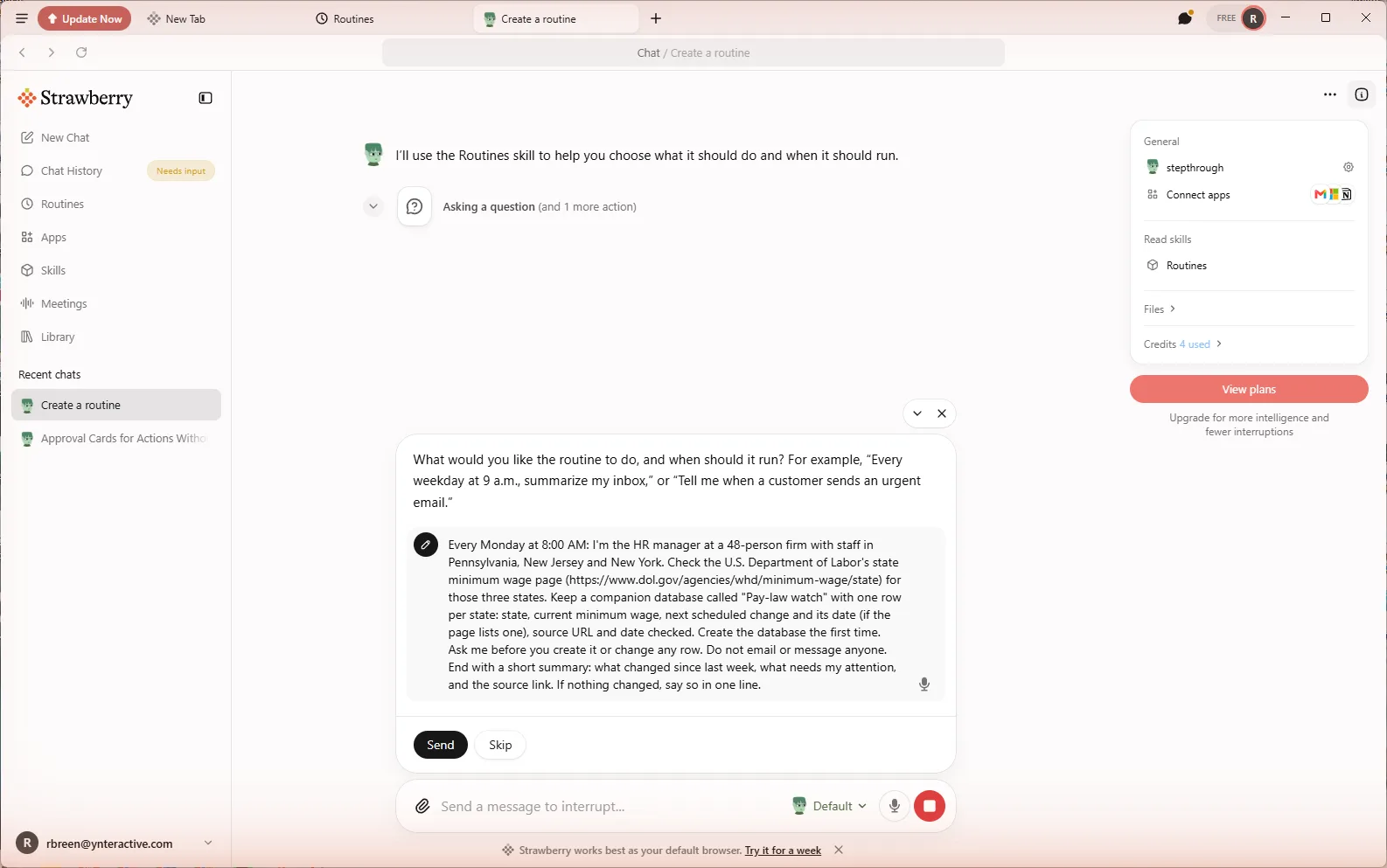
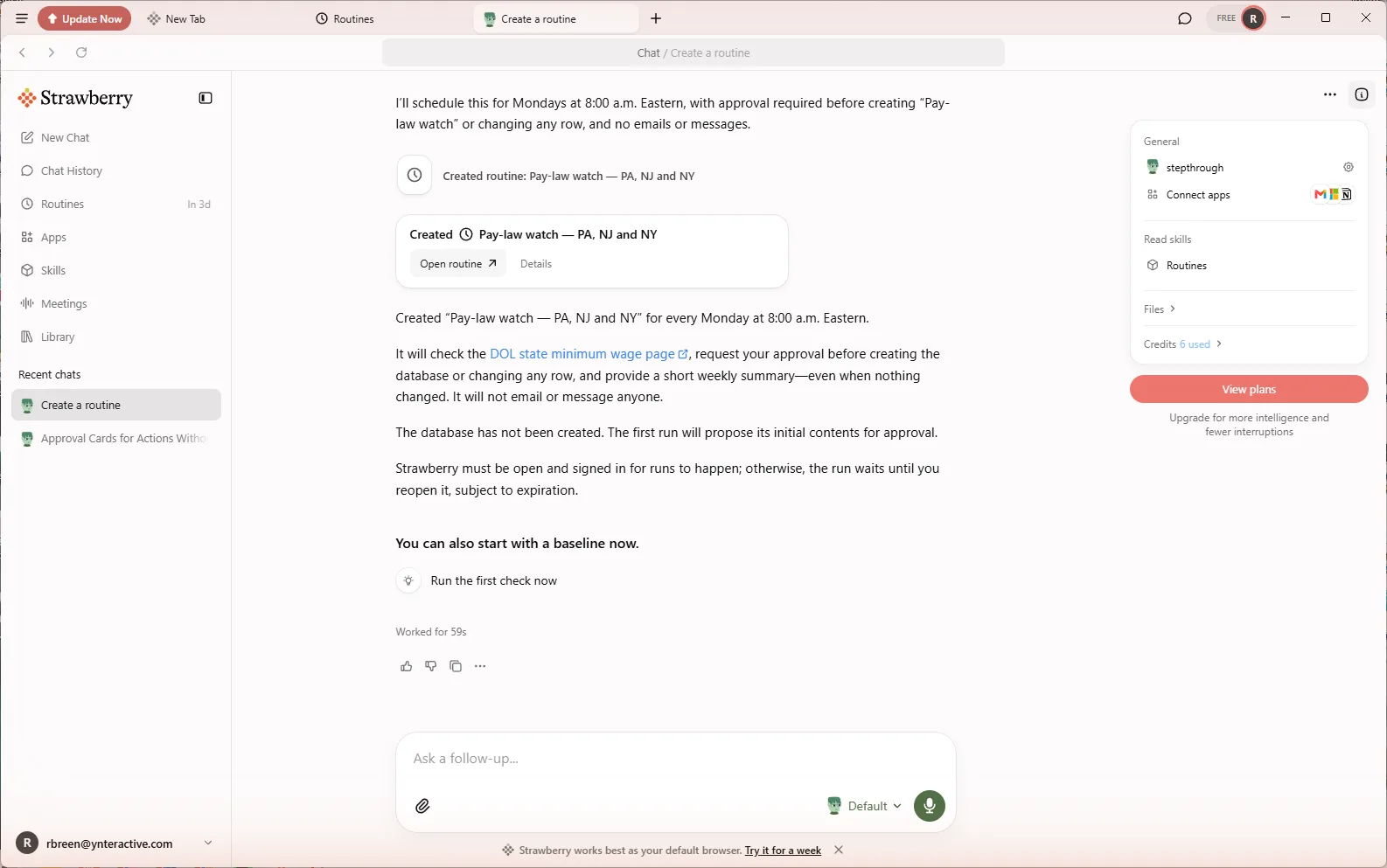
A chat opens and the companion asks what the routine should do and when. Paste the instructions from the box above. The companion reads its Routines skill, creates the routine and shows a Created card with Open routine. It also repeats the rules back and warns that Strawberry must be open and signed in for runs to happen; a run that comes due while it is closed waits until you reopen it.
Step 2: run it once and read the result
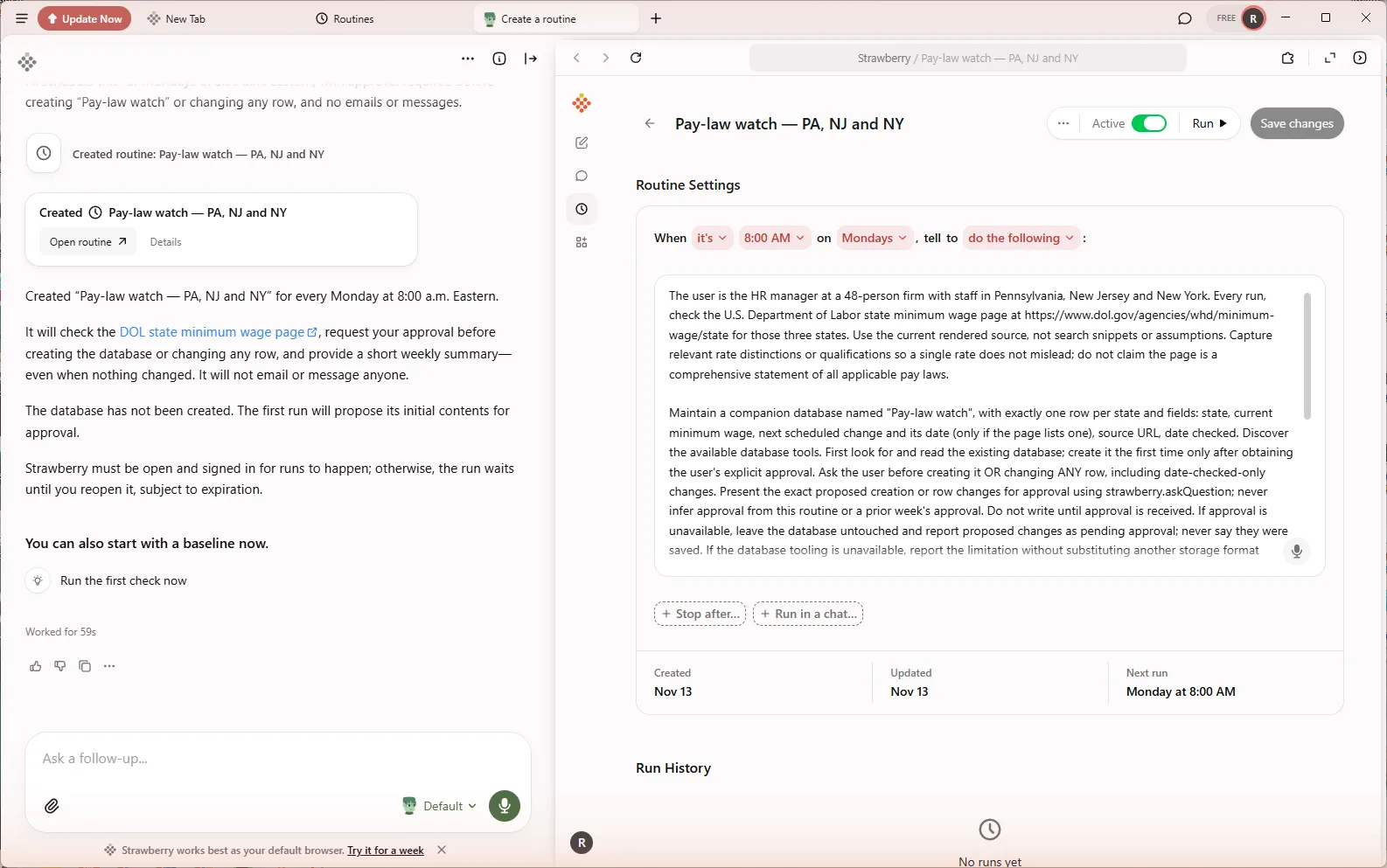
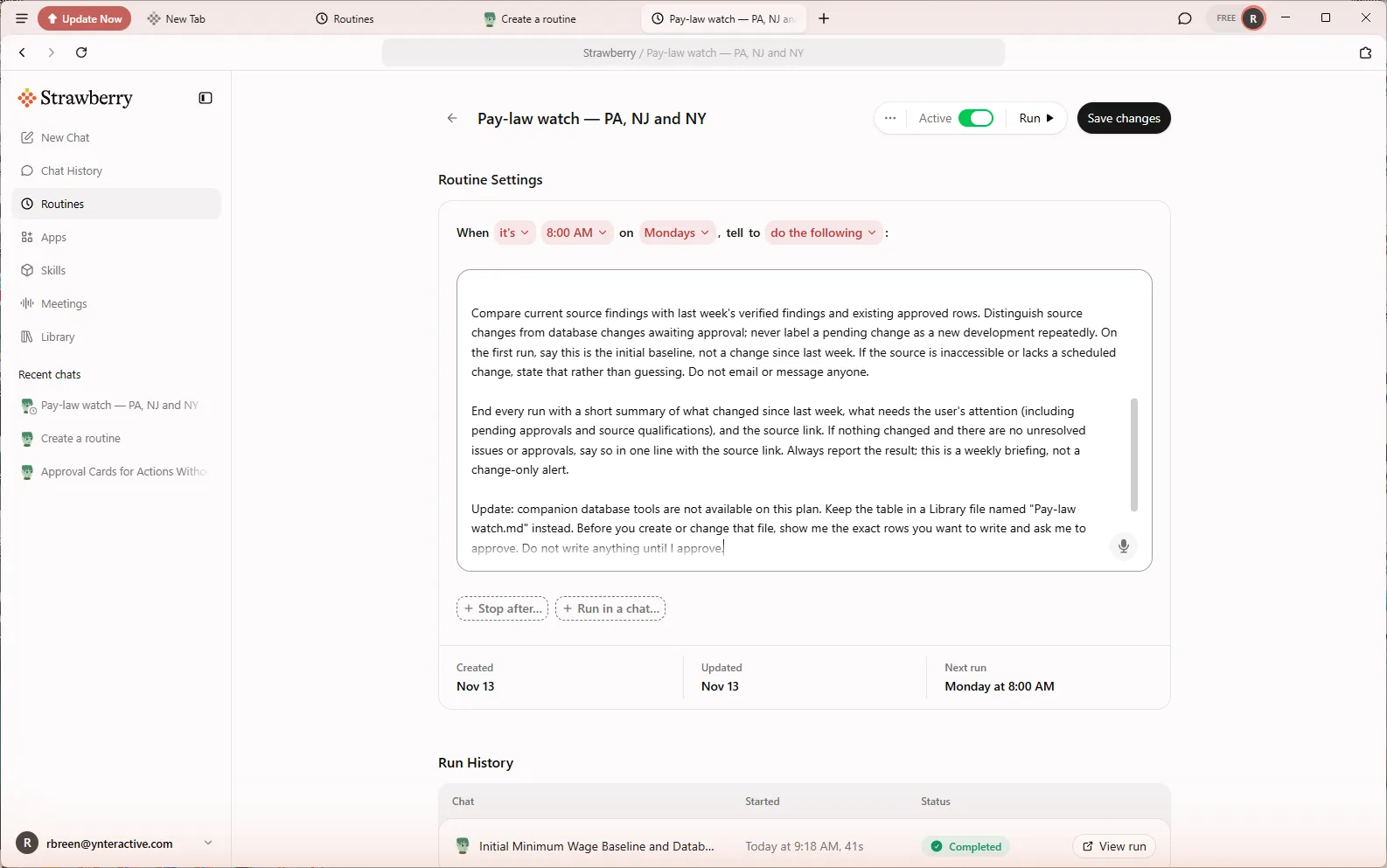
Open the routine. Its page reads When it's 8:00 AM on Mondays, tell to do the following, with the instructions below. The companion had rewritten them in more detail, adding rules such as use the current rendered page, not search snippets, and never infer approval from a prior week. Under them are Created, Updated and Next run (Monday at 8:00 AM), and at the top an Active switch, Run and Save changes.
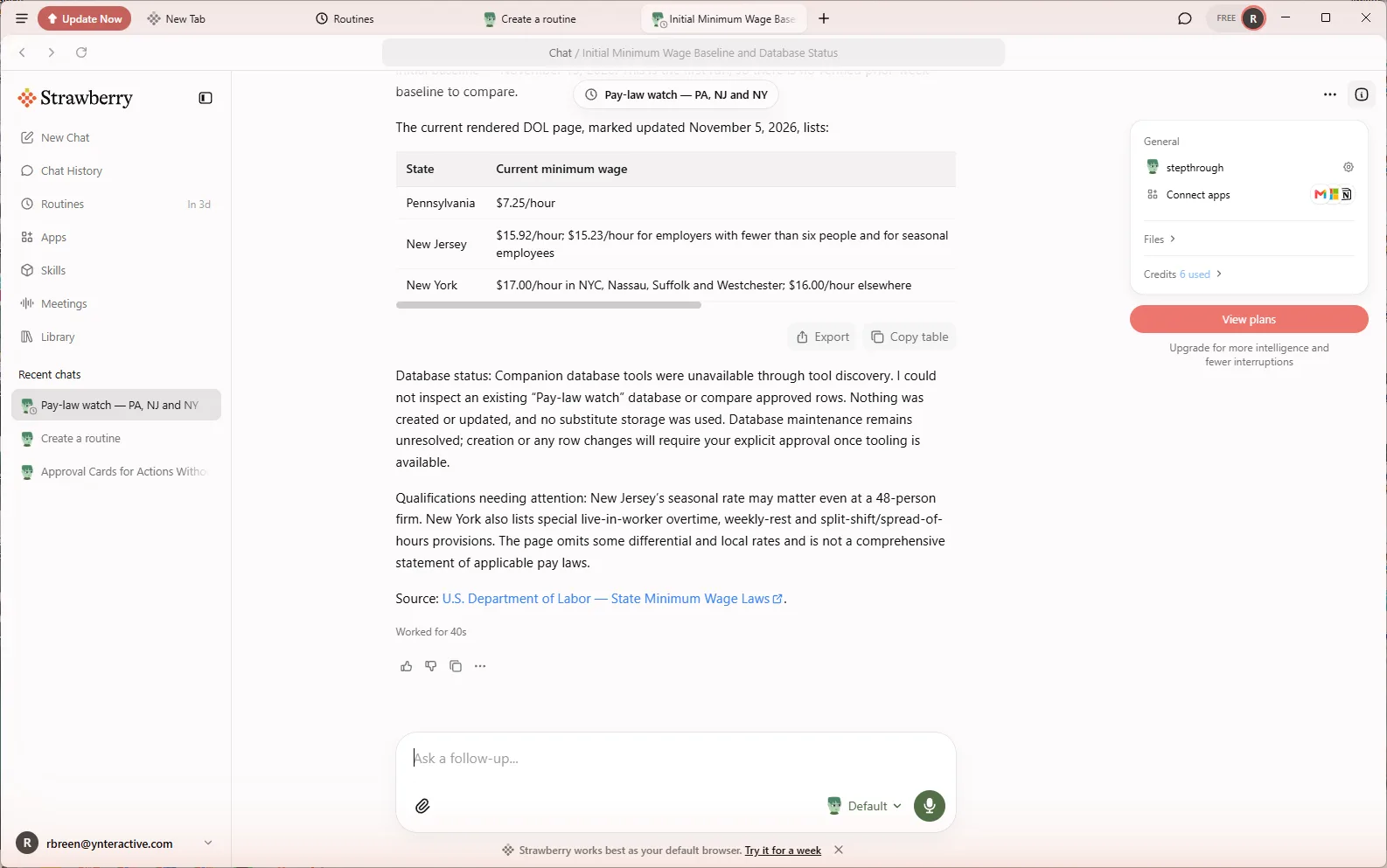
Click Run, then View run in Run History. Our first run read the live DOL page (marked updated 5 November 2026) and listed Pennsylvania at $7.25 an hour, New Jersey at $15.92 with $15.23 for employers with fewer than six people and seasonal employment, and New York at $17.00 in New York City, Nassau, Suffolk and Westchester and $16.00 elsewhere. Then it said companion database tools were unavailable, so nothing was created or updated and no substitute storage was used. That is the behaviour you want from an agent that runs alone: it stopped and said so.
Step 3: tune the instructions
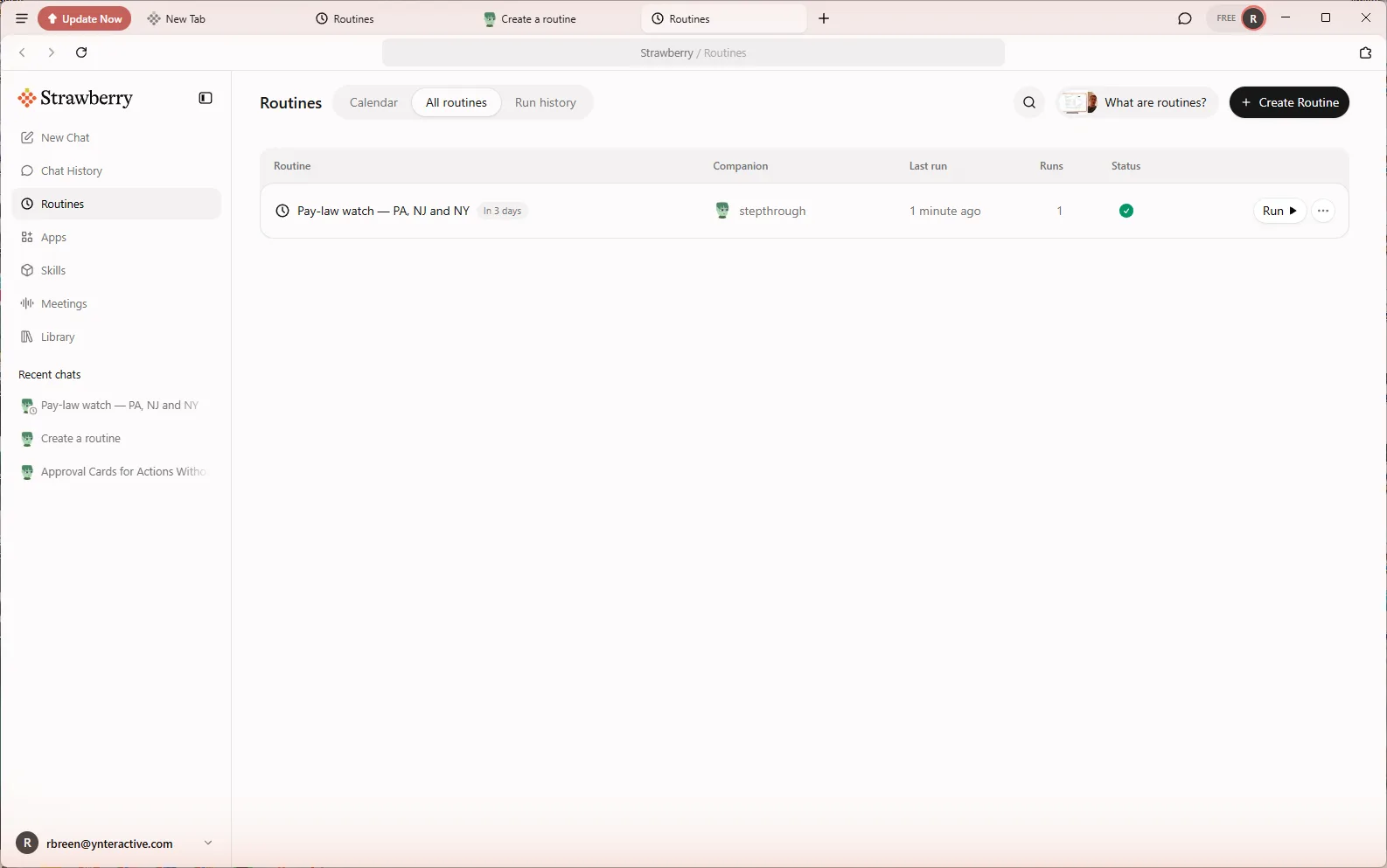
Go to Routines, click All routines, and open the routine. The list shows its companion, last run, number of runs and a status. Click at the end of the instructions and add the update from the box above: keep the table in a Library file, show the exact rows, ask before writing. Save changes turns dark once the text changes. Click it.
This is the same loop Strawberry's routine guide describes: read the run history, then tune the instructions rather than adding a second routine.
Step 4: run it again and approve on the card
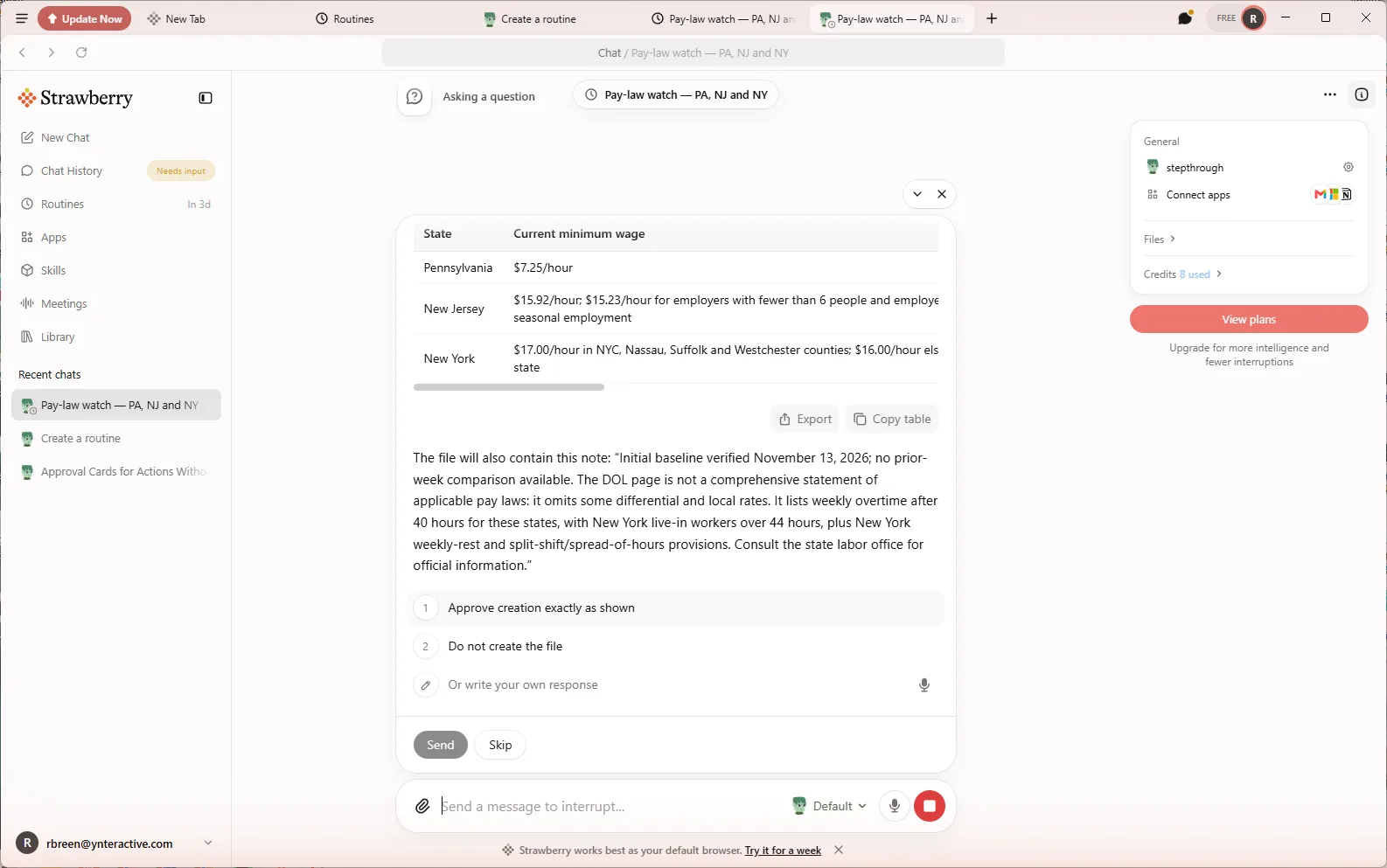
Click Run and View run. This time the routine stops in the chat with a question card: May I create Pay-law watch.md in your personal Library with the exact table below? Nothing has been written. It shows the three rows, the source link and a note that the DOL page is not a comprehensive statement of pay law. The choices are 1 Approve creation exactly as shown, 2 Do not create the file, or Or write your own response, with Send and Skip. Chat History shows Needs input in the sidebar while it waits.
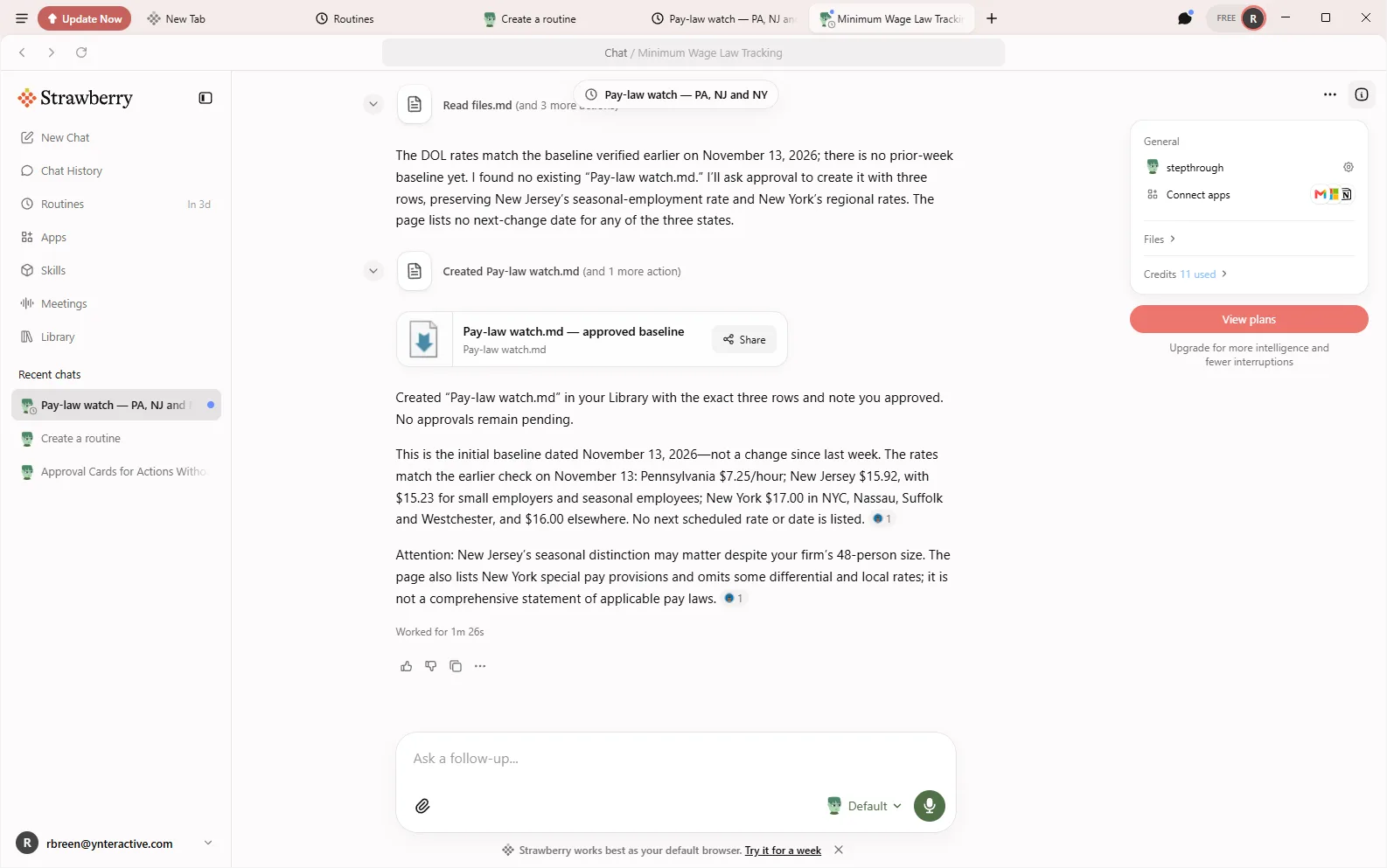
Check each figure against the source, choose Approve creation exactly as shown and click Send. Only then does it create Pay-law watch.md — approved baseline in the Library. Its summary flagged two things for Priya: New Jersey's lower rate for small and seasonal employers, and New York's regional rates. Every Monday after that it checks again and asks before it changes a row.
Where to go next
For the same approval idea with email, see Strawberry lesson 2, a morning inbox routine that drafts and waits for approval. For more HR work with AI, try setting a job post pay range you can defend or answering a leave policy question.
To compare approval steps in other tools, see an approval gate in an n8n workflow and AI agent vs chatbot vs automation.
Who this is for
HR managers, office managers and payroll leads at small and mid-sized firms with staff in more than one state. The practice lesson needs nothing installed. To do it for real you need Strawberry on macOS or Windows; we used the Free plan, and two runs plus the setup used about a dozen AI credits.
A note on the screens: every image on this page is a screenshot of the real Strawberry app on Windows, taken on 13 November 2026 while this routine was built and run. Your version may differ, and the wage figures will change, which is the point of the routine. The DOL page is a summary for reference; your state labor office is the official source.
Mistakes to avoid
- Leaving out the approval line, so the routine saves or changes rows without asking.
- Pointing the routine at search results instead of one official page.
- Treating the DOL summary as complete: local rates, tipped wages and special industries need your state labor office.
- Approving the card without checking the figures against the source link.
- Expecting a run with Strawberry closed: a missed run waits until you open it.
- Building a second routine when the first one needs a better rule.
Links
- Strawberry: the product site: download for macOS and Windows and current plans.
- Routines (Strawberry docs): the Routines page, Create with companion, Create manually, run history and the routine page.
- Routine best practices (Strawberry docs): keep routines scoped, define notification rules and use approval gates.
- State minimum wage laws (U.S. Department of Labor): the page the routine reads. A summary, not the whole of pay law: check your state labor office too.
Try it yourself, free
Reading the steps is a start. Doing them is how it sticks. The interactive module walks you through every click in a practice copy of Strawberry, checks each step, and never touches your real accounts.
Start “Strawberry: Check Minimum-Wage Rules Every Monday and Approve Every Change”Step by step: Strawberry: Check Minimum-Wage Rules Every Monday and Approve Every Change
All 18 steps of the interactive module, in order. In the module you watch each one, then do it yourself in a practice copy that checks your work.
1. Open Routines
- Open Routines. This is Strawberry on Priya's computer. She is the HR manager at a made-up 48-person design firm with staff in three states, and she checks minimum-wage rules by hand. Today she puts that check on a schedule. Click Routines in the sidebar.
This is Priya Nair. She runs HR at a made-up 48-person design firm, with staff in Pennsylvania, New Jersey and New York. A wage change she spots late means a payroll correction. Today, she puts that check on a schedule.
2. Set up the routine
- Create a routine. The Routines page opens on Calendar, with All routines and Run history next to it and an App triggers panel on the right. No routines yet. Click Create Routine.
The Routines page opens on a calendar. No routines yet.
- Create with companion. Two choices: Create with companion (set it up by chatting) or Create manually (choose a skill or write instructions). On 13 November the manual dialog stopped at "Choose a companion to run it." with no companion picker, so use Create with companion.
Two choices. Set it up by chatting, or fill in a form yourself. When we tested it, the form would not save without a companion, and it had no way to pick one.
- Describe the job and the schedule. A chat opens and the companion asks: "What would you like the routine to do, and when should it run?" Paste the description. It names the schedule (Every Monday at 8:00 AM), one source, what to keep, and the approval rule: Ask me before you create it or change any row. Do not email or message anyone.
The companion asks what the routine should do, and when. It says every Monday at eight. It names one source, the Department of Labor's state minimum wage page. It says what to keep. And it sets the rule that matters most. Ask me before you create it or change any row.
Every Monday at 8:00 AM: I'm the HR manager at a 48-person firm with staff in Pennsylvania, New Jersey and New York. Check the U.S. Department of Labor's state minimum wage page (https://www.dol.gov/agencies/whd/minimum-wage/state) for those three states. Keep a companion database called "Pay-law watch" with one row per state: state, current minimum wage, next scheduled change and its date (if the page lists one), source URL and date checked. Create the database the first time. Ask me before you create it or change any row. Do not email or message anyone. End with a short summary: what changed since last week, what needs my attention, and the source link. If nothing changed, say so in one line.
- Send it. Click Send. The companion reads its Routines skill, schedules the job and shows a Created card for Pay-law watch — PA, NJ and NY. Its reply repeats the rules back: approval before any change, no emails, and "Strawberry must be open and signed in for runs to happen".
The companion creates the routine, and repeats the rules back. Approval before any change. No emails. And one thing to know. Strawberry has to be open for a run to happen.
- Open the routine. Click Open routine on the card.
3. Run it once
- Run it now. The routine page: When it's 8:00 AM on Mondays, tell to do the following, the instructions (the companion rewrote them in more detail), Created, Updated, Next run: Monday at 8:00 AM, an Active switch and Run. Don't wait for Monday. Click Run.
This is the routine's own page. When it is eight on Mondays, do the following. The companion rewrote the instructions in more detail. Next run, Monday at eight. You do not have to wait.
- Open the run. A row appears under Run History with the status Running. Every run is a chat. Click View run.
A row appears under Run History. Running. Every run is a real chat.
4. Tune the instructions
- Read the result, then go back. The run checked the live DOL page and listed the three states. Then the honest part: "Companion database tools were unavailable… Nothing was created or updated." On the Free plan there was no database to write to, so the routine stopped instead of guessing. That is a rule to fix. Click Routines.
The run read the live Department of Labor page, and listed all three states. Then the honest part. There was no database to write to, so nothing was saved. It stopped, instead of inventing somewhere else to put it. That is a rule to fix.
- All routines. The run sits on today's calendar. Click All routines to see the list.
The run is on today's calendar.
- Open the routine. Each routine shows its Companion, Last run, Runs and Status, with its own Run button. Click Pay-law watch — PA, NJ and NY.
Each routine shows its companion, its last run, how many runs, and a status.
- Add the new rule. Click at the end of the instructions and paste the update. It moves the table to a Library file and keeps the gate: show me the exact rows and ask me to approve. Do not write anything until I approve.
Keep the table in a Library file instead. And keep the gate. Show me the exact rows, and ask me to approve. Do not write anything until I approve.
Update: companion database tools are not available on this plan. Keep the table in a Library file named "Pay-law watch.md" instead. Before you create or change that file, show me the exact rows you want to write and ask me to approve. Do not write anything until I approve.
- Save changes. Save changes turned dark when the text changed. Click it.
5. Approve the change
- Run it again. Same schedule, better rule. Click Run.
Same schedule, better rule.
- Open the new run. The new run is at the top of Run History. Click View run.
- Read the approval card. This is the approval card. The routine stopped and asked: "May I create Pay-law watch.md … Nothing has been written." It shows the exact rows, the source and a note that the DOL page is not a full statement of pay law. Chat History shows Needs input in the sidebar. Check each rate against the source link, then click 1 Approve creation exactly as shown.
This is the approval card. The routine stopped, and asked first. Nothing has been written. It shows the exact rows, the source, and a note that this page is not the whole of pay law. In the sidebar, Chat History says needs input. Check the rates against the source.
- Send the approval. The option is selected and Send is now dark. Click Send. You could also pick Do not create the file, write your own answer, or Skip.
You could also say no, or write your own answer.
- Done: it runs on its own. Only now does it write: Pay-law watch.md — approved baseline is in the Library, and the summary flags what needs Priya (New Jersey's lower rate for small and seasonal employers, New York's regional rates). Every Monday at 8:00 it checks again and asks before changing a row. Click Routines to finish.
Only now does it write the file. And it flags what needs Priya. New Jersey's second rate. New York's regional rates. Every Monday at eight, it checks again, and asks before it changes a thing.
Screenshots
Frequently asked questions
- Is this an official Strawberry course?
- No. This is my own guide and practice lesson. Strawberry is a separate product from strawberrybrowser.com. The screenshots are of the real app, taken on 13 November 2026.
- Does the routine change payroll or email anyone?
- No. The instructions say not to email or message anyone, and the only thing it writes is a Library file in your Strawberry account, after you approve the exact rows on the card.
- Why did the first run not save anything?
- In our test on the Free plan, the companion reported that companion database tools were unavailable. It stopped and said so instead of saving somewhere else. Adding one line that moves the table to a Library file fixed it.
- Does a Strawberry routine run when my computer is off?
- No. The companion's own note says Strawberry must be open and signed in for runs to happen; otherwise the run waits until you reopen it.
- Should I use Create with companion or Create manually?
- Either can work. On 13 November 2026 on Windows, Create manually stopped at Choose a companion to run it. with no picker in the dialog, and Create with companion created the routine in one message, so the lesson uses it.
- Is the Department of Labor page enough for pay compliance?
- No. It is a summary, and the routine's own note says it is not a comprehensive statement of pay law. Use it as an early warning and confirm changes with your state labor office or employment counsel.
More in AI Automation for Recruiting & HR
 Score Every Candidate Fairly After the Interview using ChatGPT
Turn the transcript of an interview panel's debrief into a scorecard against the role's must-haves, the decisions, action items with owners and dates, and a follow-up…
Free · Live ~7 min Beginner
 Write a Fair, Job-Related Job Posting with ChatGPT's Interview Prompt
Ask ChatGPT for a front desk lead posting the quick way, then let it interview you: true must-haves only, a real pay range, the work described instead of a personality…
Free · Live ~7 min Beginner
 Collect Job Applications in Google Sheets with an n8n Form and a Careers-Page Webhook
Stop losing applicants between job boards and your careers page. An n8n form plus a careers-page webhook put every application in one Google Sheet.
Free · Live ~12 min Advanced
◷Keep Top Candidates Warm with Honest Status Replies using ChatGPTYour best candidate has another offer and wants to know if she got the job, if you'll match her pay and when she can start. Give ChatGPT the thread and the hiring…
Free · Live ~9 min Beginner
 An AI Resume Screener, with a Fairness Step (Recruiting & HR)
Have n8n read each applicant’s PDF resume, score it against the job’s must-haves with the evidence quoted, and rank it in Google Sheets, while a person makes every…
Free · Live ~14 min Advanced
◷Answer an Employee's Leave Questions Without Overpromising using ChatGPT for Recruiting & HRAn employee asks about pay, unpaid weeks and whether his leave dates are approved. Give ChatGPT the thread and your leave policy, catch the answers you can't give yet…
Free · Live ~10 min Beginner
All 17 modules in AI Automation for Recruiting & HR
More Strawberry tutorials
 Strawberry: Research Leads into a Sheet and Approve Every Email
Use the Strawberry AI browser to research 10 target firms with sources, save them to a Google Sheet and draft first emails, with a person approving every send.
Free · Live ~9 min Beginner
 Strawberry: Sort the Quote Inbox Every Morning and Approve Every Reply
Build a Strawberry routine that reads a shared quote inbox every morning, logs each request to a Google Sheet, drafts the urgent replies and stops at an approval card…
Free · Live ~9 min Beginner
Terms in this lesson
Plain-English definitions, each with an example from a free lesson.