Updated . Built against the tool’s current screens and checked step by step. How we check this lesson
The problem: an annual review with a commercial client covers a new machine, new hires, a cyber question and an "are we covered if..." in thirty minutes, and the follow-up depends on whoever remembers it. Endorsements go in late, quotes never get requested, and a hurried recap that says "you're covered" before the carrier answers is an errors and omissions risk. In this free, interactive lesson you hand the review transcript to ChatGPT with one clear request and get back a summary, the decisions, an action items table with owners and dates, the open questions, and a separate list of questions only the carrier can answer. Then you turn it into a recap email for the client that promises nothing early.
At a glance
| Question | Answer |
|---|---|
| What you build | Turn the transcript of a small-business client's annual policy review into the decisions, an action items table, the questions only the carrier can answer, and a recap email that promises nothing the carrier hasn't confirmed. |
| Tools | ChatGPT |
| Time | About 7 minutes, 17 steps in 4 parts |
| Level | Beginner, no coding needed |
| Cost | Free |
| Ways to learn it | Practice it step by step |
The 4 parts, in short
- Copy the transcript: Open the Edit menu, Select all, Open the Edit menu again, Copy it.
- Ask for a summary: Switch to ChatGPT, Click the message box, Paste your request, Paste the transcript, and 1 more step.
- Check the details: Check the action items, Click the message box, Fill in the gaps, Send it.
- Write the follow-up: Click the message box, Ask for the follow-up email, Send it, Copy the email.
Start here first: Summarize a Meeting Transcript with ChatGPT. This Insurance Agencies version follows the same build with its own example business, Kestrel Point Insurance Agency.
Part of: AI for Insurance Agencies (step 3 of 12). Next up: ChatGPT: Keep Client Data Safe, Set Up Your Team's Data Controls in 10 Minutes
The example: a print shop's renewal review
You work with the transcript of a short video call at Kestrel Point Insurance Agency, a made-up independent agency. Maria, an account manager, and Dev, a producer, meet with Greg and Tasha from Fenwick Print & Sign, a made-up print shop whose business package renews November 1.
Four things changed this year. Greg bought an $85,000 wide-format printer in August, which isn't on the policy yet. Tasha hired three people to run it, so the workers comp payroll estimate is out of date. Customers now pay by card on the website, so Greg asks about cyber insurance. And staff sometimes drive their own cars to the supplier, so Tasha asks whether the shop is covered if one of them has an accident. Maria doesn't guess on that one: Dev will ask the carrier. Greg also wants to see the price of raising the umbrella from $1 million to $2 million before deciding.
What you need before you start
- A ChatGPT account. For real client details a business plan that doesn't train on your data is best; free works for practice with made-up notes.
- A transcript of the review: Google Meet, Zoom and Teams can save one on some plans, and typed notes from an in-person review work too.
- Your agency's rules on client data. Take out policy numbers, dates of birth, driver's license numbers and bank details before you paste anything.
- Nothing at all for the practice copy in this lesson: it needs no account.
Why "questions for the carrier" is its own section
Clients ask coverage questions in reviews all the time, and the friendliest-sounding answer is usually "yes, you're fine." Whether a policy responds to employees driving their own cars on errands depends on whether the policy includes hired and non-owned auto and on its exact wording. The carrier answers that, not the account manager in the meeting.
Giving those questions their own list does two things. It turns them into tasks with an owner, so they get asked. And it stops a summary, or the recap email built from it, from turning a maybe into a written promise. If a client later says "your email told me I was covered," that's the kind of statement that becomes an E&O claim. The rule in the request, never say something is covered, is the line that keeps it out.
Who this lesson is for
Account managers, producers, CSRs and agency owners at independent and captive agencies who run renewal and stewardship reviews with commercial or personal-lines clients. It works for a 15-minute renewal call and a full stewardship meeting alike. No AI experience needed.
Ways to use it after the lesson
- Keep the five-part request in a note and reuse it for every renewal meeting. Change the client name and renewal date, and keep the two rules.
- Paste the action items straight into your agency management system as activities with due dates.
- Add a sixth part when you need one, such as "exposure changes since last renewal" (new locations, vehicles, payroll, revenue) for the underwriter.
- Use the same request on a call with a carrier underwriter to capture what they agreed to quote.
How the interactive lesson works
Each step plays first in the Watch panel with a short voice-over, then you do it yourself in Your turn on a practice copy of Google Docs and ChatGPT. Nothing touches a real account and no email is sent. The agency, the client, the limits and the carrier questions are made up.
Try it yourself, free
Reading the steps is a start. Doing them is how it sticks. The interactive module walks you through every click in a practice copy of ChatGPT, checks each step, and never touches your real accounts.
Start “Turn Every Policy Review into Clear Next Steps using ChatGPT”Step by step: Turn Every Policy Review into Clear Next Steps using ChatGPT
All 17 steps of the interactive module, in order. In the module you watch each one, then do it yourself in a practice copy that checks your work.
1. Copy the transcript
- Open the Edit menu. This is the transcript Google Meet saved after the annual policy review with Fenwick Print & Sign. Click Edit in the menu bar.
Here's the transcript of an annual policy review at Kestrel Point Insurance Agency. Maria and Dev met with a print shop client: a new printer, three new hires, online card payments, and a question about staff driving their own cars. Let's copy the whole thing.
- Select all. Click Select all.
On a keyboard, that's Control A.
- Open the Edit menu again. The whole transcript is highlighted. Click Edit again.
The whole transcript is highlighted.
- Copy it. Click Copy.
That's Control C. The transcript is now on your clipboard.
2. Ask for a summary
- Switch to ChatGPT. Click the ChatGPT tab at the top.
Now switch over to ChatGPT.
- Click the message box. Click the message box.
Before you paste the transcript, tell ChatGPT what you want out of it. Otherwise you'll just get a vague recap.
- Paste your request. Paste in the request. It asks for five things: a short summary, the decisions, an action items table with owner and due date, open questions, and questions for the carrier.
Here's the request. It asks for five things: a three sentence summary, the decisions, a table of action items with an owner and a due date, any open questions, and a separate list of questions only the carrier can answer. Two rules matter most: only use what's in the transcript, and never say something is covered. That keeps a maybe from turning into a promise.
You're my account management assistant. I'm Maria, an account manager at Kestrel Point Insurance Agency. Below is the transcript of today's annual policy review with our client Fenwick Print & Sign. Their package renews November 1. Give me:
1. A three-sentence summary
2. The decisions we made
3. The action items as a table: task, owner, due date
4. Open questions
5. Questions for the carrier: anything about whether something is covered or what it costs, which only the carrier can answer
Only use what's in the transcript. Never say something is covered. If an owner or date isn't said, write "Not stated".
- Paste the transcript. Now paste the transcript under the request. Paste in the transcript. (In real ChatGPT, press Shift+Enter for a new line first, then Ctrl+V. Plain Enter would send the message.)
In real ChatGPT, press Shift and Enter to start a new line first, because Enter on its own sends the message. Then Control V to paste.
00:00:03
Maria Santos: Thanks for making time, Greg, Tasha. Your package renews November first, so, um, let's walk through what changed this year. Anything new in the shop?

00:00:14
Greg Fenwick: Big one. We bought a wide-format printer in August. Eighty-five thousand dollars. It's in the back room now.

00:00:22
Maria Santos: Okay, that needs to go on your business property right away. Greg, can you send me the invoice today? I'll request the endorsement by Friday.

00:00:31
Greg Fenwick: Sure, I have it on my desk.

00:00:35
Tasha Lin: We also hired three people for the new printer. Two full time, one part time. So payroll's up.

00:00:42
Dev Patel: That changes the workers comp estimate. Tasha, if you can send me the new payroll numbers, we'll update it.

00:00:49
Tasha Lin: Yep, I can pull that together.

00:00:53
Greg Fenwick: Oh, and customers pay online now. Cards, through the website. Someone told me we need cyber insurance for that?

00:01:02
Dev Patel: It's worth looking at. You're storing customer details now. I'll get you quotes from two carriers so you can compare.

00:01:09
Greg Fenwick: Okay, let's do that. Get me the quotes.

00:01:13
Tasha Lin: One more. Our staff sometimes run to the supplier in their own cars. If one of them gets in an accident, are we covered?

00:01:21
Maria Santos: Good question, and I don't want to guess. That's usually hired and non-owned auto, but it depends on your policy. Dev, can you ask the carrier?

00:01:30
Dev Patel: I'll ask them and get back to you by Thursday.

00:01:34
Greg Fenwick: And I'm thinking about the umbrella. Should we go from one million to two? I want to see what it costs first.

00:01:41
Maria Santos: We'll price it with the renewal. And you said you want to keep the thousand-dollar deductible on property, right?

00:01:48
Greg Fenwick: Right, keep it at a thousand. Okay, I think that's everything.

00:01:52
Maria Santos: Great. I'll send a recap so we're all on the same page. Thanks, both of you.
- Send it. Click Send.
Request on top, transcript below.
3. Check the details
- Check the action items. Read the summary, the decisions and the questions for the carrier. Then click the action items table: two due dates say Not stated.
Half an hour of review, boiled down to a summary, three decisions, five action items, two open questions and three questions for the carrier. The errand driving question sits with the carrier, not in a promise. Now look at the action items table. Two due dates say not stated. That's right: nobody said when the payroll numbers or the cyber quotes are due.
- Click the message box. You know the missing dates. Click the message box to tell ChatGPT.
You were in the meeting, so you can fill in the gaps.
- Fill in the gaps. Type the missing dates (or Paste in the dates): Tasha will send the payroll estimate by Wednesday, and Dev will have the cyber quotes by October 23.
Tell it the missing dates: Tasha will send the payroll estimate by Wednesday, and Dev will have the cyber quotes by October twenty third.
- Send it. Click Send.
4. Write the follow-up
- Click the message box. Every action item has an owner and a date now. Click the message box.
Now every task has an owner and a date. Because ChatGPT still has the whole meeting in this chat, you don't need to paste anything again. Just ask for the next thing.
- Ask for the follow-up email. Paste in the request to ask for a short recap email to the client that promises no coverage the carrier hasn't confirmed.
Now the recap for the client. Ask for a short, friendly email with the decisions and action items, and one rule: don't say anything is covered until the carrier confirms it.
Now write a short recap email from me to Greg and Tasha with the decisions and action items. Friendly and plain, under 150 words. Don't say anything is covered until the carrier confirms it.
- Send it. Click Send.
- Copy the email. Read the email. Then click the Copy button. (In real ChatGPT the email comes in its own card, with the copy icon at its top right.)
There's your recap for Greg and Tasha: what you agreed, who does what by when, and what's still open. Notice it says you'll confirm with the carrier, not that they're covered. Read it once, change anything that doesn't sound like you, then click copy. In real ChatGPT the email shows up in its own card, and the copy icon is at the top right of that card.
Frequently asked questions
- Can ChatGPT write a recap after an insurance policy review?
- Yes. Paste the review transcript under a request for a summary, decisions, action items with owners and dates, open questions and questions for the carrier, then check the table and fill in any dates nobody said. Ask for the client email last, with a rule that it can't say anything is covered until the carrier confirms it.
- How do I stop ChatGPT from saying something is covered?
- Say so in the request: "Never say something is covered." Give coverage questions their own section, questions for the carrier, so they become tasks, not answers. Then read the email yourself before it goes out.
- Is it safe to paste a client meeting transcript into ChatGPT?
- Remove policy numbers, dates of birth, driver's license numbers and bank details first, and follow your agency's written information security program. Business and Enterprise plans don't train on your chats by default; on personal plans you can turn that off under Data controls.
- Does this lesson give insurance advice?
- No. It teaches a meeting-recap routine. The agency, the client and the coverage questions are made up, and coverage always depends on the policy and the carrier.
- Is it free?
- Yes. Stepthrough is free and the practice copy needs no account. To do it for real you need your own ChatGPT account.
More in AI Automation for Insurance Agencies
All 3 modules in AI Automation for Insurance Agencies
More ChatGPT tutorials
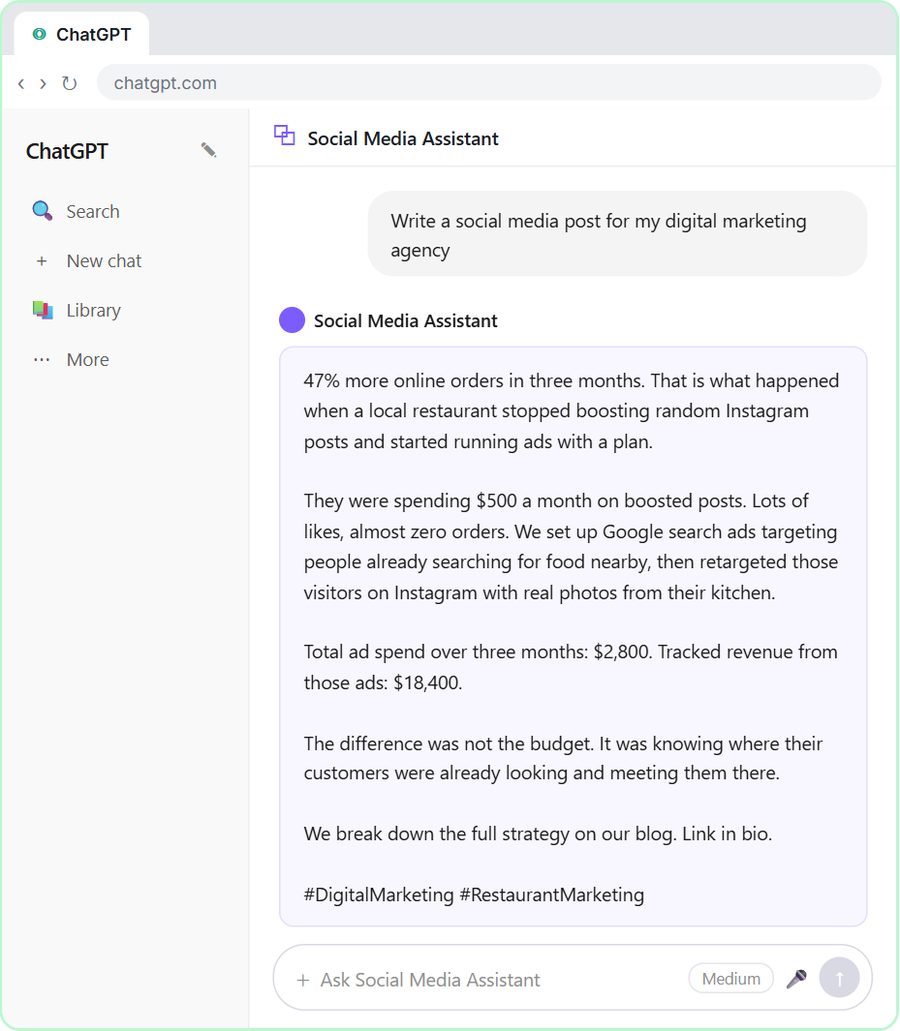 Get On-Brand Social Posts Every Time using a ChatGPT Custom GPT
See why generic prompts give generic results, then build a Custom GPT loaded with your brand voice and watch the output transform.
Free · Live ~8 min Beginner
 Prompt Writing 101: Role, Context, Task, Format
Ask ChatGPT for the same customer email twice, once vaguely and once with a four-part prompt, and see exactly why structure gets a better answer.
Free · Live ~8 min Beginner
◷Send a Same-Day Follow-up After Every Discovery Call using ChatGPTTurn a discovery call transcript into the decisions, the next steps with owners and dates, deal notes for your CRM, and a follow-up email the prospect gets the same…
Free · Live ~7 min Beginner
◷Hold Your Price When a Prospect Asks for a Discount using ChatGPTA prospect wants 30% off and a free month to sign this week. Give ChatGPT the thread and your pricing rules, catch the discount you can't approve, and send a reply that…
Free · Live ~9 min Beginner
 Get Your Business Recommended by ChatGPT
Ask ChatGPT who it recommends in your town, see which pages it trusts, then use it to write an FAQ page and Business Profile copy that answer real customer questions.
Free · Live ~10 min Intermediate
◷Run a Weekly Ops Review Where Every Task Has an Owner using ChatGPTTurn a weekly operations and vendor review into the decisions, the next steps with owners and dates, the risks to watch and a team recap, without turning a vendor's…
Free · Live ~7 min Beginner
Visual guides
This lesson’s key ideas as quick visual guides: swipe through the slides, or read the same guide as text.
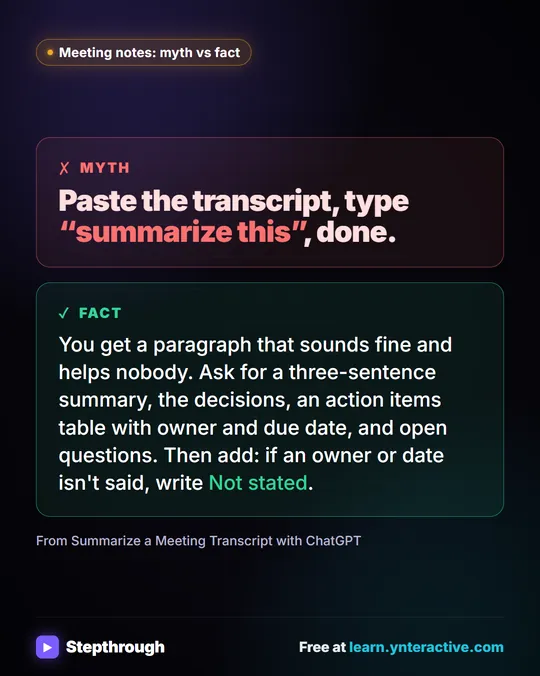 Meeting notes myth: “summarize this” is all ChatGPT needs
Myth: paste a transcript, type “summarize this”, done. Fact: ask for the decisions, an action items table with owners and dates, and open questions.
Myth vs fact One graphic
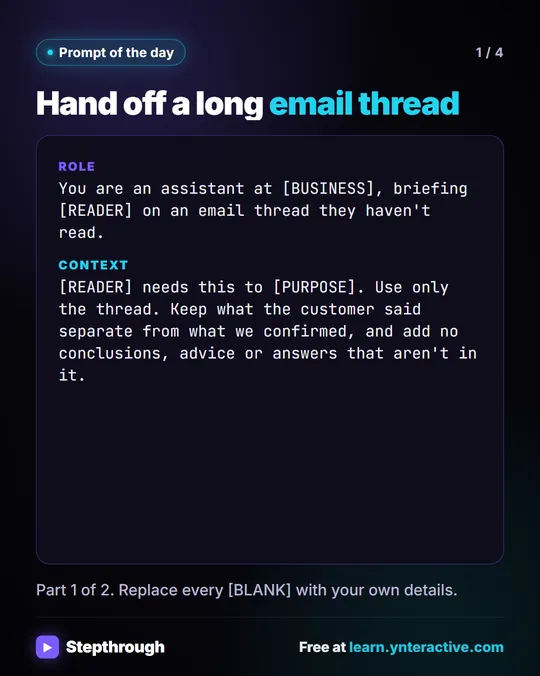 Prompt of the Day: Summarize an Email Thread for a Handoff
A visual prompt card: turn a long email thread into a short handoff with the situation, what was promised and each question marked Answered or Open.
Prompt to copy 4 slides
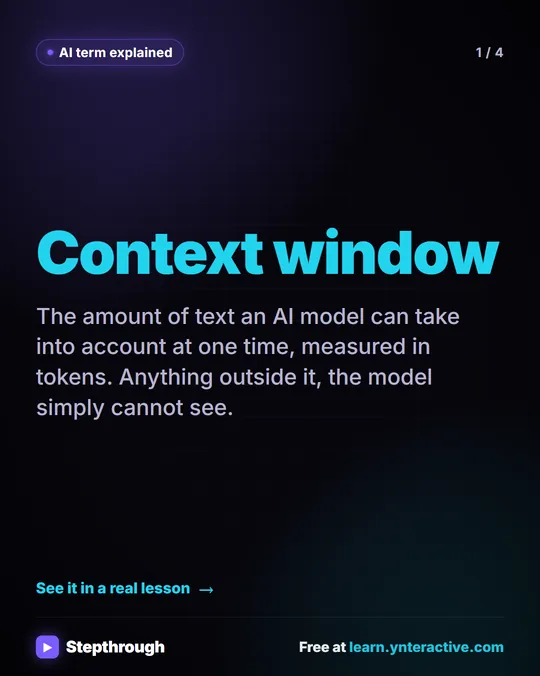 What Is a Context Window? A Visual Guide
A visual guide to the context window: how much text an AI model can see at once, shown with a real ChatGPT meeting summary lesson.
AI term explained 4 slides
Free cheat sheets
Print it or save the PDF: the key steps and checks from this lesson on one page, free.
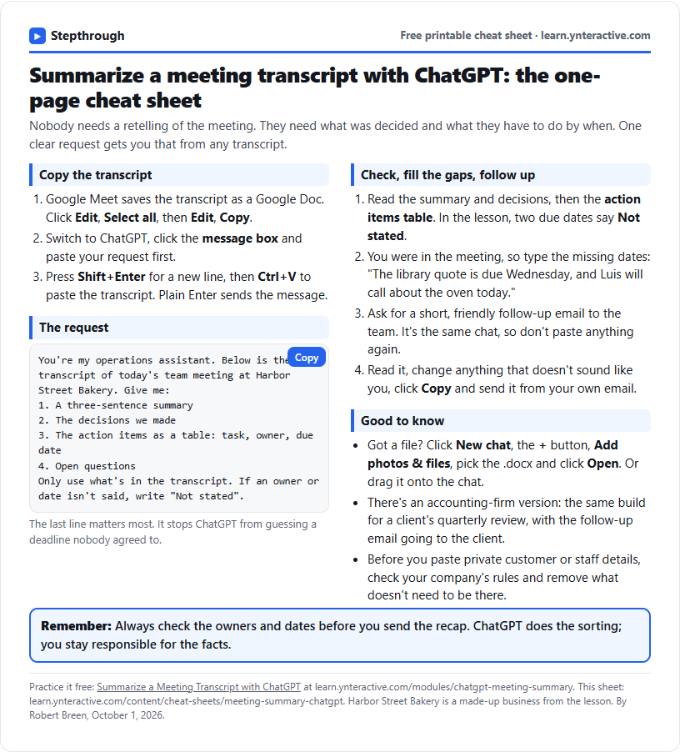 Summarize a Meeting with ChatGPT Cheat Sheet
A free one-page cheat sheet: turn a meeting transcript into decisions, an action items table with owners and dates, and a follow-up email.
Lesson cheat sheet Free PDF
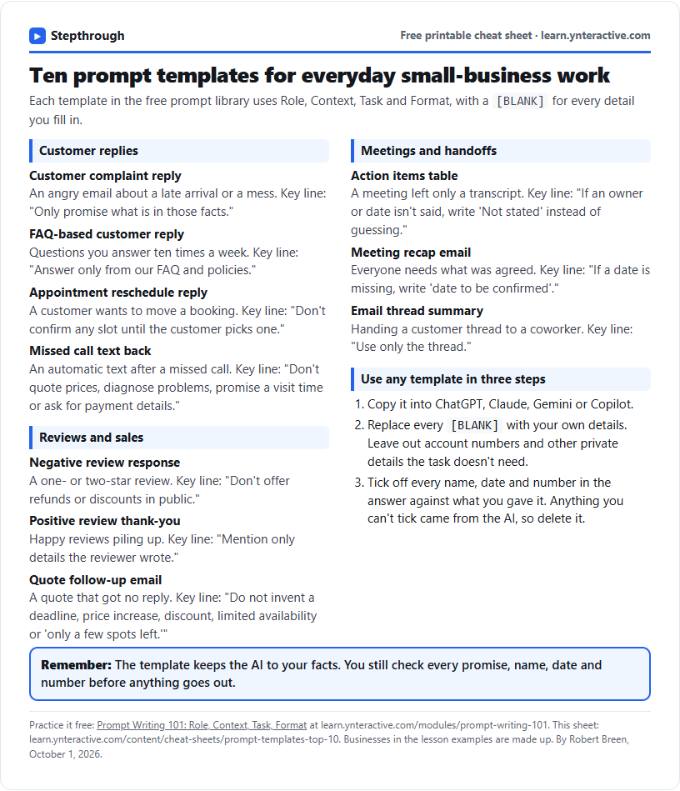 Top 10 Prompt Templates for Small Business: Cheat Sheet
A free one-page cheat sheet of ten copy-ready AI prompt templates: customer replies, reviews, quote follow-ups, meeting recaps and handoffs.
Topic cheat sheet Free PDF
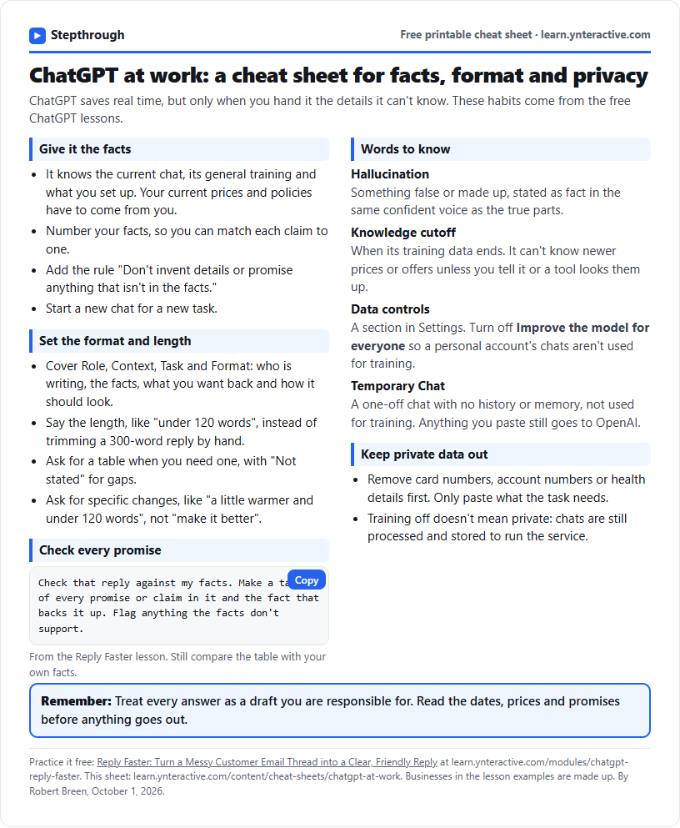 ChatGPT at Work Cheat Sheet: Facts, Format, Privacy
A free one-page cheat sheet for ChatGPT at work: give it facts, set the format and length, check every promise and keep private data out.
Tool cheat sheet Free PDF
All free printable cheat sheets
Terms in this lesson
Plain-English definitions, each with an example from a free lesson.
Related prompts
- Action items table prompt: Paste a meeting transcript or rough notes and get a table of every task, owner and due date, with "Not stated" wherever nobody…
- Feedback conversation script prompt: Plan a short, direct feedback talk with a teammate: the specific moment, why it mattered, a question to hear their side and one…
- Meeting agenda prompt: Turn a list of topics into a timed meeting agenda where every item has an owner, a question to settle and minutes that add up to…
- Performance review notes prompt: Turn a year of scattered manager notes into dated, factual examples for a performance review. A free ChatGPT prompt that keeps…