Updated . Built against the tool’s current screens and checked step by step. How we check this lesson
Part 3 of Pin for small-firm hiring. Pin drafts a 4-step email sequence for your shortlist. Catch what it got wrong about your firm, fix every step with one plain-English instruction, write a subject accountants will open, and stop before anything is sent.
At a glance
| Question | Answer |
|---|---|
| What you build | Part 3 of Pin for small-firm hiring. Pin drafts a 4-step email sequence for your shortlist. Catch what it got wrong about your firm, fix every step with one plain-English instruction, write a subject accountants will open, and stop before anything is sent. |
| Tools | Pin |
| Time | About 6 minutes, 13 steps in 3 parts |
| Level | Beginner, no coding needed |
| Cost | Free |
| Ways to learn it | Practice it step by step |
The 3 parts, in short
- Read what Pin drafted: Open Outreach, See the four steps, The personal line, Spot the wrong bullet, and 1 more step.
- Fix it in plain English: Ask Pin to fix every step, Send the instruction, Check the new line, Check the follow-up, and 1 more step.
- Stop before it sends: Save, Preview another candidate, Stop here.
Start here first: DeepL: Translate a Client Document and Keep Its Formatting (module 1 of AI Automation for Recruiting & HR)
Part of: AI for Recruiting & HR (step 22 of 24). Next up: X-Pilot: Turn an Onboarding SOP into a Training Video for Recruiting & HR
Part of: AI Apps Worth Knowing (step 88 of 123). Next up: X-Pilot: Turn an Onboarding SOP into a Training Video for Recruiting & HR
What you'll build
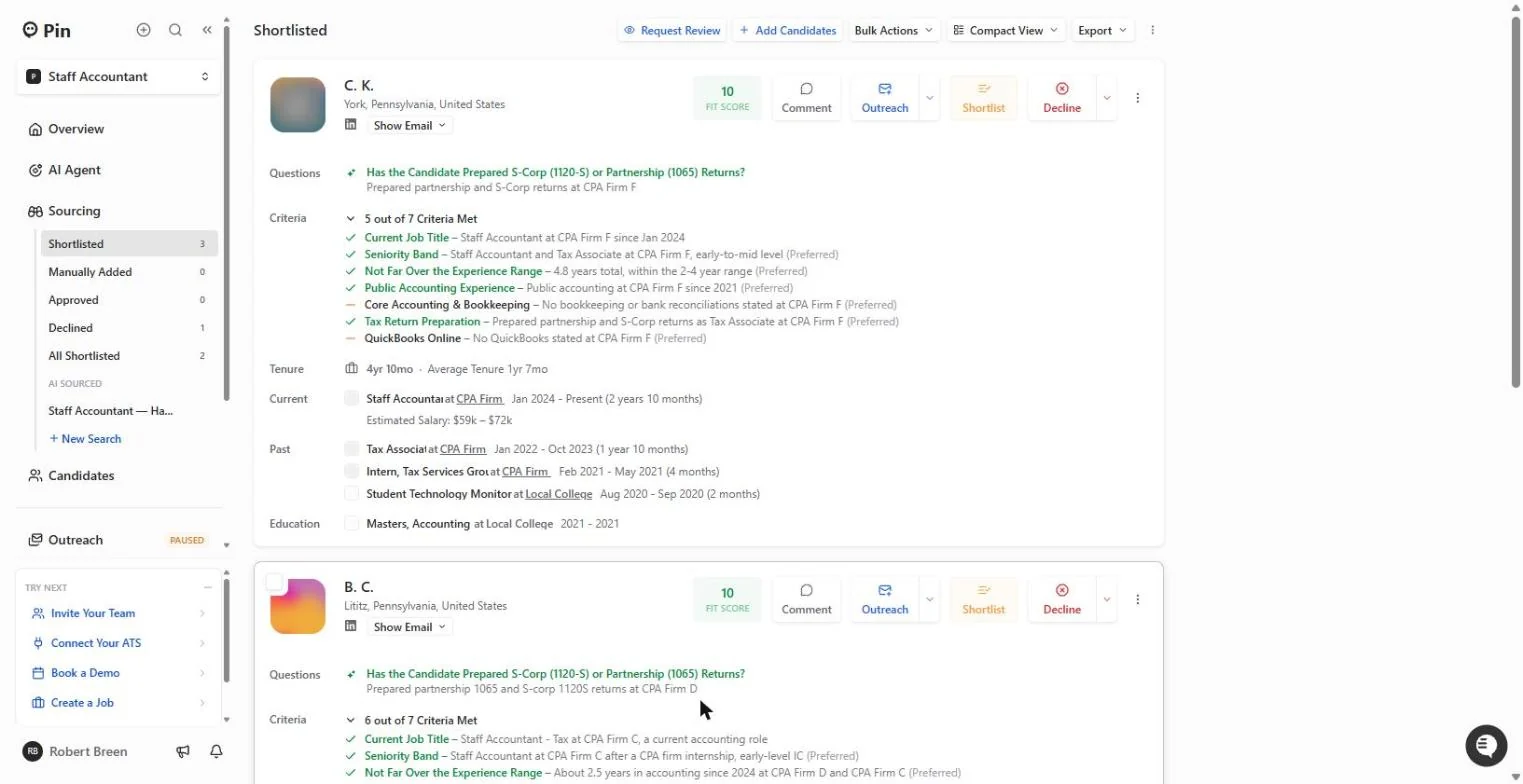
The made-up 12-person Harrisburg accounting firm from parts 1 and 2 has a three-person shortlist for its Staff Accountant job. Pin has already drafted the outreach: an email on day 1, two follow-ups and a LinkedIn reminder. That saves hours, but an AI draft describes your firm from whatever it can find, and in a small local market a wrong first email gets talked about. In this lesson you read the four steps, catch the line that describes the wrong business, fix every step with one sentence to Pin, rewrite the subject, save, and stop while outreach is still paused. Every screen is a real Pin screen; candidates are shown only as initials.
You read Pin's 4-step sequence, caught the firm description it got wrong, fixed all four steps with one instruction, wrote a subject with hybrid, pay and CPA support, saved, and stopped with outreach paused. What it saves: four emails written for you, without the risk of sending the wrong story to every candidate. When a partner has read the shortlist, connect the firm's email and add only the approved people. That completes Pin for small-firm hiring: market check, shortlist, outreach. Pin's plans change; check pin.com for what yours includes.
- Tools: Pin
- Time: about 6 minutes, 13 steps in 3 chapters
- Level: beginner, no coding needed
- Price: free
Practice first, then build it for real
Practice copy built from real Pin screens (app.pin.com), captured 27 October 2026. Nothing here touches a Pin account, and nothing was sent while capturing: no email account was connected and outreach stayed paused. Candidates are shown as initials with relabelled employers. To build it for real you need your own Pin account, and some services charge once you use them for real work, so check each tool's current pricing.
Try it yourself, free
Reading the steps is a start. Doing them is how it sticks. The interactive module walks you through every click in a practice copy of Pin, checks each step, and never touches your real accounts.
Start “Pin: Check the Outreach Emails Before Anything Goes Out for Recruiting & HR”Step by step: Pin: Check the Outreach Emails Before Anything Goes Out for Recruiting & HR
All 13 steps of the interactive module, in order. In the module you watch each one, then do it yourself in a practice copy that checks your work.
1. Read what Pin drafted
- Open Outreach. Your three-person shortlist from part 2 is ready. In the left menu, click Outreach. Note the orange PAUSED tag next to it.
Your shortlist is ready. Note that it says paused.
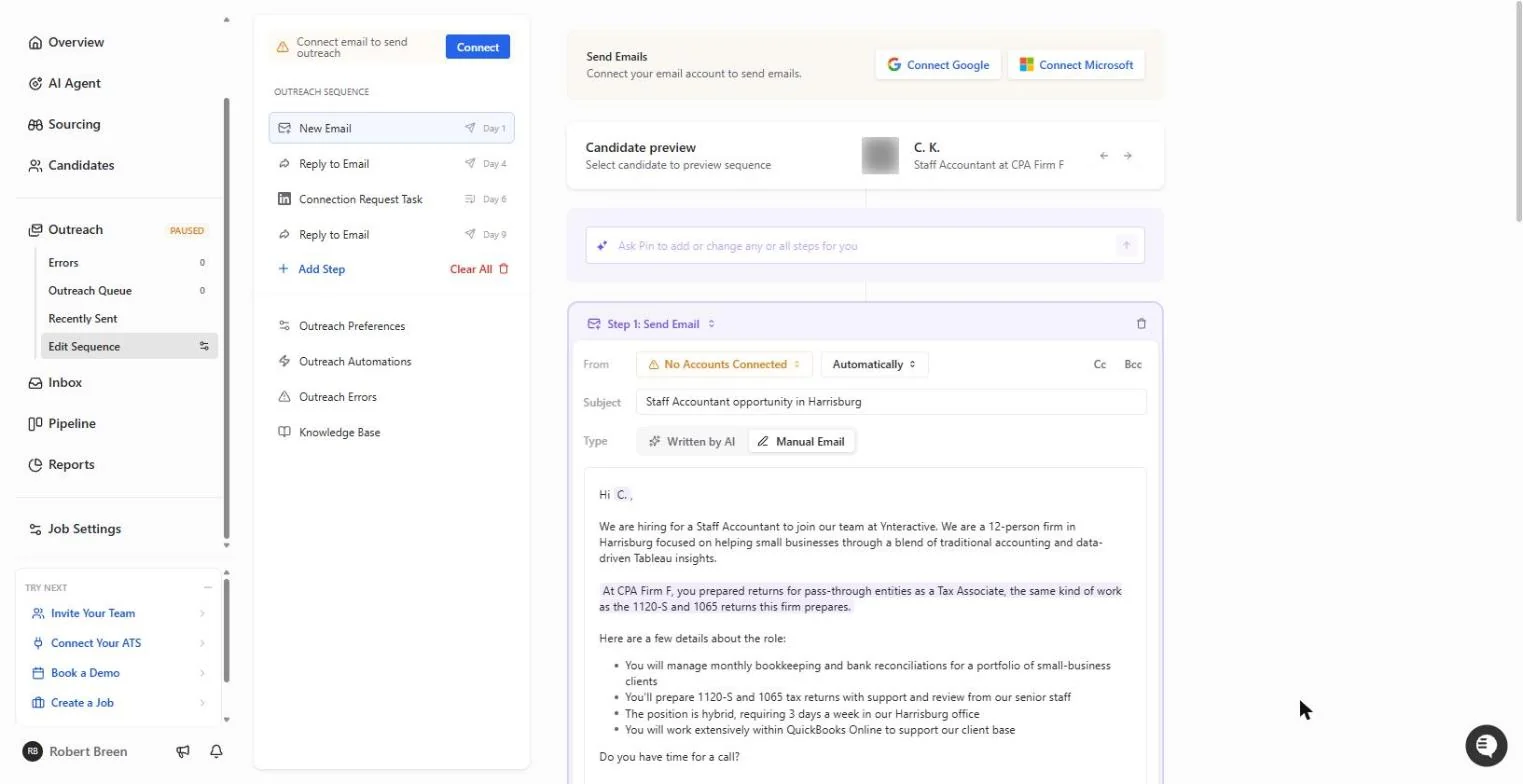
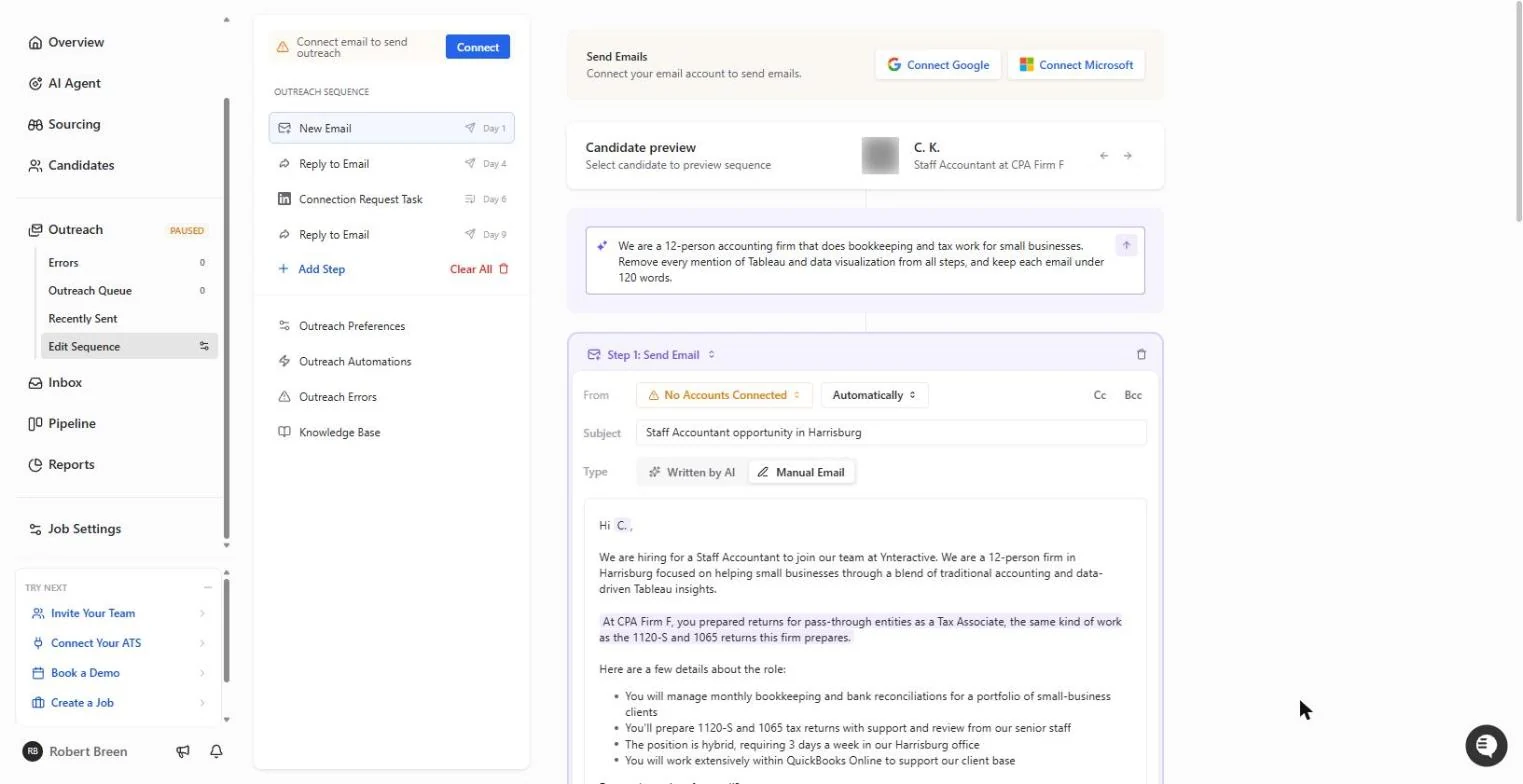
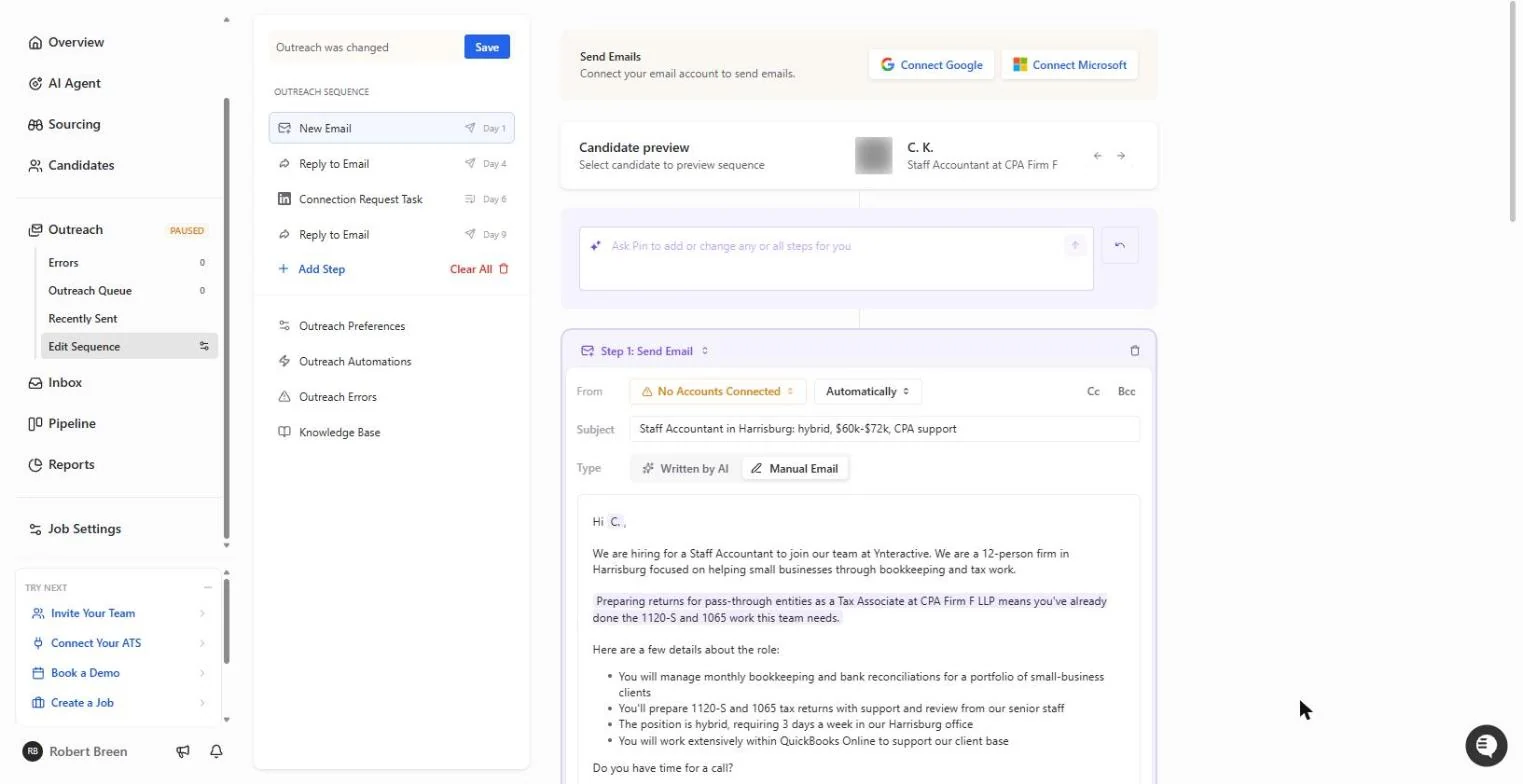
- See the four steps. Pin already drafted a sequence from your job: New Email (Day 1), Reply to Email (Day 4), a LinkedIn Connection Request Task (Day 6) and another Reply to Email (Day 9). At the top: Connect email to send outreach. No email account is connected, so nothing can go out. Click New Email.
Pin drafted four steps over nine days. No email is connected, so nothing can go out.
- The personal line. Step 1 is a full email with the job details from your description. The shaded line is written for each person: for C. K., it ties their tax work to your 1120-S and 1065 returns. But read the line above it too: Pin describes the firm as "traditional accounting and data-driven Tableau insights". It pulled that from the account's company, not from our job. Click the shaded line.
The shaded line is written for each person. But read the line above it. Pin described the firm wrong.
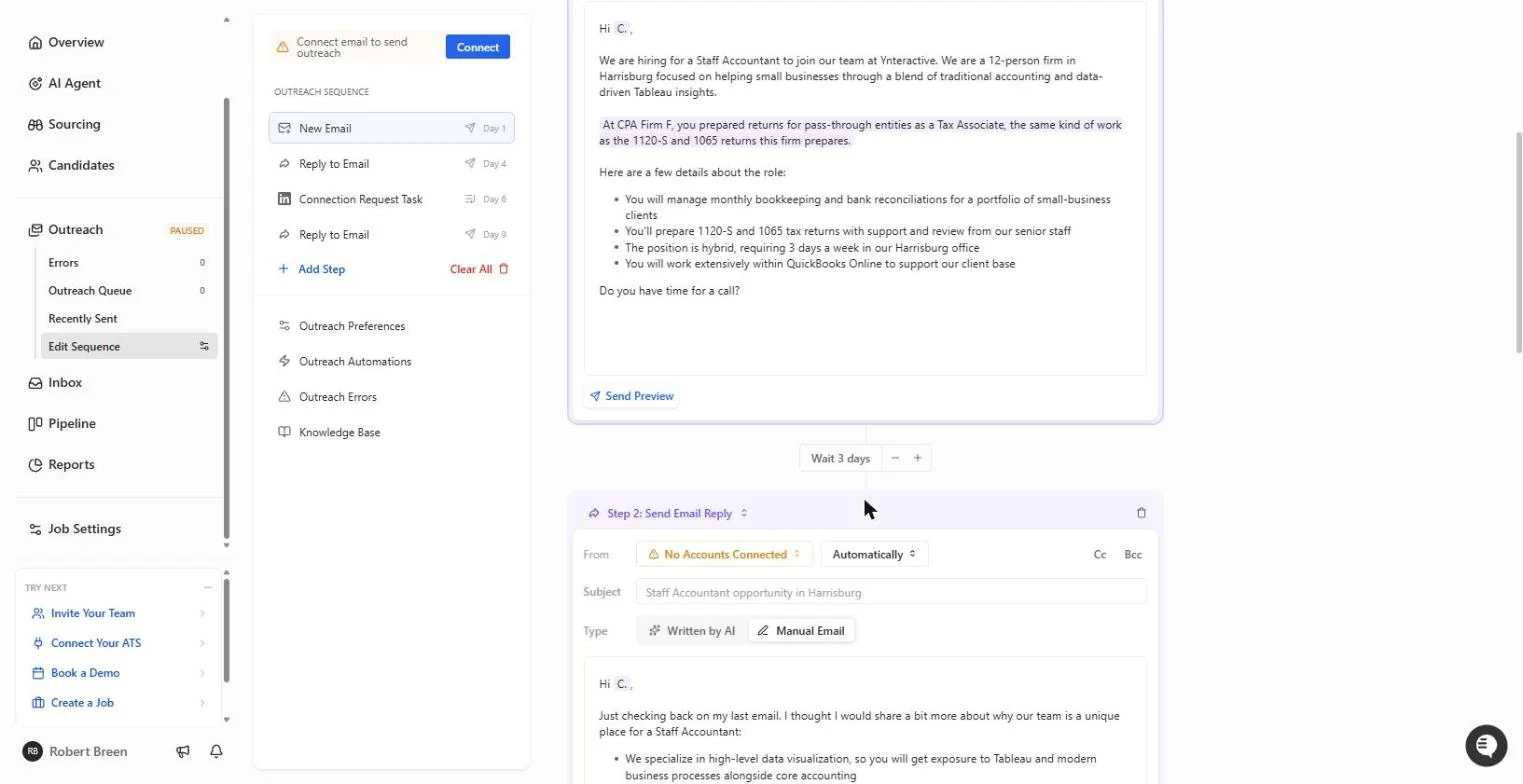
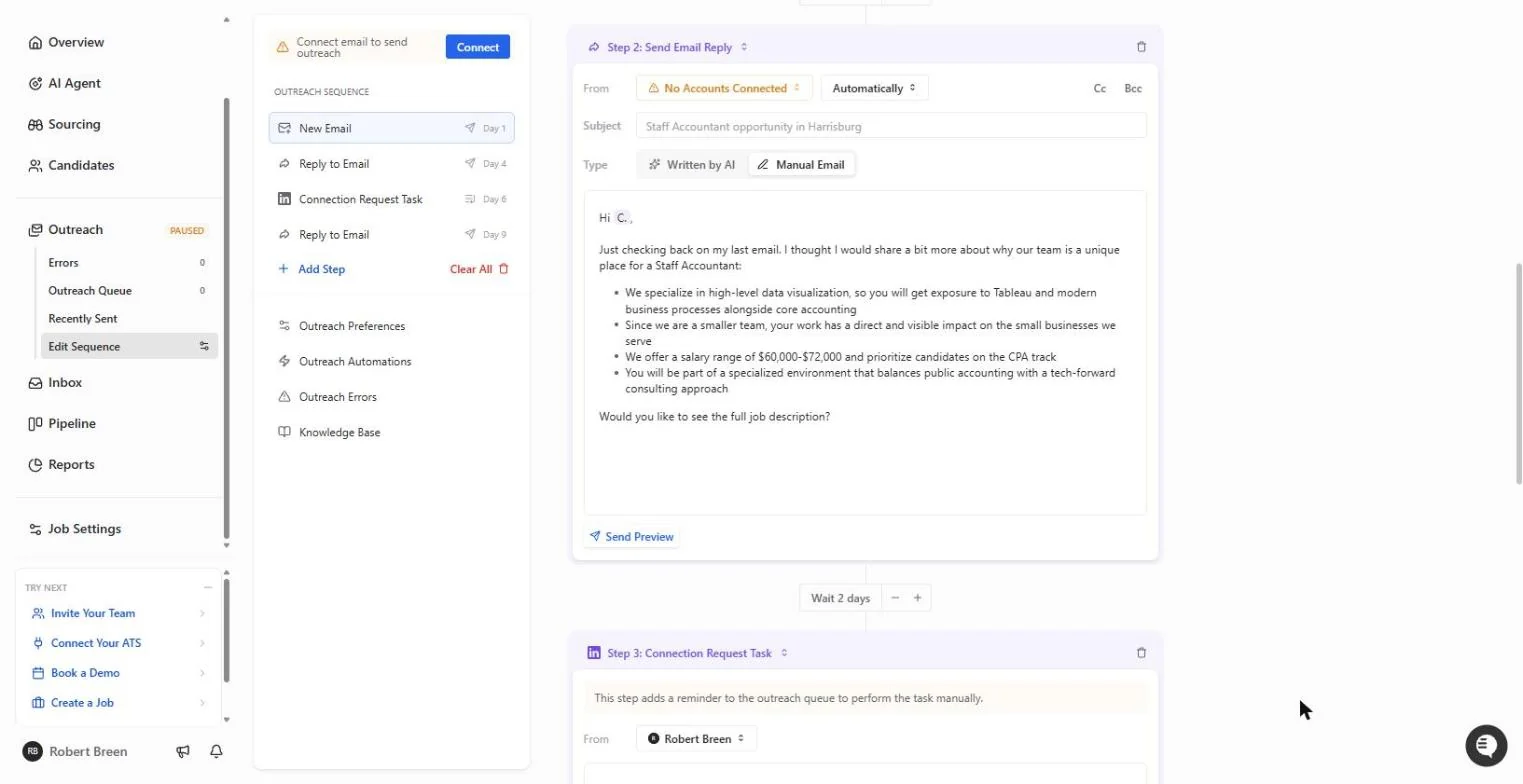
- Spot the wrong bullet. Step 2, the Day 4 follow-up, repeats it: "We specialize in high-level data visualization... Tableau". An accountant applying for bookkeeping and tax work would be confused. Click that bullet.
The follow-up repeats it. Tableau has nothing to do with this job.
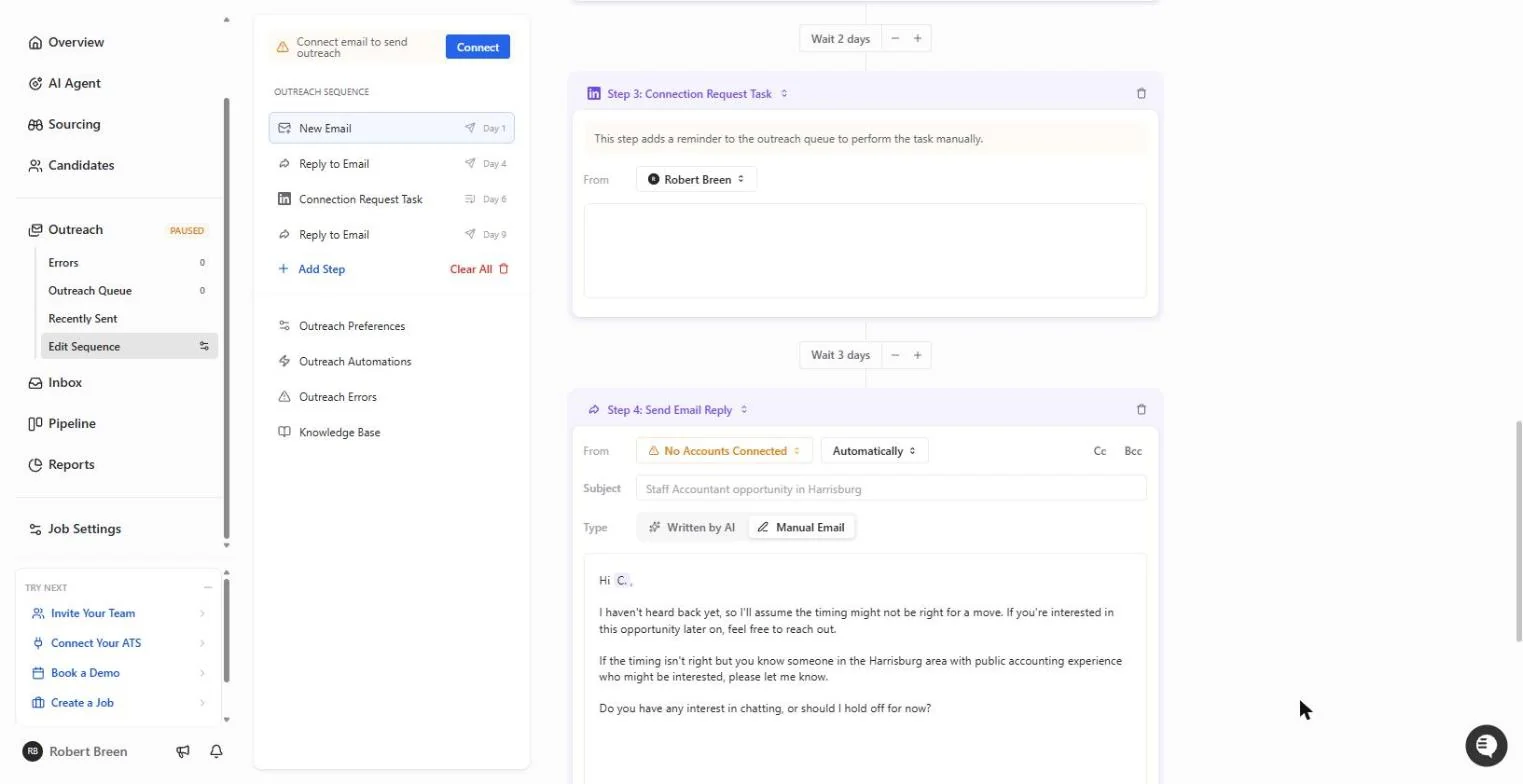
- The manual LinkedIn step. Step 3: Connection Request Task only adds a reminder to your outreach queue. You do it yourself on LinkedIn. Step 4 is a polite last check-in. Click the Step 3 title.
Step three is only a reminder to connect on LinkedIn yourself. Step four is a polite last check-in.
2. Fix it in plain English
- Ask Pin to fix every step. Scroll back up to the purple box, Ask Pin to add or change any or all steps for you. Tell it who you really are and what to remove, in plain English.
Back at the top, tell Pin in plain English who you are and what to remove.
We are a 12-person accounting firm that does bookkeeping and tax work for small businesses. Remove every mention of Tableau and data visualization from all steps, and keep each email under 120 words.
- Send the instruction. Click the arrow at the right of the box. Pin rewrites all four steps in about 15 seconds.
Pin rewrites all four steps.
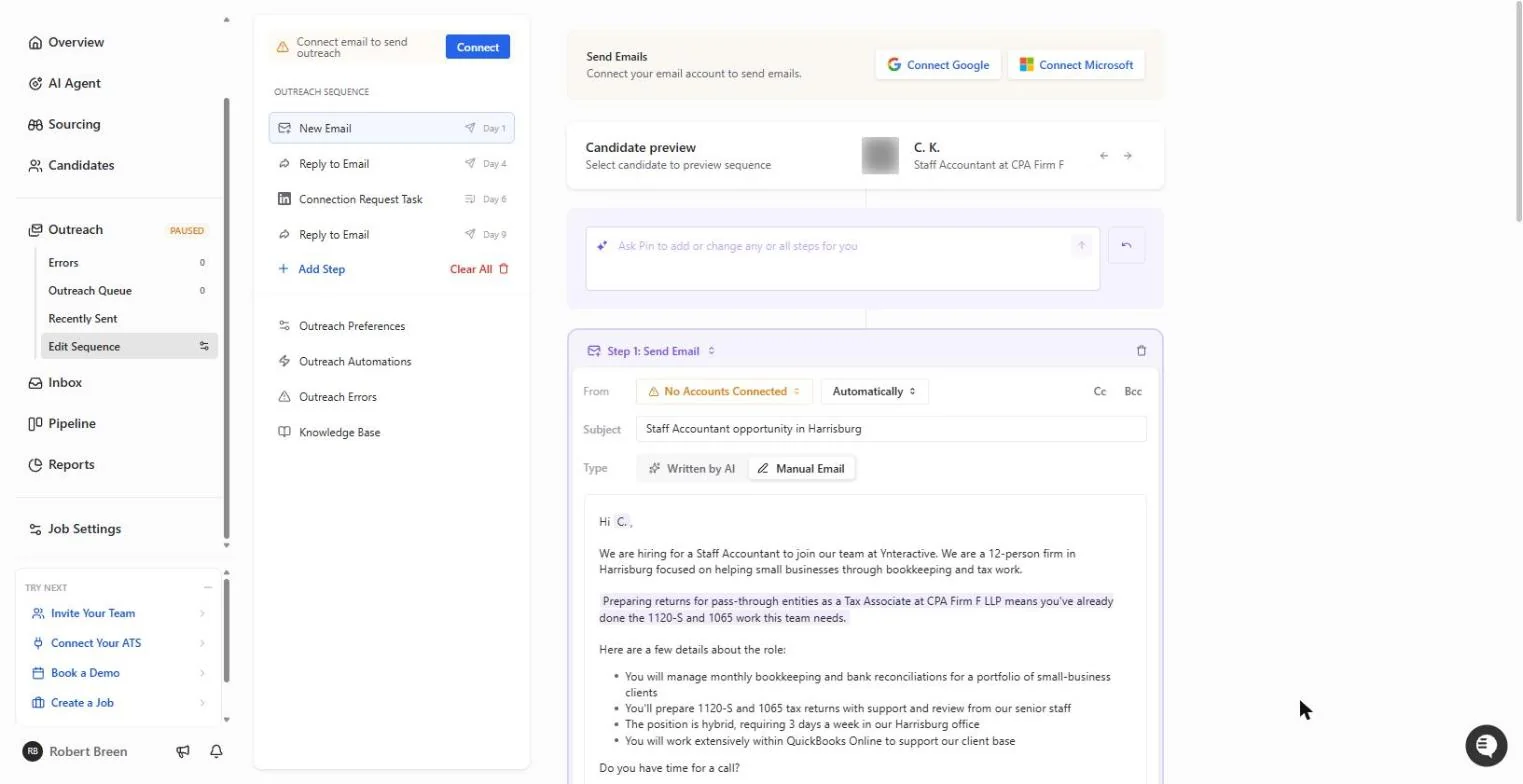
- Check the new line. The firm line now reads "focused on helping small businesses through bookkeeping and tax work." The personal line was rewritten too. Click the new firm line.
Now it says bookkeeping and tax work. Check the new line.
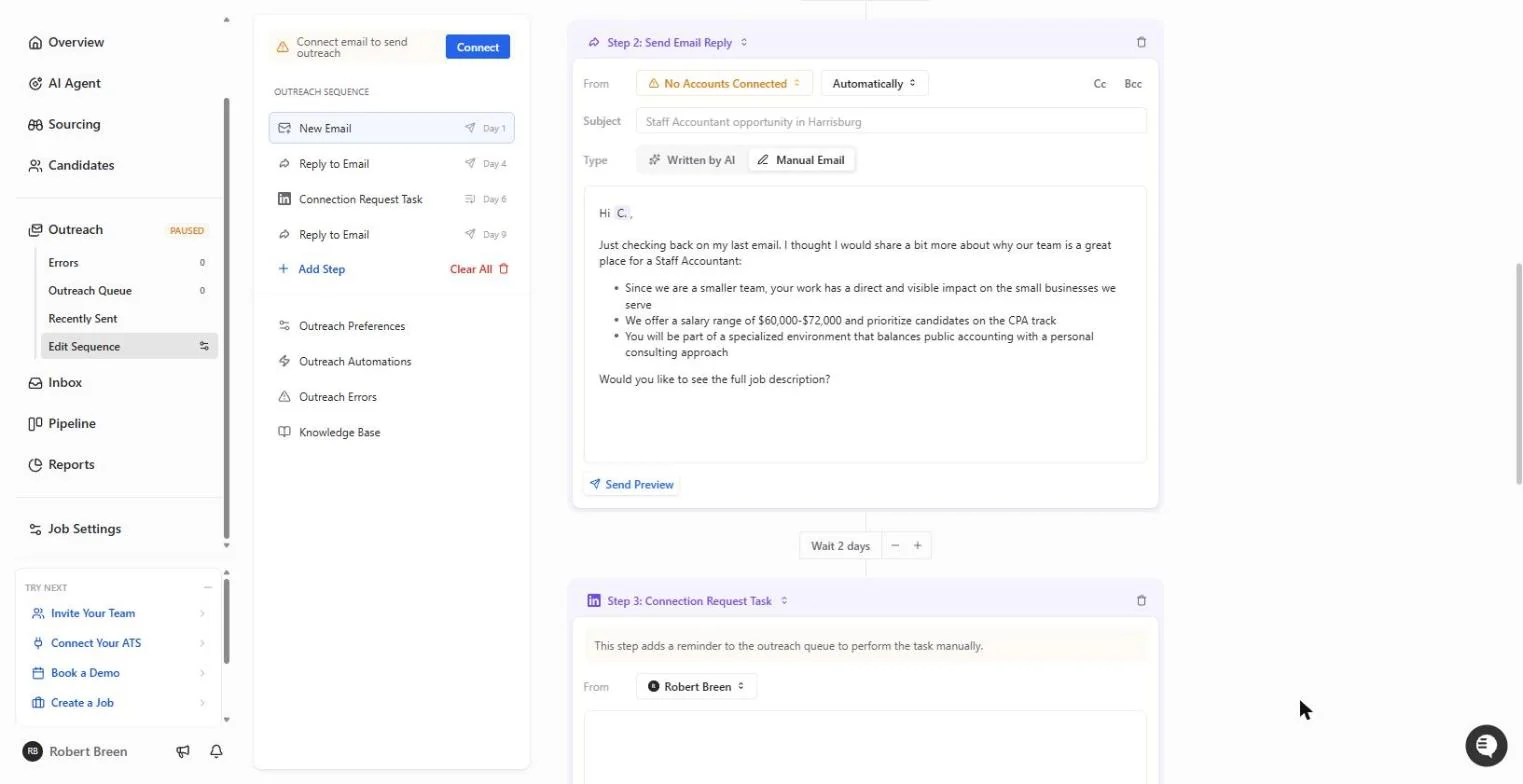
- Check the follow-up. Step 2 lost the Tableau bullet and kept the useful ones: direct impact on small-business clients, $60,000-$72,000 and the CPA track. Always reread every step after an AI edit. Click the bullets.
The follow-up kept the useful parts and lost Tableau. Always reread every step after an AI edit.
- Write a better subject. The subject "Staff Accountant opportunity in Harrisburg" says nothing a busy accountant cares about. Replace it with the three things they check first: hybrid, pay and CPA support.
Replace the subject with what an accountant checks first. Hybrid, pay, and CPA support.
3. Stop before it sends
- Save. Outreach was changed appears in the top left. Click Save. Saving keeps the draft; it does not send anything.
Saving keeps the draft. It does not send anything.
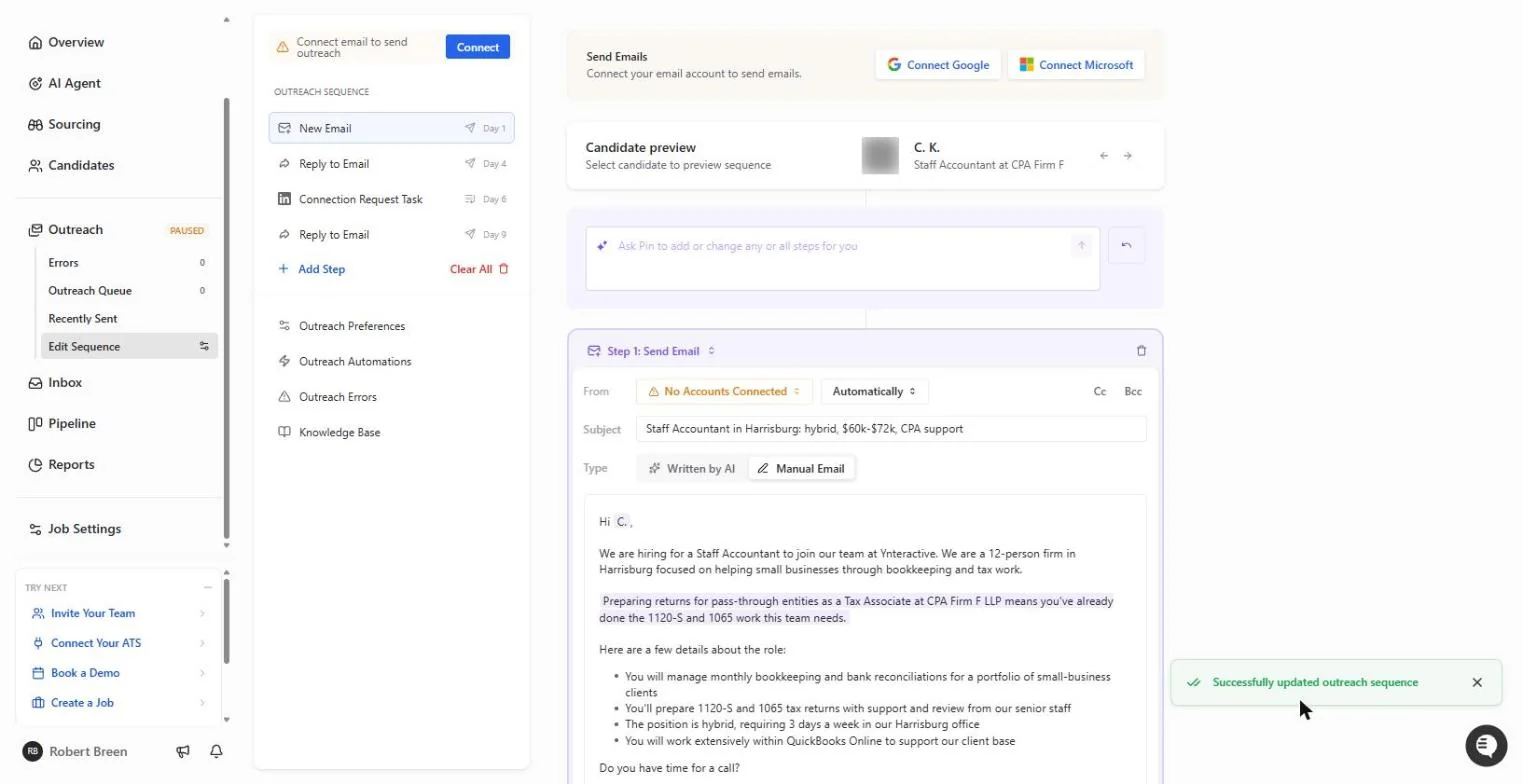
- Preview another candidate. Successfully updated outreach sequence. Use the arrow next to the candidate preview to see how the email reads for someone else.
Saved. Use the arrow to preview the email for another candidate.
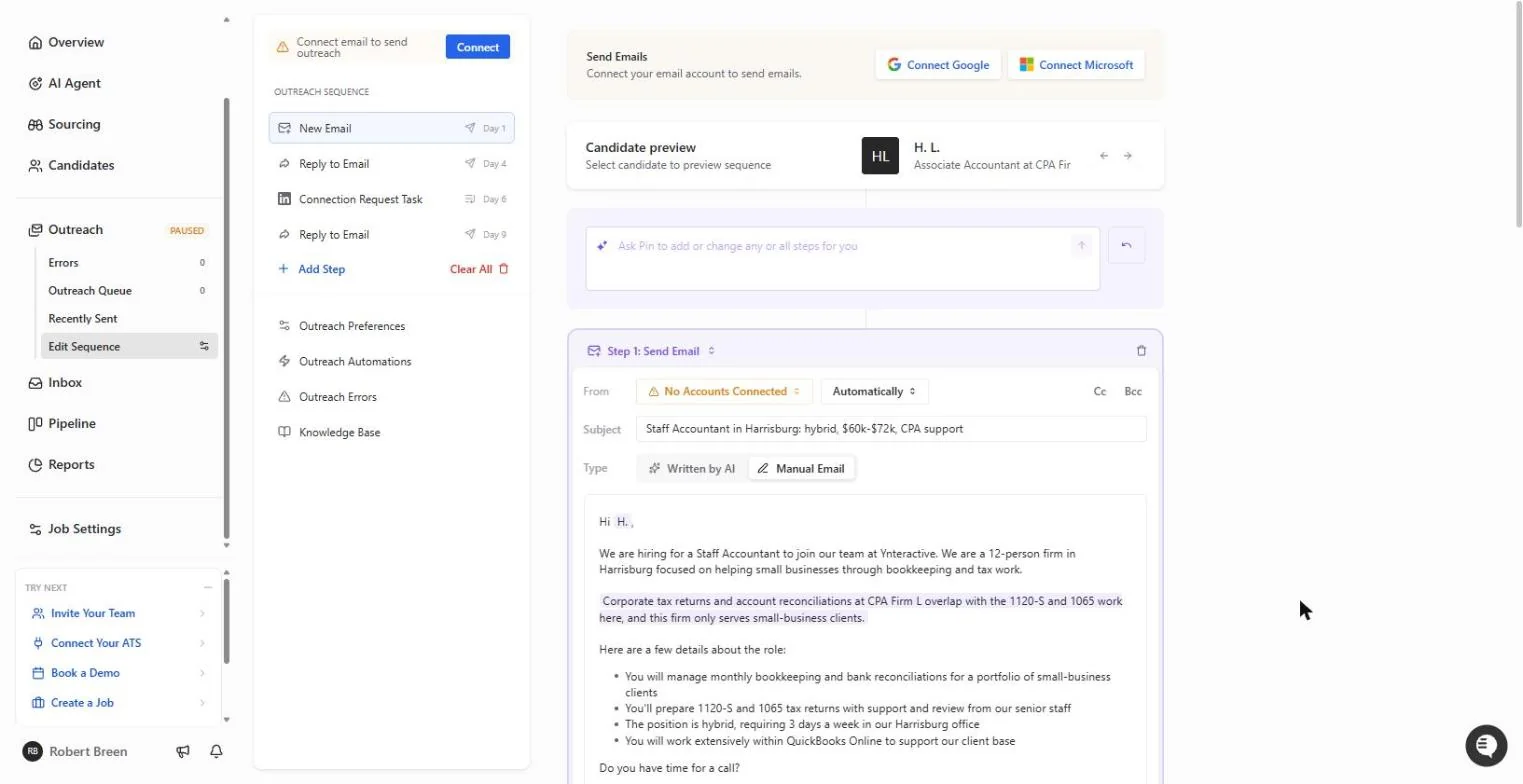
- Stop here. For H. L., the personal line now talks about corporate tax returns and reconciliations. This is where the lesson stops. Outreach is still PAUSED and no email is connected, so nothing has gone out. When you are ready, a partner reads the shortlist, then you connect the firm's email (Google or Microsoft) and add only the people you approved to outreach. Click PAUSED to finish.
Each person gets their own line. This is where we stop. Outreach is still paused and nothing has gone out.
Screenshots
More in AI Automation for Recruiting & HR
Translate a client's Word policy into Spanish with DeepL file translation, keep its headings and table, set a formal tone, then polish the English cover email with…
Free · Live ~5 min Beginner
 Score Every Candidate Fairly After the Interview using ChatGPT
Turn the transcript of an interview panel's debrief into a scorecard against the role's must-haves, the decisions, action items with owners and dates, and a follow-up…
Free · Live ~7 min Beginner
 Write a Fair, Job-Related Job Posting with ChatGPT's Interview Prompt
Ask ChatGPT for a front desk lead posting the quick way, then let it interview you: true must-haves only, a real pay range, the work described instead of a personality…
Free · Live ~7 min Beginner
 Collect Job Applications in Google Sheets with an n8n Form and a Careers-Page Webhook
Stop losing applicants between job boards and your careers page. An n8n form plus a careers-page webhook put every application in one Google Sheet.
Free · Live ~12 min Advanced
◷Keep Top Candidates Warm with Honest Status Replies using ChatGPTYour best candidate has another offer and wants to know if she got the job, if you'll match her pay and when she can start. Give ChatGPT the thread and the hiring…
Free · Live ~9 min Beginner
 An AI Resume Screener, with a Fairness Step (Recruiting & HR)
Have n8n read each applicant’s PDF resume, score it against the job’s must-haves with the evidence quoted, and rank it in Google Sheets, while a person makes every…
Free · Live ~14 min Advanced
All 15 modules in AI Automation for Recruiting & HR
More Pin tutorials
Terms in this lesson
Plain-English definitions, each with an example from a free lesson.