Why this matters
Writing a first email and two follow-ups for every candidate takes a small firm hours, so recruiting messages go out late or not at all. AI recruiting tools now draft the whole sequence for you.
The risk is the first email: an AI draft describes your firm from whatever it can find, and a wrong story in a small local market gets talked about. In Pin you read the four steps, fix every step with one plain-English instruction, write a subject people open, save, and stop while outreach is still paused.
Practice
Do every step yourself in a practice copy of the real tool. It checks your work, and “Do it for me” finishes any step you get stuck on.
What you’ll build
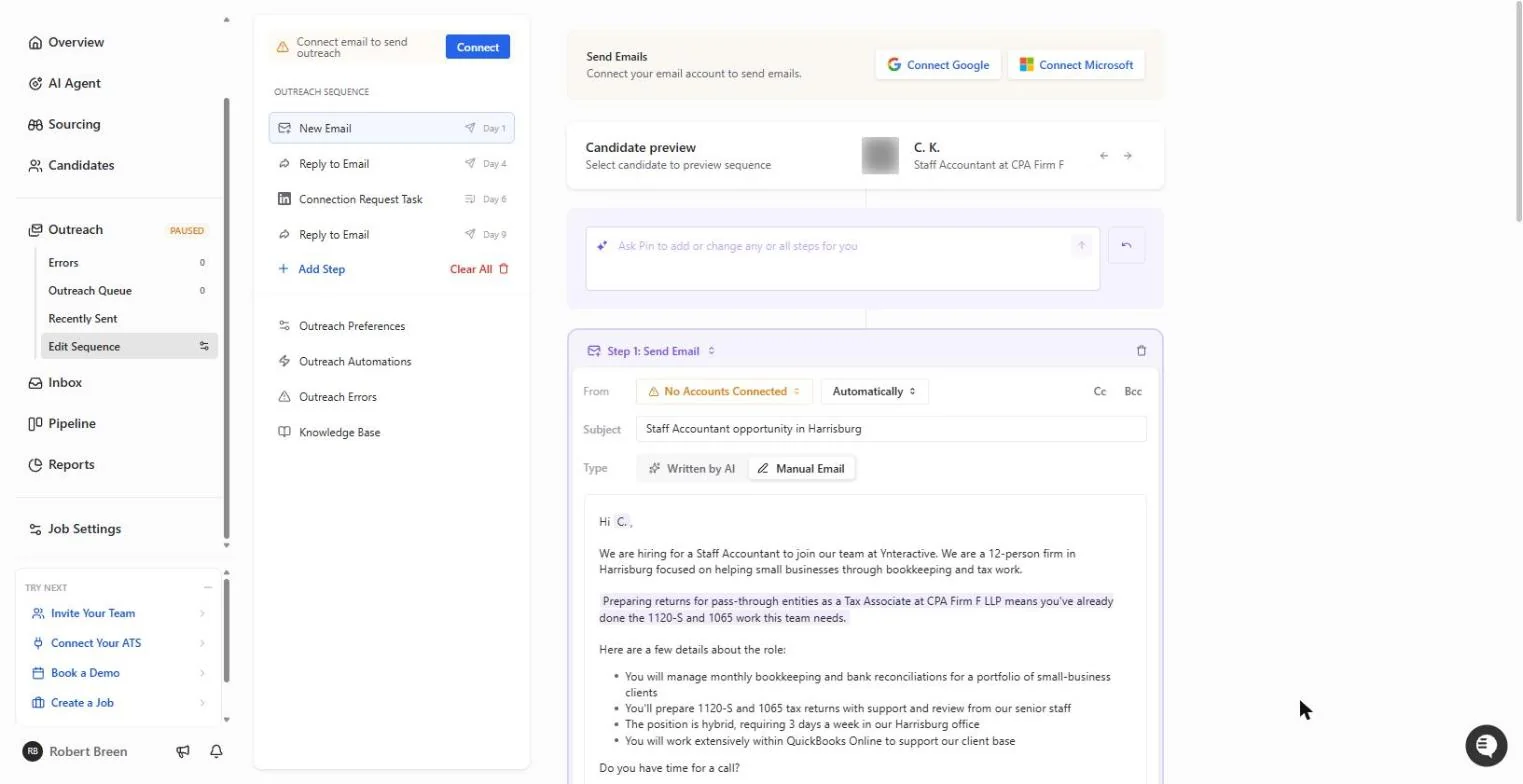
You check the outreach sequence Pin drafted for the three-person shortlist from part 2, for a made-up 12-person accounting firm in Harrisburg, PA.
You catch a firm description that was wrong (it talked about Tableau and data visualization), fix all four steps with one Ask Pin instruction, rewrite the subject, save, and stop before anything is sent. The screens are real screenshots from my own Pin account, captured October 2026.
What you need
- Nothing to start the practiceThe lesson is a practice copy. Nothing is sent.
- Parts 1 and 2 first (recommended)Set up the search, then build the shortlist.
- A Pin account, to do it for realpin.com offers a free plan. Sending needs a connected Google or Microsoft email account.
Concepts
Read the first two sentences of every step
Pin drafts a sequence from your job description and your account's company: an email on day 1, a reply on day 4, a LinkedIn connection reminder on day 6 and a last reply on day 9. A shaded line is written for each candidate.
The company description sits in the first two sentences. If the account's company is not the firm doing the hiring, or its website is out of date, every candidate reads the wrong story.
Fix every step with one sentence, then stop
The Ask Pin box at the top edits all steps at once. Say who you are, what to remove and a length limit, then reread every step.
Outreach stays paused until you connect an email account and add candidates. Have a second person read the shortlist and step 1 first. A first email cannot be unsent.
Do it for real
Now repeat it in your own account. Tick each step as you go.
Quick check
3 questions to check you’ve got it.
1. Where does Pin's draft usually go wrong for a small firm?
- The company description in the first sentences
- The candidate's first name
- The day numbers
Show the answer
The company description in the first sentences. It describes the firm from the account's company and website, which may be wrong or out of date.
2. What is the fastest way to fix the same mistake in four emails?
- One instruction in the Ask Pin box, then reread every step
- Delete the sequence
- Edit only step 1
Show the answer
One instruction in the Ask Pin box, then reread every step. Ask Pin edits all steps at once; rereading catches anything it missed.
3. You clicked Save on the sequence. Has anything been sent?
- No: outreach is paused and no email is connected
- Yes, to the whole shortlist
- Only to the first candidate
Show the answer
No: outreach is paused and no email is connected. Saving keeps the draft. Nothing sends until you connect email and add candidates.