Why this matters
A partner at a small firm does not have an afternoon to read twenty LinkedIn profiles, so hiring slips behind client work. The usual result is a long list nobody reads, or a shortlist picked on job titles alone.
Pin finds the candidates and explains every match: your qualifying question answered first, then each criterion with the evidence it found. Read those reasons the fast way, shortlist the clear fits, decline the weak ones with a reason so the next batch improves, and you have a three-person call list in about ten minutes. Nobody is contacted while you do it.
Practice
Do every step yourself in a practice copy of the real tool. It checks your work, and “Do it for me” finishes any step you get stuck on.
What you’ll build
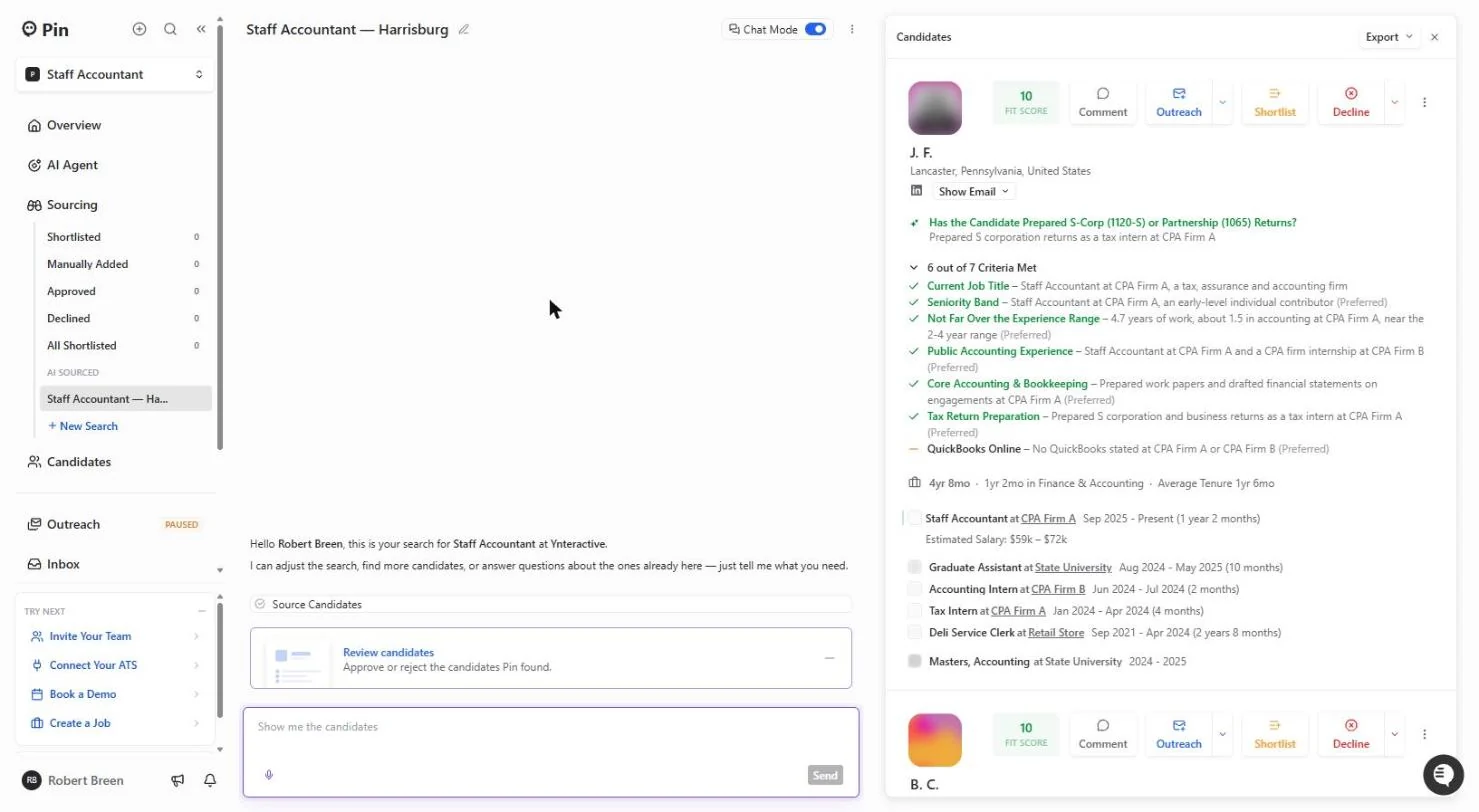
You review the AI-sourced candidates for the Staff Accountant search from part 1, for a made-up 12-person accounting firm in Harrisburg, PA.
You shortlist three people on stated evidence, leave a "probably" match for later, and decline one as Lacking Experience. The screens are real screenshots from my own Pin account, captured October 2026, with every candidate shown only as initials, a blurred photo and relabelled employers.
What you need
- Nothing to start the practiceThe lesson is a practice copy. The firm and the job are made up.
- Part 1 first (recommended)Check the market and set up the AI candidate search in Pin.
- A Pin account, to do it for realpin.com offers a free plan. Plans change; check the site for what yours includes.
Concepts
Read the reasons, not the score
Most of the top 20 can show the same fit score. What tells them apart is the card: the answer to your qualifying question, the criteria met, and the orange dashes that mark a gap.
Ask one question about every gap: could we teach this in the first month? QuickBooks, yes. Two years of tax returns, no.
"Probably" means Pin is guessing
When a profile does not say it outright, Pin infers it from the title and the firm and writes "Probably". Shortlist on stated evidence and keep the guesses for a second pass or a question on the call.
Decline with a reason (Lacking Experience, Wrong Location, Unaffordable...). Pin learns from every Shortlist and Decline, and a reason makes the next batch better. Shortlisting does not contact anyone.
Do it for real
Now repeat it in your own account. Tick each step as you go.
Quick check
3 questions to check you’ve got it.
1. Two candidates both show a fit score of 10. How do you choose?
- Read the qualifying answer and the gaps on each card
- Pick the first one
- Look only at the job title
Show the answer
Read the qualifying answer and the gaps on each card. The reasons and the gaps tell them apart, not the score.
2. What does "Probably prepares 1120-S returns" mean on a Pin card?
- Pin is inferring it; the profile does not say it
- The candidate confirmed it
- Pin checked their tax software
Show the answer
Pin is inferring it; the profile does not say it. It is a guess from the title and firm. Ask on the call.
3. Why pick a reason when you decline?
- Pin learns what to bring next time
- It emails the candidate the reason
- It is required to save
Show the answer
Pin learns what to bring next time. Declines are internal. The reason trains the search; nobody is contacted.