Why this matters
A small firm hires a few times a year, so nobody keeps up with what the market pays. The usual way is to post the job, pay for the listing and wait. When the range is under the market, the first sign is a quiet inbox a month later.
Pin is an AI recruiting tool that searches 850M+ profiles. Paste a job description and, before you set anything up, its Talent Preview shows how many people match and what they earn. Then it turns the same description into a search: titles, level, years, location and the questions that decide the fit.
Practice
Do every step yourself in a practice copy of the real tool. It checks your work, and “Do it for me” finishes any step you get stuck on.
What you’ll build
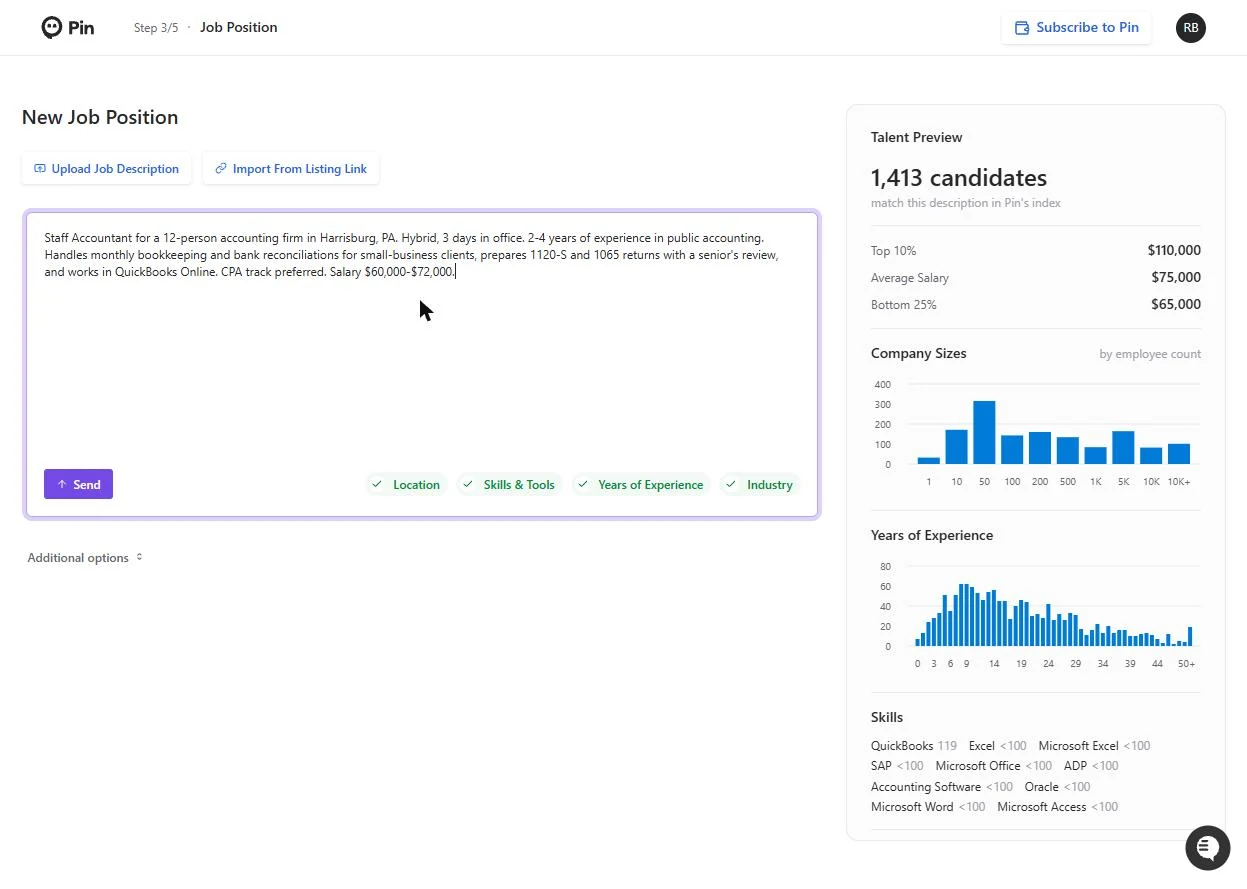
You set up a search for a Staff Accountant at a made-up 12-person accounting firm in Harrisburg, PA.
You read the Talent Preview (1,413 matching people, average salary $75,000, above the $72,000 top of the range), then fill the Job Position cards: company, four titles, Regular level, 2 to 4 years, 50 miles around Harrisburg and one qualifying question. The screens are real screenshots from my own Pin account, captured October 2026.
What you need
- Nothing to start the practiceThe lesson is a practice copy. The firm and the job are made up.
- A Pin account, to do it for realpin.com offers a free trial. Plans change; check the site for what yours includes.
- A job descriptionYour own, or copy the sample from the lesson.
Concepts
Read the Talent Preview first
As soon as you paste a description, Pin shows how many people in its index match it, the salary bands (bottom 25%, average, top 10%), the size of the companies they work at, their years of experience and their top skills.
Compare the top of your range with the average. If you are under it, raise the range, or lead the job post with what else you offer.
Titles, years and one good question
People with the same job use different titles. Pin suggests them (Staff Accountant, Public Accountant, General Ledger Accountant...), and ticking the right ones widens the search without making it worse.
Qualifying questions are what you would check first on a resume. Keep them to one or two yes-or-no questions about real work.
Do it for real
Now repeat it in your own account. Tick each step as you go.
Quick check
3 questions to check you’ve got it.
1. What does the Talent Preview tell you before you set up the search?
- How many people match and what they earn
- Who already applied to your job
- Your job board budget
Show the answer
How many people match and what they earn. It shows the match count, salary bands, company sizes, years of experience and top skills for your description.
2. Your range tops out at $72,000 and the Average Salary is $75,000. What should you do?
- Raise the range or lead with what else you offer
- Nothing, post it as is
- Lower the range
Show the answer
Raise the range or lead with what else you offer. A range under the market average usually means fewer replies.
3. What makes a good qualifying question?
- A yes-or-no question about real work, like returns prepared
- A question about hobbies
- The full job description again
Show the answer
A yes-or-no question about real work, like returns prepared. It is the first thing you would check on a resume.