Why this matters
At a small firm, onboarding lives in one person's head and one SOP document. The office manager repeats the same Week 1 talk for every new hire, it takes most of a morning, and each hire hears a slightly different version.
X-Pilot turns a document into a narrated training video. Paste the SOP, and it plans the scenes, writes the script, builds the slides and adds a voice. You check the outline against the SOP, fix a scene by typing a sentence, and the next new hire watches the same two minutes as everyone else.
Practice
Do every step yourself in a practice copy of the real tool. It checks your work, and “Do it for me” finishes any step you get stuck on.
What you’ll build
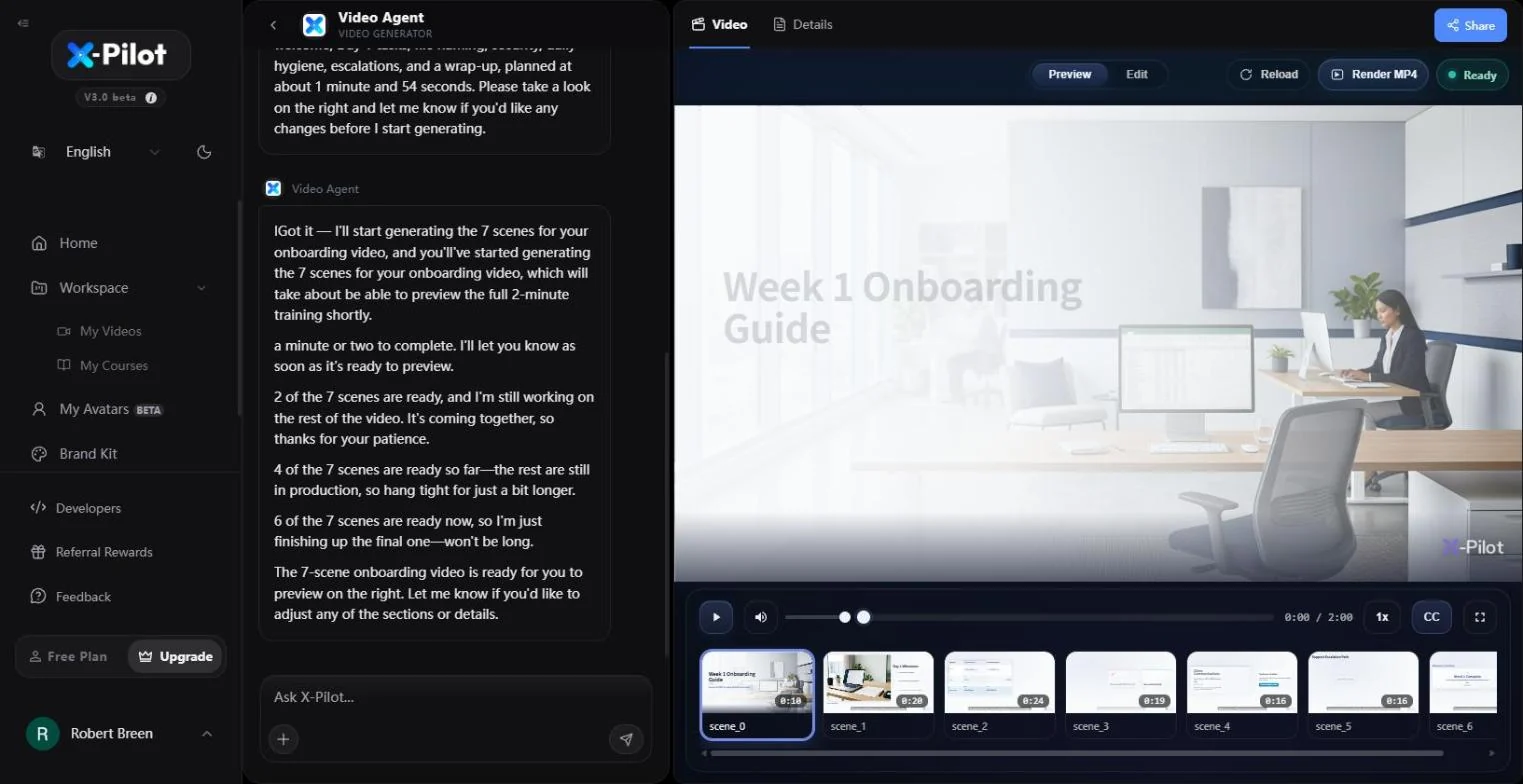
You turn a made-up 12-person accounting firm's Week 1 onboarding SOP into a 2-minute narrated training video with 7 scenes.
You check the outline against the SOP, then add a missing rule (reply with the portal link and delete the attachment) to one scene by typing it. The screens are real screenshots from my own X-Pilot account on the Free plan, captured October 2026.
What you need
- Nothing to start the practiceThe lesson is a practice copy. The SOP and the firm are made up.
- An X-Pilot account, to do it for realx-pilot.ai has a free plan. Check it for MP4 export and watermark options; plans change.
- Your onboarding SOPNumbered steps work best. Paste them, or attach the document.
Concepts
One line of context, then the steps
Start the prompt with who the video is for, how long it should be and the tone. Then paste the SOP steps as they are, numbered.
X-Pilot replies with an outline (one sentence per scene) and builds the scenes, narration and slides in a couple of minutes.
Check the outline, edit by typing
Tick each SOP step against a scene in Details > Outline before anyone watches it. It is faster to catch a missing or invented step there.
To change a rule, type it in the chat and name the scene. X-Pilot rebuilds only that scene. Stop before Share or publishing until someone has watched it against the SOP.
Do it for real
Now repeat it in your own account. Tick each step as you go.
Quick check
3 questions to check you’ve got it.
1. What should the first line of your X-Pilot prompt say?
- Who the video is for, how long, and the tone
- Your company history
- Nothing, just paste the SOP
Show the answer
Who the video is for, how long, and the tone. Without it, X-Pilot guesses the audience and the length.
2. Where is the fastest place to catch a missing SOP step?
- Details > Outline, one sentence per scene
- The finished MP4
- The Share dialog
Show the answer
Details > Outline, one sentence per scene. Seven sentences are quicker to check than a two-minute video.
3. A rule changed. How do you update the video?
- Type the change in the chat and name the scene
- Start a new video from scratch
- Re-record the narration yourself
Show the answer
Type the change in the chat and name the scene. X-Pilot rebuilds only the scene you name.