Why this matters
A hospital network hires every week, and whoever is free gives the new group the first-week talk: where to pick up the badge, when orientation runs, how to clock in, how time off works, who to call. The details drift from group to group, and HR spends the first week answering the same questions.
ElevenLabs Studio turns a short script into a narrated audio file in a stock voice, paragraph by paragraph, with a pronunciation dictionary for names. Every new hire hears the same briefing, and when a policy changes you fix one paragraph and export again. It still needs a person for three jobs: writing the script to be heard, telling it how to say the names, and listening before it goes out.
Practice
Do every step yourself in a practice copy of the real tool. It checks your work, and “Do it for me” finishes any step you get stuck on.
What you’ll build
You are the HR generalist at Mercy Ridge Health, a made-up network of five hospitals. You paste an eight-paragraph first-week briefing into a Studio audio project, give it a stock voice, voice the paragraph with names first, add pronunciation rules for three names, compare the takes and export an 85-second MP3.
The screens are real screenshots from ElevenLabs Studio, captured November 2026. Nothing was published.
What you need
- Nothing to start the practiceThe lesson is a practice copy of the real Studio screens.
- An ElevenLabs account, to do it for realElevenLabs has a free plan with monthly credits. Our run used about 1,450 credits for an 85-second briefing, roughly one credit per character plus test takes, so check what your plan includes.
- The first-week part of your handbook, as a short scriptOne topic per paragraph, short sentences, names and times written out. About 200 words makes a 90-second briefing.
Concepts
Write it to be heard, one topic per paragraph
A handbook is written to be read and searched. A briefing is heard once, at the speed of the voice, so long sentences, lists and abbreviations get lost. Ours is eight short paragraphs: welcome, badge pickup, orientation, clocking in, time off, privacy, who to call, goodbye.
Studio turns each line you paste into its own paragraph, with its own voice and its own takes. That is what makes the briefing easy to keep current: when the time-off rule changes, you regenerate that paragraph, not the whole recording.
Test the names before you spend credits on the rest
A voice picked with nothing selected only applies to the paragraph your cursor is in. Select all (Ctrl+A) first, then pick the voice. Use a stock voice for company audio, not a cloned voice of a real person.
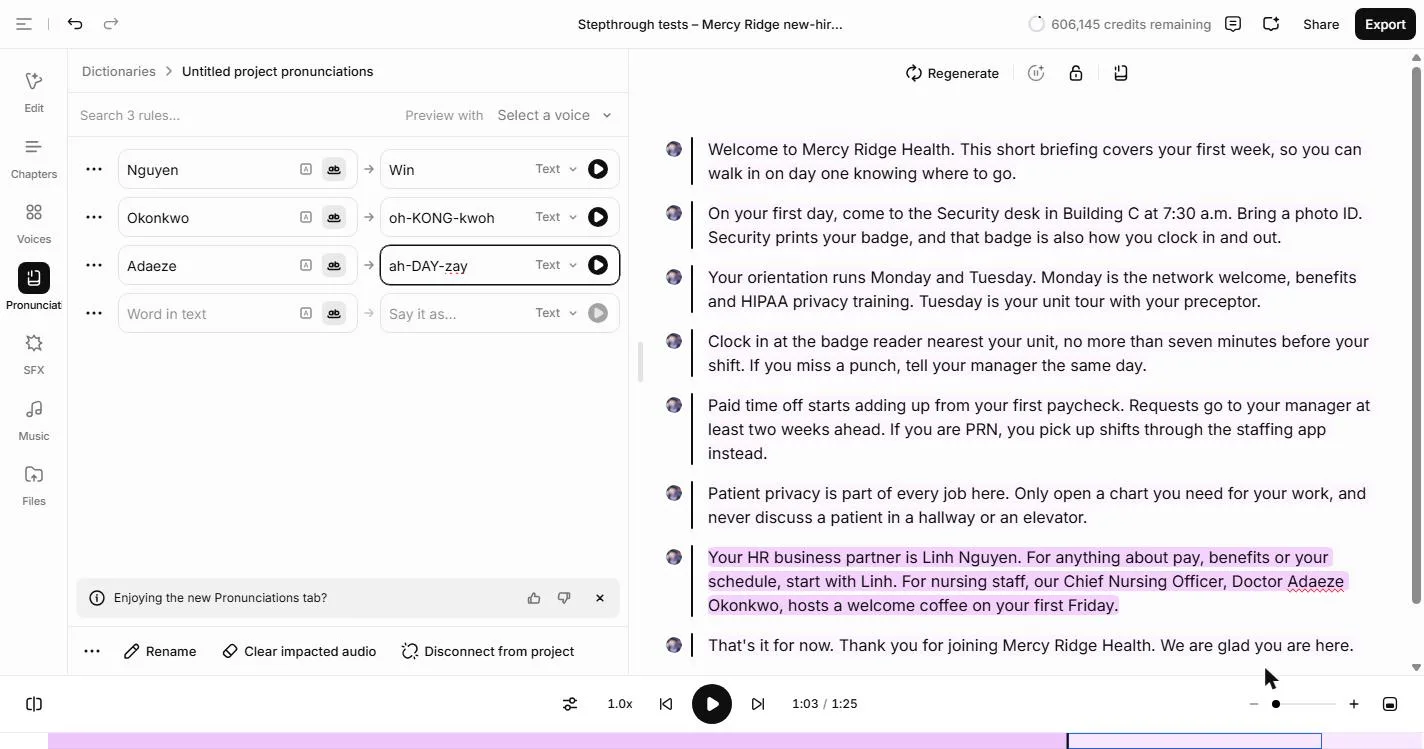
AI voices read common words well and guess at names from other languages. Generate only the paragraph with names (about 220 credits for ours), then open Pronunciation and add a rule for each name: the word as written, and how to say it in plain spelling, like Nguyen as Win. Studio keeps the rules in a pronunciation dictionary on your account, so the next project can reuse it. Regenerate, play both takes under Generation History, and keep the one that is right. Ask people how they say their own names.
Export once, then listen before it goes out
Export shows the cost before it spends anything: our six remaining paragraphs were 913 credits. Audio, single file, MP3 gives one file, 85 seconds at 192 kbps. Leave the Publish tab alone unless you mean to share the project publicly.
Play the whole file once, and have someone who knows the names listen. Then put it where new hires are on day one: the welcome email, the onboarding portal, or the screen at badge pickup.
Do it for real
Now repeat it in your own account. Tick each step as you go.
Quick check
3 questions to check you’ve got it.
1. You pick a voice, but only the last paragraph gets it. Why?
- Nothing was selected, so it applied to the paragraph with the cursor
- The voice is not on your plan
- Studio only allows one voice per project
Show the answer
Nothing was selected, so it applied to the paragraph with the cursor. Studio applies the voice to the selected paragraphs. Press Ctrl+A in the text first, and the panel shows Edit Speech (8).
2. Which paragraph do you generate first?
- The one with the names
- The first one
- All of them at once
Show the answer
The one with the names. Names are where AI voices slip. Testing that paragraph first costs a couple of hundred credits, and the fix carries into the export.
3. How do you tell Studio to say Nguyen as "Win"?
- Add a pronunciation rule: Nguyen, say it as Win
- Change the spelling in the script
- Pick a different voice
Show the answer
Add a pronunciation rule: Nguyen, say it as Win. A rule keeps the real spelling in your script and fixes the sound everywhere it appears in the project.