What is dispatching in a service business?
Updated · By Robert Breen
Dispatching is the job of assigning each service call to a technician or crew and making sure they know the address, time, customer and work to be done. In a small trades business it is usually the office manager's morning routine, and it is one of the easiest pieces to automate.
Why it matters for a small business
When dispatching goes wrong, customers notice right away: a tech shows up without the right part, two techs go to the same house, or nobody goes at all. Most of those mistakes come from copying job details by hand from one place to another, early in the morning, in a hurry.
The decision of who takes which job still belongs to a person who knows the techs, the trucks and the customers. The repetitive part, sending each tech their own list with the right details, is a perfect fit for a simple automation. Once the jobs and assignments live in one sheet, a workflow can send the messages the same way every day.
In a real lesson: Daily Job Alerts: Email Each Tech Their Jobs from Google Sheets with n8n
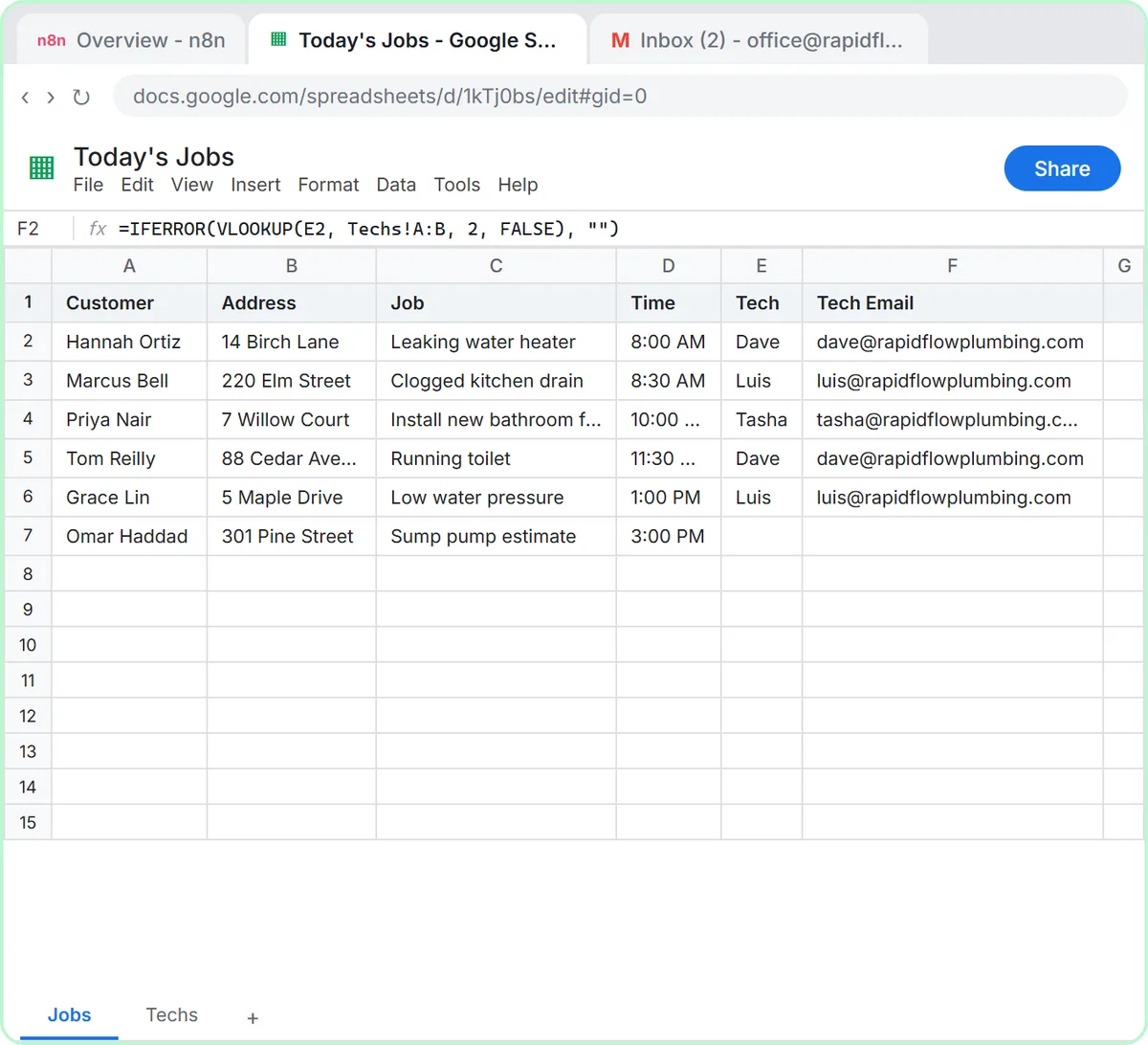
The Daily Job Alerts lesson puts you in the office at Rapid Flow Plumbing, a made-up plumbing company. Today's jobs sit in a Google Sheet called Today's Jobs with columns for the customer, address, job and time, plus Tech and Tech Email. A Techs tab lists four techs, so the office only types a first name.
You build an n8n workflow that dispatches for you. A Schedule Trigger runs every day at 7am (after you set the workflow's timezone), Google Sheets: Get row(s) in sheet reads the jobs, a Filter keeps only rows where Tech is not empty, and Gmail: Send a message emails each job to the address in Tech Email, with a subject like the time plus the customer's name.
The test shows the payoff. Six jobs come out of the sheet and five pass the filter, because the sump pump estimate has no tech yet. Five emails go out: two to Dave, two to Luis, one to Tasha and none to Kevin, who has no jobs today. Reassign a job in the sheet and tomorrow's email goes to the new tech. The lesson uses no AI at all.
Try this lesson free or read the step-by-step guide.
Common confusions
Dispatching vs scheduling
Scheduling books the customer into a date and time window. Dispatching decides who goes and sends them the details, usually on the day. A job can be scheduled weeks ahead and still need dispatching that morning.
Dispatching vs triage
AI triage sorts incoming requests by urgency. Dispatching happens after that, when an urgent or scheduled job is handed to a specific person.
Tips
- Keep one source of truth for assignments. If the sheet and the whiteboard disagree, the automation will follow the sheet.
- Use a filter like the lesson's so unassigned jobs never go out to nobody.
- Ask a couple of techs what they need in the message. If they always call the office for a gate code, add a column for it.
Related terms
Where you use it: free lessons
- Daily Job Alerts: Email Each Tech Their Jobs from Google Sheets with n8n (n8n, 10 min)
- Build an AI Emergency Request Form for Your Plumbing Company (Lovable and n8n, 15 min)
Frequently asked questions
- Can AI decide which tech gets each job?
- It can suggest, but a person who knows skills, locations and workloads should make the call. The lesson keeps that choice in the sheet and only automates sending the details.
- Will the workflow resend emails if I run it twice?
- Yes. Each run sends one email per assigned row, so run your tests on a copy of the sheet or with your own address in the Tech Email column.