This guide is for recruiters, HR generalists and office managers who hire. Each job below is a free, hands-on Stepthrough lesson you practice in a copy of ChatGPT (or Claude or n8n) with a made-up clinic, starting with Write a Fair, Job-Related Job Posting. It is general guidance, not legal advice: your company's policy and the employment law where you hire come first. Screens and features are as of October 2026.
What recruiting jobs can ChatGPT actually do?
ChatGPT is good at asking the right questions, turning notes into clear writing and organizing what people said. It should not decide who gets hired, guess at anything that isn't about the job, or promise what only the hiring manager can promise. Here is how the common jobs sort out:
| Recruiting job | Use ChatGPT? | What it does | What you still do | Practice it free |
|---|---|---|---|---|
| Writing a job post | Yes | Asks you up to five questions, one at a time, then writes a posting with true must-haves, the pay range and the real schedule | Confirm its summary, cut anything not job-related, check it against your hiring rules | Fair job posting (7 min) |
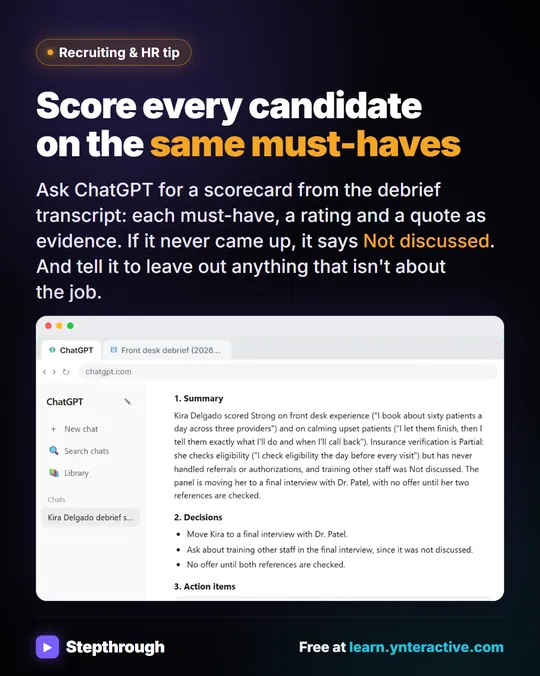
| Interview debrief to scorecard | Yes | Rates each must-have Strong, Partial or Not discussed with a quote, lists decisions and action items | Read it against your notes; people make the hiring decision | Interview scorecard (7 min) |
| Candidate status replies | Yes, with a check | Drafts a warm reply from the thread and your hiring facts, then checks every promise | Remove anything not decided yet, such as an offer or a pay figure, and send it yourself | Candidate status reply (9 min) |
| Pay range for the post | Use Claude Research | Scans what nearby employers publish for the same role, with a source for every range | Open the sources, drop stale postings, set the range yourself | Pay range research (8 min) |
| Ranking a pile of resumes | Use an n8n workflow | Scores each PDF resume against the must-haves, quotes the evidence and logs a row in Google Sheets | Read the evidence and make every call; no automatic rejections | AI resume screener (14 min) |
| Deciding who to hire or reject | No | Can summarize evidence | A person decides, following your process and the law | Not a ChatGPT job |
How do you use ChatGPT for recruiting, step by step?
The same five steps work for every job in the table.
- Use the account your company approved. Candidate details are personal data, so use a business plan or the settings your policy requires. ChatGPT: Keep Client Data Safe shows the data controls.
- Give it the job's must-haves first. Two to four true requirements for the role are the yardstick for the post, the scorecard and the screener.
- Make it ask before it writes. An interview prompt ("ask me up to five questions, one at a time, then sum up before you write") stops ChatGPT filling gaps with boilerplate.
- Keep it on the job. Tell it: "Only use what's about the job's must-haves. Don't guess at age, family, health, religion or anything else that isn't job-related."
- Check every line before it leaves your desk. Every score needs evidence, every promise needs a fact behind it, and a person makes every hiring decision.
How do you write a job post with ChatGPT?
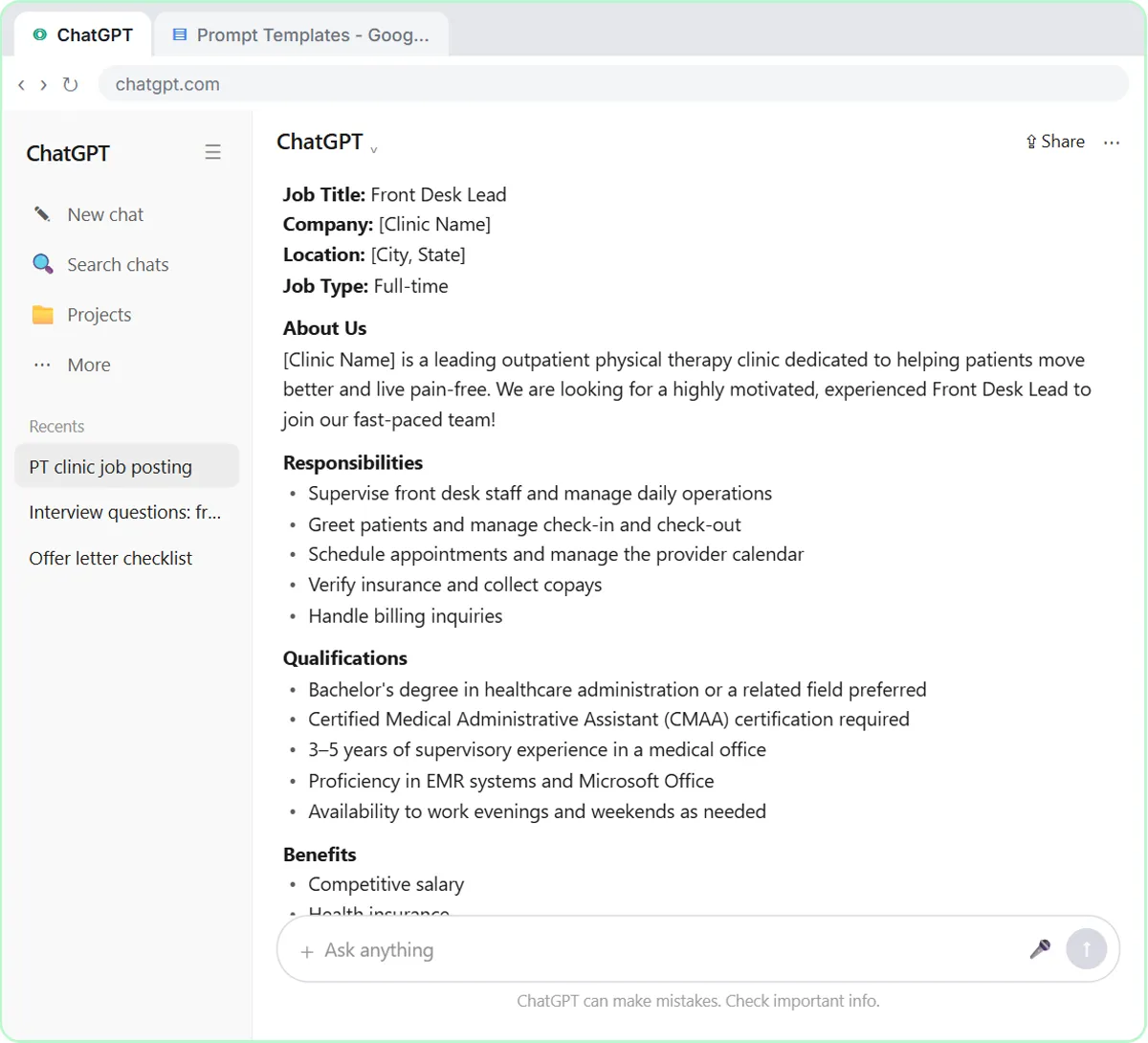
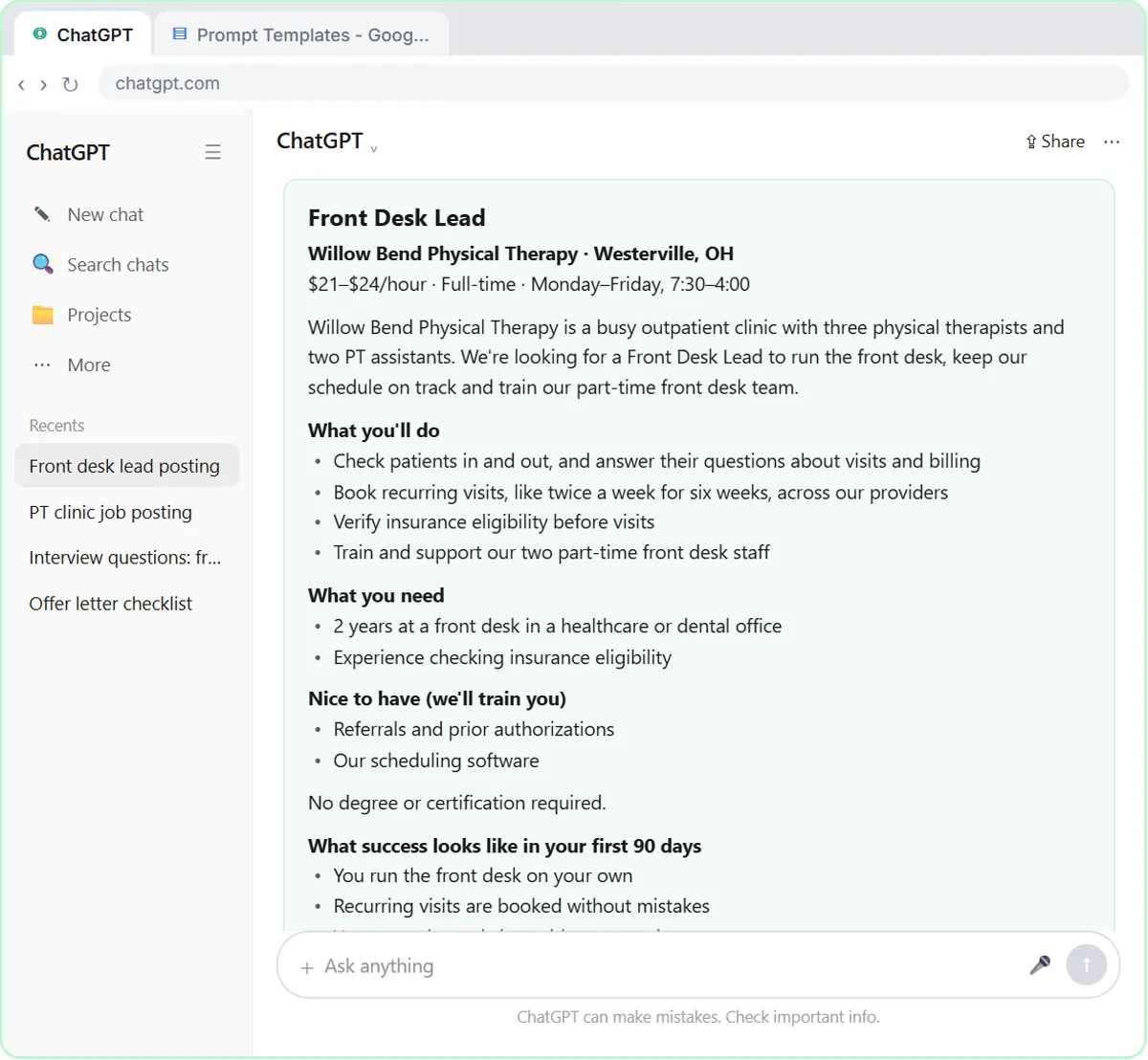
Don't ask in one sentence. In the job posting lesson, a one-line prompt for a Front Desk Lead at Willow Bend Physical Therapy, a made-up clinic, comes back with [Clinic Name] blanks, a degree and a certification the job doesn't need, weekend hours the clinic doesn't have and "competitive salary". The fix is an interview prompt: ChatGPT asks you up to five questions, one at a time, confirms a summary of the must-haves, pay and schedule, and only then writes.
The finished posting has two true must-haves, what the clinic will train, $21 to $24 an hour, the real 7:30 to 4 schedule and what success looks like in 90 days. You save the prompt as a template for the next role. Make ChatGPT Ask You Questions First teaches the same habit for any document.
How do you set a pay range for the job post?
Research it with sources instead of asking ChatGPT to guess. More and more states and cities require a pay range in job posts. In the pay range lesson, Claude Research checks what nearby employers publish for the same role and cites a source for every range. Then you open a source, catch a posting that closed last year, and turn the findings into talking points while the decision stays with you. Check the pay transparency rules where you hire; this isn't legal advice.
How do you score candidates fairly with ChatGPT?
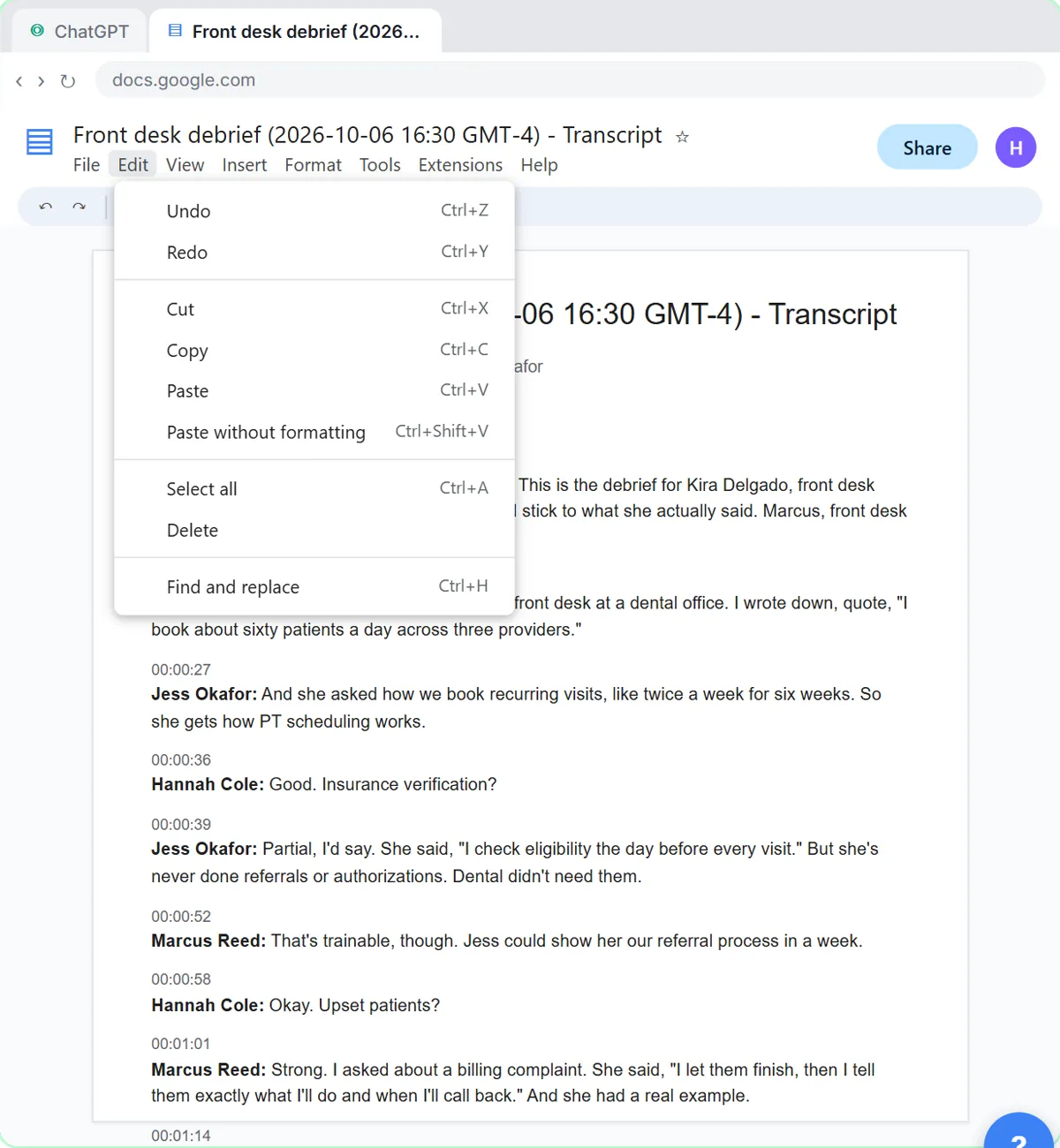
Paste the interview debrief transcript under a request that names the role's must-haves and asks for a rating and a quote for each. In the interview scorecard lesson, one must-have comes back Not discussed, which tells the final round what to cover, and a panel comment about the candidate's kids stays out because the request told ChatGPT to stick to the job. ChatGPT for recruiters walks through the whole debrief, including the candidate email. A written interview scorecard and a structured interview make every candidate's record comparable.
Try it free, step by step
Write a Fair, Job-Related Job Posting with ChatGPT's Interview Prompt. Ask ChatGPT for a front desk lead posting the quick way, then let it interview you: true must-haves only, a real pay range, the work described instead of a personality, and a posting you can use. You do every step yourself in a practice copy of ChatGPT, it checks your work as you go, and “Do it for me” finishes any step you get stuck on. Free, and nothing touches your real accounts.
Start the free lessonHow do you answer candidates without overpromising?
Give ChatGPT the candidate's thread plus a short list of what is actually decided, then have it check every promise in its draft. In the candidate status lesson, the top candidate has another offer with a Friday deadline. A rushed reply would say "you're our pick, $26 is fine, go ahead and give notice", which only the hiring manager can promise. The checked reply is warm and honest and gives her a firm date for an answer, and you send it from Gmail yourself.
Can AI screen resumes?
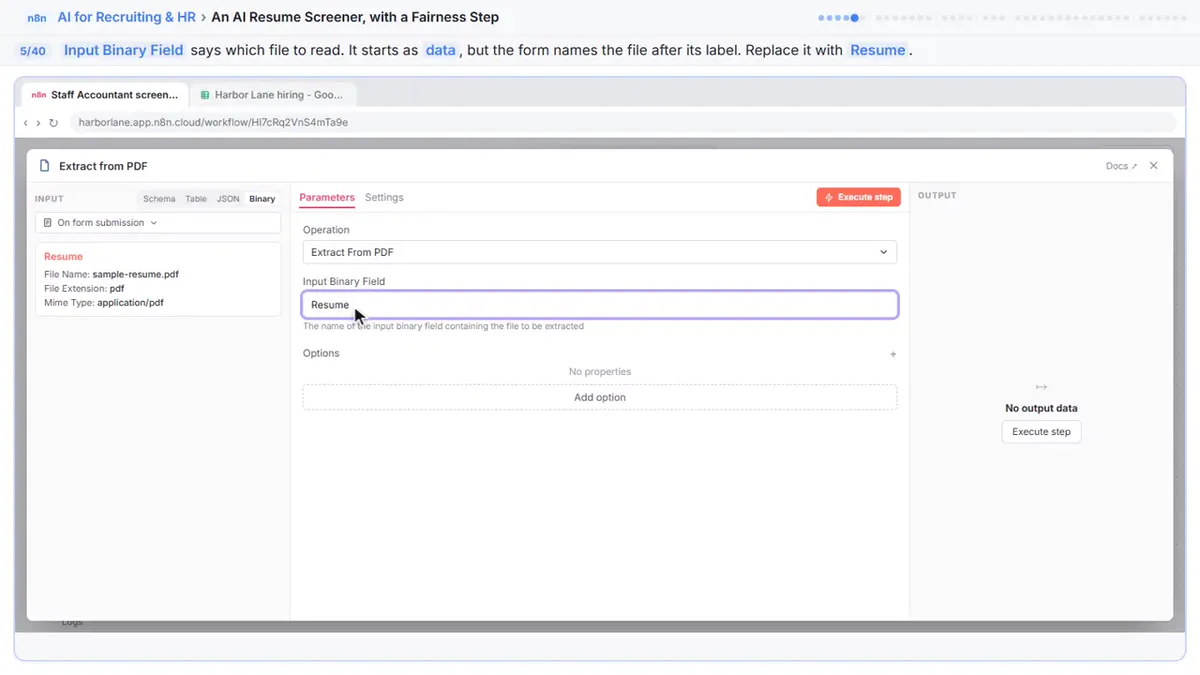
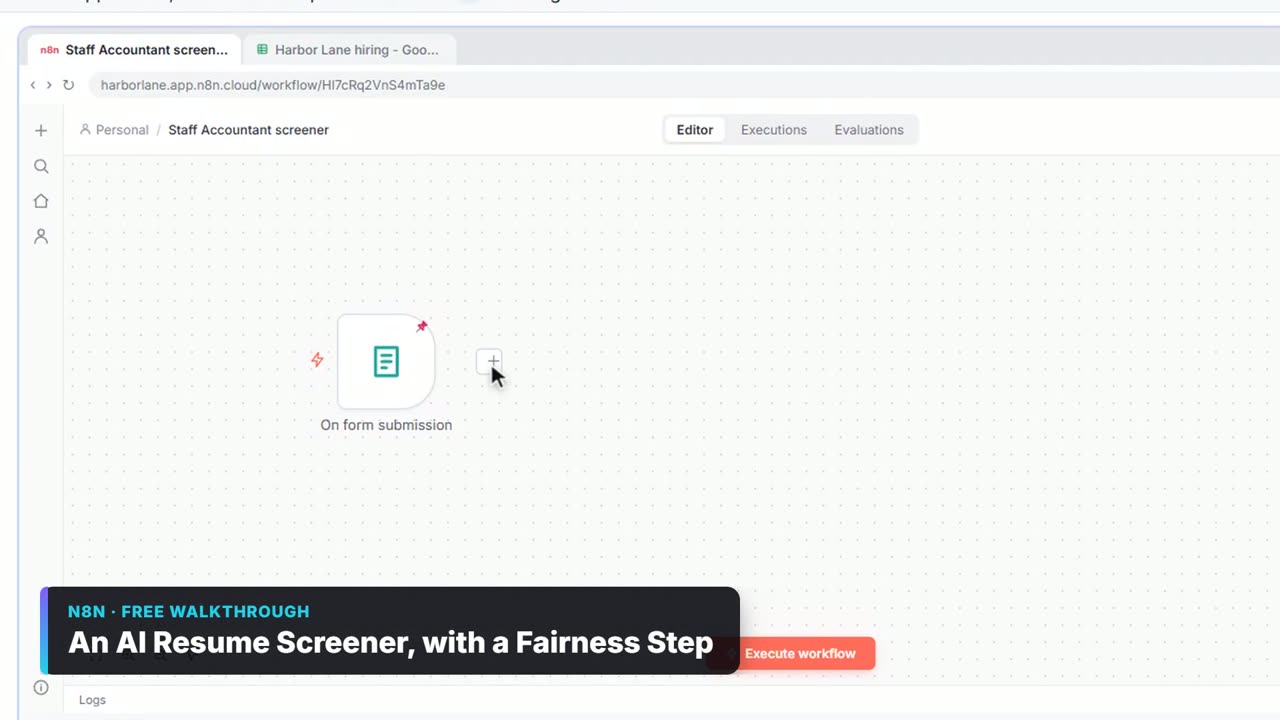
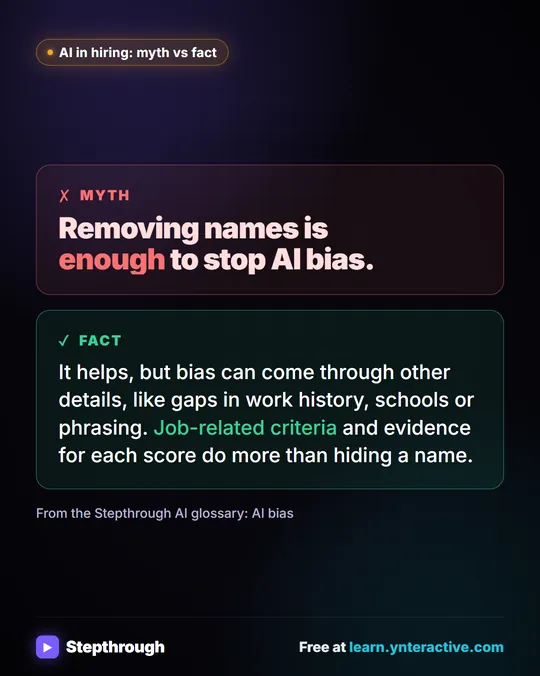
It can rank them for a person to review, but it shouldn't reject anyone on its own. The AI resume screener lesson builds an n8n workflow that reads each PDF resume, scores it against the must-haves, quotes the resume's own words for every score and adds a row to a Google Sheet. Fairness rules keep name, age, gender, race, photos, address and graduation years out of the score. Before you use AI on real applicants, check the rules where you hire, since some places regulate automated hiring tools. Collect Job Applications in Google Sheets puts every application in one place first.
Is it safe to paste candidate resumes into ChatGPT?
Only with the right plan and settings, and only the details the job needs. Remove Social Security numbers, dates of birth, home addresses and anything about health or family before you paste. Use AI at Work Without Leaking Client Data shows what to strip, and Is it safe to paste client data into ChatGPT? has the full checklist. If your team hasn't agreed on rules yet, Roll Out a Team AI Policy in One Afternoon writes them with Claude.
Is ChatGPT the best AI for recruiters?
It is one good option. If your company runs on Google Workspace, Gemini works inside Gmail and Docs, and Microsoft Copilot does the same in Outlook and Word. The best AI for recruiters compares the options job by job, and ChatGPT vs Gemini for HR goes head to head. For copy-paste prompts, see ChatGPT prompts for recruiters. The whole set of lessons is in the free AI for Recruiting & HR course, and best free AI training for HR explains how to fit it around a hiring week.
Key takeaways
- Use ChatGPT to ask questions, write and organize; people make every hiring decision.
- For job posts, an interview prompt keeps requirements job-related and puts the real pay range and schedule in.
- Score every candidate against the same must-haves, with a quote as evidence and "Not discussed" for gaps.
- Have ChatGPT check every promise in a candidate reply against what is actually decided.
- Strip personal details the job doesn't need, use your company's approved account, and follow the hiring law where you work.
Frequently asked questions
- How do I use ChatGPT for recruiting and job posts?
Start with the job's two to four true must-haves. For the post, use an interview prompt so ChatGPT asks you questions before it writes, and include the real pay range and schedule. After interviews, have it score each candidate against the same must-haves with quotes, then draft honest status replies. Check everything before it goes out.
- Can ChatGPT write a job description?
Yes, if you give it the facts. Asked in one sentence, it adds degrees, certifications and "competitive pay" you never mentioned. Asked to interview you first, it writes a posting with only true must-haves, what you will train, the pay range and the real schedule.
- Should ChatGPT decide which candidate to hire?
No. It can organize the panel's evidence into a scorecard, but people make the decision, following your company's process and the law where you hire.
- Is it legal to use AI in hiring?
It depends on where you hire and how you use it. Using ChatGPT to draft a job post or a reply is ordinary writing help, but some places regulate automated tools that screen or rank candidates. Keep a person making every decision and check with counsel before you automate any screening. This isn't legal advice.
- Are the recruiting lessons free?
Yes. Every Stepthrough lesson is free and runs in a practice copy of the tool with a made-up clinic and candidates, so you need no account to learn the routine.