Updated . Built against the tool’s current screens and checked step by step. How we check this lesson
"Write a complete campaign plan" is the prompt every agency tries once. What comes back covers everything and nothing: vague audiences, offers any business could run, and sometimes a discount the client never agreed to. In this free, interactive lesson you see that happen with a real-looking client brief, then build the same campaign as a prompt chain: three audiences, five offers for one of them, a four-week calendar you check against the brief and fix, and the first week's posts. You finish with a checklist you can reuse for the next client.
At a glance
| Question | Answer |
|---|---|
| What you build | Ask ChatGPT for a client's whole 4-week campaign in one prompt, then build a better one in four steps: audiences, offers, a calendar table checked against the client's rules, and the first week's posts. |
| Tools | ChatGPT |
| Time | About 7 minutes, 23 steps in 7 parts |
| Level | Beginner, no coding needed |
| Cost | Free |
| Ways to learn it | Practice it step by step |
The 7 parts, in short
- One giant prompt: Click the message box, Paste the giant prompt, Send it.
- Step 1: customers: Start a new chat, Paste step 1, Send it.
- Step 2: offers: Click the message box, Paste step 2, Send it.
- Step 3: calendar: Click the message box, Paste step 3, Send it.
- Fix one thing: Check the table, Paste the fix, Send it.
- Step 4: posts: Click the message box, Paste step 4, Send it, Copy the posts.
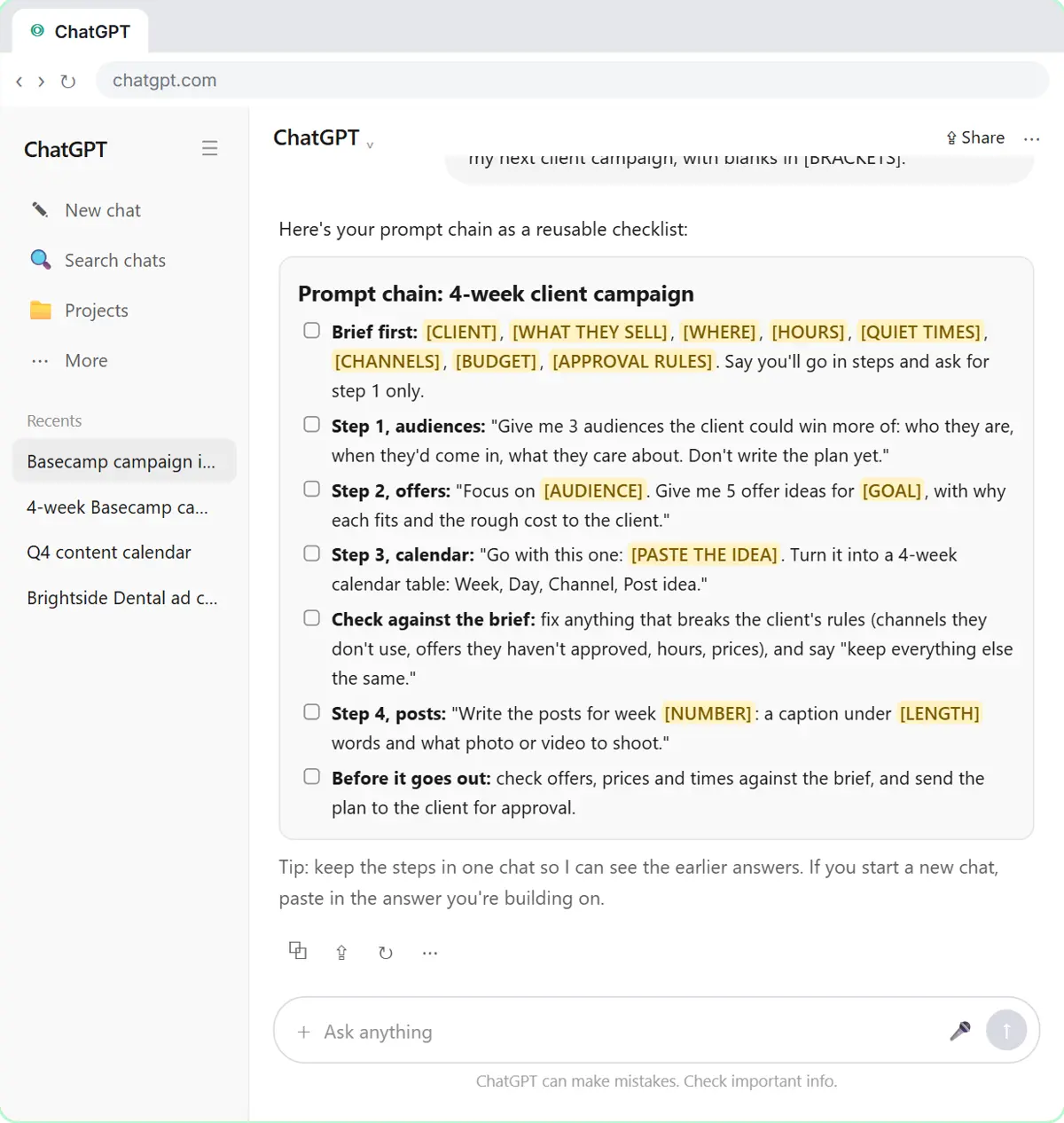
- Save the chain: Click the message box, Ask for a checklist, Send it, Copy the checklist.
Start here first: Break Big Jobs into Steps: Prompt Chaining for a Marketing Plan. This Consulting & Agencies version follows the same build with its own example business, Bluefinch Creative.
Part of: AI for Consulting & Agencies (step 1 of 2). Next up: OLVA: A Private AI Assistant on Your Client Calls
The example: a climbing gym with quiet mornings
Marcus runs social media at Bluefinch Creative, a made-up small agency. The client is Basecamp Bouldering, a made-up indoor climbing gym near a university and a tech office park. The brief: open 6 am to 10 pm on weekdays and 9 am to 8 pm on weekends, weekday mornings are quiet, Instagram and TikTok only, a $500 budget, and the owner approves every offer before it goes out.
The one-shot plan offers a free first visit, which breaks the approval rule, and ends with a post full of emoji. The chain lands on one audience (remote and hybrid tech workers, whose free time matches the quiet mornings) and one offer (Morning Crew: an intro class plus a day pass for $25, Tuesday and Thursday at 9 am), then builds everything else around them.
Who this lesson is for
Social media managers, account managers, freelance marketers and small-agency owners who plan campaigns for clients. It also suits in-house marketers who work from a brief. You don't need a ChatGPT account to practice here.
It is the fifth module in the AI Automation for Consulting & Agencies block.
Why chaining works better for client work
A client plan has to survive the client. The one-shot prompt fails that test because you can't check or steer any single part: by the time you see the offers, the calendar and posts are already built on top of them. A chain gives you a checkpoint after every step. You choose the audience and the offer, not ChatGPT, and you catch rule-breakers in the calendar before a single caption is written.
The fix step is the habit that matters most. Name exactly what's wrong and say "keep everything else the same," and ChatGPT changes only those rows instead of rewriting the plan.
Tips for agency use
- Put the client's rules in the brief: channels they use, what needs approval, hours, prices. The chain can only respect rules it's been told.
- Keep each client's chain in its own chat, or in a ChatGPT project per client, so earlier answers stay in view.
- Paste the chosen idea word for word in step 3. There's no doubt which one you mean.
- Check class times, prices and what an offer includes against the brief before anything goes to the client, and send the plan for approval before scheduling.
- Don't paste confidential client data you don't need. Follow your agency's and your client's policies on AI tools.
Try it yourself, free
Reading the steps is a start. Doing them is how it sticks. The interactive module walks you through every click in a practice copy of ChatGPT, checks each step, and never touches your real accounts.
Start “Prompt Chaining for a Client Campaign Plan: Build It in Steps with ChatGPT (Agencies)”Step by step: Prompt Chaining for a Client Campaign Plan: Build It in Steps with ChatGPT (Agencies)
All 23 steps of the interactive module, in order. In the module you watch each one, then do it yourself in a practice copy that checks your work.
1. One giant prompt
- Click the message box. Click the message box at the bottom of ChatGPT.
Marcus runs social media at a small agency, and a client, a climbing gym, needs a four-week campaign. First, let's do what most people do: ask for the whole thing in one prompt.
- Paste the giant prompt. Paste in the prompt. It gives ChatGPT the client brief, then asks for everything at once: audiences, offers, a calendar and all the posts.
This prompt has a good brief: the hours, the quiet mornings, the channels, the budget, and the rule that the owner approves every offer. Then it asks for everything at once.
I run social media at our agency for a client, Basecamp Bouldering, an indoor climbing gym near a university and a tech office park. They're open 6 am to 10 pm on weekdays and 9 am to 8 pm on weekends. Weekday mornings (6 to 11 am) are quiet. The client posts on Instagram and TikTok only, the budget is $500 for the month, and the owner approves every offer before it goes out.

Write a complete 4-week campaign plan: target audiences, offers, a content calendar, and all the social media posts.
- Send it. Click the send arrow.
2. Step 1: customers
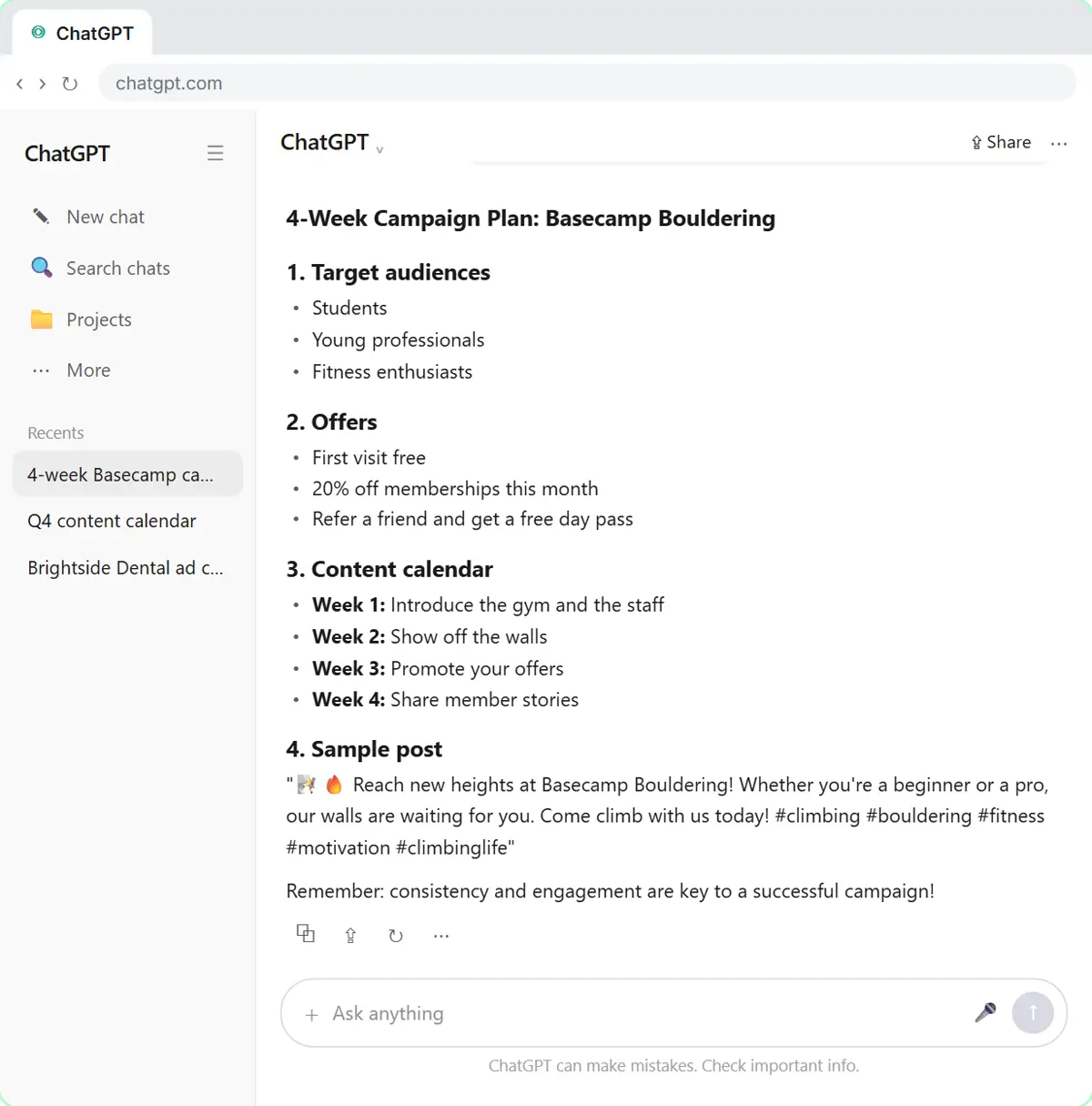
- Start a new chat. Read the plan: three vague audiences, offers any gym could run (including a free first visit nobody approved), one line per week, one sample post full of emoji. Then click New chat in the sidebar.
It touched everything, but nothing goes deep. Three vague audiences, offers any gym could run, including a free first visit the owner never approved, one line per week, and a post full of emoji. When you ask for everything at once, you can't check or steer any single part. So let's break it into steps.
- Paste step 1. Paste in the step 1. Same client brief, then only step 1: three audiences, and Don't write the plan yet.
A prompt chain is a series of small prompts, where each answer feeds the next one. Step one gives the same client brief, but asks for one thing only: three audiences. The last line, don't write the plan yet, keeps ChatGPT from jumping ahead.
I run social media at our agency for a client, Basecamp Bouldering, an indoor climbing gym near a university and a tech office park. They're open 6 am to 10 pm on weekdays and 9 am to 8 pm on weekends. Weekday mornings (6 to 11 am) are quiet. The client posts on Instagram and TikTok only, the budget is $500 for the month, and the owner approves every offer before it goes out.

We'll build the campaign in steps. Step 1 only: give me 3 audiences the gym could win more of. For each one: who they are, when they'd come in, and what they care about most. Keep it short. Don't write the plan yet.
- Send it. Click the send arrow.
3. Step 2: offers
- Click the message box. Read the three audiences. Number 2, remote and hybrid tech workers, fits the quiet weekday mornings. Click the message box to keep going in the same chat.
Now each audience says when they'd come in and what they care about. The remote and hybrid workers stand out, because their free time matches the quiet mornings. You don't need to repeat anything. In the same chat, ChatGPT can see its earlier answers.
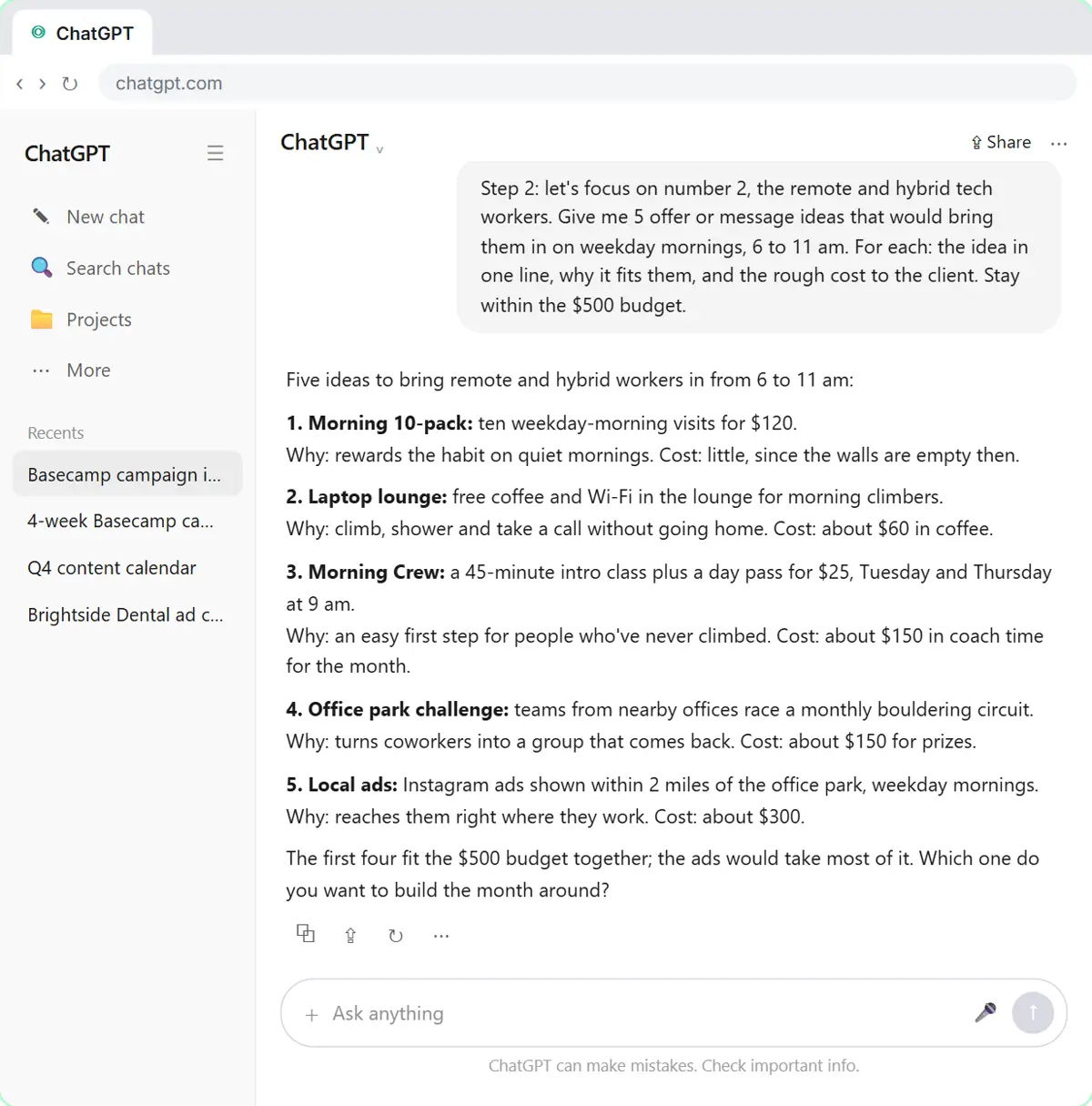
- Paste step 2. Paste in the step 2. It refers to "number 2" from the last answer and asks for 5 offer ideas, each with why it fits and the rough cost to the client.
Step two points back at the last answer: number two, the remote and hybrid workers. It asks for five offer ideas for weekday mornings, each with why it fits and what it costs the client.
Step 2: let's focus on number 2, the remote and hybrid tech workers. Give me 5 offer or message ideas that would bring them in on weekday mornings, 6 to 11 am. For each: the idea in one line, why it fits them, and the rough cost to the client. Stay within the $500 budget.
- Send it. Click the send arrow.
4. Step 3: calendar
- Click the message box. Read the five ideas and their costs. Marcus picks idea 3, Morning Crew, to build the month around. Click the message box.
Five concrete ideas, each with a cost. This is where you decide, not ChatGPT. Marcus picks number three, Morning Crew: an intro class and a day pass for twenty-five dollars. It still needs the owner's OK, but it fits the brief.
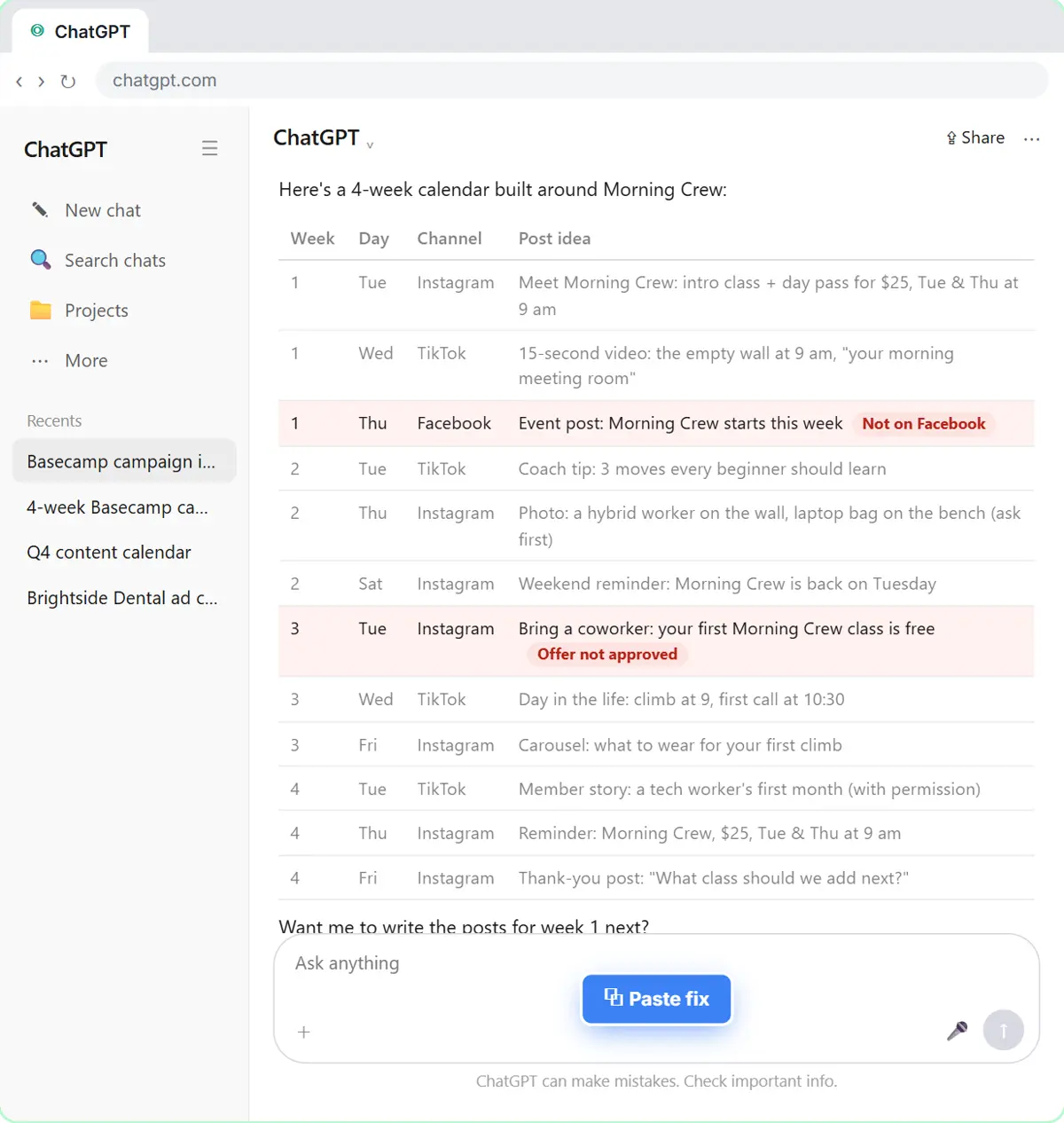
- Paste step 3. Paste in the step 3. It pastes the chosen idea in quotes, then asks for a 4-week calendar table with the columns Week, Day, Channel, Post idea.
This time, paste the idea you picked right into the prompt, word for word. Then there's no doubt which one you mean. Ask for a table and name the columns you want.
Step 3: go with this one:
"Morning Crew: a 45-minute intro class plus a day pass for $25, Tuesday and Thursday at 9 am."

Turn it into a 4-week calendar as a table with these columns: Week, Day, Channel, Post idea. Three posts a week.
- Send it. Click the send arrow.
5. Fix one thing
- Check the table. Read the table, then click it. The practice copy marks the two rows that break the client's rules. Real ChatGPT won't mark them, and your table may break different rules, so check every row against the brief.
Before you build on this, check it. That's the big win of going step by step.
- Paste the fix. Paste in the fix. It names the two problems and ends with Keep everything else the same.
Two rows are wrong. There's a Facebook post, but the client only uses Instagram and TikTok. And there's a free class the owner never approved. Say exactly what to change, and add: keep everything else the same.
Two fixes. The client doesn't use Facebook, so make that post Instagram. And the owner hasn't approved a free class, so change the week 3 post to the $25 Morning Crew offer. Keep everything else the same.
- Send it. Click the send arrow.
6. Step 4: posts
- Click the message box. Only the two flagged rows changed (shaded green in the practice copy). Click the message box for the last step.
Only those two rows changed, and the rest of the plan stayed put. Now for the last step: the actual posts.
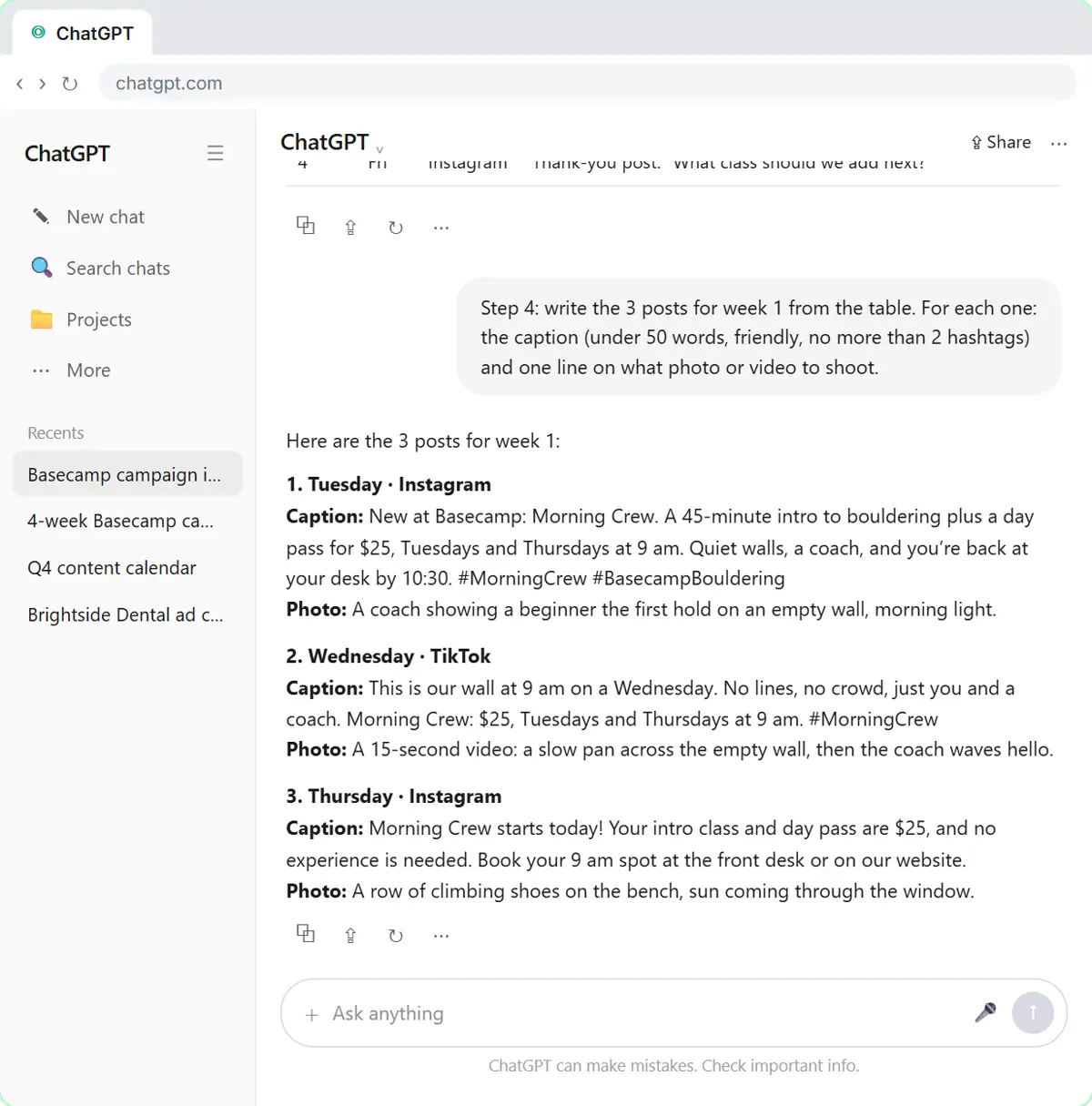
- Paste step 4. Paste in the step 4. It asks for week 1's three posts from the table: a caption under 50 words, at most 2 hashtags, and what photo to take.
Step four asks for week one's posts from the table, with a word limit, a hashtag limit, and a note on what photo to take.
Step 4: write the 3 posts for week 1 from the table. For each one: the caption (under 50 words, friendly, no more than 2 hashtags) and one line on what photo or video to shoot.
- Send it. Click the send arrow.
- Copy the posts. Read the three posts. Check details like class times and what the $25 includes before they go to the client. Then click the Copy icon under the answer.
Compare these with the emoji post from the giant prompt. These are about one real offer, for one audience, on the right channels. Check the details, like the class times and what the twenty-five dollars includes.
7. Save the chain
- Click the message box. The posts are copied. Now click the message box to turn this chain into a checklist you can reuse.
The posts are copied, ready to send to the client for approval. One more thing: save this chain so you can run it again for the next client.
- Ask for a checklist. Paste in the request. It asks for the steps you just did as a reusable checklist with blanks in [BRACKETS].
Ask ChatGPT to turn the steps you just did into a checklist with blanks.
- Send it. Click the send arrow.
- Copy the checklist. Read the checklist: context first, one job per step, check and fix, then the posts. Click the Copy icon under it.
There's your prompt chain: give the context first, ask for one job per step, check each answer, fix what's wrong, then build on it.
Screenshots
Frequently asked questions
- What is prompt chaining?
- Breaking a big job into a series of small prompts, where each answer feeds the next. You check each answer before building on it, instead of asking for everything at once.
- Can ChatGPT write a whole campaign plan for a client?
- It can write one in a single prompt, but the result is usually thin and can break the client's rules. Building it in steps (audiences, offers, calendar, posts) gives you a plan you can check and defend.
- How do I fix one part of ChatGPT's answer without it rewriting everything?
- Name exactly what to change and end with "Keep everything else the same." In the lesson, only the two rows that broke the brief change.
- Should the steps be in one chat?
- Yes. In one chat, ChatGPT can see its earlier answers. If you start a new chat, paste in the answer you're building on.
- Is this lesson free?
- Yes. Stepthrough is completely free and the practice copy needs no accounts.
More in AI Automation for Consulting & Agencies
All 4 modules in AI Automation for Consulting & Agencies
More ChatGPT tutorials
 Prompt Writing 101: Role, Context, Task, Format
Ask ChatGPT for the same customer email twice, once vaguely and once with a four-part prompt, and see exactly why structure gets a better answer.
Free · Live ~8 min
 Get Your Business Recommended by ChatGPT
Ask ChatGPT who it recommends in your town, see which pages it trusts, then use it to write an FAQ page and Business Profile copy that answer real customer questions.
Free · Live ~10 min
 Summarize a Meeting Transcript with ChatGPT
Paste a long meeting transcript into ChatGPT and get the decisions, an action items table with owners and due dates, and a follow-up email ready to send.
Free · Live ~9 min
 Reply Faster: Turn a Messy Customer Email Thread into a Clear, Friendly Reply
Turn a messy customer email thread into a clear, friendly reply: give ChatGPT the thread and your facts, check every promise, fix the tone, and send it from Gmail.
Free · Live ~9 min
 ChatGPT Projects: Keep Your Brand Voice, Files and Instructions in One Place
Set up a ChatGPT Project with your brand voice instructions, your price list and your style guide, so every new chat already knows your business.
Free · Live ~9 min
 Analyze a Spreadsheet with ChatGPT: Upload a CSV, Get a Chart and Three Takeaways
Upload a CSV of sales to ChatGPT, have it check the data first, ask your questions, get a chart you can download, and finish with the three takeaways that matter.
Free · Live ~10 min
Terms in this lesson
Plain-English definitions, each with an example from a free lesson.