Updated . Built against the tool’s current screens and checked step by step. How we check this lesson
The pitch that wins is usually the one that shows the prospect something about their own market they hadn't seen. Getting there means checking every competitor's website, which takes an afternoon you don't have. In this free, interactive lesson you use Claude's Research mode to scan a prospect's competitors with a source for every fact, read the cited report, open a source and catch what the report missed, and turn the findings into three talking points for the pitch.
At a glance
| Question | Answer |
|---|---|
| What you build | Turn on Research before a pitch, have Claude check what a prospect's competitors offer online, read the cited report, check a source and turn it into talking points for the meeting. |
| Tools | Claude |
| Time | About 7 minutes, 18 steps in 4 parts |
| Level | Beginner, no coding needed |
| Cost | Free |
| Ways to learn it | Practice it step by step |
The 4 parts, in short
- Turn on Research: Open the + menu, Choose Research, Click the message box, Ask for a competitor scan, and 1 more step.
- Watch it work: See what Claude is doing, Let it finish, Look at the sources.
- Read the cited report: Open the report, Check a citation, Open the source, Spot the date, and 1 more step.
- Ask a follow-up: Turn Research off, Click the reply box, Ask a follow-up, Send it, and 1 more step.
Start here first: Claude Research: Get a Cited Competitor Price Scan, Then Check It. This Consulting & Agencies version follows the same build with its own example business, Lantern Street Marketing.
The example: a marketing agency pitching a physical therapy clinic
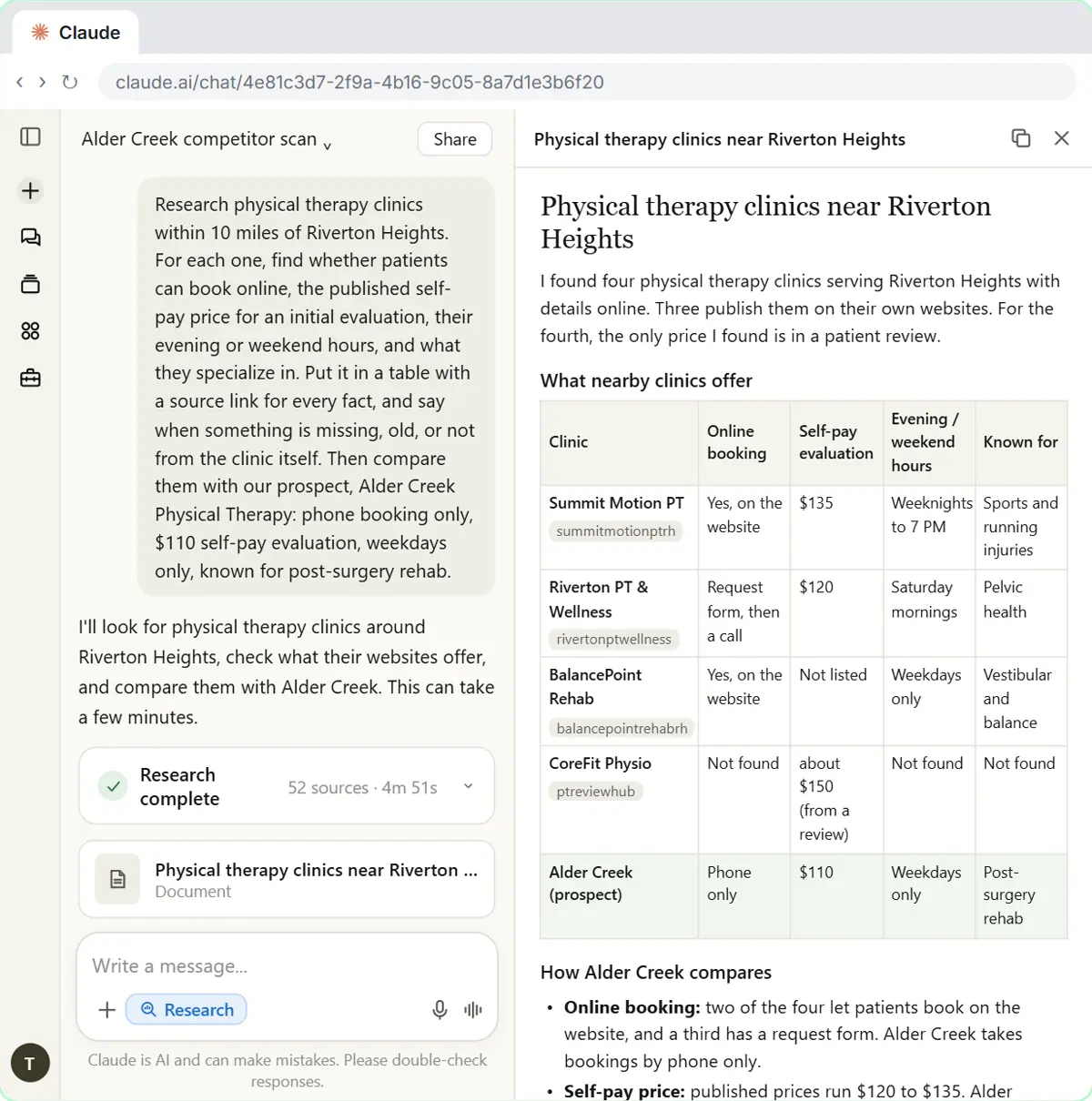
Tessa Morgan works at Lantern Street Marketing, a made-up small agency. Next week she's pitching Alder Creek Physical Therapy, a made-up clinic in the made-up town of Riverton Heights. She knows Alder Creek's side: bookings by phone only, a $110 self-pay evaluation, weekday hours, and a reputation for post-surgery rehab. What she needs is the other side: what the nearby clinics offer online.
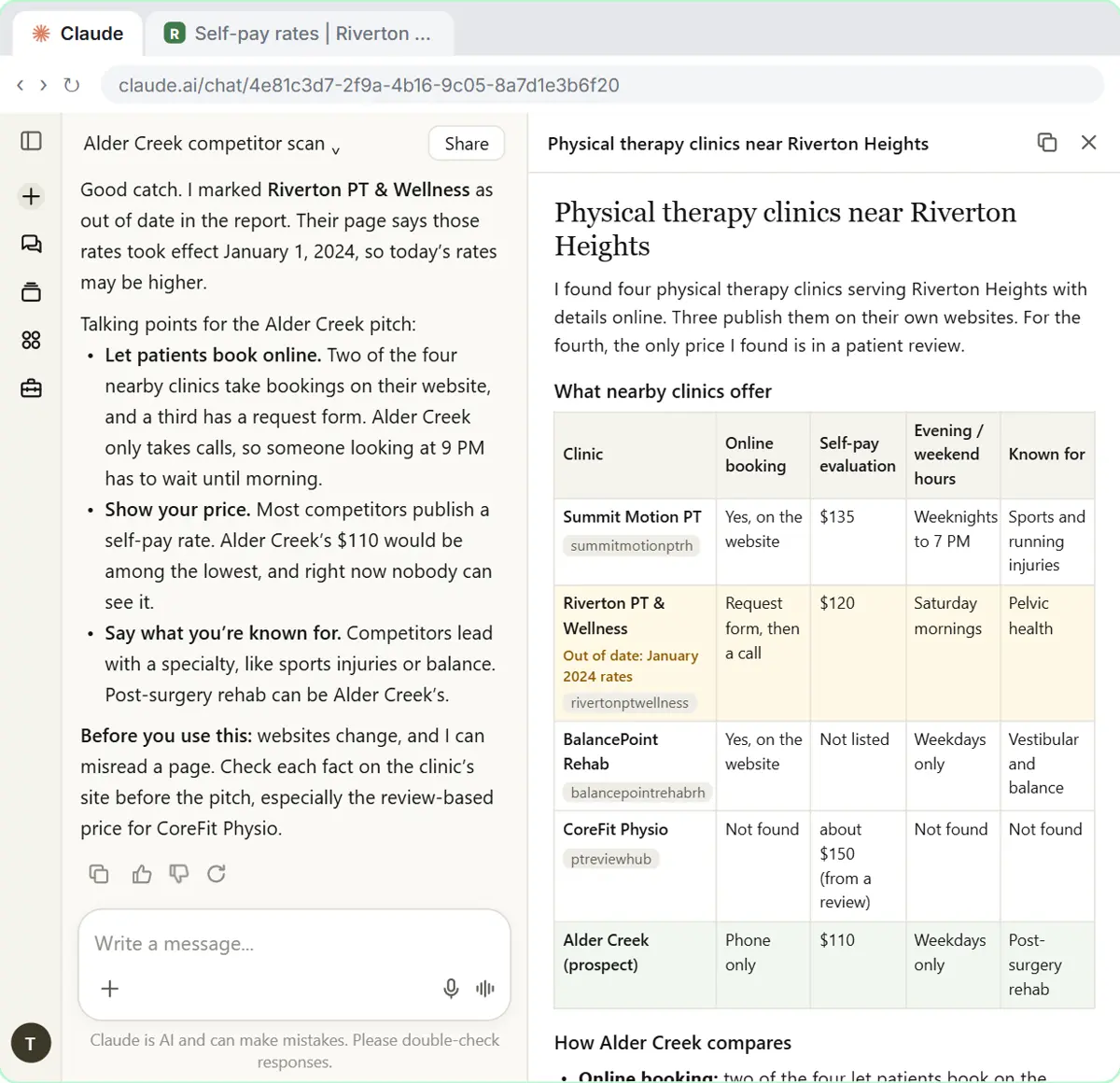
Research comes back with four clinics. Two take bookings on their website and a third has a request form. Published self-pay prices run $120 to $135. One clinic is open weeknights until 7 PM and another on Saturday mornings. For the fourth clinic, the only price is a patient's review on a directory site, and the report says so.
Who this lesson is for
Agency owners, account managers, strategists, freelance marketers and consultants who prepare for pitches, audits or strategy sessions. The same method works for any prospect: dental practices, law firms, contractors, restaurants. You don't need a Claude account to practice here.
It is the third module in the AI Automation for Consulting & Agencies block.
Why the citation check matters in a pitch
Putting a competitor's price or feature in front of a prospect is a claim with your agency's name on it. If the prospect knows the number is out of date, the whole pitch loses credibility. Research makes the claims checkable by attaching a source to every one, but it can't guarantee the source is current. In the lesson, Claude read the rate card correctly and still missed that it was from 2024.
The habit to build: for anything you'll show a client, open the source. It takes a minute per fact, and the report already did the finding for you.
Good to know before you do it for real
- Research is on paid Claude plans (Pro, Max, Team and Enterprise) and uses your usage limits faster than a normal chat. It can take several minutes.
- It needs web search. On Team and Enterprise plans, an Owner turns web search on in Organization settings > Capabilities.
- Research reads public web pages. Don't paste confidential details about the prospect, like their revenue or their own client list, into the request unless your agreements allow it.
- Turn Research off for quick follow-ups, or your next message starts a whole new research run.
- Frame findings as observations, not criticism: "two of your four neighbors let patients book online" lands better than "your website is behind".
Try it yourself, free
Reading the steps is a start. Doing them is how it sticks. The interactive module walks you through every click in a practice copy of Claude, checks each step, and never touches your real accounts.
Start “Research a Prospect's Market with Claude Research Before a Pitch (Consultants & Agencies)”Step by step: Research a Prospect's Market with Claude Research Before a Pitch (Consultants & Agencies)
All 18 steps of the interactive module, in order. In the module you watch each one, then do it yourself in a practice copy that checks your work.
1. Turn on Research
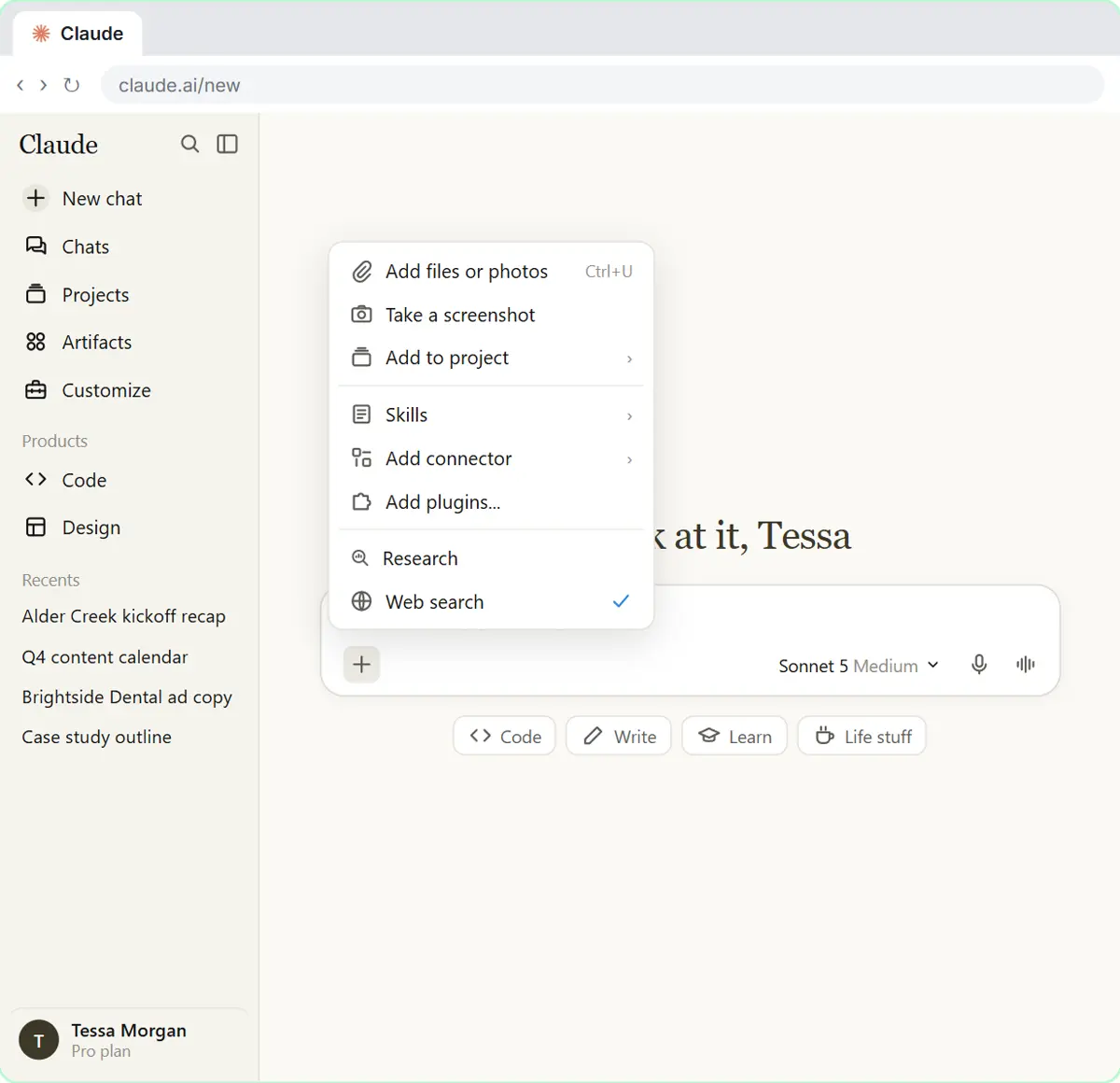
- Open the + menu. For a quick fact, Claude can just search the web. For a bigger question, like what a prospect’s competitors offer, use Research: Claude runs many searches, reads the pages, and hands you a report with a source for every claim. Research is on paid plans (Pro, Max, Team and Enterprise). Click the + at the bottom left of the message box.
Lantern Street Marketing is pitching a physical therapy clinic next week, and wants to know what the clinic's competitors already do online. That's a job for Research. Claude runs many searches, reads the pages, and gives you a report with a source for every claim. Research comes with paid plans.
- Choose Research. Click Research. A blue magnifier icon lights up next to the + while it’s on. Research searches the web by itself, so there’s no separate web search switch to turn on.
A blue magnifier lights up next to the plus, so you know it's on. Research searches the web by itself, so there's nothing else to switch on.
- Click the message box. Click the message box.
- Ask for a competitor scan. A good research request says where, what to find, how to lay it out, and what to compare. Asking for a source link for every fact, and to flag old or second-hand details, makes the report easy to check. Paste in the request.
A good research request says where to look, what to find, how to lay it out, and what to compare it with. Here you ask for a source link for every fact, and for a warning when something is missing, old, or not from the clinic itself.
Research physical therapy clinics within 10 miles of Riverton Heights. For each one, find whether patients can book online, the published self-pay price for an initial evaluation, their evening or weekend hours, and what they specialize in. Put it in a table with a source link for every fact, and say when something is missing, old, or not from the clinic itself. Then compare them with our prospect, Alder Creek Physical Therapy: phone booking only, $110 self-pay evaluation, weekdays only, known for post-surgery rehab.
- Send it. Click the send arrow.
2. Watch it work
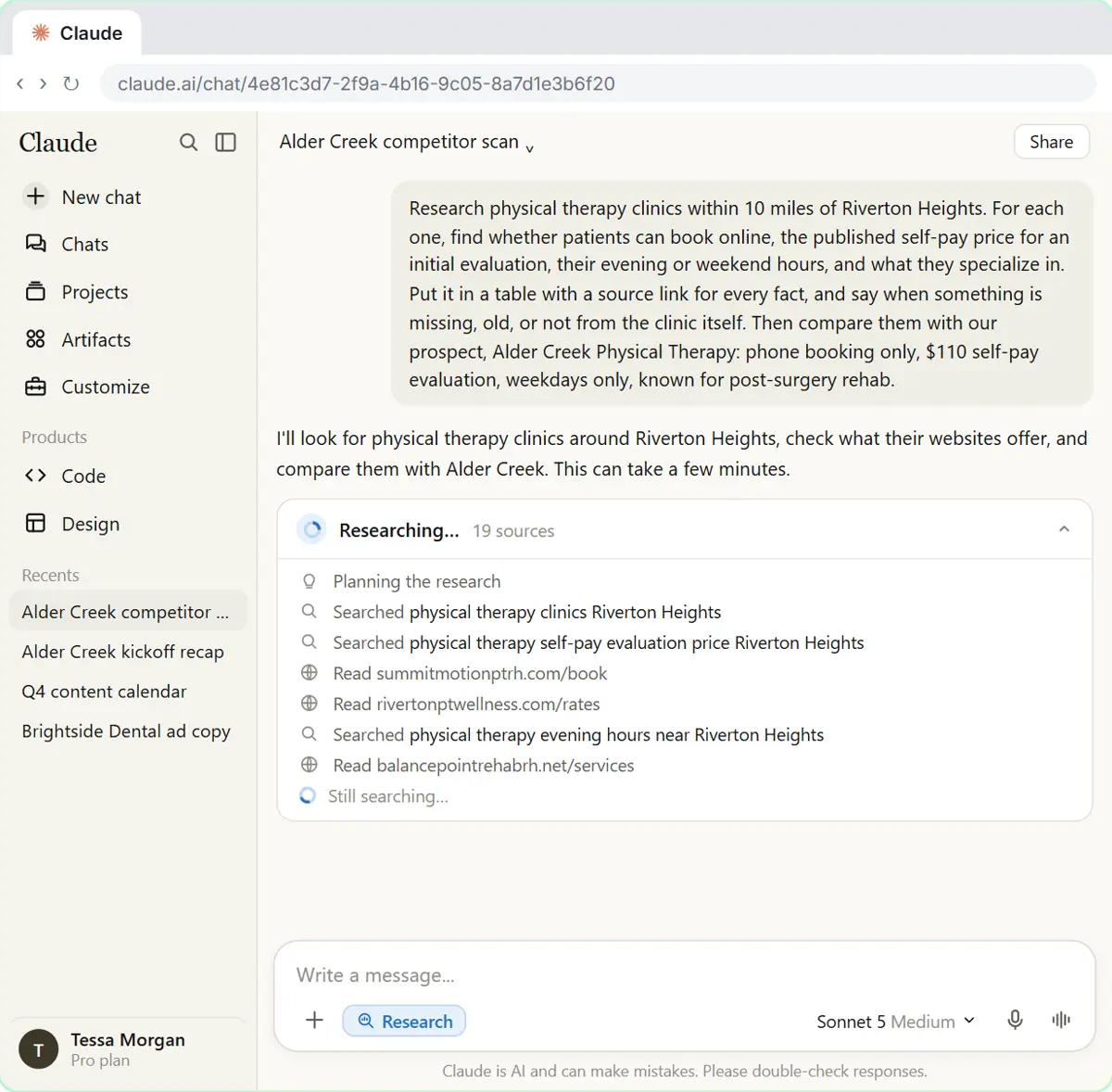
- See what Claude is doing. Claude plans first, then searches, reads pages and searches again based on what it finds. The count shows how many sources it has looked at so far. Click the progress card to see the steps.
Claude plans its approach first, then searches, reads pages, and searches again based on what it finds. The number shows how many sources it has checked so far.
- Let it finish. Research takes a few minutes, sometimes longer. You don’t have to watch: in the new Claude experience it keeps running even if you leave the page, and the result waits in the chat. Here it finishes right away. Close the steps (in Claude, the X at the top of the steps panel).
Research takes a few minutes, sometimes more. You don't have to sit and watch. Go do something else, and come back when it's done. In this practice copy, it finishes right away.
- Look at the sources. It’s done, with the number of sources and how long it took. Click Research complete to see the sources Claude used.
Research complete. You can see how many sources Claude used and how long it took.
3. Read the cited report
- Open the report. Claude put the findings in a report, with a short summary in the chat. Click the report to open it beside the chat. (In Claude it may already be open.)
Claude wrote the findings up as a report, with a short summary in the chat.
- Check a citation. Every fact has a citation, a small tag with the source. Read the table and the notes: the report already warns that one price comes from a review. Now check a source yourself. Click the rivertonptwellness citation.
Every fact has a citation: a small tag that shows where it came from. Notice the report already warns that one price comes from a patient review. Now check a source yourself.
- Open the source. The preview shows the page’s title and site. Click it to open the page in a new tab.
The preview shows the page title and the site it came from.
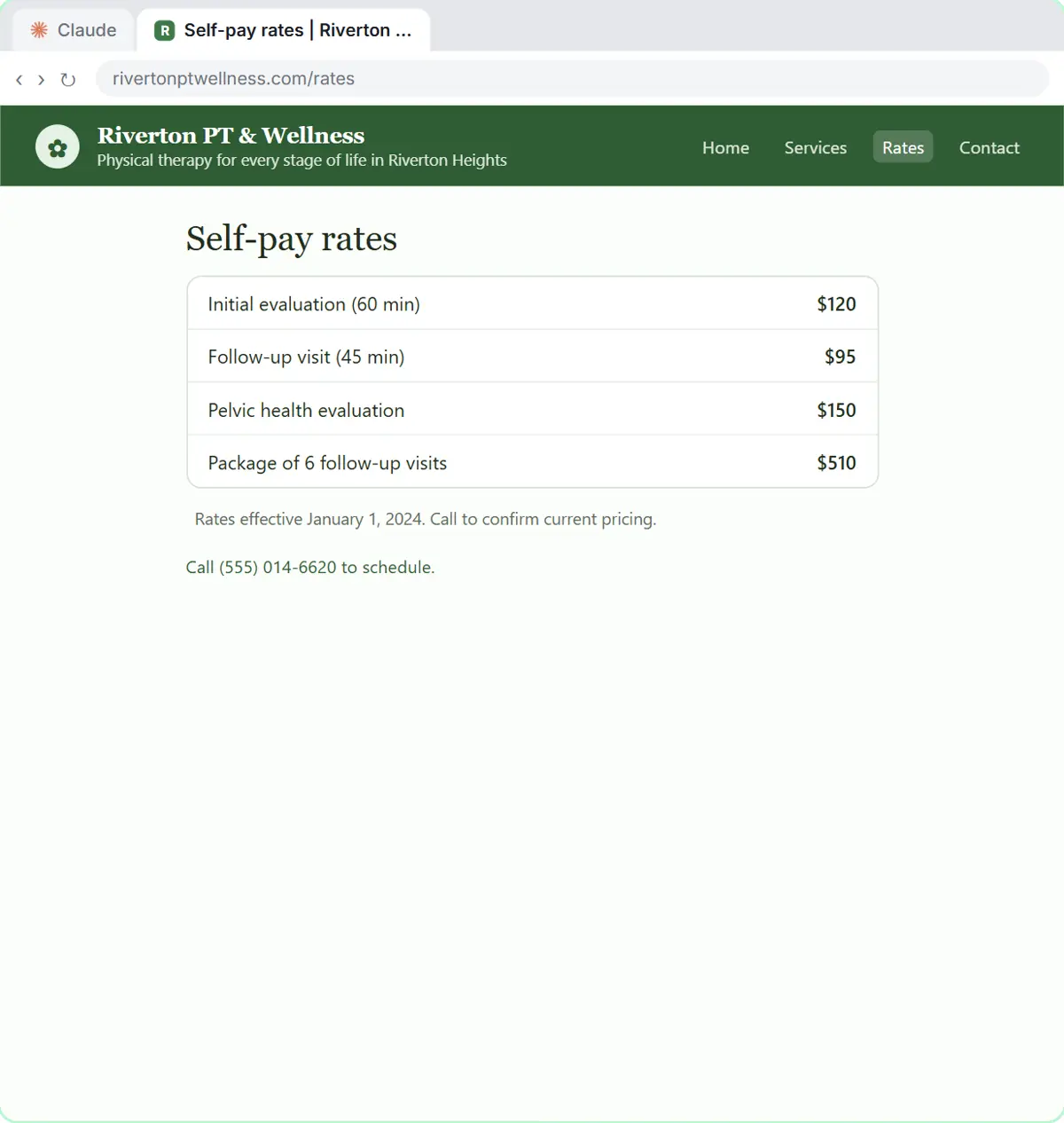
- Spot the date. The prices match the report, but look at the small print at the bottom. Click the line under the prices.
The prices match the report. But read the small print under them.
- Go back to Claude. These rates are from January 2024, and the report didn’t say so. That’s why you open the sources for anything you’ll put in front of a client. Click the Claude tab.
These rates are from January 2024, and the report didn't mention it. Claude read the page correctly, but missed the date. That's why you open the sources for anything you'll put in front of a client.
4. Ask a follow-up
- Turn Research off. For a quick follow-up you don’t want a whole new research run. Research usually switches itself off when the report is done; if the blue magnifier next to the + is still lit, click it to turn Research off.
You just need a quick follow-up, not a whole new research run. Research usually switches itself off when the report is done. If the blue magnifier next to the plus is still lit, click it to turn Research off.
- Click the reply box. Click the reply box.
- Ask a follow-up. Tell Claude what you found, and ask for something you can use in the pitch. Paste in the follow-up.
Tell Claude what you found, and ask for something you can use in the pitch: a few talking points about what the competitors do better online.
Riverton PT & Wellness' rates page says the prices are from January 2024, so mark that row as out of date. Then give me 3 short talking points for our pitch to Alder Creek about what their competitors do better online. Don't recommend a price change.
- Send it. Click the send arrow.
- Check, then copy. Claude marked the old row and wrote three talking points, and it reminds you to check the facts before you use them. Websites change, and pages can be misread, so check each clinic’s site before the pitch. Click the copy button under the reply.
Claude marked the old row in the report and wrote three talking points for the pitch. It also reminds you to check the facts before you rely on them. Websites change, and pages get misread, so check each clinic's site before you walk into the meeting.
Screenshots
Frequently asked questions
- What is Claude Research?
- A mode in Claude that runs many web searches, reads the pages and writes a report with citations. You turn it on from the plus menu under the message box, or by typing /deep-research in the new Claude experience.
- Can Claude research a prospect's competitors for a pitch?
- Yes. Say where to look, what to find, how to lay it out and what to compare it with, and ask for a source link for every fact. Then open the sources for anything you'll show the prospect.
- Are Claude's research reports always right?
- No. Pages change and can be misread. In the lesson, a clinic's rate card was from 2024 and the report didn't say so. Treat the report as a starting point and check the citations.
- Which Claude plans include Research?
- Paid plans: Pro, Max, Team and Enterprise. It uses usage limits faster than a normal chat.
- Is this lesson free?
- Yes. Stepthrough is completely free and the practice copy needs no accounts.
More in AI Automation for Consulting & Agencies
All 4 modules in AI Automation for Consulting & Agencies
More Claude tutorials
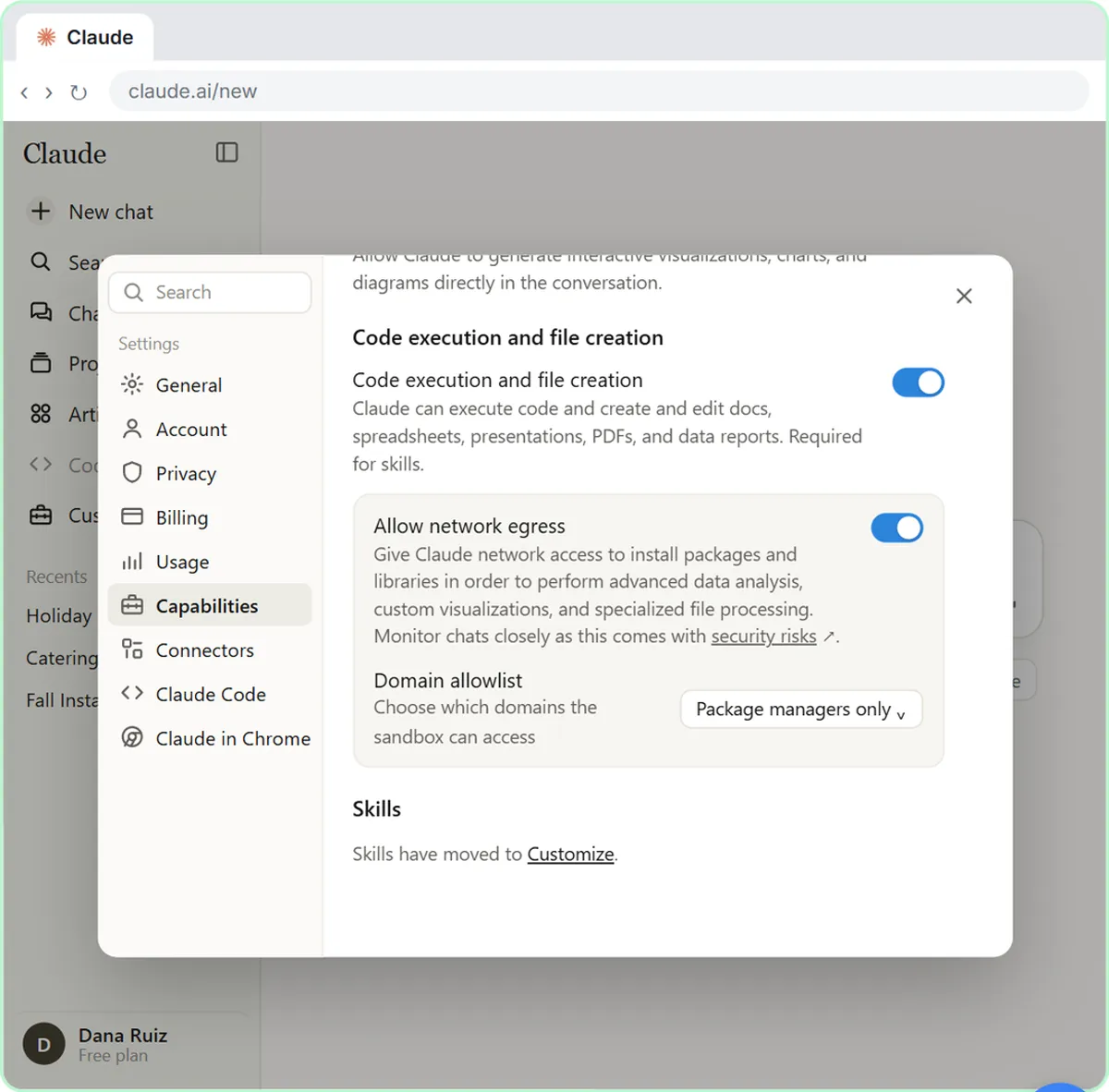 What Are Claude Skills? Turn One On and Watch It Work
Learn what a Claude skill is, switch on the setting skills need, turn on an example skill in Customize, and watch Claude use its Excel and Word skills on its own.
Free · Live ~7 min
◷Your First Chat with Claude: Models, Files and a Great First PromptPick a model, attach a customer's complaint email with the + menu, write a four-part prompt, read Claude's reply, ask a follow-up, then star and rename the chat.
Free · Live ~7 min
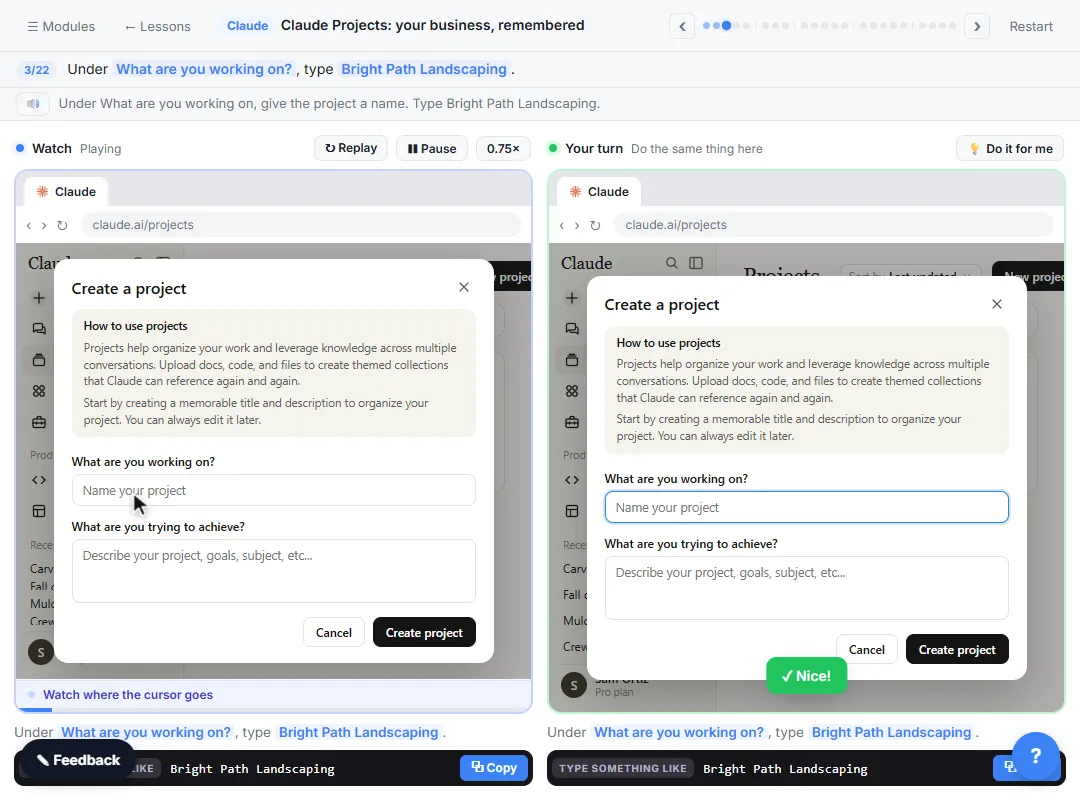 Claude Projects for Your Business: Instructions, Knowledge and Quotes
Create a project for your business, give it instructions for tone and policies, add your price sheet and warranty as project knowledge, and get a customer quote that…
Free · Live ~8 min
 Claude Artifacts: Build a Price Calculator You Can Try, Change and Share
Have Claude build an interactive lawn price calculator, try it in the artifact panel, ask for a change, and share it with a link.
Free · Live ~7 min
 Connect Claude to Google Drive, Gmail and Google Calendar
Connect Google Drive, Gmail and Google Calendar to Claude, then find your price sheet, summarize a customer's email thread and check your week, approving each tool as…
Free · Live ~8 min
 Check a Contract for Red Flags with Claude
Upload a vendor contract, get it in plain English, find the risky clauses with the exact words quoted, draft questions for the vendor, and save the review as a project…
Free · Live ~11 min
Terms in this lesson
Plain-English definitions, each with an example from a free lesson.