Safe AI email drafts: a cheat sheet for keeping a person in charge
A free one-page cheat sheet: let AI write email drafts, not sends. Give it facts and rules, keep private data out and check every promise.
Safe AI email drafts: a cheat sheet for keeping a person in charge
AI can write a good customer reply in seconds, and now and then a wrong one with total confidence. If it drafts instead of sends, you catch the mistake before the customer sees it.
Make it drafts-only (n8n Gmail Tool)
- Resource opens on Message, and the operation is send. Choose Draft. The operation switches to Create.
- Under Add option, set Thread ID to
{{ $json.threadId }}so the draft sits under the customer's email. - Add To Email set to
{{ $json.From }}, so you can just hit send after you read it. - Keep the email type on text. Plain text reads more like a person.
Give it facts and rules
Rules:
You cannot send email. You can only create drafts.
If you don't know something, say someone from the team will follow up. Never make up prices, dates or services.
From the Greenline system message. The rule helps, but choosing the Draft resource is what makes sending impossible.
Keep private data out
- Before you paste a thread into ChatGPT, leave out anything private, like a card number.
- Scan for ID numbers, birth dates, account and card numbers, and health details.
- The test: only the details this reply needs. Write a short facts list instead of pasting whole records.
Watch for text that gives orders
- Prompt injection: an email the AI reads can hide instructions, like "ignore your rules." The model can't always tell data from commands.
- Give an agent only the tools its job needs. Drafts, not sends.
- Wrap outside text in clear delimiters, like the
<email>tags in the lesson's prompt.
Before you click Send
- Read every draft for dates, prices and promises.
- Ask ChatGPT for a table of every promise and the fact behind it, and fix anything flagged.
- Review drafts daily. A pile of unread drafts helps no one.
- If the agent keeps handing off the same question, add the answer to its facts.
Remember: The AI writes the draft; a person reads it and clicks Send. Make that limit structural with a drafts-only tool, not just a line in the prompt.
Practice it free: AI Email Responder: Draft Gmail Replies Automatically with n8n at learn.ynteractive.com/modules/email-responder. This sheet: learn.ynteractive.com/content/cheat-sheets/ai-email-drafts-safety. Greenline Pest Control is a made-up business from the lesson. By Robert Breen, October 1, 2026.
Practice it in the free lesson
AI Email Responder: Draft Gmail Replies Automatically with n8n. Build an n8n agent that watches your Gmail, reads each new customer email, and writes a reply as a draft in the same thread, ready for you to check and send. You do every step yourself in a practice copy of n8n, it checks your work as you go, and “Do it for me” finishes any step you get stuck on. Free, and nothing touches your real accounts.
Start the free lessonLessons on this sheet
 AI Email Responder: Draft Gmail Replies Automatically with n8n
Build an n8n agent that watches your Gmail, reads each new customer email, and writes a reply as a draft in the same thread, ready for you to check and send.
Free · Live ~12 min
 Reply Faster: Turn a Messy Customer Email Thread into a Clear, Friendly Reply
Turn a messy customer email thread into a clear, friendly reply: give ChatGPT the thread and your facts, check every promise, fix the tone, and send it from Gmail.
Free · Live ~9 min
Related terms
Plain-English definitions, each with an example from a free lesson.
Related prompts
- Check reply promises prompt: A ChatGPT prompt that checks a draft before you send it: a table of every promise, the fact behind each, and safer wording for…
- AI agent system message prompt: Draft the system message for an n8n AI Agent: who it is, what it knows, its rules and how it writes, including a rule never to…
- Billing question reply prompt: A ChatGPT prompt for "why was I charged this?" emails: the charge, the correct amount, the reason, the fix as simple math, and…
- Daily priorities plan prompt: Paste your to-do list and fixed times and get a realistic plan for today: top three, time blocks, a buffer, and what to move to…
More cheat sheets
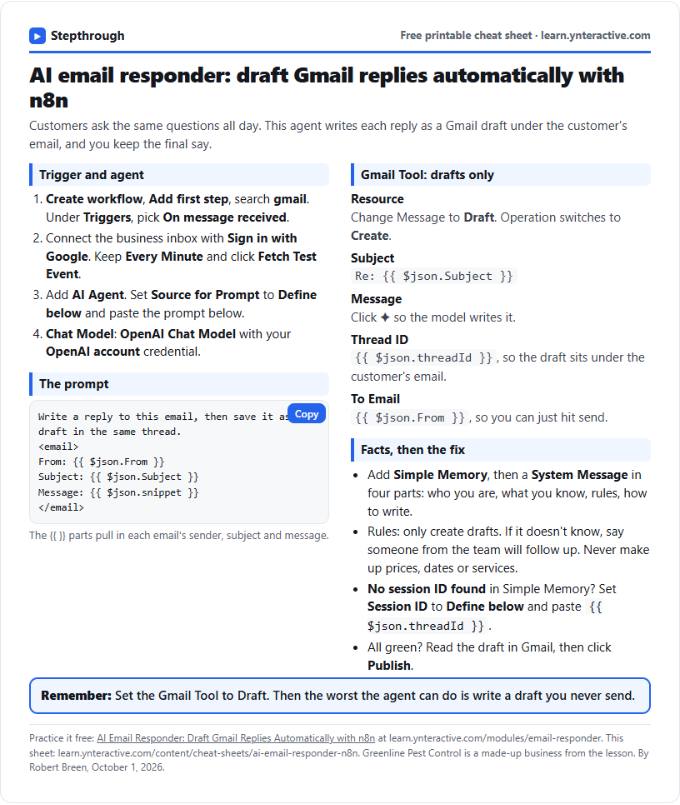 AI Email Responder in n8n Cheat Sheet
A free one-page cheat sheet: n8n watches Gmail, an AI agent reads each customer email and saves a reply as a draft in the same thread.
Lesson cheat sheet Free PDF
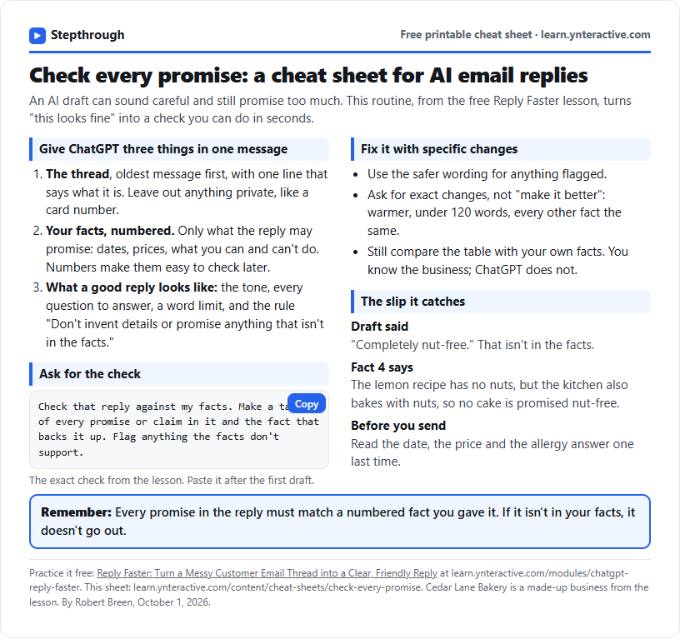 Check Every Promise in an AI Reply: Cheat Sheet
A free one-page cheat sheet: give ChatGPT the thread and your numbered facts, ask for a promise-by-promise table, fix what it flags, then send.
Topic cheat sheet Free PDF
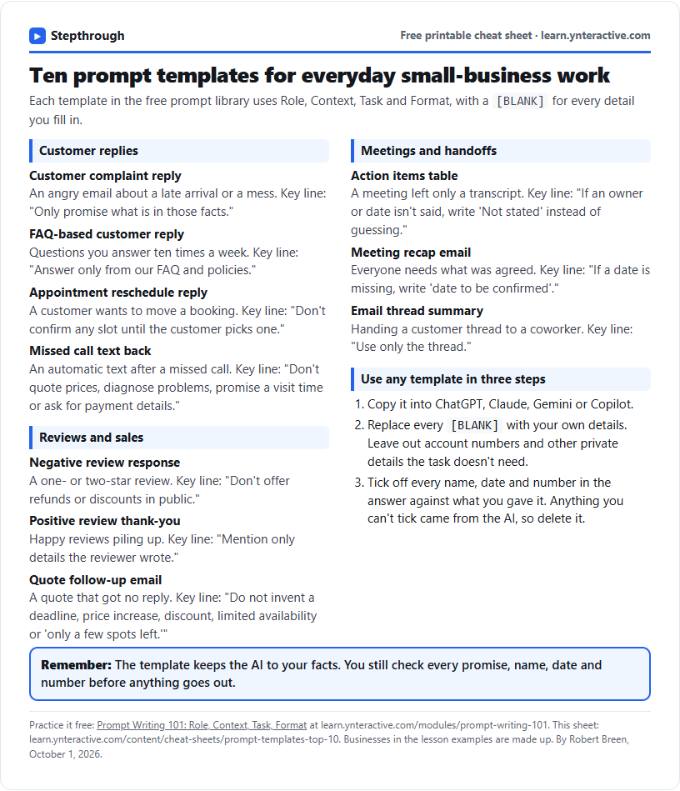 Top 10 Prompt Templates for Small Business: Cheat Sheet
A free one-page cheat sheet of ten copy-ready AI prompt templates: customer replies, reviews, quote follow-ups, meeting recaps and handoffs.
Topic cheat sheet Free PDF