Updated . Built against the tool’s current screens and checked step by step. How we check this lesson
The problem: a first buyer consultation covers budget, must-haves, deal-breakers and a deadline, and most agents walk out with half a page of notes. The listings that follow miss the home office or the commute, and the buyers start touring with someone who listened better. In this free, interactive lesson you hand the consultation transcript to ChatGPT with one clear request and get back a summary, the decisions, the next steps with owners and dates, the open questions, and buyer criteria for your CRM taken only from what the buyers said, with nothing in writing about which neighborhoods are "safe" or who lives there. Then you turn it into a follow-up the buyers get the same day.
At a glance
| Question | Answer |
|---|---|
| What you build | Turn a buyer consultation transcript into the buyers' criteria, the next steps with owners and dates, notes for your CRM and a same-day follow-up, with nothing in writing that steers them toward or away from a neighborhood. |
| Tools | ChatGPT |
| Time | About 7 minutes, 17 steps in 4 parts |
| Level | Beginner, no coding needed |
| Cost | Free |
| Ways to learn it | Practice it step by step |
The 4 parts, in short
- Copy the transcript: Open the Edit menu, Select all, Open the Edit menu again, Copy it.
- Ask for a summary: Switch to ChatGPT, Click the message box, Paste your request, Paste the transcript, and 1 more step.
- Check the details: Check the next steps, Click the message box, Fill in the gaps, Send it.
- Write the follow-up: Click the message box, Ask for the follow-up email, Send it, Copy the email.
Start here first: Summarize a Meeting Transcript with ChatGPT. This Real Estate version follows the same build with its own example business, Kingsbury Realty.
Part of: AI for Real Estate (step 3 of 11). Next up: Stop Losing Context: When to Start a New Chat vs Keep Going using ChatGPT
The example: a relocating couple with a December deadline
You're Marisol, a buyer's agent at Kingsbury Realty, a made-up brokerage. Sam and Leah are moving for Leah's new job at a downtown hospital, and their lease ends on December 15, so they need to close before then. They're pre-approved up to $485,000 but would rather stay under $460,000.
They need three bedrooms with one as an office, a commute under 30 minutes because Leah is on call some nights, and a move-in-ready house; a garage is a nice-to-have, and Sam isn't sure about a townhouse with an HOA. Near the end, Sam asks which neighborhoods are safe and have "families like us." Marisol says she can't steer them toward or away from neighborhoods and sends links to the public crime maps and school information instead. They agree to sign a buyer agreement before touring, see three homes on Saturday, and send the pre-approval letter.
What you need before you start
- A ChatGPT account. Free works; if your brokerage has a business plan, use that for real client details.
- A transcript or typed notes of the consultation. Google Meet, Zoom and Teams can save one on some plans, and phone call recorders often can too. Ask the buyers before you record.
- The fields your CRM or listing search uses (price range, must-haves, timeline, financing), so the criteria part matches them.
- Nothing at all for the practice copy in this lesson: it needs no account.
Why the notes say nothing about neighborhoods
Buyers ask "is it safe?" and "are there families like us?" all the time, and the friendly answer is an opinion. Under the federal Fair Housing Act, guiding buyers toward or away from areas based on who lives there is steering, and written notes and emails are exactly where it shows up later. AI makes this easier to get wrong: ask for "neighborhood notes" and it will happily describe areas. So the request in this lesson asks only for the buyers' own criteria (price, rooms, commute, timeline, financing) and tells ChatGPT not to describe any neighborhood. When buyers want to judge safety or schools, the follow-up points them to public data and lets them decide.
The same "only what was said" rule covers money. Sam asks whether a signing bonus would let them go above $485,000. That's the lender's question, so it's listed as open and the email points him to his loan officer instead of guessing.
Who this lesson is for
Buyer's agents, team leads, showing assistants and new agents who run buyer consultations, in person, on video or by phone. The same request works for a listing consultation if you change part 5 to the seller's goals, timeline and pricing expectations. No AI experience needed.
Ways to use it after the lesson
- Save the five-part request and use it after every first consultation, then paste the criteria straight into your listing search alerts.
- After each round of tours, paste your notes and ask what changed in the criteria, so the next listings match.
- Ask for a one-paragraph handoff for your showing assistant from the same chat.
- Keep the "don't describe any neighborhood" line in every request you use with clients.
How the interactive lesson works
Each step plays first in the Watch panel with a short voice-over, then you do it yourself in Your turn on a practice copy of Google Docs and ChatGPT. Nothing touches a real account and no email is sent. The brokerage, buyers, lender and prices are made up.
Try it yourself, free
Reading the steps is a start. Doing them is how it sticks. The interactive module walks you through every click in a practice copy of ChatGPT, checks each step, and never touches your real accounts.
Start “Turn Every Buyer Consultation into a Written Search Plan using ChatGPT”Step by step: Turn Every Buyer Consultation into a Written Search Plan using ChatGPT
All 17 steps of the interactive module, in order. In the module you watch each one, then do it yourself in a practice copy that checks your work.
1. Copy the transcript
- Open the Edit menu. This is the transcript Google Meet saved after your buyer consultation with Sam and Leah Varga. Click Edit in the menu bar.
Here's the transcript of a buyer consultation. You're Marisol, a buyer's agent at Kingsbury Realty, and you just met Sam and Leah, who are moving for a new job and have to close before their lease ends in December. Let's copy the whole thing.
- Select all. Click Select all.
On a keyboard, that's Control A.
- Open the Edit menu again. The whole transcript is highlighted. Click Edit again.
The whole transcript is highlighted.
- Copy it. Click Copy.
That's Control C. The transcript is now on your clipboard.
2. Ask for a summary
- Switch to ChatGPT. Click the ChatGPT tab at the top.
Now switch over to ChatGPT.
- Click the message box. Click the message box.
Before you paste the transcript, tell ChatGPT what you want out of it. Otherwise you'll just get a vague recap.
- Paste your request. Paste in the request. It asks for five things: a short summary, the decisions, a next steps table with owner and due date, open questions, and the buyer criteria for your CRM.
Here's the request. It asks for five things: a three sentence summary, the decisions, a table of next steps with an owner and a due date, any open questions, and the buyer criteria for your CRM: price range, must haves, nice to haves, timeline and financing. The last lines matter most: only use what the buyers said, and don't describe any neighborhood or the people who live there. That keeps your notes useful and fair.
You're my assistant. I'm Marisol, a buyer's agent at Kingsbury Realty. Below is the transcript of tonight's buyer consultation with Sam and Leah Varga. Give me:
1. A three-sentence summary
2. The decisions we made
3. The next steps as a table: task, owner, due date
4. Open questions
5. Buyer criteria for the CRM: price range, must-haves, nice-to-haves, timeline, financing
Only use what the buyers said. Don't describe any neighborhood or the people who live there. If an owner or date isn't said, write "Not stated".
- Paste the transcript. Now paste the transcript under the request. Paste in the transcript. (In real ChatGPT, press Shift+Enter for a new line first, then Ctrl+V. Plain Enter would send the message.)
In real ChatGPT, press Shift and Enter to start a new line first, because Enter on its own sends the message. Then Control V to paste.
00:00:03
Marisol Vega: Thanks for making time tonight. Tell me about the move first, and then what the house has to have.

00:00:11
Leah Varga: I start at the hospital downtown in November, and our lease ends December fifteenth. So we really need to close before then.

00:00:20
Sam Varga: We're pre-approved with Crestline Home Loans up to four eighty-five. Um, I'd rather stay under four sixty if we can.

00:00:29
Marisol Vega: Good to know. What does the house need?

00:00:33
Leah Varga: Three bedrooms, and one of them has to work as an office. I'm on call some nights, so I need a commute under thirty minutes.

00:00:42
Sam Varga: A garage would be nice. Not a deal breaker. And no big renovation projects, we just don't have time.

00:00:50
Marisol Vega: So move-in ready, three bedrooms with an office, under thirty minutes to downtown. Townhouses too, or only single-family?

00:00:58
Leah Varga: I'd look at townhouses. Sam's not sure about an HOA.

00:01:03
Sam Varga: Yeah, let's talk about that later. Which neighborhoods are safe, though? We'd like somewhere with families like us.

00:01:10
Marisol Vega: I can't steer you toward or away from neighborhoods, but I'll send you links to the public crime maps and school information so you can decide for yourselves. Today.

00:01:20
Sam Varga: Fair enough.

00:01:22
Marisol Vega: Before we tour, we'll sign a buyer agreement. It spells out what I do for you and how I'm paid. I'll send it today.

00:01:30
Leah Varga: Okay. Can we see a few houses this Saturday?

00:01:34
Marisol Vega: Yes. I'll send listings that match, you pick your favorites, and I'll book three tours by Thursday.

00:01:42
Marisol Vega: And Sam, could you send me your pre-approval letter? Sellers will want to see it with any offer.

00:01:48
Sam Varga: Sure. One question: if Leah gets a signing bonus, could we go higher than four eighty-five?

00:01:54
Marisol Vega: That's a question for Crestline, not me. I'd call your loan officer before we look above four eighty-five.
- Send it. Click Send.
Request on top, transcript below.
3. Check the details
- Check the next steps. Read the summary and the buyer criteria. Then click the next steps table: two due dates say Not stated.
A whole consultation, boiled down to a summary, three decisions, five next steps, two open questions, and buyer criteria you can paste straight into your CRM and your listing search. Notice the criteria say nothing about any neighborhood, only what Sam and Leah asked for. Now check the next steps table. Two due dates say not stated: nobody said when the listings or the pre-approval letter would come.
- Click the message box. You know the missing dates. Click the message box to tell ChatGPT.
You were in the meeting, so you can fill in the gaps.
- Fill in the gaps. Type the missing dates (or Paste in the dates): I will send the listings by tomorrow morning, and Sam will send the pre-approval letter by Friday.
Tell it the missing dates: you'll send the listings by tomorrow morning, and Sam will send the pre-approval letter by Friday.
- Send it. Click Send.
4. Write the follow-up
- Click the message box. Every action item has an owner and a date now. Click the message box.
Now every task has an owner and a date. Because ChatGPT still has the whole meeting in this chat, you don't need to paste anything again. Just ask for the next thing.
- Ask for the follow-up email. Paste in the request to ask for a short follow-up email to the buyers, with no description of any neighborhood or school and nothing about how much they can borrow.
Now the follow-up to Sam and Leah. Ask for a short, warm email with what you heard and the next steps. No description of any neighborhood or school, and nothing about how much they can borrow. That's the lender's call.
Now write a short follow-up email from me to Sam and Leah with what I heard and the next steps. Warm and plain, under 150 words. Don't describe any neighborhood or school, and don't say anything about how much they can borrow.
- Send it. Click Send.
- Copy the email. Read the email. Then click the Copy button. (In real ChatGPT the email comes in its own card, with the copy icon at its top right.)
There's your follow-up: what the buyers asked for, who does what by when, and a plain pointer to their loan officer. Notice there's no word about which neighborhoods are safe or who lives where, just the links to public data. Read it once, change anything that doesn't sound like you, then click copy. In real ChatGPT the email shows up in its own card, and the copy icon is at the top right of that card.
Frequently asked questions
- Can ChatGPT take notes from a buyer consultation?
- Yes. Paste the transcript or your typed notes under a request for a summary, decisions, next steps with owners and dates, open questions and buyer criteria, then ask for the follow-up email in the same chat. Check names, prices and dates before you send anything.
- What should buyer criteria in my CRM include?
- Price range, must-haves, nice-to-haves, timeline and financing are a good start. In the lesson ChatGPT fills them in only from what the buyers said, so a guess never becomes a search filter.
- How do I answer "is this a safe neighborhood?" in writing?
- Don't give an opinion about the area or who lives there. Point buyers to public sources, such as local crime maps and school information, and let them decide. The lesson's request also tells ChatGPT not to describe neighborhoods.
- Is it OK to paste client details into ChatGPT?
- Follow your brokerage's rules. Use a business plan if you have one, and leave out loan numbers, income figures and anything from the pre-approval letter.
- Is it free?
- Yes. Stepthrough is free and the practice copy needs no account. To do it for real you need your own ChatGPT account.
More in AI Automation for Real Estate
All 3 modules in AI Automation for Real Estate
More ChatGPT tutorials
 Get On-Brand Social Posts Every Time using a ChatGPT Custom GPT
See why generic prompts give generic results, then build a Custom GPT loaded with your brand voice and watch the output transform.
Free · Live ~8 min Beginner
 Prompt Writing 101: Role, Context, Task, Format
Ask ChatGPT for the same customer email twice, once vaguely and once with a four-part prompt, and see exactly why structure gets a better answer.
Free · Live ~8 min Beginner
◷Send a Same-Day Follow-up After Every Discovery Call using ChatGPTTurn a discovery call transcript into the decisions, the next steps with owners and dates, deal notes for your CRM, and a follow-up email the prospect gets the same…
Free · Live ~7 min Beginner
◷Hold Your Price When a Prospect Asks for a Discount using ChatGPTA prospect wants 30% off and a free month to sign this week. Give ChatGPT the thread and your pricing rules, catch the discount you can't approve, and send a reply that…
Free · Live ~9 min Beginner
 Get Your Business Recommended by ChatGPT
Ask ChatGPT who it recommends in your town, see which pages it trusts, then use it to write an FAQ page and Business Profile copy that answer real customer questions.
Free · Live ~10 min Intermediate
◷Run a Weekly Ops Review Where Every Task Has an Owner using ChatGPTTurn a weekly operations and vendor review into the decisions, the next steps with owners and dates, the risks to watch and a team recap, without turning a vendor's…
Free · Live ~7 min Beginner
Visual guides
This lesson’s key ideas as quick visual guides: swipe through the slides, or read the same guide as text.
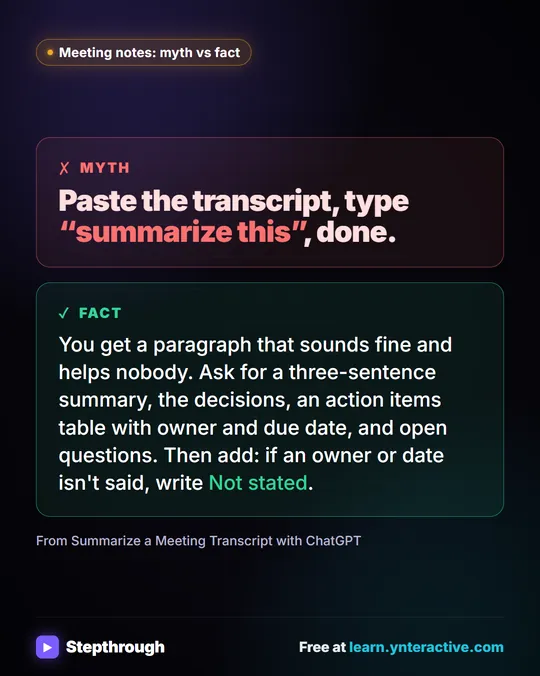 Meeting notes myth: “summarize this” is all ChatGPT needs
Myth: paste a transcript, type “summarize this”, done. Fact: ask for the decisions, an action items table with owners and dates, and open questions.
Myth vs fact One graphic
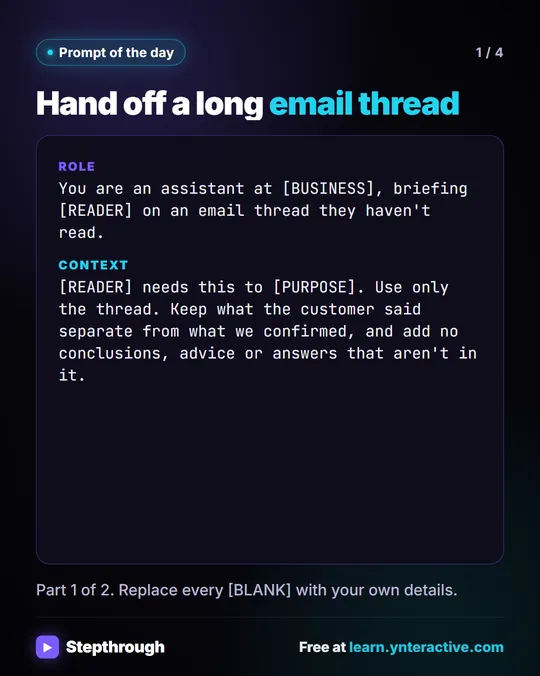 Prompt of the Day: Summarize an Email Thread for a Handoff
A visual prompt card: turn a long email thread into a short handoff with the situation, what was promised and each question marked Answered or Open.
Prompt to copy 4 slides
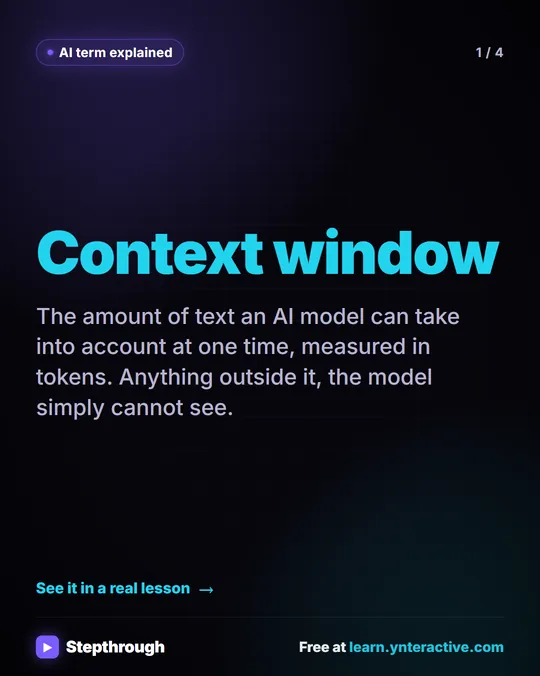 What Is a Context Window? A Visual Guide
A visual guide to the context window: how much text an AI model can see at once, shown with a real ChatGPT meeting summary lesson.
AI term explained 4 slides
Free cheat sheets
Print it or save the PDF: the key steps and checks from this lesson on one page, free.
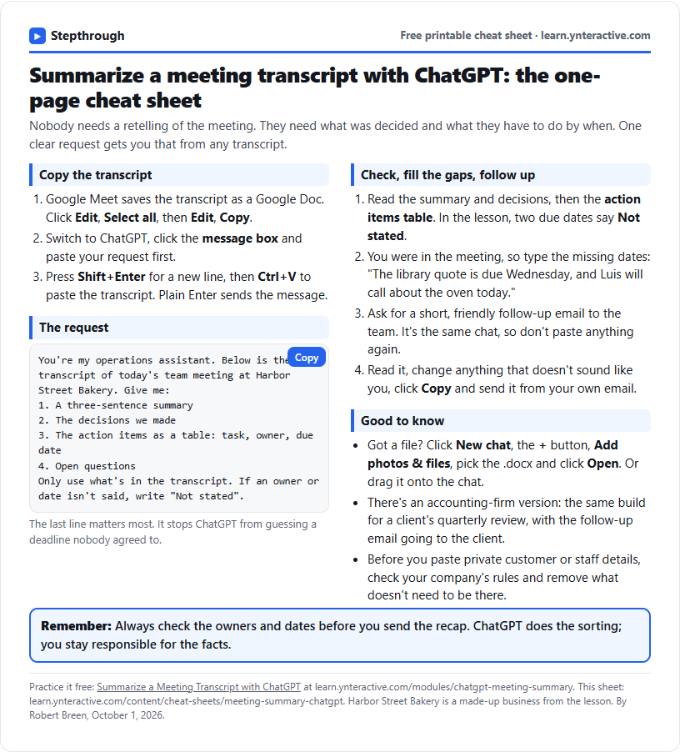 Summarize a Meeting with ChatGPT Cheat Sheet
A free one-page cheat sheet: turn a meeting transcript into decisions, an action items table with owners and dates, and a follow-up email.
Lesson cheat sheet Free PDF
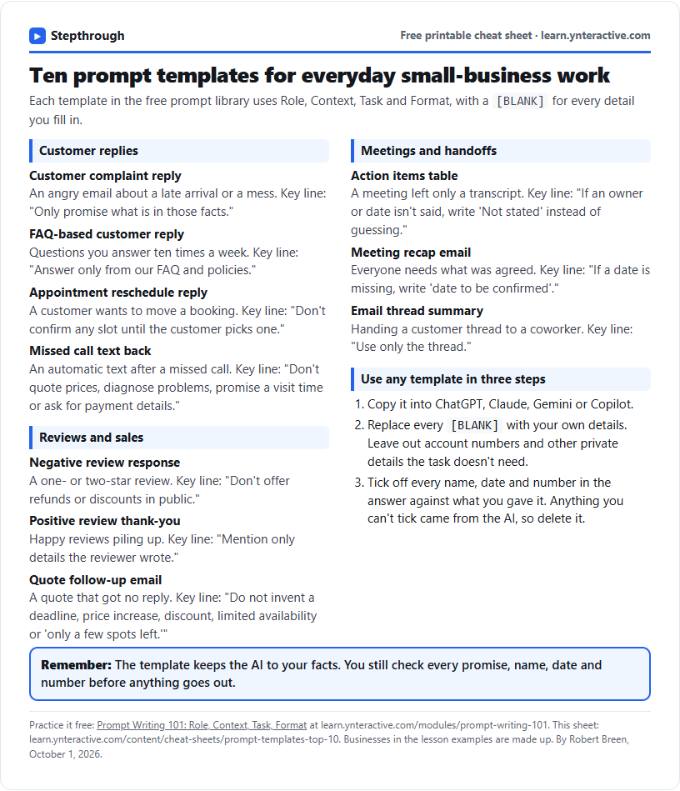 Top 10 Prompt Templates for Small Business: Cheat Sheet
A free one-page cheat sheet of ten copy-ready AI prompt templates: customer replies, reviews, quote follow-ups, meeting recaps and handoffs.
Topic cheat sheet Free PDF
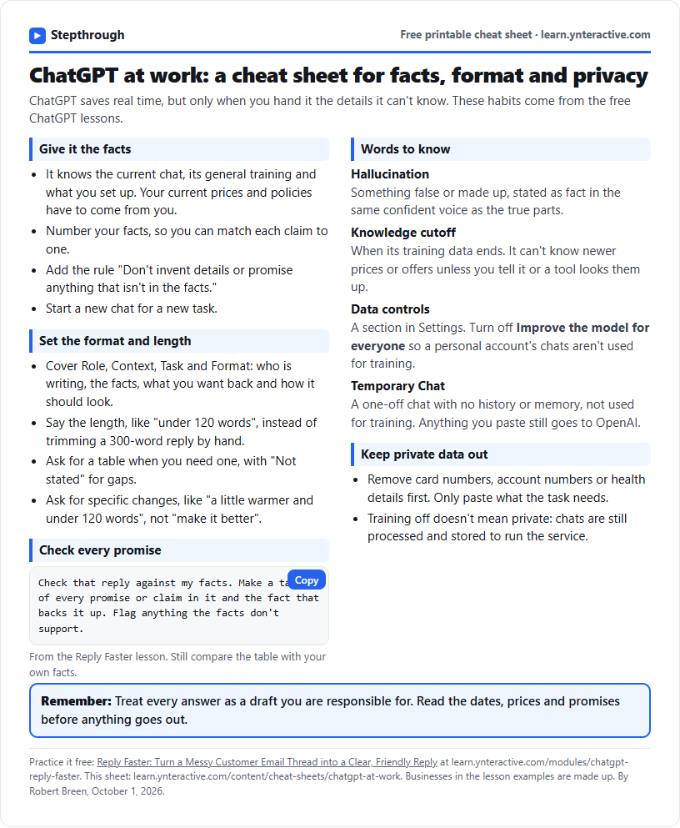 ChatGPT at Work Cheat Sheet: Facts, Format, Privacy
A free one-page cheat sheet for ChatGPT at work: give it facts, set the format and length, check every promise and keep private data out.
Tool cheat sheet Free PDF
All free printable cheat sheets
Terms in this lesson
Plain-English definitions, each with an example from a free lesson.
Related prompts
- Action items table prompt: Paste a meeting transcript or rough notes and get a table of every task, owner and due date, with "Not stated" wherever nobody…
- Feedback conversation script prompt: Plan a short, direct feedback talk with a teammate: the specific moment, why it mattered, a question to hear their side and one…
- Meeting agenda prompt: Turn a list of topics into a timed meeting agenda where every item has an owner, a question to settle and minutes that add up to…
- Performance review notes prompt: Turn a year of scattered manager notes into dated, factual examples for a performance review. A free ChatGPT prompt that keeps…