The cost of an ignored rule shows up later. "Never invent a price" gets skipped once, and a customer gets a quote you can't honor. "No emoji" gets skipped, and a client email looks careless. When I set up ChatGPT for a small business, most of the work is making rules that hold, not writing clever prompts.
Why does ChatGPT ignore my instructions?
Because it's working out what you most likely want from everything in front of it, and your rule is only one part of that. If the rule is unclear, conflicts with something else, or sits far back in a long conversation, the rest of the context can win. It's not stubbornness. The fixes below are about making the rule the clearest thing it can see.
Is the instruction too vague?
Often. "Make it better" or "be more professional" gives ChatGPT nothing to aim at, so it changes things you didn't mean and leaves the real problem.
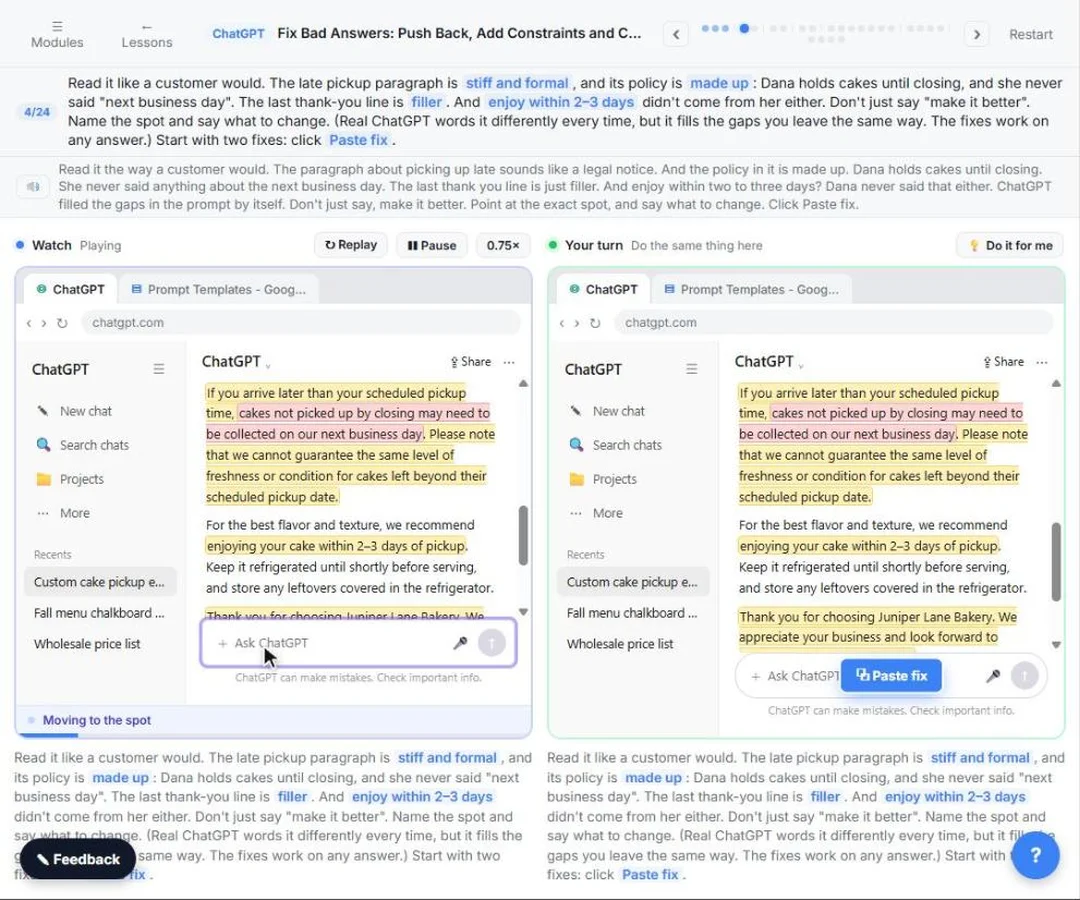
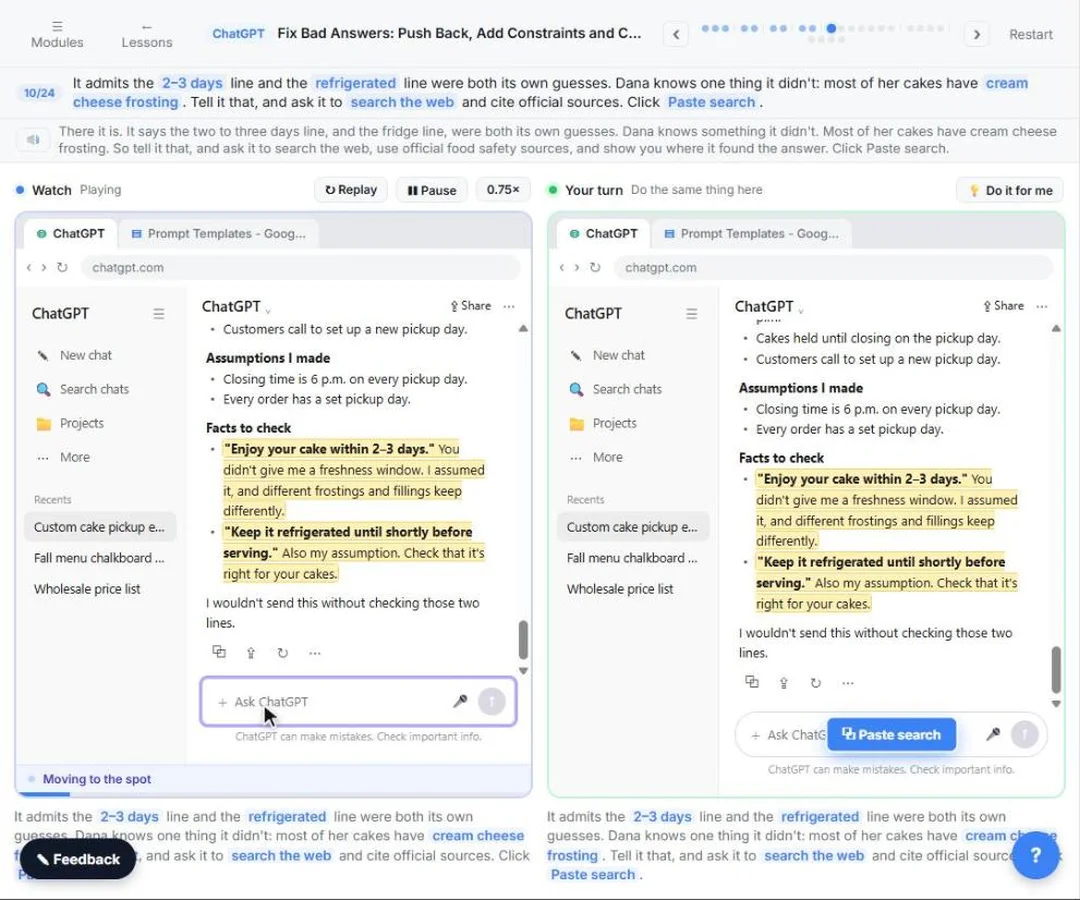
The Catch Made-up Facts lesson shows the fix with an email for Juniper Lane Bakery, a made-up bakery. Instead of "make it better," you name the spot: the paragraph about late pickup is too formal, rewrite it the way you'd talk to a regular customer, and here is the real policy. Then you add rules it can check itself against:
- Under 100 words
- Easy to read: short sentences, everyday words
- Must include: pickup days and hours, that we hold cakes until closing, and to call us for a new day
- Avoid: filler like "We appreciate your business"
A rule it can check is a rule it follows. "Under 100 words" works better than "short." Still count it yourself, because word limits are close, not exact.
Do two of my rules clash?
Check. "Keep it under 50 words" and "include every detail from the notes" can't both win, so ChatGPT picks one. So can "be warm and chatty" and "formal, legal tone." When a rule seems ignored, read your whole prompt, plus any custom instructions, for a rule that pulls the other way. Then decide which one matters and delete or change the other.
Has the rule been lost in a long chat?
If you gave a rule at the start of a long chat, it may fade. Everything in a chat competes for attention, and older parts can be weighed less as the chat grows. Why ChatGPT forgets things in a long chat lists the signs, and "it ignores a rule you gave at the start, like no emoji" is one of them.
Two fixes: restate the rule in your latest message, or start a new chat with the rules at the top. If you've corrected the same thing twice and it keeps coming back, start over. That's the signal the new chat vs same chat guide uses too.
Is the instruction in the right place?
ChatGPT has more than one place to put standing rules, and they don't all apply to every chat:
- Custom instructions apply to every chat you start.
- Project instructions apply only to chats inside that Project, and take priority over your custom instructions when they disagree.
- A Temporary Chat doesn't use memory, so a rule you saved as a memory won't be there.
- Memory is the weakest home for a rule. ChatGPT decides what it keeps, and it can miss or misapply it.
A changed rule also doesn't rewrite old chats. If you edit a Project's instructions, start a new chat in that Project to test them. For where each rule belongs, see custom instructions vs project instructions.
Does the rule need facts ChatGPT doesn't have?
This is the one that catches most businesses. A rule like "use our prices" can't work if the prices aren't there.
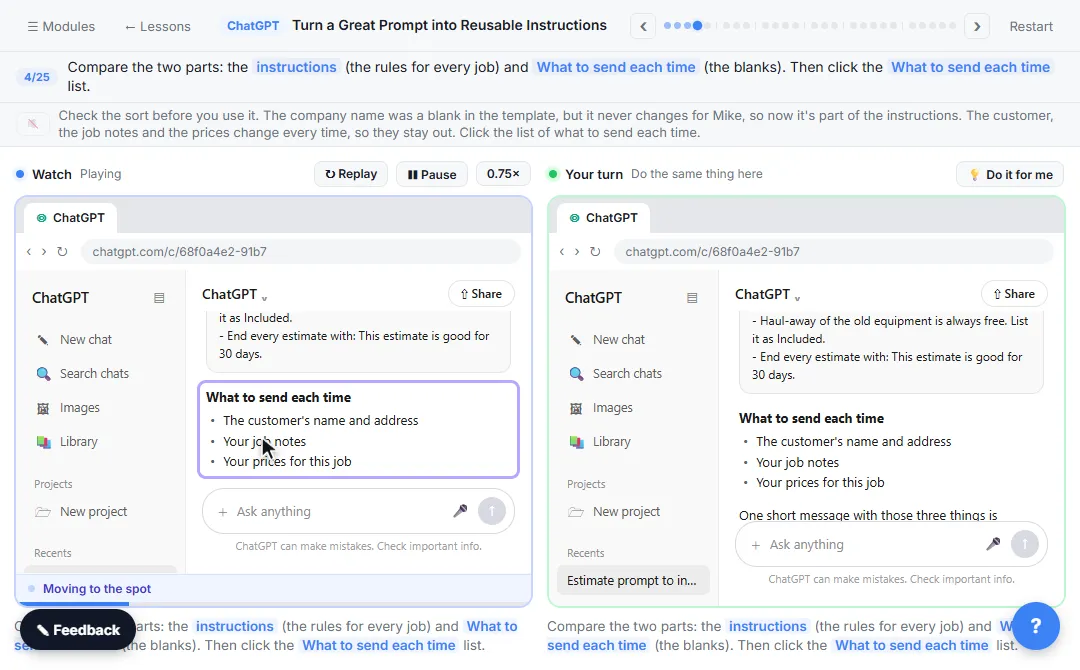
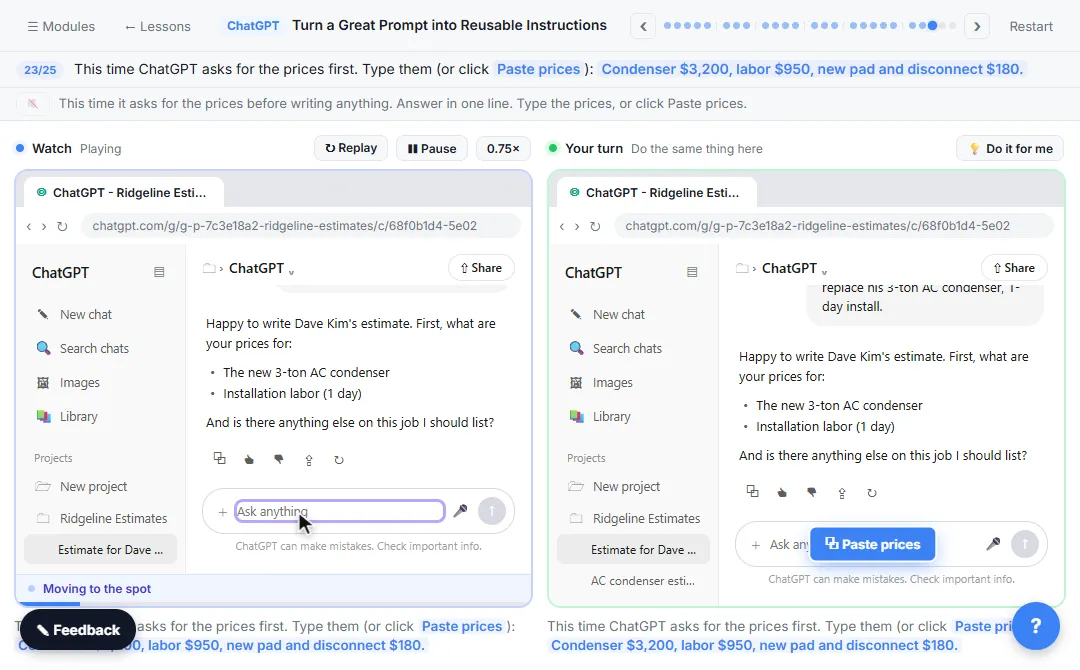
In the reusable instructions lesson, Mike at Ridgeline Heating & Air, a made-up HVAC company, puts his estimate rules in a Project, including "Don't invent prices. Use only the numbers I give you." Then he tests it with a one-line request for an AC condenser job and no prices. ChatGPT follows the rule, but the estimate still comes back with the total marked as needing a price. The rule only said what not to do.
So he adds one line: if the prices, name or address are missing, ask first, and don't write the estimate until you have them. On the next test, ChatGPT asks for the prices before writing anything.
The lesson in one line: pair every "don't" with what to do instead, and test the rules with a request that's missing something.
Try it free, step by step
Turn a Great Prompt into Reusable Instructions. Take a prompt you paste every week, sort it into permanent rules and fill-in blanks, put the rules in a ChatGPT Project, and test it with a one-line request. You do every step yourself in a practice copy of ChatGPT, it checks your work as you go, and “Do it for me” finishes any step you get stuck on. Free, and nothing touches your real accounts.
Start the free lessonWhy does ChatGPT keep copying my examples?
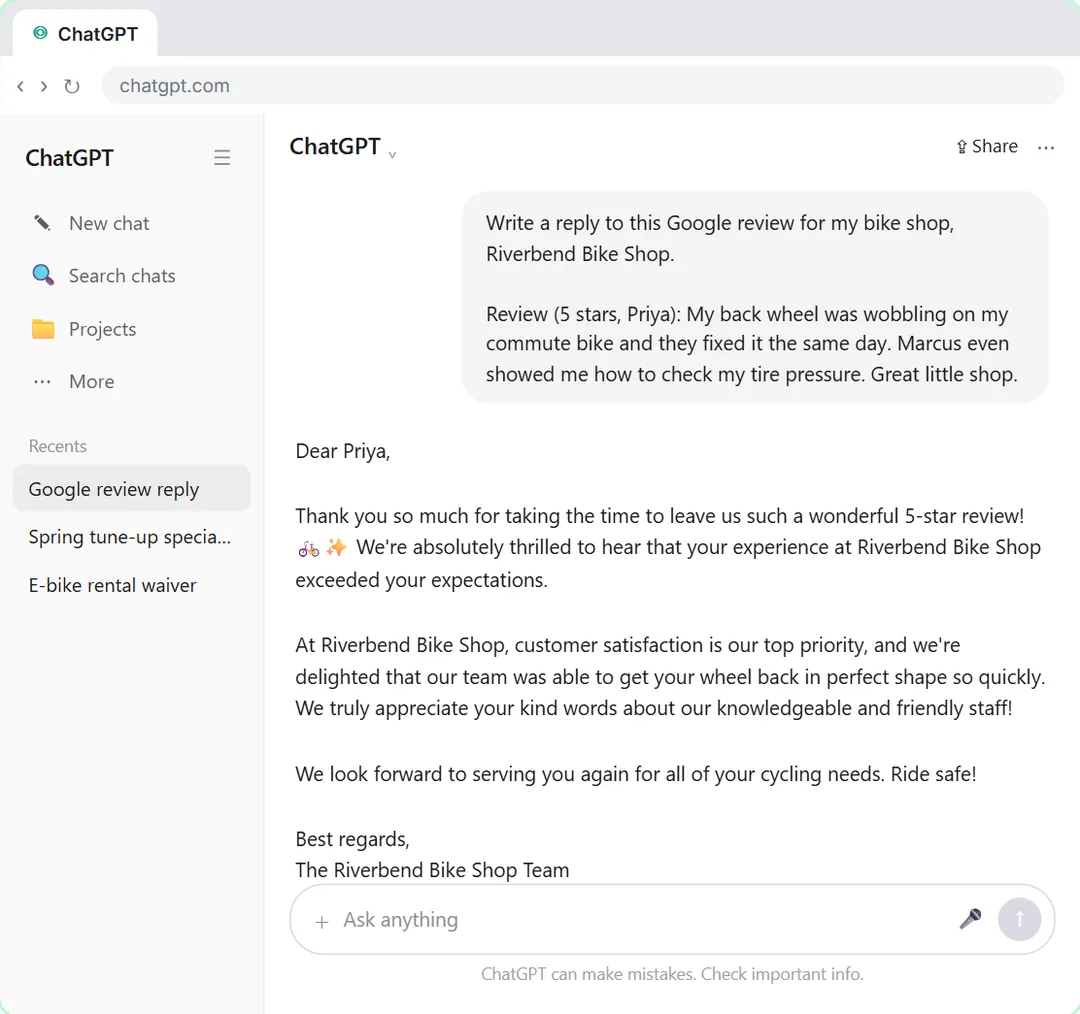
Because examples are strong signals. In the Few-Shot Prompts lesson, three of Marcus's real review replies teach ChatGPT his style for Riverbend Bike Shop. That works so well it can also borrow names, reasons or promises from the examples. The lesson adds a guard line before the next review: "Copy my style, not the facts: don't reuse names, reasons or promises from the examples. Only use what's in this review." Then the reply to a two-star complaint sounds like Marcus without lifting anything from the examples.
How do I write instructions ChatGPT follows?
A short checklist I use with clients:
- Be specific. Numbers, names and examples beat adjectives.
- One rule per line. Lists are easier to follow and easier to fix.
- Say what to do, not only what to avoid. "Ask me for the price" beats "don't guess."
- Remove clashes. Read the prompt and your custom instructions together.
- Put standing rules in a Project, not memory, and test them in a new chat.
- Check the result. Even good rules slip now and then, so read it before it goes out.
Key takeaways
- ChatGPT ignores instructions most often when they are vague, clash, sit far back in a long chat or live in a setting that doesn't apply.
- A rule it can check, like "under 100 words," holds better than "short."
- Pair every "don't" with what to do instead; the estimate lesson's "ask first" line is the model.
- Project instructions apply only inside that Project and win over custom instructions.
- Test new rules in a new chat with a request that's missing something.
Frequently asked questions
- Why does ChatGPT ignore my instructions?
Usually the rule is vague, conflicts with another rule, got lost in a long chat, lives in a setting that doesn't apply to this chat, or needs facts it doesn't have. Make the rule specific, restate it, and give the facts.
- Why does ChatGPT ignore my custom instructions?
Check where you are. A Project's instructions take priority over custom instructions, and a Temporary Chat skips memory. Then check your custom instructions for a rule that clashes with the request.
- Why does ChatGPT ignore word limits?
It writes in words and sentences, not by counting, so limits come out close rather than exact. Give a number, such as under 100 words, and trim or ask again if it runs over.
- How do I make ChatGPT follow my instructions every time?
You can't guarantee it, but you can get close: specific rules, one per line, no clashes, a "do this instead" for every "don't," rules kept in a Project, and a check before anything goes out.
- Should I put my rules in memory?
No. Memory is what ChatGPT chooses to save, and it can miss or misapply a rule. Write rules where you can see and edit them, like custom instructions or a Project.
- Is Ridgeline Heating & Air a real company?
No. Ridgeline Heating & Air, Juniper Lane Bakery and Riverbend Bike Shop are made-up businesses used in the lessons.
Where can I go next?
- The habit that fixes most drift: when to start a new chat in ChatGPT, with the free Stop Losing Context lesson.
- Why the same prompt gives a different reply: why ChatGPT gives different answers.
- What carries between chats: does ChatGPT remember other chats? and ChatGPT memory vs custom instructions.
- Rules that stop made-up details: how to stop ChatGPT making things up.
- Write the prompt right the first time: How to Write Better ChatGPT Prompts, role prompting and delimiters in prompts.