What are project instructions in ChatGPT?
Quick answer
Project instructions are rules and background you save once in a ChatGPT or Claude project, so every new chat inside that project follows them. They hold what never changes, like your tone and policies, so each chat only needs the details of the new job.
Last updated
Take the free module →Module 8 of the free Better Prompts course, about 7 minutes. No account needed.
Updated · By Robert Breen
Why it matters for a small business
If you paste the same long prompt into every chat, you will eventually forget a line or change the wording. Project instructions move the unchanging part into one place. You send only the small piece that is new, such as a customer name or a job.
They also give you one spot to improve. When a result is off, you change a rule in the instructions and every future chat picks it up. The tradeoff is that old chats do not change, and instructions are not a place for secrets or customer data.
In a real lesson: Turn a Great Prompt into Reusable Instructions
In Turn a Great Prompt into Reusable Instructions, Mike, the owner of Ridgeline Heating & Air (a made-up HVAC company), pastes the estimate prompt he reuses and asks ChatGPT to split it into instructions (rules for every job) and What to send each time (the blanks).
He creates a project named Ridgeline Estimates, opens Project settings, pastes the instructions and clicks Save. His first request is short: Estimate for Dave Kim, 9 Oak St: replace his 3-ton AC condenser, 1-day install.
Later he adds one rule: if prices, name or address are missing, ask first. The same request now gets a question for the prices before any estimate.
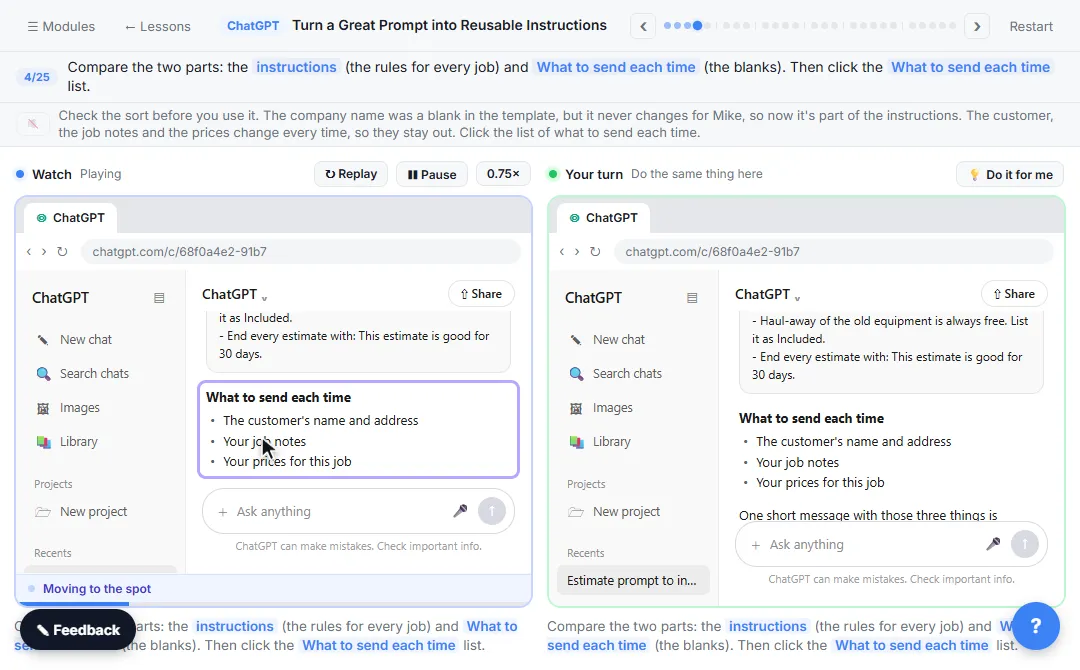
Try this lesson free or read the step-by-step guide.
Common confusions
Project instructions vs custom instructions
Custom instructions apply to all your chats. Project instructions apply only to chats inside one project.
Project instructions vs files in a project
Instructions are rules. Files are reference material, such as a price sheet. Claude has the same idea in Claude Projects.
Tips
- Keep rules short and specific, with "don't invent prices" style lines.
- Put what changes each time, like the customer, in the chat, not the instructions.
- Click Save, then test with a real job.
Related terms
More Prompting terms
Where you use it: free lessons
- Turn a Great Prompt into Reusable Instructions (ChatGPT, 7 min)
- Claude Projects for Your Business: Instructions, Knowledge and Quotes (Claude, 8 min)
- ChatGPT Projects: Keep Your Brand Voice, Files and Instructions in One Place (ChatGPT, 9 min)
- A Claude Project for Your Accounting Firm: Fee Schedule, Engagement Terms and Tone (Claude, 9 min)
Frequently asked questions
- What are project instructions?
- Saved rules for a ChatGPT or Claude project that apply to every new chat in it, so you do not paste the same prompt again.
- How do I turn a prompt into project instructions?
- Separate the rules that never change from the details that do, save the rules in the project's instructions and send only the details in each chat.
- Do project instructions change old chats?
- No. A change applies to new chats you start afterward.