Why automate sales admin first?
Because response time decides deals. A lead who waits a day has often talked to someone else. Reply in a minute, score the lead, alert a person: that's speed to lead, and it's mostly plumbing that n8n does well.
1. Answer every web lead in 60 seconds
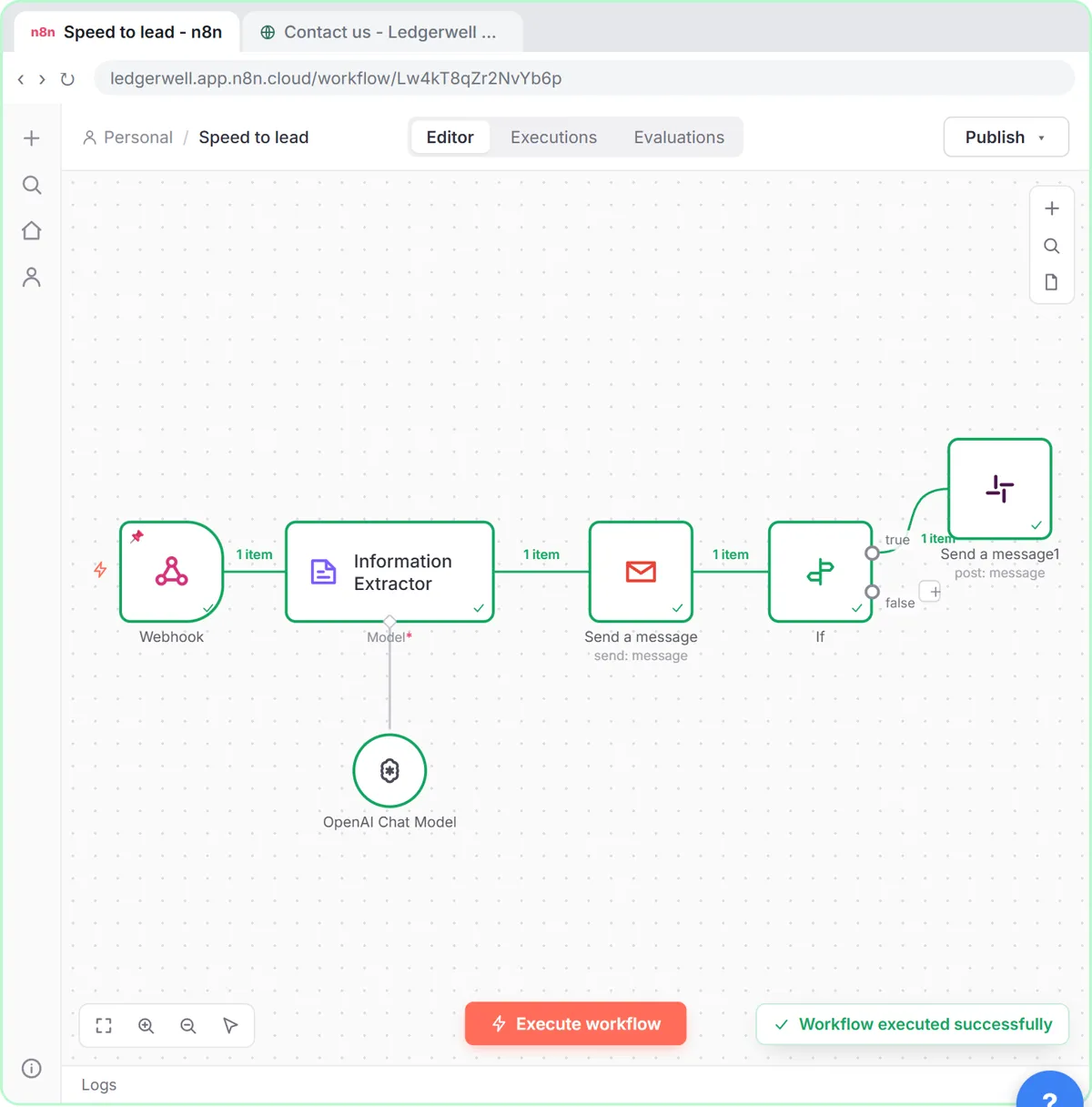
Trigger: Webhook from the website form. Steps: Information Extractor scores the lead and writes a reply; Gmail Send a message sends it. This is the core of the Speed-to-Lead lesson, built for Ledgerwell Bookkeeping (made up).
2. Score leads hot, warm or cold
Same extractor, with the rules written in plain words: 8 to 10 hot (budget and timing fit), 5 to 7 warm, 1 to 4 cold, plus a one-sentence reason. Reps see why, not just a number. See n8n Information Extractor Examples and the lead scoring entry.
3. Ping the team about hot leads only
An If node checks score is greater than or equal to 8 and posts to #new-leads in Slack with the score, name, company, reason and email. n8n Slack Node has the message template.
4. Discovery call notes to a follow-up email
Paste or upload the call notes, have OpenAI draft the recap with next steps, and save it as a Gmail draft for the rep to check. The client status email lesson shows the draft-not-send pattern.
5. Meeting action items into a tracker
After a sales meeting, turn the notes into owner, task and due date rows in Google Sheets. The Meeting to Action lesson does it with ChatGPT, n8n and Gamma; the meeting notes lesson does it fully inside n8n with Split Out.
6. Log every lead to a sheet or CRM
Append each form lead to a sheet with Append or update row matched on Email, so a resubmitted form updates the row instead of duplicating it. n8n Append or Update Row explains the setting.
7. Weekly pipeline digest
A Monday 8am schedule reads the deals sheet, filters to open deals, and emails the sales lead one summary. n8n Weekly Schedule and n8n Filter Node Examples cover the pieces. In Make, a Text aggregator does the "one email" part: Make Text Aggregator Examples.
8. Competitor price watch
A weekly HTTP Request to a search API logs competitor prices into a sheet, as in the Litescrape lesson. Useful for teams that sell products with public prices.
9. Follow up when a lead goes quiet
A daily schedule finds leads with no reply after three days and drafts a polite nudge for the rep. Keep it as drafts; Follow-Up Email After No Response has wording.
10. Route leads by service or territory
A Switch node sends each lead to the right rep's inbox by service or region, with a fallback output for anything unknown so nothing is lost. n8n If vs Switch shows the setup.
Try it free, step by step
Speed-to-Lead Agent: Answer Every Web Lead in 60 Seconds. Build an n8n workflow that scores every website lead with AI, emails a personal first reply within seconds, and pings Slack only when a lead is hot. You do every step yourself in a practice copy of n8n, it checks your work as you go, and “Do it for me” finishes any step you get stuck on. Free, and nothing touches your real accounts.
Start the free lessonWhich one should I build first?
Idea 1 plus 3: instant reply and hot-lead alert. It touches every lead, it's easy to measure (time to first reply), and the lesson walks you through it in a practice copy of n8n with no account connected.
Key takeaways
- Start with an instant AI reply and a hot-lead Slack alert.
- Let AI score with written rules and a reason, and let people make the call.
- Save AI emails as drafts until you trust the wording.
- Use Append or update row so repeat leads don't create duplicates.
Frequently asked questions
- What can sales teams automate with n8n?
Lead replies, lead scoring, alerts for hot leads, meeting follow-ups, tracker updates, pipeline digests and lead routing.
- Is n8n or Make better for sales automation?
Both work. n8n is strong when AI steps and custom logic matter; Make is quick for simple app-to-app scenarios. The free Make & Zapier Jump Start course covers Make.
- Do I need to code?
No. Every idea here uses built-in nodes and short expressions.
- Is there a free course for sales teams?
Yes: AI for Sales Teams.