How do I set a weekly schedule?
- Add first step... > On a schedule.
- The trigger starts on Days. Click Trigger Interval and choose Weeks.
- n8n ticks Sunday by default. Click Trigger on Weekdays, click Monday, then click Sunday once to untick it.
- Open Trigger at Hour (default Midnight) and choose 8am.
- Close the node.
The lesson changes Sunday because clients don't read email on Sunday night. The glossary entry is Schedule Trigger.
Why does the timezone matter?
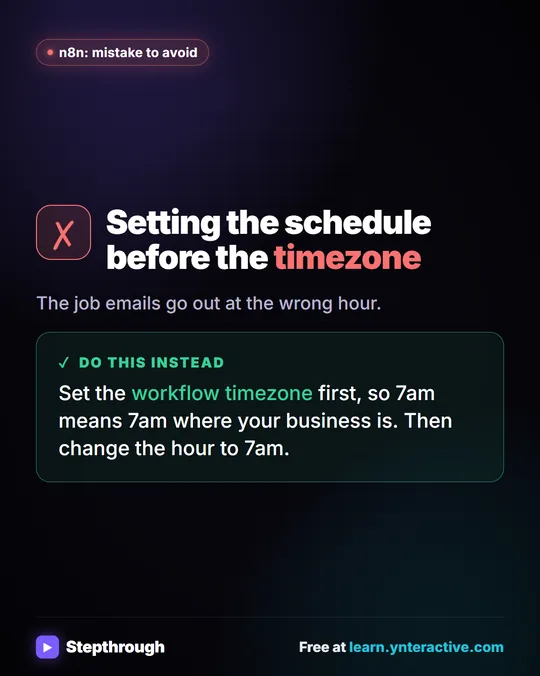
8am is 8am in the workflow's timezone, which may not be yours. Set it first: ··· next to the workflow name > Settings > Timezone. The Daily Job Alerts lesson sets America/Chicago before anything else, because the default can make 7am the wrong 7am. Workflow timezone explains the setting.
Common schedules
| Schedule | Settings |
|---|---|
| Every weekday at 7am | Interval Weeks, tick Monday to Friday, hour 7am |
| Every day at 7am | Interval Days, every 1 day, hour 7am |
| Every Monday 8am | Interval Weeks, Monday only, hour 8am |
| First of the month 9am | Interval Months, day 1, hour 9am |
| Every 15 minutes | Interval Minutes, 15 |
| Something custom | Interval Custom (Cron) |
Cron examples
Choose Custom (Cron) when the options don't fit. A cron expression has five fields: minute, hour, day of month, month, weekday.
| Cron | Runs |
|---|---|
0 8 * * 1 | Mondays at 8:00 |
0 7 * * 1-5 | Weekdays at 7:00 |
30 16 * * 5 | Fridays at 16:30 |
0 9 1 * * | 9:00 on the 1st of each month |
0 12 * * 1,3 | Mondays and Wednesdays at noon |
Try it free, step by step
n8n: Weekly Client Status Emails from a Google Sheet, Written by AI. Build an n8n workflow that wakes up every Monday, reads your client tracker in Google Sheets, has AI write a friendly update for each client and saves it as a Gmail draft. You do every step yourself in a practice copy of n8n, it checks your work as you go, and “Do it for me” finishes any step you get stuck on. Free, and nothing touches your real accounts.
Start the free lessonWhy didn't my schedule run?
Usually because it isn't published. Closing the node doesn't start anything; the lesson says so directly, and it never publishes the practice copy. Also check the timezone, and that the run didn't fail (open Executions). n8n Workflow Not Running has the full checklist.
Should I publish straight away?
For anything that emails clients, no. The client status workflow saves Gmail drafts, and the lesson says to publish only after you've checked a week of drafts. Then switch Create a draft to Send a message if you want it fully automatic.
Key takeaways
- Weekly: Trigger Interval Weeks, tick the weekday, untick Sunday, pick the hour.
- Set the workflow timezone before relying on any time.
- Use Custom (Cron) for schedules the options can't express.
- Nothing runs on schedule until you click Publish.
Frequently asked questions
- How do I run an n8n workflow once a week?
Use the Schedule Trigger with Trigger Interval set to Weeks, choose the weekday and hour, then publish the workflow.
- What timezone does the n8n Schedule Trigger use?
The workflow's timezone setting, under the workflow's Settings. Set it to your business's timezone.
- Can I test a schedule without waiting?
Yes. Click Execute workflow to run it now; the schedule only matters once it's published.
- Which course is this from?
n8n Jump Start and AI for Consulting & Agencies. Also see n8n Triggers Explained.


![n8n + Gmail: mistake to avoid. Mistake: Typing one address in the To field. Every job email goes to the same person. Do this instead: Make To an expression for the Tech Email column. The name has a space, so write it as $json["Tech Email"].](/content/visual/mistake-one-address-for-every-job/01-540.webp)