What is HubSpot?
Quick answer
HubSpot (hubspot.com) is a customer platform for marketing, sales and customer service, built around a CRM that stores every contact, company and deal. Its free tools include forms, email and a contact and deal pipeline. Paid hubs add automation such as workflows that send emails for you.
Last updated
Take the free module →Module 47 of the free AI Apps Worth Knowing course, about 12 minutes. No account needed.
Updated · By Robert Breen
Why it matters for a small business
Most small firms lose leads in the gap between "someone filled in the website form" and "someone wrote back". HubSpot closes that gap by putting the form, the contact record and the follow-up email in one place. When a person submits a HubSpot form, HubSpot creates a contact for a new email address or updates the existing contact if the email already matches, so nobody has to copy names out of an inbox.
HubSpot says its free tools are "not a trial" and never expire, and they cover forms, email, a contact and deal pipeline, ticketing and chat. The automation layer is where the plans differ: HubSpot's knowledge base says workflows need a Professional or Enterprise subscription (for example Marketing Hub Professional), and so do automated marketing emails. It pays to know that before you design a process around it.
In a real lesson: HubSpot: Capture a Web Lead and Follow Up the Same Day
In the HubSpot lesson, a made-up accounting firm wants every web enquiry answered within four working hours. You go to Marketing > Forms, click Create form, start from a template or a blank form, drag fields such as email and company onto the preview, and publish it. Each submission becomes a contact in the CRM.
Then you do the follow-up by hand, because HubSpot's knowledge base says workflows need a Professional or Enterprise plan. In the form's settings you set new contacts to the Lead lifecycle stage and name who gets notified. When a lead arrives you open the contact from the submission, click the Email icon to send a one-to-one email with a follow-up To-do ticked, set Lead Status to Attempted to Contact, book a call task and check the activity timeline.
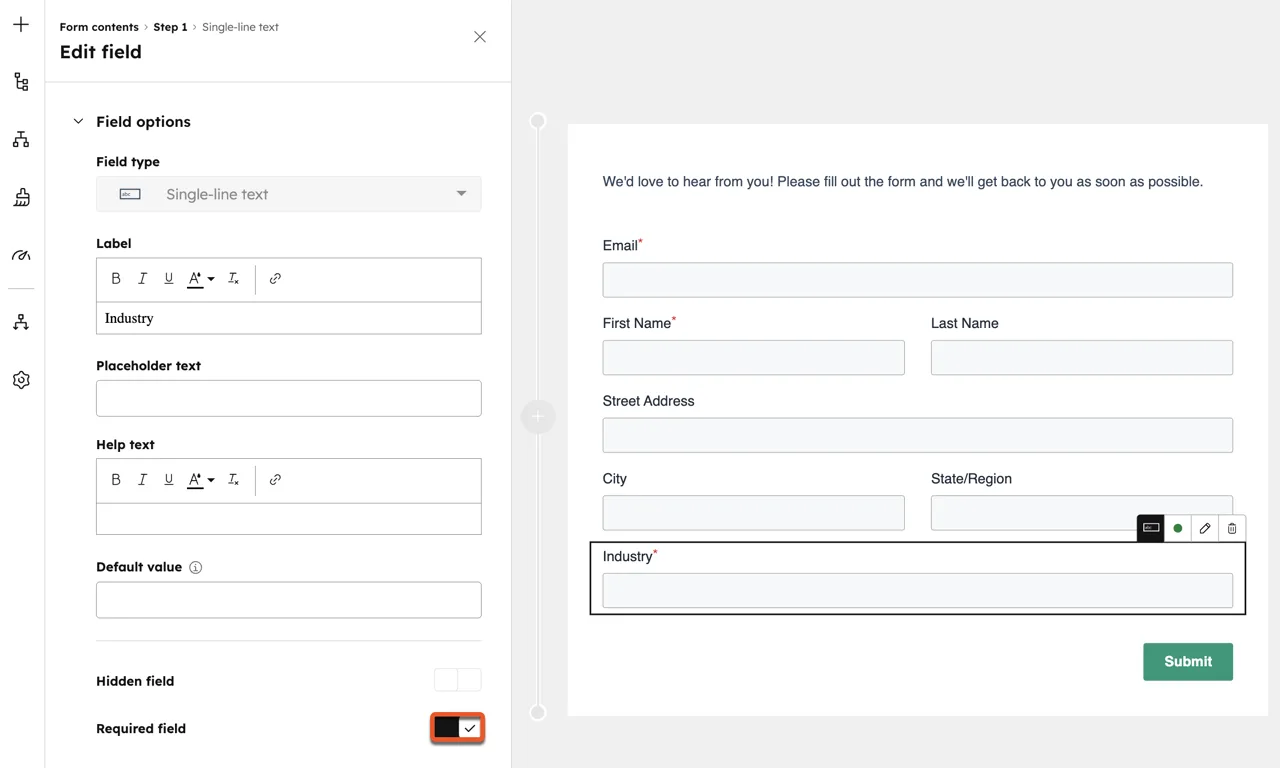
Try this lesson free or read the step-by-step guide.
Common confusions
HubSpot free tools vs paid hubs
Forms, contacts, deals and regular marketing email are in the free tools. Workflows and automated emails need a Professional or Enterprise subscription, per HubSpot's knowledge base.
Form submission vs contact
A submission is one filled-in form. A contact is the person's record in the CRM. Several submissions from the same email address all land on one contact.
Tips
- Keep the form short: email, name and one question that helps you qualify the lead.
- Write the follow-up email before you build the workflow, so the workflow has something to send.
- Submit the form yourself with a test address and check the contact record before you share the form.
- Check your plan before promising an automated reply. On the free tools you can still see each new contact and reply by hand.
Related terms
More Business terms
Where you use it: free lessons
- HubSpot: Capture a Web Lead and Follow Up the Same Day (HubSpot, 12 min)
- Speed-to-Lead Agent: Answer Every Web Lead in 60 Seconds (n8n, 15 min)
- Never Lose a Client Follow-up using Capsule CRM (Capsule CRM, 18 min)
- Kylon AI Sales Agent: Find the Reason to Reach Out (Kylon, 8 min)
AI tools that use it
Frequently asked questions
- Is HubSpot free?
- HubSpot has free tools that it says are not a trial and never expire, covering forms, email and a contact and deal pipeline. Workflows and automated emails are on paid plans. See hubspot.com/products/get-started for the free tools and HubSpot's pricing page for the plans.
- Do HubSpot forms create contacts automatically?
- Yes. A submission with a new email address creates a contact, and one with an email that already exists updates that contact.
- Can I put a HubSpot form on a site that is not built in HubSpot?
- Yes. HubSpot gives you embed code for an external page, or a share link that opens the form as its own page.