Why isn't $json enough?
Because each node replaces the data. After an AI node, $json holds the AI's answer, not the sheet row it was written from.
In the client status workflow, the order is Get row(s) in sheet, then Message a model, then Gmail: Create a draft. In the Gmail node, $json is the OpenAI output: {{ $json.output[0].content[0].text }} is the email text. The client's email and project name live two nodes back, in the sheet node.
How does $('Node').item work?
$('Get row(s) in sheet') names the node, .item picks the item linked to the one being processed, and .json.Email reads its field.
n8n keeps track of which item came from which: the third AI email traces back to the third sheet row. So .item gives the right client for each draft, without a loop or an index. The node name must match exactly, including capitals and spaces. If you rename a node, n8n updates expressions that refer to it.
Copy-ready examples from the lessons
| Where | Expression | What it gets |
|---|---|---|
| Gmail Subject | {{ $('Get row(s) in sheet').item.json.Project }} | The client's project name |
| Gmail To Email | {{ $('Get row(s) in sheet').item.json.Email }} | The client's address |
| Gmail To (lead reply) | {{ $('Webhook').item.json.body.email }} | The lead's email from the website form |
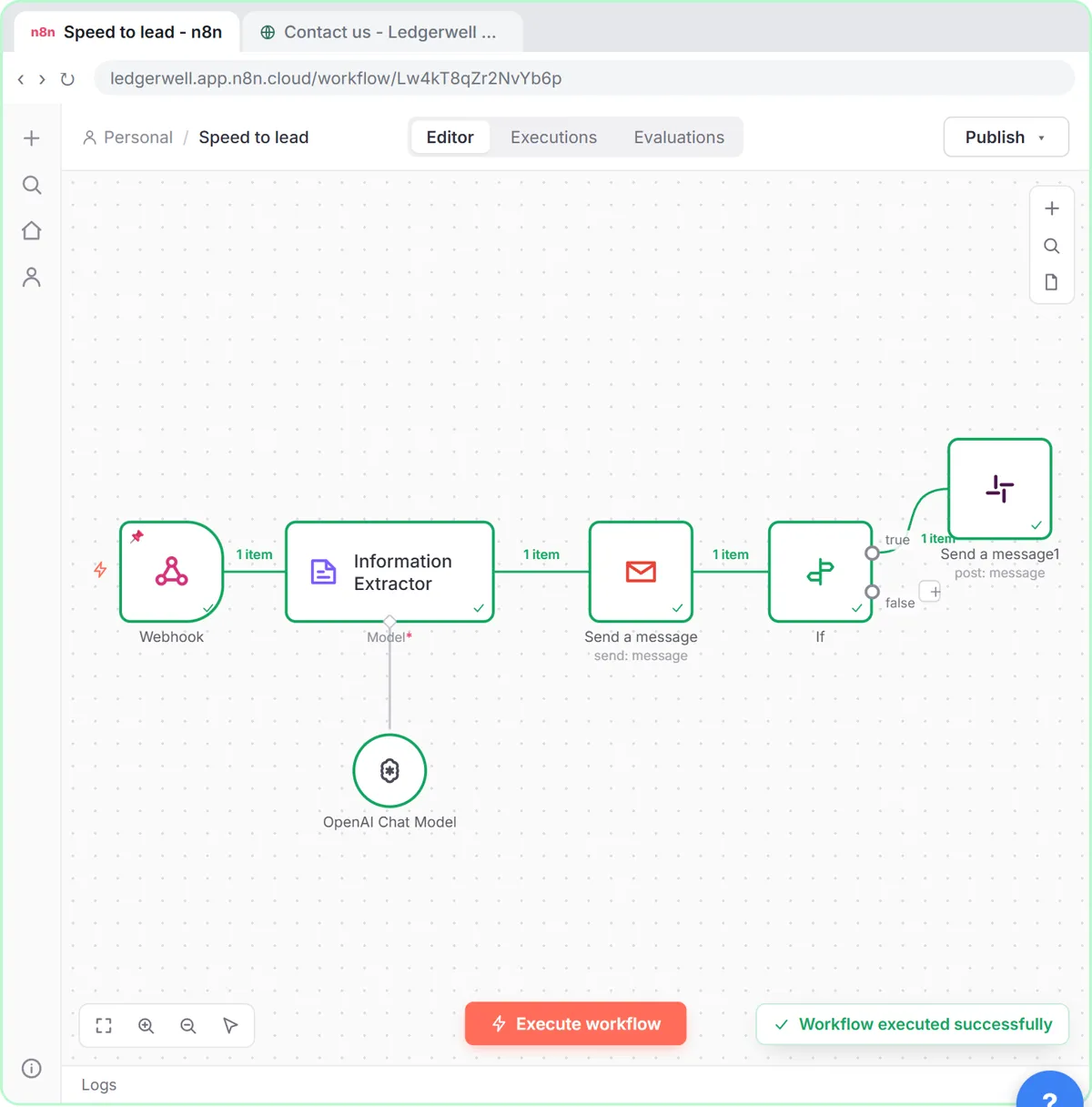
| If value1 (lead score) | {{ $('Information Extractor').item.json.output.score }} | The AI's 1-10 score |
| If value1 (invoice) | {{ $('Information Extractor').item.json.output.total }} | The invoice total |
| Slack text | {{ $('Webhook').item.json.body.name }}, {{ $('Webhook').item.json.body.company }} | Who the lead is |
In the speed-to-lead lesson, the If node comes after Gmail, so $json there would be Gmail's response. That's why the score is read from $('Information Extractor'). The invoice approval lesson does the same after a Google Sheets step.
What's the easiest way to write these?
Drag the field from the INPUT panel. On the left, earlier nodes are listed by name; drag a field from any of them into a box and n8n writes the full $('Node').item.json... expression for you. Then check the Result line under the box shows a real value.
Try it free, step by step
n8n: Weekly Client Status Emails from a Google Sheet, Written by AI. Build an n8n workflow that wakes up every Monday, reads your client tracker in Google Sheets, has AI write a friendly update for each client and saves it as a Gmail draft. You do every step yourself in a practice copy of n8n, it checks your work as you go, and “Do it for me” finishes any step you get stuck on. Free, and nothing touches your real accounts.
Start the free lessonWhat errors can this give?
- "Referenced node doesn't exist". The name is misspelled or the node was deleted.
- "Can't get data for expression" / no linked item. The earlier node hasn't run in this test. Click Execute workflow or execute previous nodes first.
- An empty Result. The field name is wrong; field names are case sensitive.
When should I use .first() instead of .item?
When the earlier node returned a single item that applies to everything, such as one settings row. $('Settings').first().json.Signature reads that one item for every item processed. For per-row data, stick with .item.
Key takeaways
- $json is only the previous node's output.
- $('Node name').item.json.Field reads the matching item from any earlier node.
- Drag fields from the INPUT panel to get the expression written for you.
- Use .first() for a single shared value, .item for per-row values.
Frequently asked questions
- How do I get data from a previous node in n8n?
Use $('Node name').item.json.Field in an expression, or drag the field from that node in the INPUT panel.
- What is the difference between $json and $('Node').item.json?
$json is the current input item, from the node directly before. $('Node').item.json is the linked item from a named earlier node.
- Do I need to change expressions if I rename a node?
n8n updates references when you rename a node in the editor. Check expressions written outside the editor, such as in pasted workflows.
- Where do I learn n8n expressions?
n8n Data Mapping Examples, n8n Expressions for Beginners and the free n8n Intermediate course.