ChatGPT New Chat vs Same Chat vs Project: which one for this job?
Quick answer
Stay in the same chat when your next request builds on the last answer, like turning a quote into a text message. Start a new chat when the customer or the task changes, so old details cannot leak in. Use a Project for work you repeat, so the instructions and files for your business are already there every time you start a chat.
Last updated
Take the free module →Module 6 of the free ChatGPT for Everyday Work course, about 9 minutes. No account needed.
This page is for office managers and team leads who use ChatGPT every day. Screens and plans change, so confirm each setting in your own account. The free Stop Losing Context lesson practices the first two in about nine minutes.
How do they compare at a glance?
| Question | Same chat | New chat | Project |
|---|---|---|---|
| Best for | Building on the last answer | A new customer or task, or a fresh start | Repeat work for one business or client |
| What ChatGPT can see | Everything earlier in that chat | Only what you give it in that chat | The project's instructions and files, plus that chat |
| Re-pasting facts | Not needed | Yes, or attach a file | Not needed: files live in Sources |
| Risk | A long chat can carry wrong turns forward | You may forget a fact | Old files can go stale |
| Setup time | None | One click on New chat | About 9 minutes in the lesson |
| Where to find it | Keep typing in the chat | New chat in the sidebar | Projects, then New project |
When should you keep going in the same chat?
Keep going when your next request depends on what is already there. In the Stop Losing Context lesson, an office manager gets a quote for Oakwood Library, a made-up customer. The library then changes its headcount from 80 to 100. She says so in the same chat and the quote is redone without pasting anything again.
She then asks for a short text to Sam in the same chat. It uses the new headcount, because everything in a chat acts as context for the next answer. Read the numbers against your fact sheet each time.
When should you start a new chat?
Start a new chat when the customer or the task changes. In the same lesson, a different customer, Pine Ridge Rotary, needs a quote next. If she kept typing in the library's chat, the library's headcount, menu and prices would sit there ready to leak into the new answer. She clicks New chat instead, attaches the new customer's facts file and sends one request. Nothing about the library comes along.
A new chat is also the quickest way to drop a bad start. Restate the task with only the facts that still matter. See the definition of a new chat.
When is a ChatGPT Project better than a new chat?
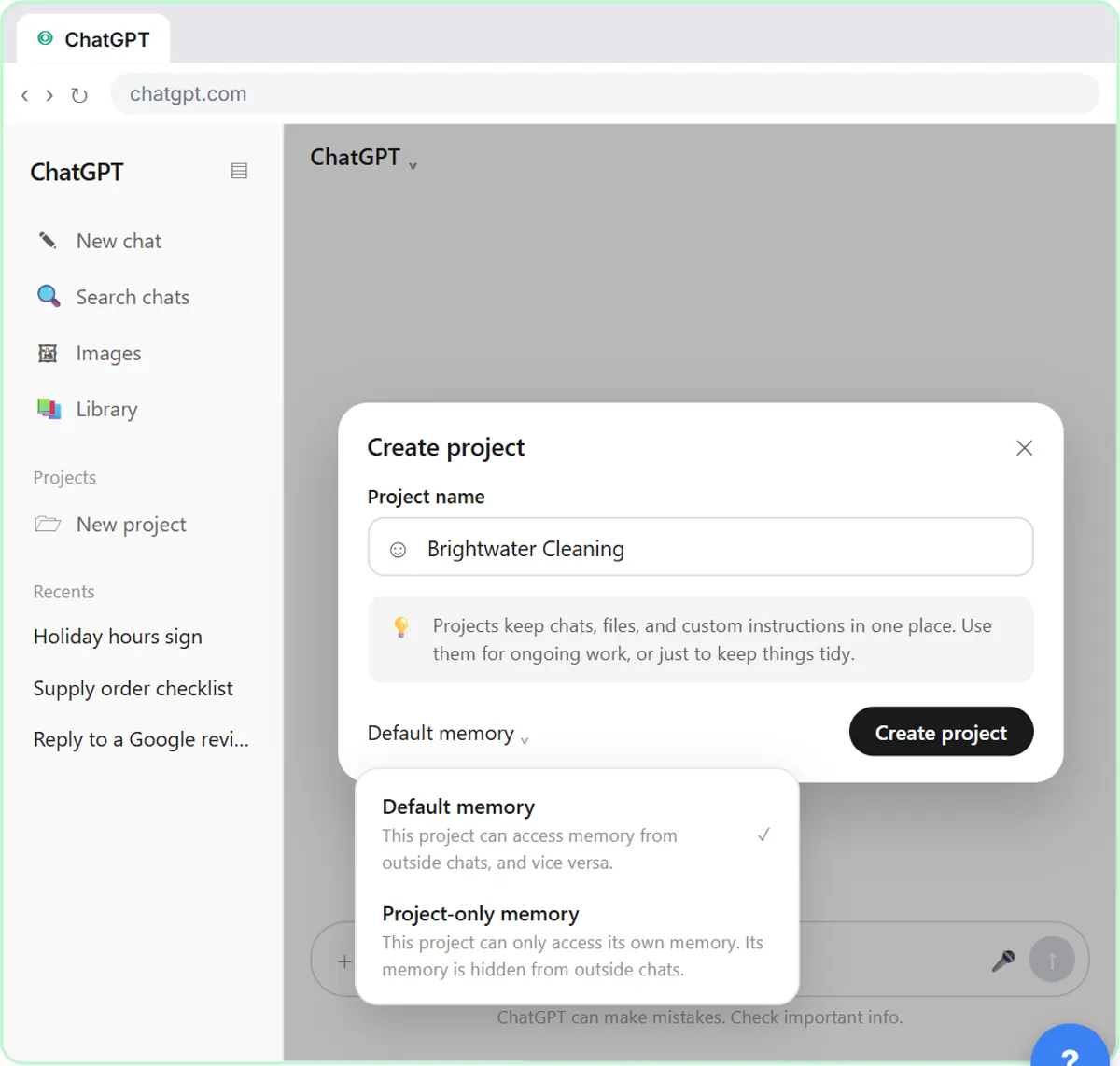
A Project fits work you repeat. In the ChatGPT Projects lesson, you build one for Brightwater Cleaning, a made-up house-cleaning company. It holds the brand voice instructions, the price list and a style guide as sources. Each new chat inside it starts out knowing the business, so a price question or an About Us request needs no explaining.
The lesson sets the project to use project-only memory, so chats in it draw on each other and not on everything else you have asked ChatGPT. It also says Projects are included on the Free plan too, with fewer files per project (5 on Free, 25 on Plus and Go, 40 on Pro and business plans). Keep the files current: when a price changes, remove the old file and add the new one.
Does a new chat remember the old one?
Not by default. A new chat starts blank, and within one chat ChatGPT sees everything you both wrote. If memory is turned on in your settings, ChatGPT may carry some saved details between chats, so do not rely on it for work facts. Put the facts in the chat you are using.
For a sensitive one-off job, use Temporary Chat instead, which ignores memory and does not appear in your history. See Temporary Chat and the data controls lesson.
What is the quick rule for choosing?
Ask two questions. First, does this request build on the last answer? If yes, stay. Second, will I do this kind of job again? If yes, put the instructions and files in a Project. If neither is true, start a new chat and give it only the facts for the job.
The lesson puts it in one line: keep going when it builds, start fresh when it changes. Wording the second message well is its own skill; see the follow-up prompt page.
Who is each one for?
Same chat
For one job with several steps, like a quote, a change and a text message. Practice it in the Stop Losing Context lesson.
New chat
For every new customer or task, and for any chat that has gone off track. Pair it with a facts file so nothing is missing.
Project
For ongoing work for one business or client, where the same prices, tone and files apply every time. Build one in the ChatGPT Projects lesson.
Which of these tools have a free Stepthrough lesson?
- Same chat: free lesson: Stop Losing Context: When to Start a New Chat vs Keep Going using ChatGPT
- New chat: free lesson: Stop Losing Context: When to Start a New Chat vs Keep Going using ChatGPT
- Project: free lesson: ChatGPT Projects: Keep Your Brand Voice, Files and Instructions in One Place
Practice it free, step by step
Stop Losing Context: When to Start a New Chat vs Keep Going using ChatGPT. Quote a customer in one ChatGPT chat, change the numbers without re-pasting anything, then start a clean chat for the next customer so their details never mix. You do every step yourself in a practice copy of ChatGPT, it checks your work as you go, and “Do it for me” finishes any step you get stuck on. Free, and nothing touches your real accounts.
Start the free lessonWatch it in a free lesson: ChatGPT Projects: Keep Your Brand Voice, Files and Instructions in One Place
 3:29
ChatGPT Projects: Your Brand Voice in One Place: video walkthrough
Set up a ChatGPT Project with your brand voice instructions, your price list and your style guide, so every new chat already knows your business. The whole lesson narrated step by step, recorded in Stepthrough’s simulated practice environment.
Key takeaways
- Same chat for steps that build on each other. New chat when the customer or task changes.
- Use a Project for repeat work, so the instructions and files are there from the first message.
- A new chat is not a privacy wall: memory can carry saved details unless you turn it off or use Temporary Chat.
- Check every number against your fact sheet before a quote goes out, whichever you choose.
Frequently asked questions
Is it better to start a new chat for every question?
No. If the question builds on the last answer, staying put saves you re-pasting facts. Start fresh when the topic or customer changes.
Do Projects cost extra?
The Projects lesson says they are included on the Free plan too, with different file limits by plan. Plans change, so check OpenAI's current pricing.
Will ChatGPT mix up customers in the same chat?
It can, because everything in the chat is context. Use one customer per chat, or a new chat with a fresh facts file for each.
Can I move an existing chat into a Project?
This page does not cover moving chats. The lesson builds a new Project and starts new chats inside it.
Where do these prices and features come from?
Every price and feature on this page was checked against the vendor's own page, as of October 2026. No numbers here are estimates or third-party figures. The example businesses in the Stepthrough lessons are made up.