Updated . Built on 6 November 2026 from Signatoro's public Zoho Mail guide and admin guide, Signatoro's own screenshots from its Zoho Marketplace listing, and real Zoho Mail settings screens (looked at only, nothing changed). The install click and Zoho's consent screen follow Signatoro's docs; we did not run the install for this lesson. How we check this lesson
If everyone in your office typed their own Zoho Mail signature, every new phone number or logo means chasing each person, and some never update. In this free lesson you follow Lena Ortiz (made up), office manager at Kestrel Architects, nine people on Zoho Mail. She saves the signature in Signatoro, where a Company plan sets the logo, colors and company details once, clicks Install into my Zoho Mail, and reads the three permissions Zoho asks her to approve. Then she opens Zoho Mail's Settings > Signature to see where the signature lands, which From address it is linked to, and whether replies and forwards get it too.
At a glance
| Question | Answer |
|---|---|
| What you build | A business case for any office on Zoho Mail: save one company signature in Signatoro, install it into Zoho Mail in one click, read the three Zoho permissions, and check where it lands in Zoho Mail's settings, so a logo or phone change reaches every mailbox by itself. |
| Tools | Signatoro |
| Time | About 7 minutes, 17 steps in 4 parts |
| Level | Beginner, no coding needed |
| Cost | Free |
| Ways to learn it | Practice it step by step |
The 4 parts, in short
- Nine signatures, typed by hand: Count what hand-typed signatures cost, Keep one company signature, and let it update Zoho Mail, What you need.
- Install it from Signatoro: Read Signatoro's three steps, Open My signature, See what the company sets, Save the signature, and 3 more steps.
- Check it in Zoho Mail: Open Zoho Mail settings, Go to Signature, Find the signature list, Check the From address, and 1 more step.
- What it gave you, and what is next: See what you have now, Up next.
Start here first: Granola: Client Call Notes Written for You, With No Meeting Bot (module 1 of AI Automation for Consulting & Agencies)
Part of: Email on Autopilot (step 17 of 17)
Part of: AI Apps Worth Knowing (step 134 of 140). Next up: OLVA: Follow a Spanish-Speaking Supplier Call with Live Translation
The business case: nine signatures that drift apart
Kestrel Architects changes something about its signature about three times a year: a new phone line, a new logo, a new title. Updating and chasing nine people takes about 20 minutes per person per change, about 9 hours a year, and a month later two people still have the old version, or Zoho's default Sent using Zoho Mail.
Signatoro keeps each person's signature in one place, with the company's parts set once. Its Zoho Mail install writes that signature into Zoho Mail, and every later change, the person's or the company's, reaches Zoho Mail by itself.
What you do in the lesson
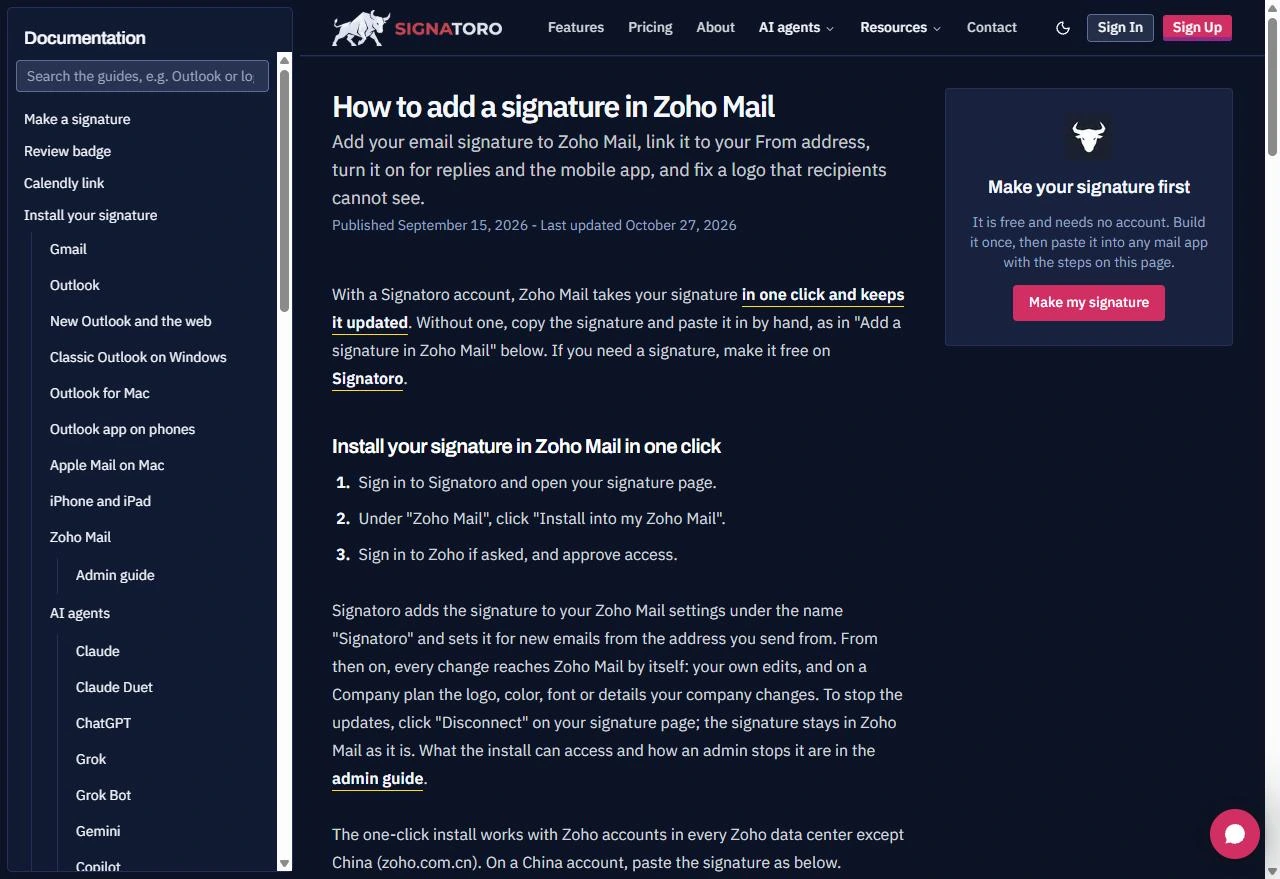
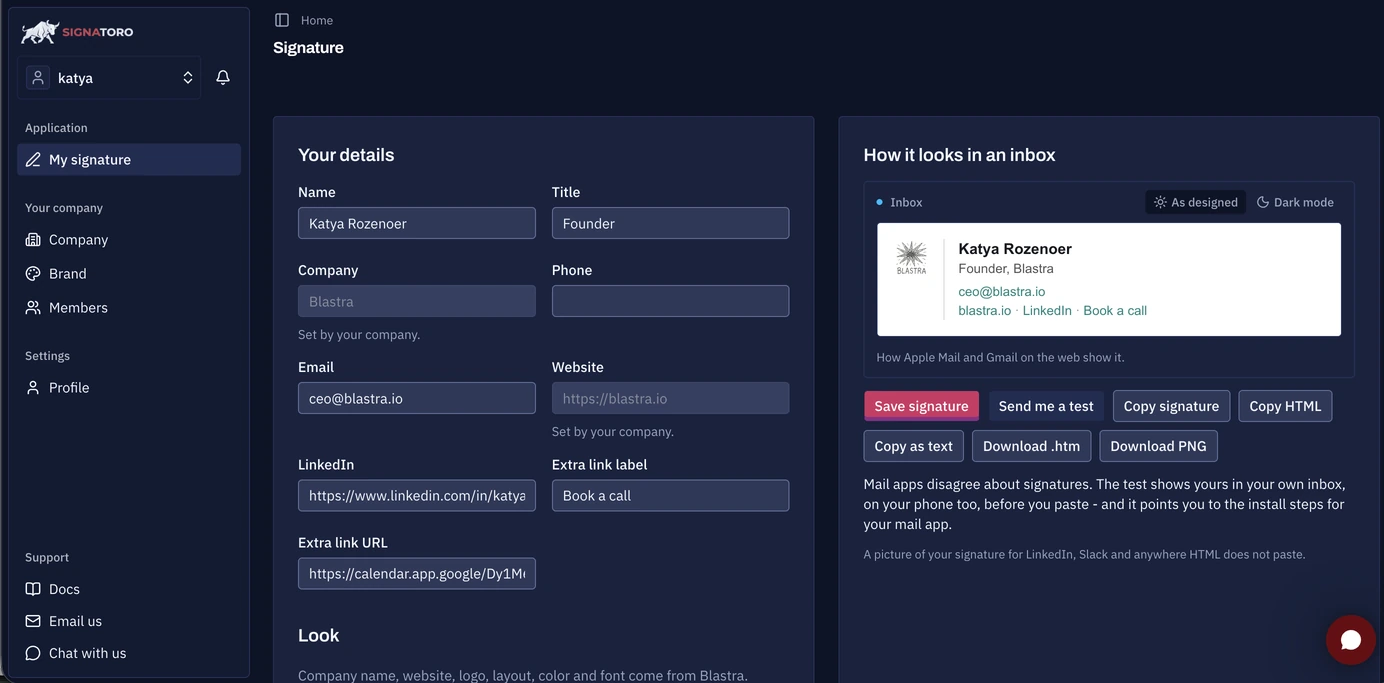
Signatoro's guide has the install in three steps: sign in to Signatoro and open your signature page, click Install into my Zoho Mail on the Zoho Mail card, then sign in to Zoho if asked and approve access. On a Company plan, the company name, website, logo, layout, color and font say Set by your company; each person fills in only their own details.
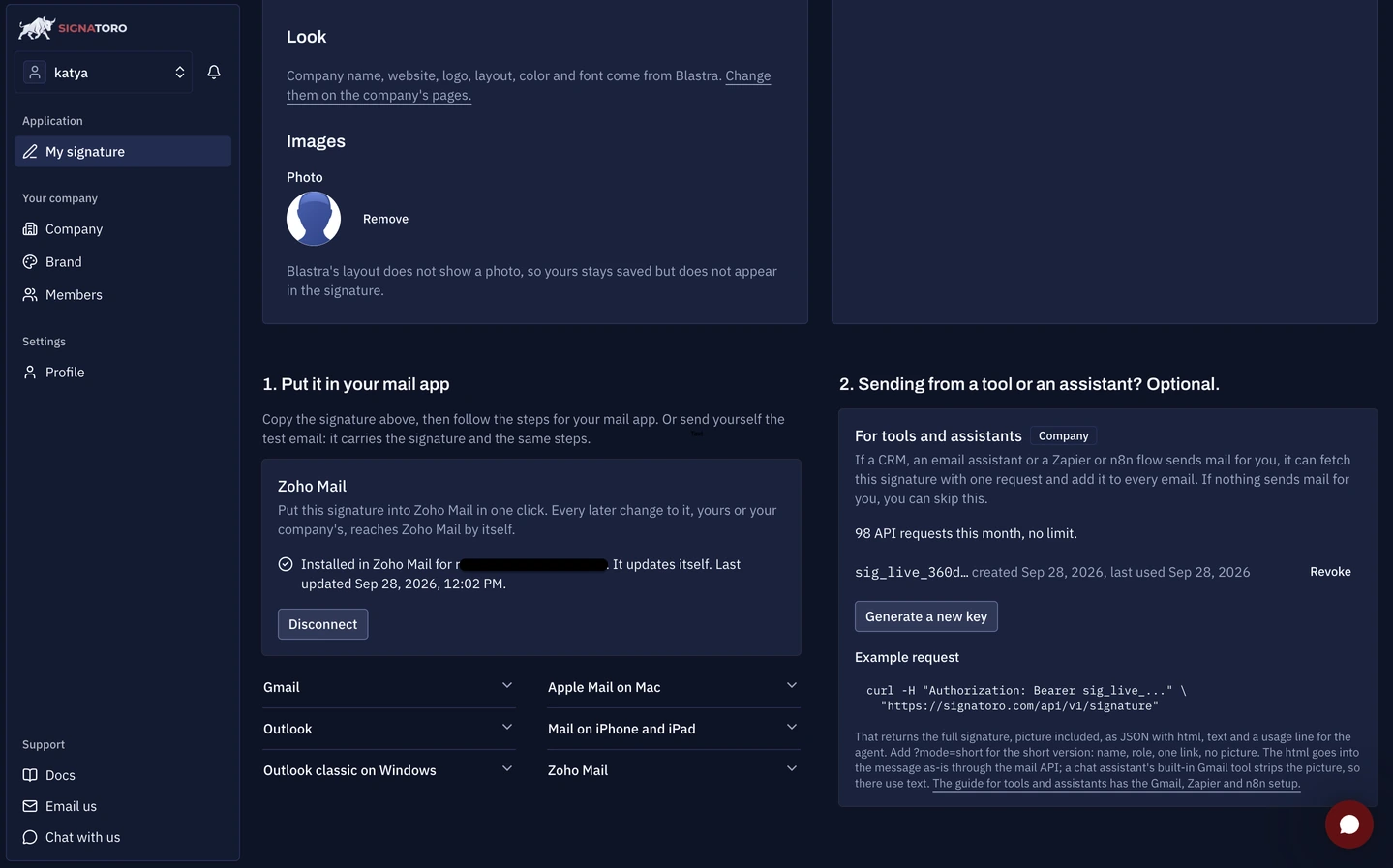
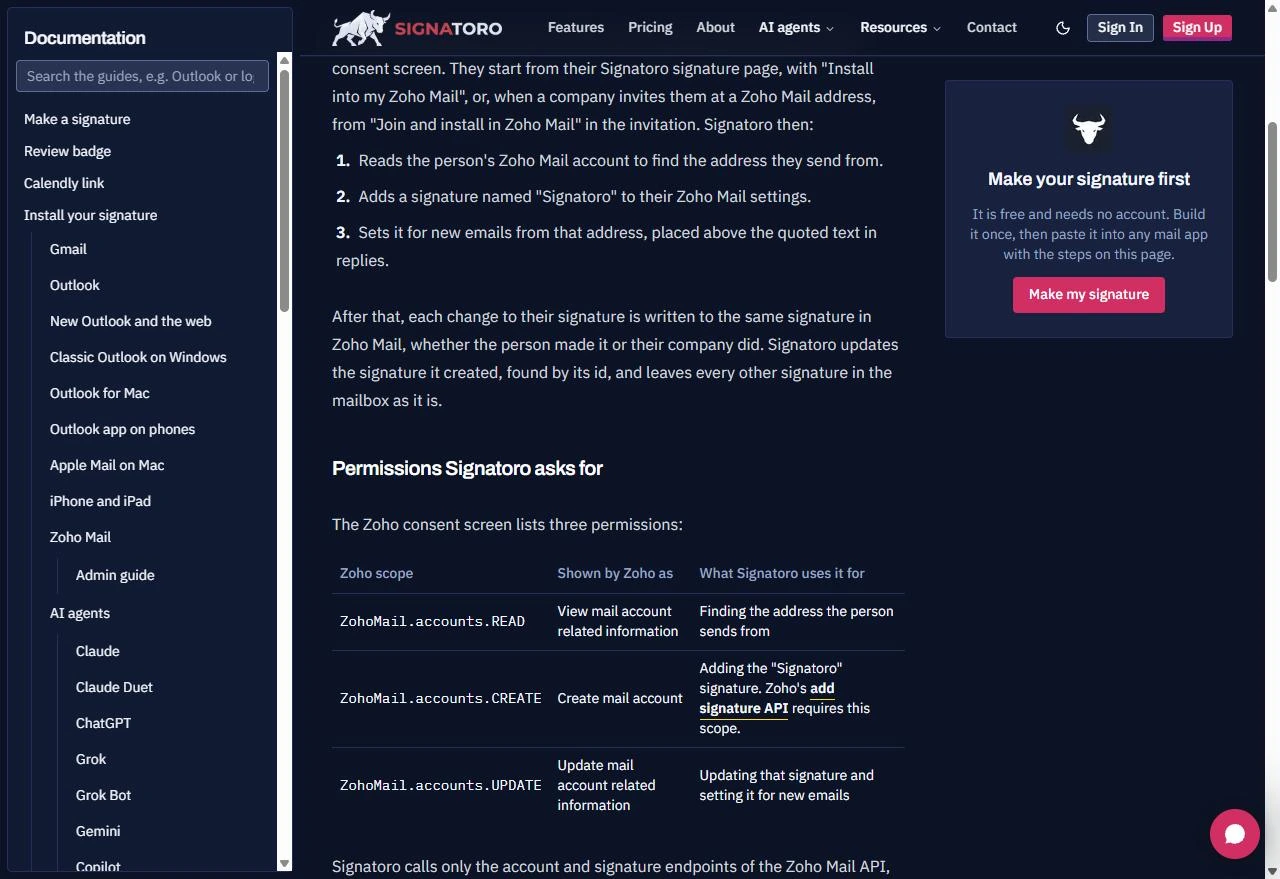
Zoho's consent screen lists three permissions: view mail account information, create, and update. Signatoro's admin guide says it uses them only to find the address you send from, add a signature named Signatoro, and keep it updated, and that it leaves every other signature in the mailbox alone. Afterwards the card says Installed in Zoho Mail, It updates itself, with a Disconnect button.
Checking it in Zoho Mail
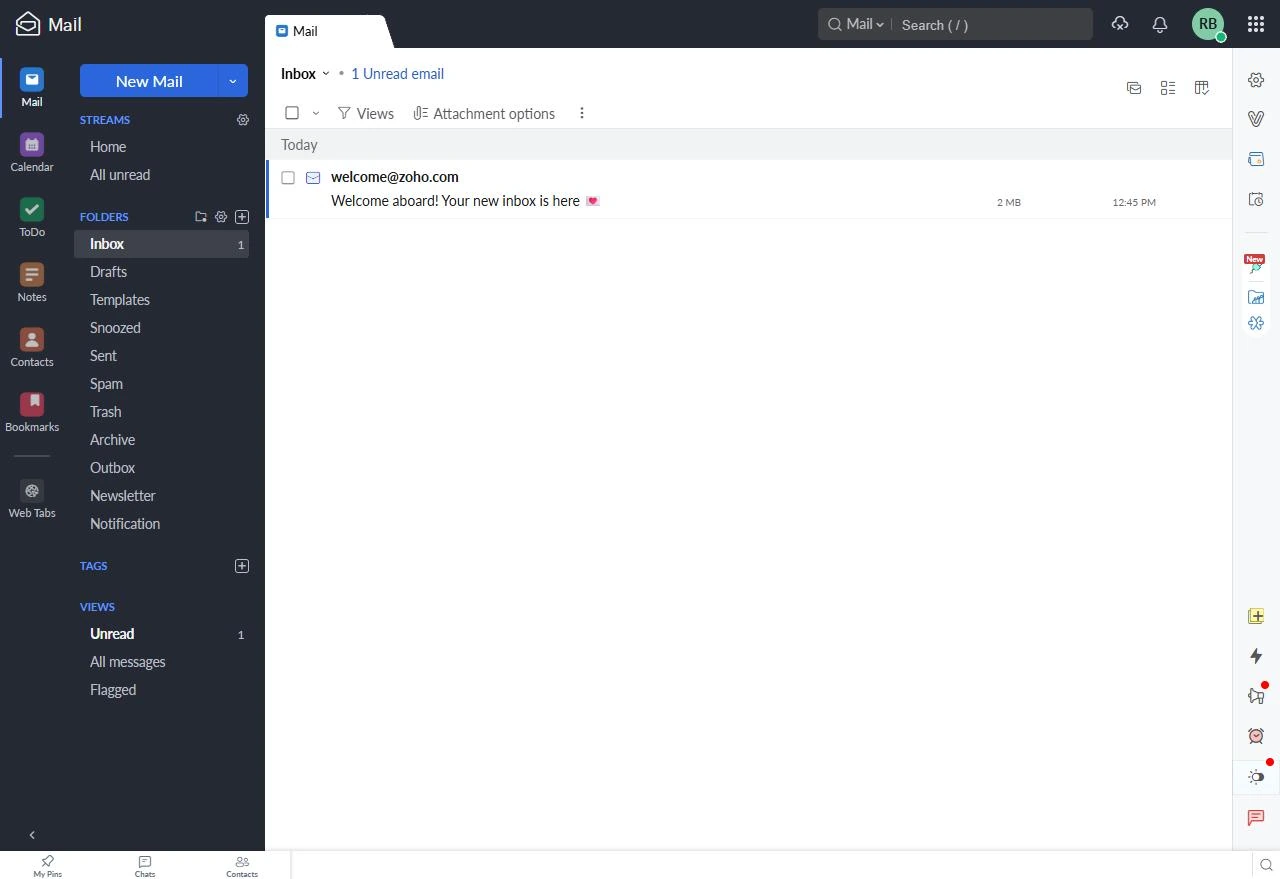
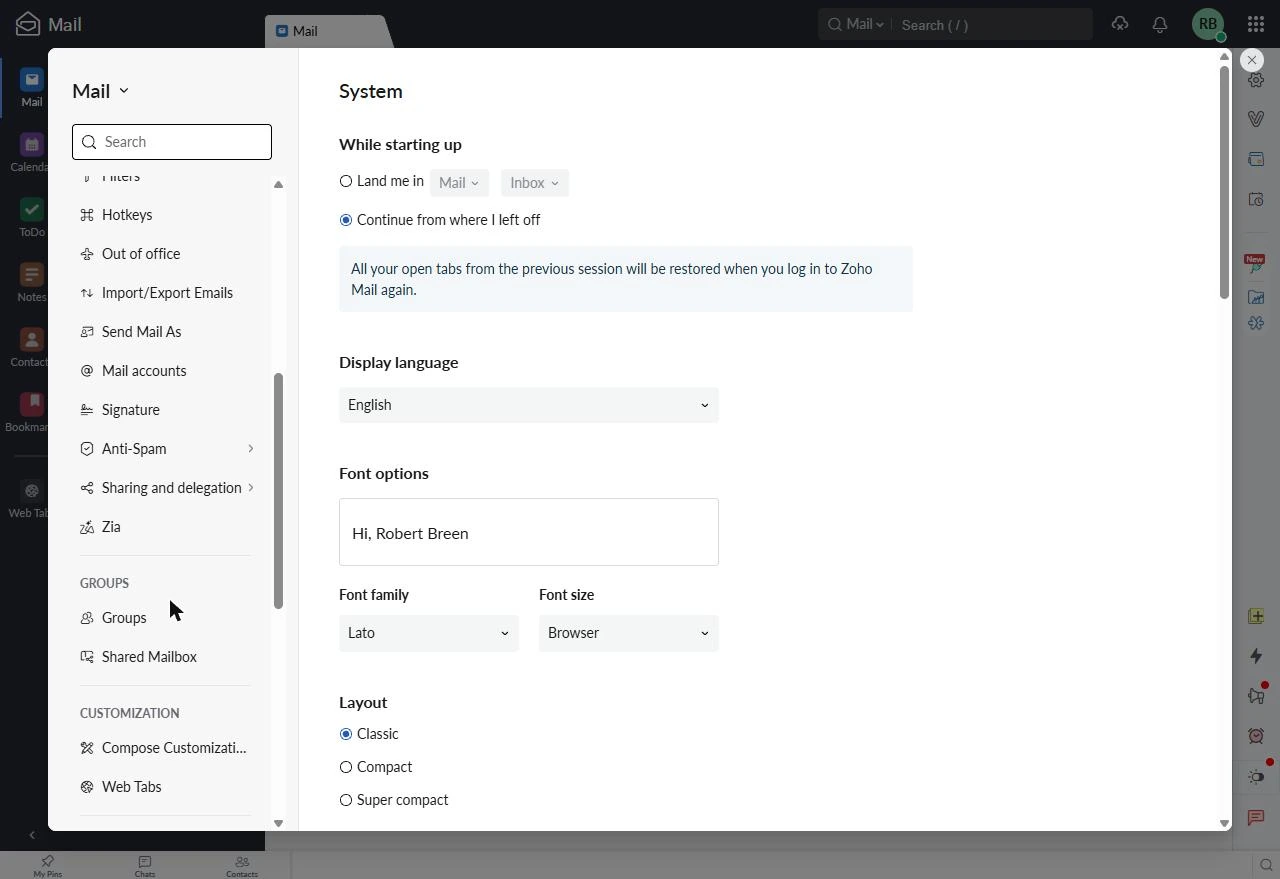
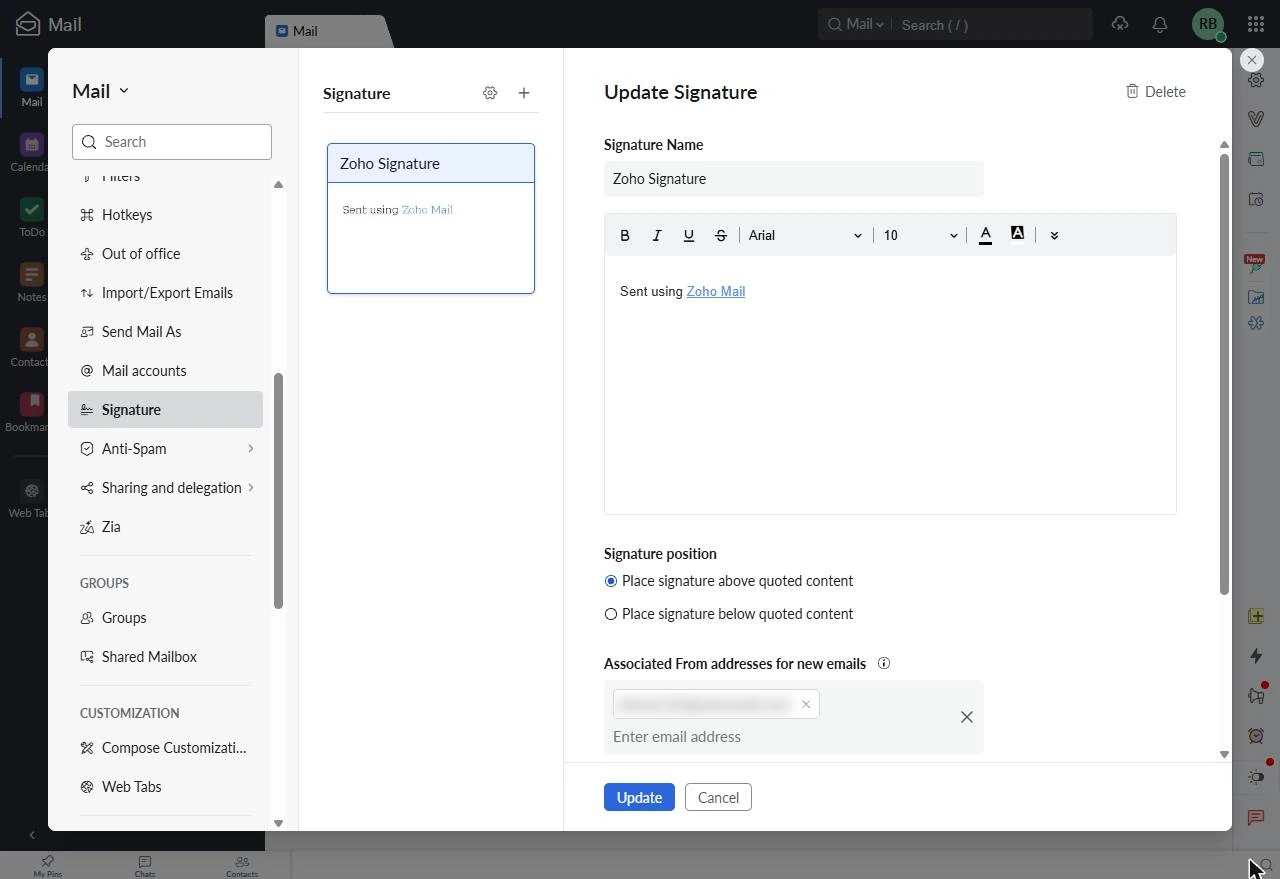
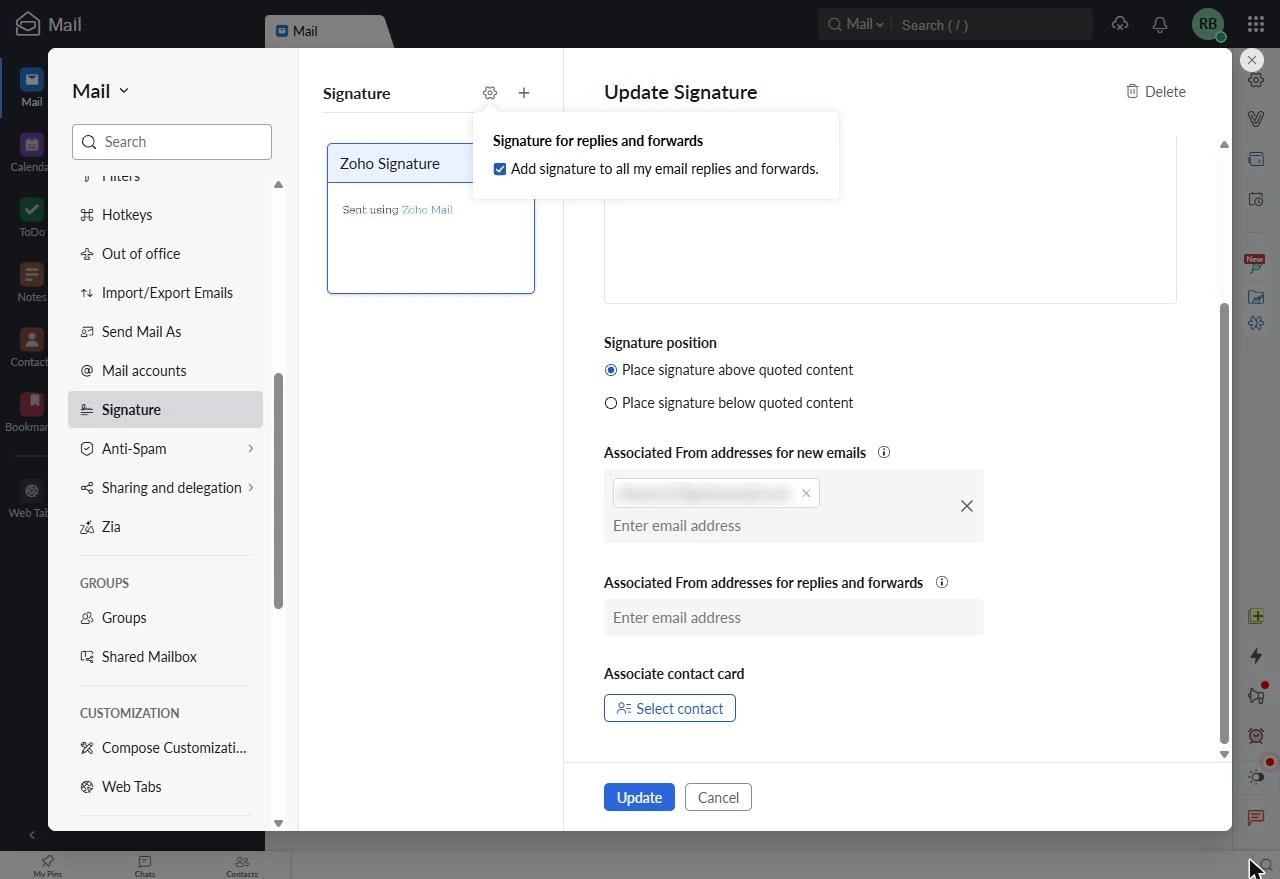
In Zoho Mail, the Settings gear on the right opens Settings, and Signature is in the Mail section of the menu. The list shows every signature in the mailbox; a new mailbox has only Zoho's default, Sent using Zoho Mail, and after the install a signature named Signatoro sits there too.
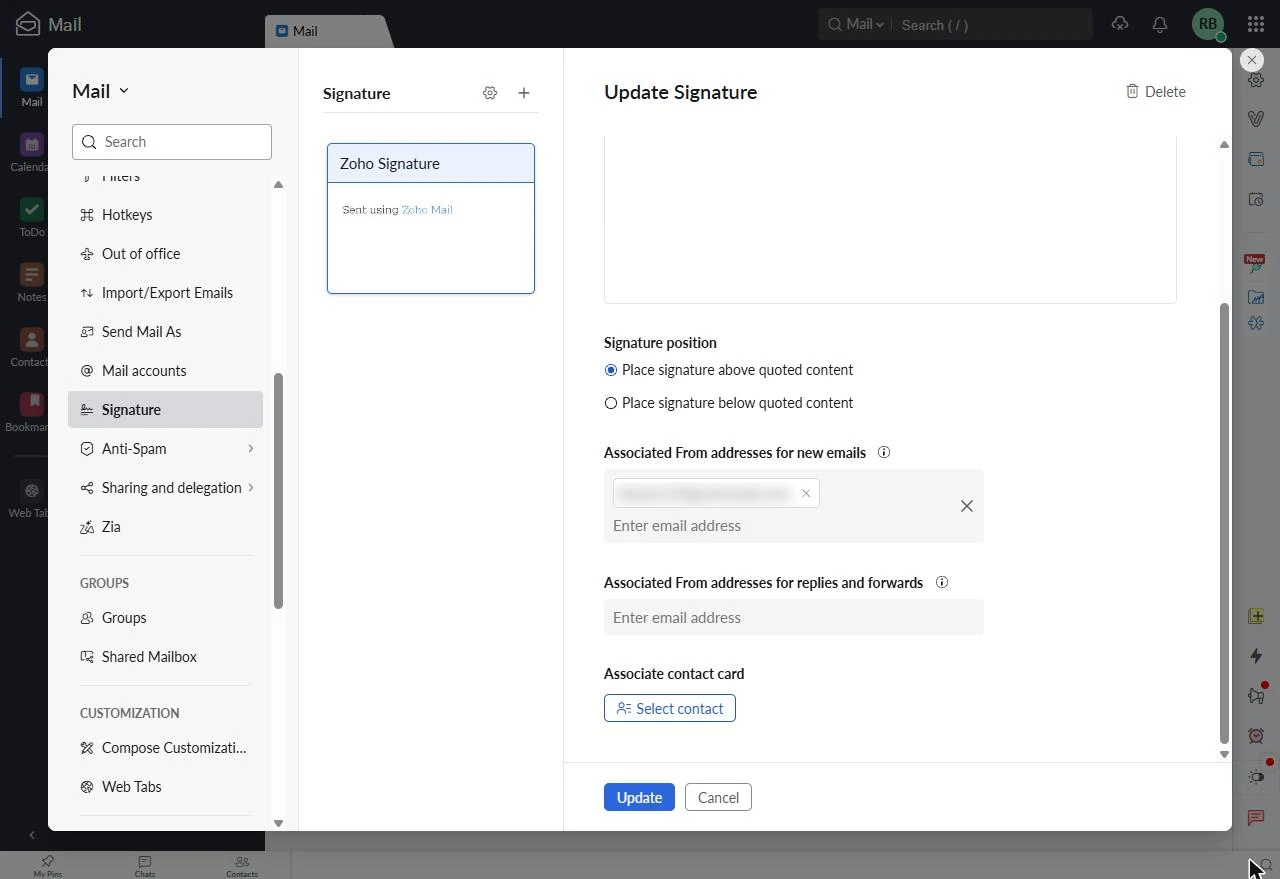
Zoho adds a signature to new emails only when it is linked to your address under Associated From addresses for new emails, and the install sets that for you. The gear next to Signature holds Add signature to all my email replies and forwards: if it is not ticked, replies go out unsigned. The Zoho Mail phone app takes the signature only after you sync its settings from the web.
Links
- Signatoro: the email signature platform this lesson installs into Zoho Mail.
- Signatoro: how to add a signature in Zoho Mail: Signatoro's own guide: the one-click install, plus the paste-by-hand steps, replies and the phone app.
- Signatoro for Zoho Mail: admin guide: the three Zoho permissions, what Signatoro stores and how a person or an admin stops it.
Try it yourself, free
Reading the steps is a start. Doing them is how it sticks. The interactive module walks you through every click in a practice copy of Signatoro, checks each step, and never touches your real accounts.
Start “Add Your Company Email Signature to Every Zoho Mail Message with Signatoro”Step by step: Add Your Company Email Signature to Every Zoho Mail Message with Signatoro
All 17 steps of the interactive module, in order. In the module you watch each one, then do it yourself in a practice copy that checks your work.
1. Nine signatures, typed by hand
- Count what hand-typed signatures cost. Lena Ortiz (made up) runs the office at Kestrel Architects: 9 people, all on Zoho Mail, each with a signature they typed themselves. The firm changes something about 3 signature changes a year: a new phone line, a new logo, a new title. Every change means chasing nine people. Click the about 9 hours a year row.
Meet Lena. She runs the office at a nine-person architecture firm, and everyone typed their own Zoho Mail signature. Every time the logo or the phone number changes, she chases nine people.
- Keep one company signature, and let it update Zoho Mail. Signatoro keeps each person's signature in one place, with the company's logo, colors and details set once by the owner. With its Zoho Mail install, the signature goes into Zoho Mail in one click, and every later change reaches Zoho Mail by itself. Click the Signatoro card.
Signatoro keeps one signature per person, with the company's look set once. Install it into Zoho Mail in one click, and every later change reaches Zoho Mail by itself.
- What you need. Three things: a Signatoro account with your signature saved (a Company plan if the company sets the logo and details), a Zoho Mail account in any Zoho data center except China, and a web browser. Download our notes on this page, then click the list.
Three things. A Signatoro account with your signature saved. A Zoho Mail account. And a web browser.
2. Install it from Signatoro
- Read Signatoro's three steps. Signatoro's own Zoho Mail guide has the whole install in three steps: open your signature page, click Install into my Zoho Mail, then approve access in Zoho. Click step 2.
Signatoro's own guide has the install in three steps.
- Open My signature. Sign in to Signatoro and open My signature in the left menu. This is Signatoro's own screenshot from its Zoho Marketplace listing, so it shows Signatoro's demo company. Lena's page has the same parts. Click My signature.
Sign in to Signatoro, and open My signature.
- See what the company sets. On a Company plan, some fields say Set by your company: the company name, the website, and under Look the logo, layout, color and font. Each person fills in their own name, title, phone and links. Click the Company box.
On a company plan, the company name, website, logo and colors are set once, by the company. Each person fills in their own name and phone.
- Save the signature. Check the preview under How it looks in an inbox, then click Save signature.
Check the preview, then click Save signature.
- Install into my Zoho Mail. Scroll down to 1. Put it in your mail app. On the Zoho Mail card, click Install into my Zoho Mail. This screenshot shows the card after the install, which is where you end up. Click the Zoho Mail card.
On the Zoho Mail card, click Install into my Zoho Mail.
- Read what Zoho asks you to approve. Zoho asks you to sign in if you are not already, and then shows a consent screen. Signatoro's admin guide lists the three permissions on it: view mail account information, create, and update. Signatoro uses them only to find your From address, add a signature named Signatoro, and keep it updated. If that is fine, approve it in Zoho. Click the table.
Zoho shows a consent screen with three permissions. Signatoro uses them to find your address, add one signature, and keep it updated. Read them, then approve.
- Installed, and it updates itself. Back on your signature page, the Zoho Mail card says Installed in Zoho Mail, and It updates itself, with the time of the last update. To stop the updates, click Disconnect; the signature stays in Zoho Mail as it is. Click the Installed line.
Back in Signatoro, the card says installed, and it updates itself. To stop it, click Disconnect.
3. Check it in Zoho Mail
- Open Zoho Mail settings. Now check where it went. In Zoho Mail, click the Settings gear at the top of the right-hand bar.
Now check it in Zoho Mail.
- Go to Signature. Scroll the settings menu down to the Mail section and click Signature.
- Find the signature list. Every signature in the mailbox is listed here. A new mailbox has Zoho's default, Sent using Zoho Mail, as in our test mailbox. After the install, a signature named Signatoro sits in this list too, and Signatoro only ever updates that one. Click the signature card.
Every signature is listed here. A new mailbox only has Zoho's default. After the install, one named Signatoro is here too, and Signatoro only ever updates that one.
- Check the From address. Zoho adds a signature to new emails only when it is linked to the address you send from: Associated From addresses for new emails. The install links the Signatoro signature to your address for you, and places it above the quoted text in replies. Click the address box.
Zoho only adds a signature when it's linked to the address you send from. The install does that for you.
- Check replies and forwards. Click the gear next to Signature to see Add signature to all my email replies and forwards. If it is not ticked, replies go out without a signature. It was already on in our mailbox. Click that line.
One more check. The gear next to Signature has a box for replies and forwards. Make sure it's ticked.
4. What it gave you, and what is next
- See what you have now. Lena's signature now lives in Signatoro, and Zoho Mail gets a copy that updates itself: when the firm changes its logo or phone number, it is changed once in Signatoro and reaches every installed Zoho Mail. Each person still clicks Install into my Zoho Mail once. Click What you have now.
The signature lives in Signatoro, and Zoho Mail gets a copy that updates itself. Change the logo once, and every installed mailbox has it.
- Up next. Next: give the same signature to the emails Claude drafts for you, with Signatoro's connector for Claude. Click Up next.
Next, give the same signature to the emails Claude drafts for you.
Screenshots
Frequently asked questions
- How do I add the same email signature for everyone on Zoho Mail?
- Save each person's signature in Signatoro, with the company's logo and details set once on a Company plan. Each person clicks Install into my Zoho Mail on their Signatoro signature page and approves access in Zoho. After that, changes made in Signatoro reach their Zoho Mail by themselves.
- What can Signatoro do in my Zoho Mail account?
- Zoho's consent screen lists three permissions: view, create and update mail account settings. Signatoro uses them only to find your From address, add a signature named Signatoro and keep it updated. It leaves your other signatures alone.
- How do I stop Signatoro updating my Zoho Mail signature?
- Click Disconnect on your Signatoro signature page; the signature stays in Zoho Mail as it is. You can also revoke Signatoro under Connected Apps in your Zoho account's Sessions page, and delete the Signatoro signature in Zoho Mail's Settings > Signature.
- Why is my Zoho Mail signature missing from replies?
- Zoho Mail adds a signature to replies only when Add signature to all my email replies and forwards is ticked. It is under the gear next to Signature in Zoho Mail's settings.
More in AI Automation for Consulting & Agencies
Take a client call with Granola: jot a few lines, let it write the notes from the transcript, check the budget against its source, draft the follow-up email and share…
Free · Live ~5 min Beginner
◷Beautiful.ai: A Client Review Deck from Your Brief in Under an HourBuild a client quarterly review deck with Beautiful.ai Create with AI: brief it with the real numbers, fix the outline before generating, check every figure and share a…
Free · Live ~6 min Beginner
 Turn a Client Kickoff Call into a Proposal Outline with ChatGPT (Agencies & Consultants)
Turn the transcript of a client kickoff call into the scope, budget and timeline the client stated, an action items table, open questions, and a recap email with a…
Free · Live ~10 min Beginner
◷Handle Scope Creep Without Losing the Client using ChatGPTA client asks for "one small extra" and a new language, and wants the launch date to hold. Give ChatGPT the thread and the project facts, catch the free work and the…
Free · Live ~9 min Beginner
 Research a Prospect's Market with Claude Research Before a Pitch (Consultants & Agencies)
Turn on Research before a pitch, have Claude check what a prospect's competitors offer online, read the cited report, check a source and turn it into talking points for…
Free · Live ~7 min Beginner
 Prompt Chaining for a Client Campaign Plan: Build It in Steps with ChatGPT (Agencies)
Ask ChatGPT for a client's whole 4-week campaign in one prompt, then build a better one in four steps: audiences, offers, a calendar table checked against the client's…
Free · Live ~7 min Beginner
All 19 modules in AI Automation for Consulting & Agencies
Terms in this lesson
Plain-English definitions, each with an example from a free lesson.