AI Prompts for Consultants: 10 Copy-Ready Templates
Updated · By Robert Breen
Consultants sell expertise but spend a large share of their hours on unbillable writing: research before a pitch, proposals, statements of work, status reports and the delicate scope-change email. Faster first drafts mean more time for the analysis clients pay for, and quicker proposals often mean more wins.
These prompts keep your thinking at the center. They structure your notes and research, keep scope tight and mark assumptions, and they never fill a proposal with invented results or market numbers. Research prompts ask for sources you can check, because a wrong fact in a client deck costs more than the time it saved.
Practice with a made-up agency in Turn a Client Kickoff Call into a Proposal Outline and Research a Prospect's Market with Claude Research.
How do you use these prompts?
Copy a prompt into ChatGPT, Claude, Gemini or Copilot and replace every [BLANK] with your own details. Where a prompt says PASTE, paste your notes, email or document there. Each prompt follows the four parts from Prompt Writing 101: a Role, the Context, the Task and the Format you want back. Then check every name, date, number and promise in the answer before you use it.
Winning work
1. Research a prospect before the pitch
You are a consultant preparing to pitch [PROSPECT COMPANY], a [INDUSTRY] business. Using the sources I paste below (their site, news, reports), summarize: what they do, recent changes, likely priorities, competitors they mention and three questions to ask in the first meeting.

[PASTE SOURCES OR NOTES]

Label every point with the source it came from, and mark anything inferred as "Inference".

Format: headed sections, under 350 words.
2. Turn a kickoff call into a proposal outline
Act as a consultant. Here is the transcript or notes from a discovery call with [CLIENT]:

[PASTE NOTES]

Draft a proposal outline: the client's situation and goals in their words, the problem to solve, proposed approach in phases, deliverables, what we need from them, assumptions and open questions. Leave pricing as [PRICING TO ADD].

Format: headed sections with bullets.
3. Write a statement of work
You are a consultant writing a statement of work for [CLIENT]. Agreed scope: [DELIVERABLES]. Timeline: [PHASES AND DATES]. Fees: [FEES AND PAYMENT TERMS]. Client responsibilities: [RESPONSIBILITIES]. Out of scope: [OUT OF SCOPE]. Change process: [HOW CHANGES ARE HANDLED].

Write the SOW with numbered sections and acceptance criteria for each deliverable. Use only these terms and mark anything I should confirm before sending.

Format: numbered sections, under 700 words.
Delivering
4. Plan a project in phases
Act as an engagement lead planning [PROJECT] for [CLIENT] over [DURATION]. Goals: [GOALS]. Team: [TEAM]. Constraints: [CONSTRAINTS].

Break the work into phases with the key activities, deliverables, client touchpoints and decision gates for each. Point out where we depend on the client and what happens if they are late.

Format: a table with Phase, Activities, Deliverable, Client input needed, Decision gate.
5. Write a client status report
You are the consultant on [PROJECT] for [CLIENT]. This period: completed [DONE], in progress [IN PROGRESS], risks [RISKS], decisions needed from the client [DECISIONS], hours or budget used [BUDGET STATUS].

Write a concise status report that leads with the overall status and the decisions needed. Be candid about risks.

Format: a headline, then sections as bullets, under 250 words.
6. Turn findings into an executive summary
Act as a consultant. Here are my findings from [ANALYSIS OR INTERVIEWS]:

[PASTE FINDINGS]

Write an executive summary in the pyramid style: the main conclusion first, then three supporting points with evidence from the findings, then recommendations with owners and a rough sequence. Do not add evidence that is not in my findings.

Format: under 350 words, with the conclusion in bold.
7. Build a client deck outline
You are preparing a [NUMBER]-slide deck for [CLIENT]'s [MEETING] on [TOPIC]. The one message they should leave with: [MESSAGE]. Material:

[PASTE NOTES, DATA, FINDINGS]

Write a slide-by-slide outline: an action title for each slide (a full sentence that states the point), three supporting bullets and a note on the chart or visual. Use only my material.

Format: numbered slides.
Client relationships
8. Handle a scope change request
You are the consultant on [PROJECT]. The client asked for [REQUEST]. It is outside the SOW because [REASON]. Options: [OPTION 1 WITH COST AND TIME], [OPTION 2], or keep the current scope.

Write a friendly reply that welcomes the idea, explains it is a change to the agreed scope, sets out the options and asks them to choose. Do not start the work or agree to anything before they decide.

Format: under 180 words.
9. Write a project wrap-up and next-step email
Act as a consultant finishing [PROJECT] for [CLIENT]. Results delivered: [RESULTS]. Handover items: [HANDOVER]. Ideas for further work that came up: [IDEAS].

Write a wrap-up email that thanks them, summarizes what was delivered, confirms the handover and mentions the further ideas lightly, offering a call. Do not exaggerate the results.

Format: under 220 words.
10. Prepare for a difficult client conversation
You are a consultant preparing for a conversation with [CLIENT CONTACT] about [ISSUE, SUCH AS A MISSED DEADLINE OR UNPAID INVOICE]. Facts: [FACTS]. What I want from the conversation: [OUTCOME]. What I can offer: [OPTIONS].

Write an opening statement, the three points I must make, likely reactions with calm responses and a proposed close. Keep it factual and non-defensive.

Format: headed sections, under 300 words.
How do you adapt these prompts to your own work?
- Always paste your own notes and sources. Proposals and decks built from the assistant's general knowledge sound polished and say nothing specific.
- Check your client contracts for confidentiality terms before pasting client material, and use anonymized versions when you can.
- Chain big jobs: research, then outline, then draft, checking each step. Prompt chaining for a client campaign plan shows how.
Where can you practice these skills for free?
These free Stepthrough lessons practice the same jobs step by step, with a made-up business and practice copies of the real tools, so nothing touches your real accounts.
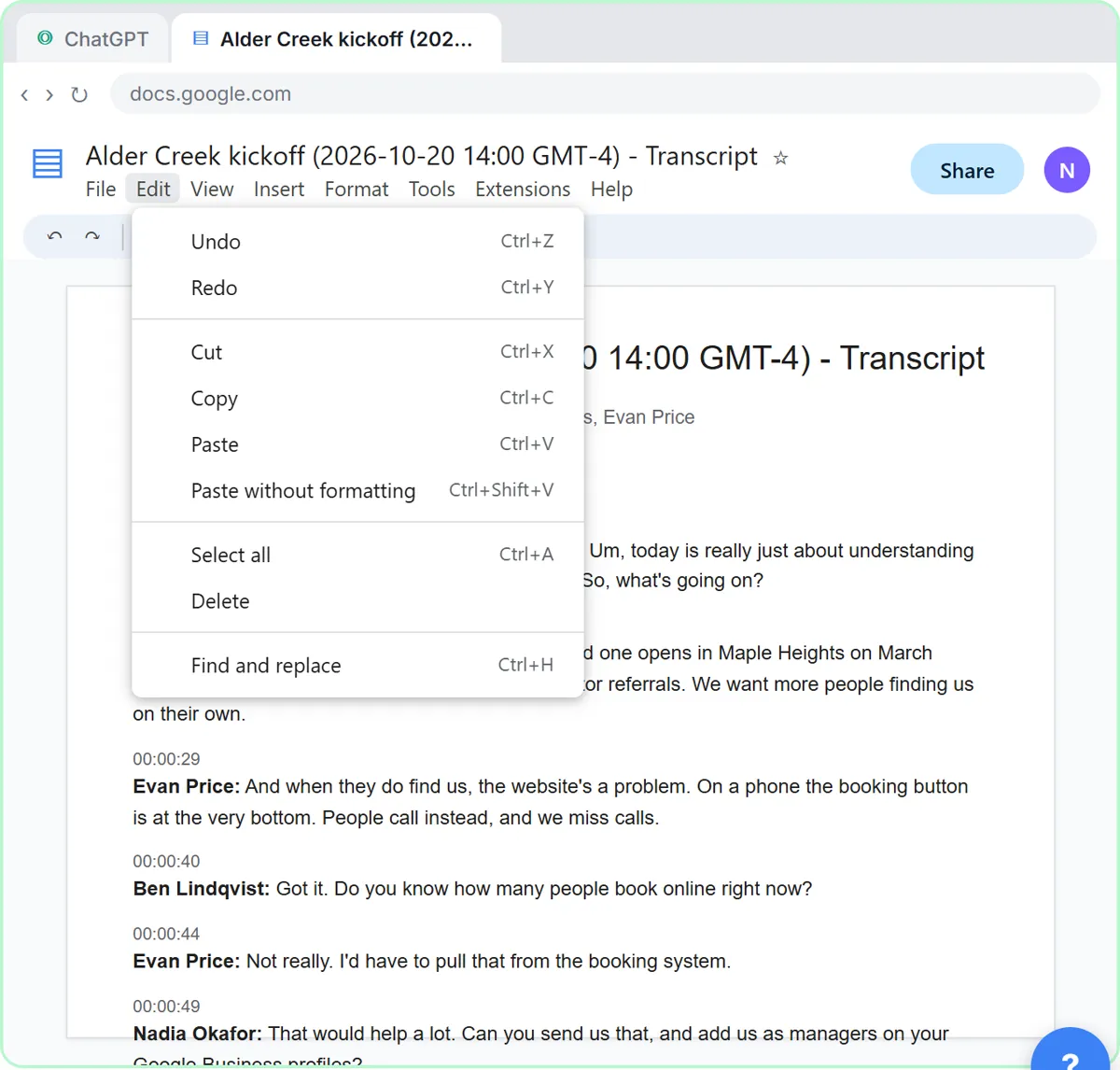 Turn a Client Kickoff Call into a Proposal Outline with ChatGPT (Agencies & Consultants)
Turn the transcript of a client kickoff call into the scope, budget and timeline the client stated, an action items table, open questions, and a recap email with a…
Free · Live ~10 min Beginner
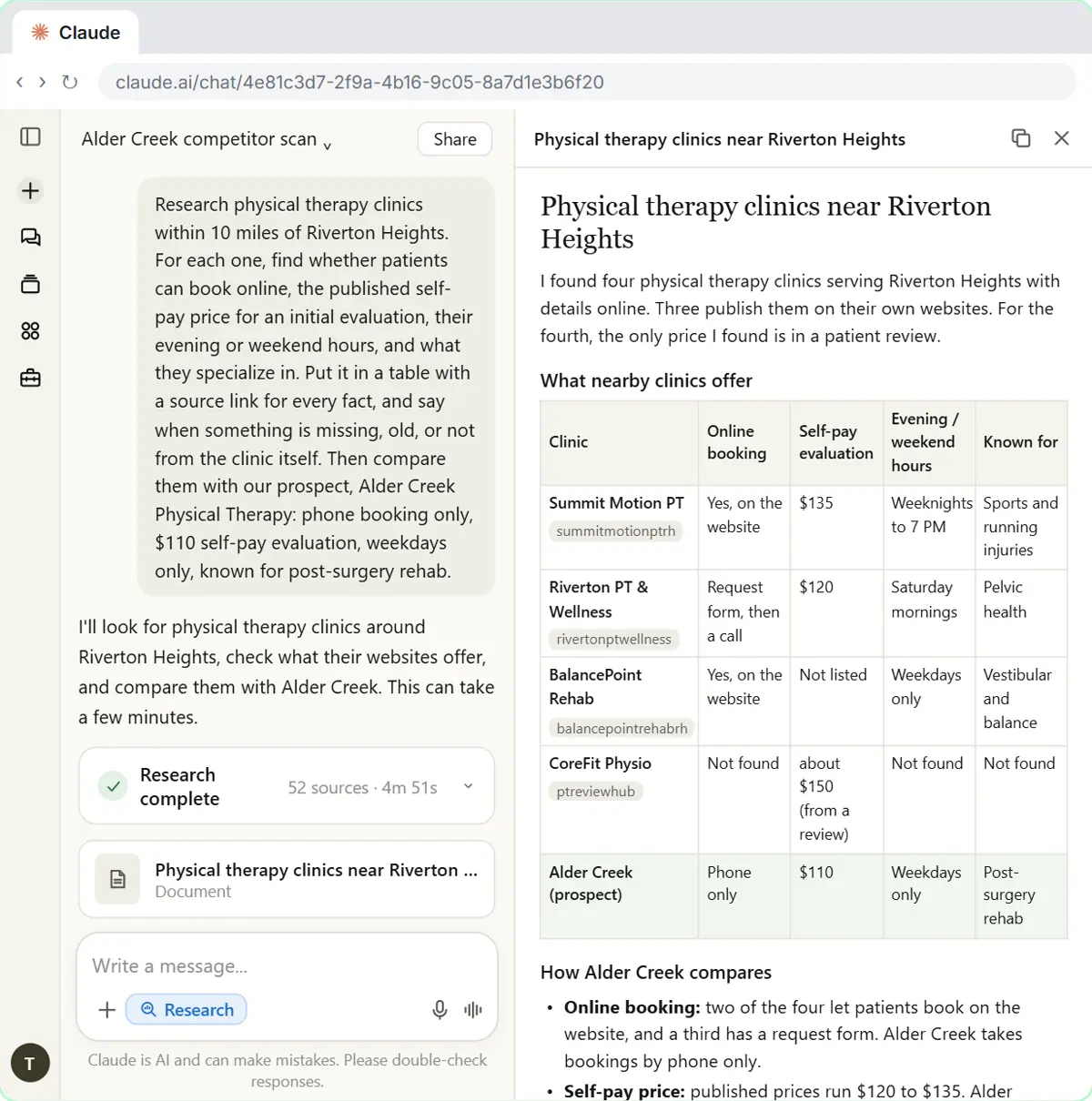 Research a Prospect's Market with Claude Research Before a Pitch (Consultants & Agencies)
Turn on Research before a pitch, have Claude check what a prospect's competitors offer online, read the cited report, check a source and turn it into talking points for…
Free · Live ~7 min Beginner
◷Handle Scope Creep Without Losing the Client using ChatGPTA client asks for "one small extra" and a new language, and wants the launch date to hold. Give ChatGPT the thread and the project facts, catch the free work and the…
Free · Live ~9 min Beginner
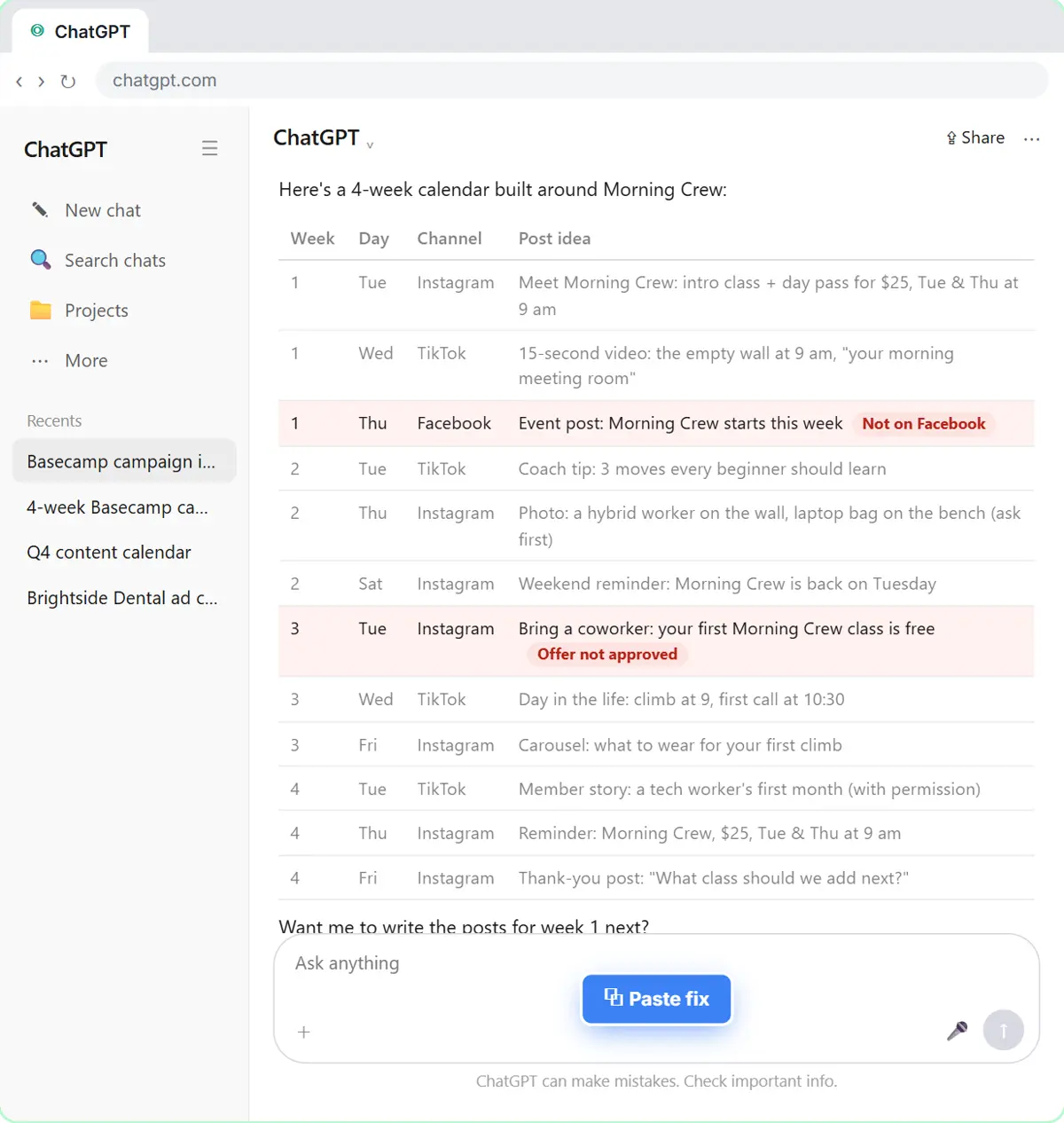 Prompt Chaining for a Client Campaign Plan: Build It in Steps with ChatGPT (Agencies)
Ask ChatGPT for a client's whole 4-week campaign in one prompt, then build a better one in four steps: audiences, offers, a calendar table checked against the client's…
Free · Live ~7 min Beginner
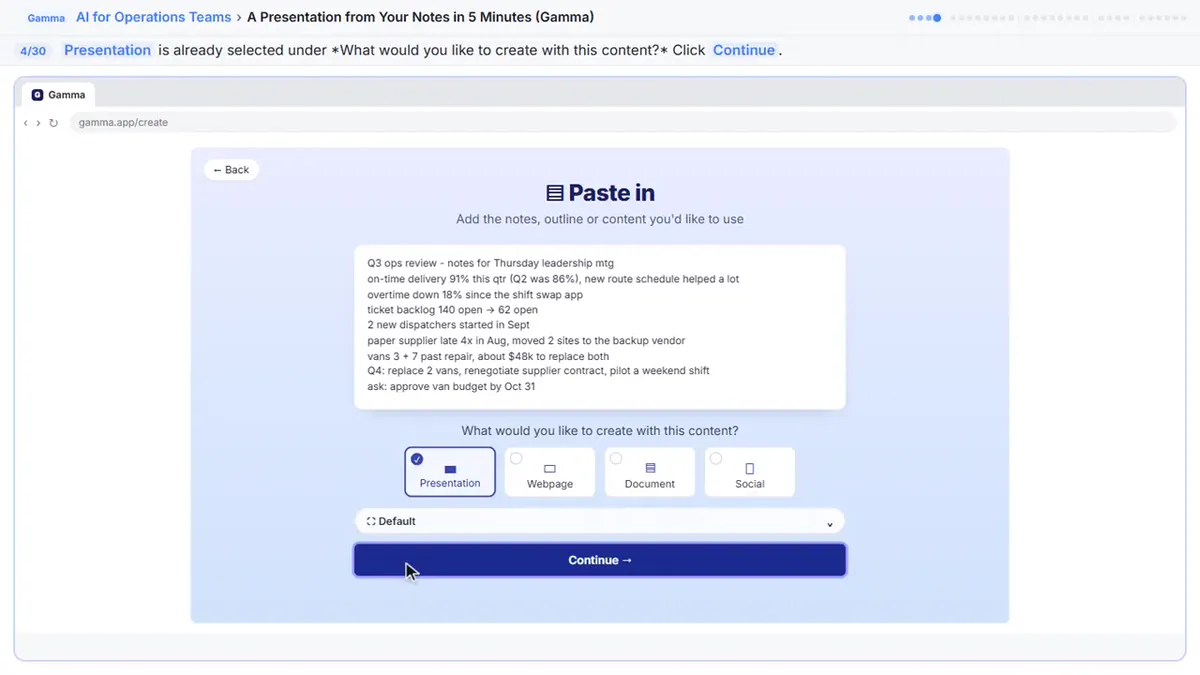 A Presentation from Your Notes in 5 Minutes (Gamma)
Paste rough meeting notes into Gamma, pick a theme, fix one slide by chatting with its AI, and export the deck to PowerPoint and PDF.
Free · Live ~9 min Intermediate
Which free courses fit this job?
- AI for Consulting & Agencies: From kickoff notes to a proposal deck, a cited market scan and client status emails that write themselves.
- Master ChatGPT for Work: Go from safe first chats to ChatGPT that knows your job, reads your files and runs multi-step work: data controls, memory, prompts, meeting minutes…
- AI Presentations & Client Decks: Go from research and rough notes to a finished client presentation, proposal deck or investor pitch in an afternoon, not a week.
New to AI at work? Start with AI for Consultants: Where to Start (Free Learning Path), a short path of free lessons in order.
Practice it free, step by step
Turn a Client Kickoff Call into a Proposal Outline with ChatGPT (Agencies & Consultants). Turn the transcript of a client kickoff call into the scope, budget and timeline the client stated, an action items table, open questions, and a recap email with a proposal outline. You do every step yourself in a practice copy of ChatGPT, it checks your work as you go, and “Do it for me” finishes any step you get stuck on. Free, and nothing touches your real accounts.
Start the free lessonMore templates for this job
Single prompts from the prompt library, each with a filled-in example and a checklist for the answer.
- Statement of work draft prompt: Turn agreed project terms into a first-draft statement of work: scope, deliverables, timeline, fees and client duties. Gaps get…
- Scope change reply prompt: Reply when a client asks for extra work: acknowledge it, say what is and isn't covered, and offer clear options without souring…
- Executive summary from a report prompt: An executive summary AI prompt for ChatGPT: turn a long report into one page with the bottom line first, key findings, decisions…
- Client kickoff agenda prompt: Build a kickoff meeting agenda for a new client project: introductions, goals, scope, who does what, timeline and the first…
Prompts for other roles
Frequently asked questions
- How are consultants using AI?
- Mostly for research summaries, proposal and SOW drafts, status reports, deck outlines and client emails. The analysis, recommendations and client judgment stay with the consultant.
- Is AI research reliable enough for client work?
- Treat it as a starting point. Use tools that cite sources, open the sources yourself and never put an unchecked number in front of a client.