What is code execution in Claude?
Quick answer
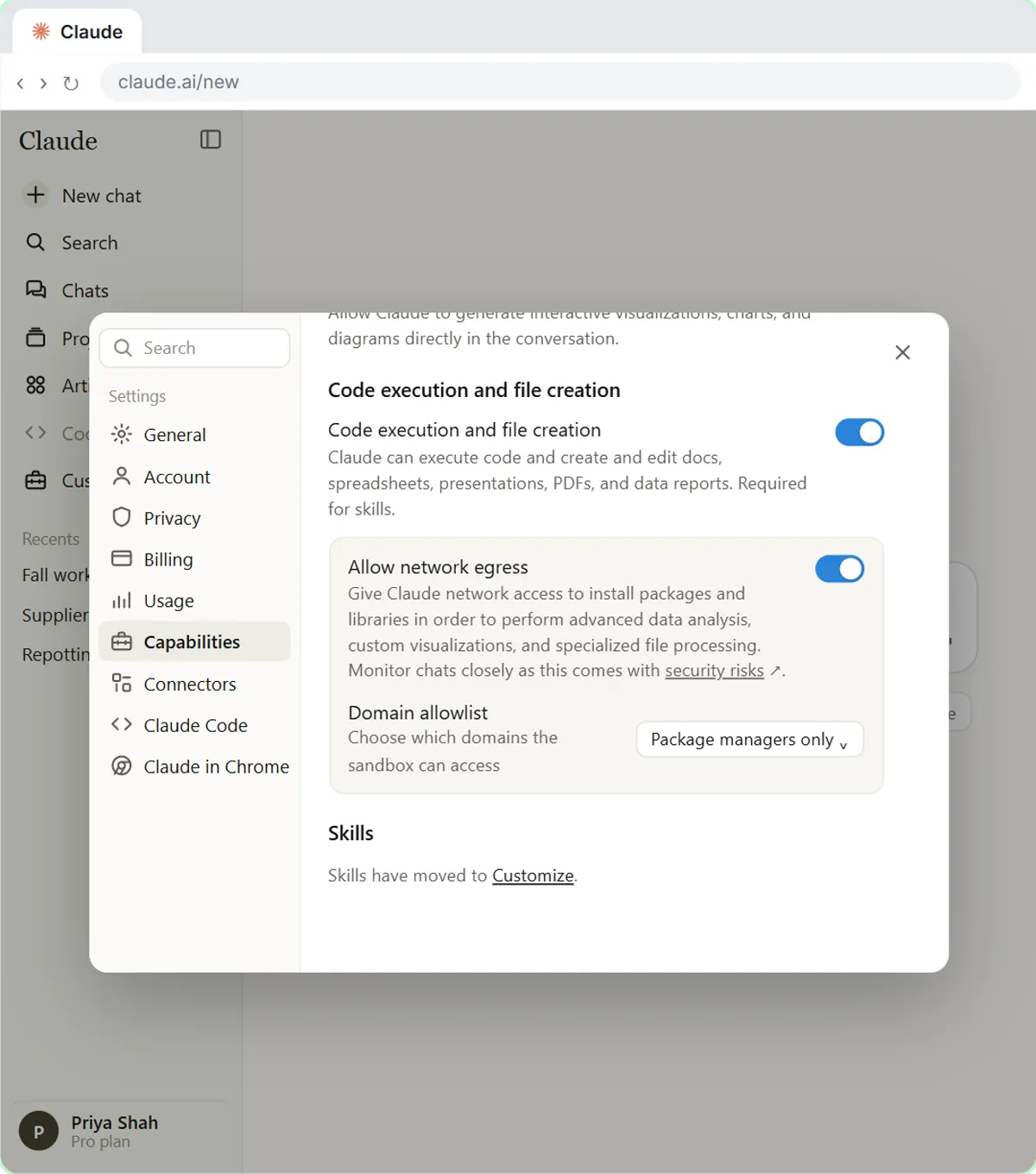
Code execution and file creation is a Claude setting that lets Claude run code in a protected workspace and hand you real files, such as an Excel workbook with formulas, a Word document or a PDF. Without it, Claude can describe a spreadsheet but cannot build one. Skills depend on it.
Last updated
Updated · By Robert Breen
Why it matters for a small business
A chat assistant that can only write text can tell you what a spreadsheet should contain. One that can run code can check its own arithmetic, open your uploaded file, fix it and return a finished workbook. That is a big difference for office work, because the output is a file you can open, not a draft you have to rebuild.
It is also why the setting matters for safety and for skills. The code runs in a sandbox, not on your computer, but it still handles your uploaded files, so apply your usual rules for personal information. And because Claude skills are partly scripts, they only work when this setting is on.
In a real lesson: Claude's Excel Skill: Turn a Messy Export into a Clean Workbook
In the Claude's Excel Skill lesson, Willow Creek Plant Shop, a made-up garden shop, uploads a messy sales export. The lesson starts by checking Settings, then Capabilities, to make sure code execution and file creation is on.
Claude then returns a workbook with a clean Data tab, a Summary tab built with SUMIFS formulas and a chart. The activity line above the reply shows it loaded the xlsx skill, and it lists the two duplicate rows it removed so you can say whether either was a real sale.
Try this lesson free or read the step-by-step guide.
Common confusions
Code execution vs Claude Code
Code execution is a setting inside the Claude chat app that lets it run code to make files. Claude Code is a separate tool for developers who work in a terminal.
Code execution vs a macro
A macro lives inside your own spreadsheet. Code execution happens in Claude's workspace and the result comes back to you as a finished file.
Tips
- Switch it on in Settings, then Capabilities, before you try any file-building lesson.
- Open a few formulas in the finished workbook and compare one total with your original data.
- Ask Claude to list what it changed or removed so you can check its decisions.
Related terms
More AI assistants terms
Where you use it: free lessons
- Claude's Excel Skill: Turn a Messy Export into a Clean Workbook (Claude, 8 min)
- What Are Claude Skills? Turn One On and Watch It Work (Claude, 7 min)
- How to Install a Custom Skill in Claude (Upload a Skill .zip) (Claude, 6 min)
- Make Every Claude Document On-Brand with a Brand Guidelines Skill (Claude, 7 min)
Prompt templates that use it
Visual guide
Code execution and file creation in a few slides, with the same guide written out as text.

Frequently asked questions
- Where do I turn on code execution in Claude?
- On Free, Pro and Max plans, open Settings, then Capabilities, and turn on code execution and file creation. On Team and Enterprise plans an owner manages it in organization settings.
- Does the code run on my computer?
- No. It runs in a sandbox that Claude controls, and you download the result. Still, only upload files you are allowed to share with an AI tool.
- Is it the same thing as a skill?
- No. It is the capability that lets Claude run code. Skills are instructions that use that capability for a specific kind of task.