1. Meeting notes to a task tracker
Read meeting rows from a sheet, have OpenAI return {"tasks":[{"task","owner","due"}]} as JSON, Split Out the list and append one row per task. Two meetings become seven tasks in the lesson. n8n Split Out Node Examples.
2. Urgent requests one way, routine another
A Make router with an "Urgent" filter emails the front desk; a fallback route logs everything else. The Filters and Routers lesson and Make Router and Filter Examples.
3. A 5pm summary of today's requests
Make Search Rows with Date equal to {{formatDate(now; "YYYY-MM-DD")}}, a Text aggregator, and one Gmail email to the manager. Make formatDate Examples.
4. Morning assignments by email
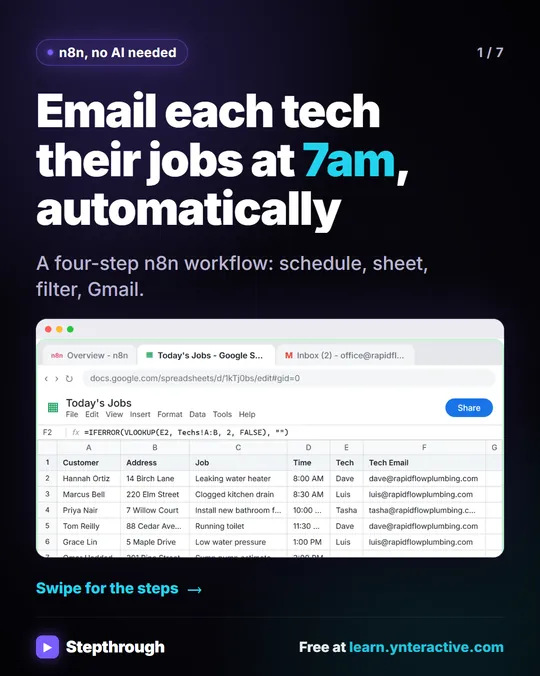
At 7am, read today's jobs or tasks, skip unassigned ones with a Filter, and email each person their own list. The Daily Job Alerts lesson does it for field techs; the same works for office assignments.
5. Form requests straight to a sheet
Every request form submission becomes a row the moment it's sent, through a Make Custom webhook. Make Custom Webhook.
6. Weekly status digest for leadership
Monday 8am, read the project tracker and email one summary, or AI-written updates per project as drafts. The client status email lesson has the pattern.
7. Kickoff meeting to recap, tracker and deck
ChatGPT recaps, n8n logs the action items, Gamma builds a five-slide deck that you then fact-check. The Meeting to Action lesson.
8. Approvals over a limit
Purchase requests above a threshold wait for a manager's approval email; small ones are just logged. n8n Send and Wait for Approval.
9. Internal help chat from an SOP doc
An AI Agent answers "how do I..." questions from your SOP document and emails ops when it can't. n8n Google Docs Tool. For writing the SOP, see Write an SOP with ChatGPT.
10. Workflow failure alerts
An error workflow posts to Slack or emails ops whenever another workflow fails. The error workflow entry and the n8n Workflow Maintenance Checklist.
Try it free, step by step
n8n: Turn Meeting Notes into Action Items in a Google Sheet. Build an n8n workflow that reads your meeting notes from a sheet, has AI pull out who agreed to do what by when, and adds one row per task to an Action Items sheet. You do every step yourself in a practice copy of n8n, it checks your work as you go, and “Do it for me” finishes any step you get stuck on. Free, and nothing touches your real accounts.
Start the free lessonHow do I choose what to automate?
Pick the task that repeats on a schedule or after a clear event, uses data you already keep, and follows a rule you can say in one sentence. When to Automate with AI has a quick test.
Key takeaways
- Collect requests in one sheet, route urgent ones, summarize the rest.
- Meeting notes to tasks is a fast win with JSON output plus Split Out.
- A daily 5pm digest replaces dozens of individual notifications.
- Add failure alerts before anyone relies on a workflow.
Frequently asked questions
- What can operations teams automate with n8n?
Request intake, routing, daily summaries, task tracking from meetings, approvals, status digests and internal help chats.
- n8n or Make for operations?
Make is quick for form, sheet and email scenarios; n8n handles AI steps and branching well. Many teams use both.
- How do I stop automations failing silently?
Add an error workflow that alerts someone, and check executions weekly.
- Is there a free course?
Yes: AI for Operations Teams and AI for Meetings.


![n8n + Gmail: mistake to avoid. Mistake: Typing one address in the To field. Every job email goes to the same person. Do this instead: Make To an expression for the Tech Email column. The name has a space, so write it as $json["Tech Email"].](/content/visual/mistake-one-address-for-every-job/01-540.webp)