What is a Custom webhook in Make?
A Custom webhook is an instant trigger: a URL Make listens on. When data arrives, the scenario runs right away instead of on a schedule.
In the module list it carries an Instant tag. That is the difference from a module like Google Forms Watch Responses, which checks for new responses every 15 minutes. If webhooks are new to you, What Is a Webhook? explains them in plain words.
How do I create a Custom webhook?
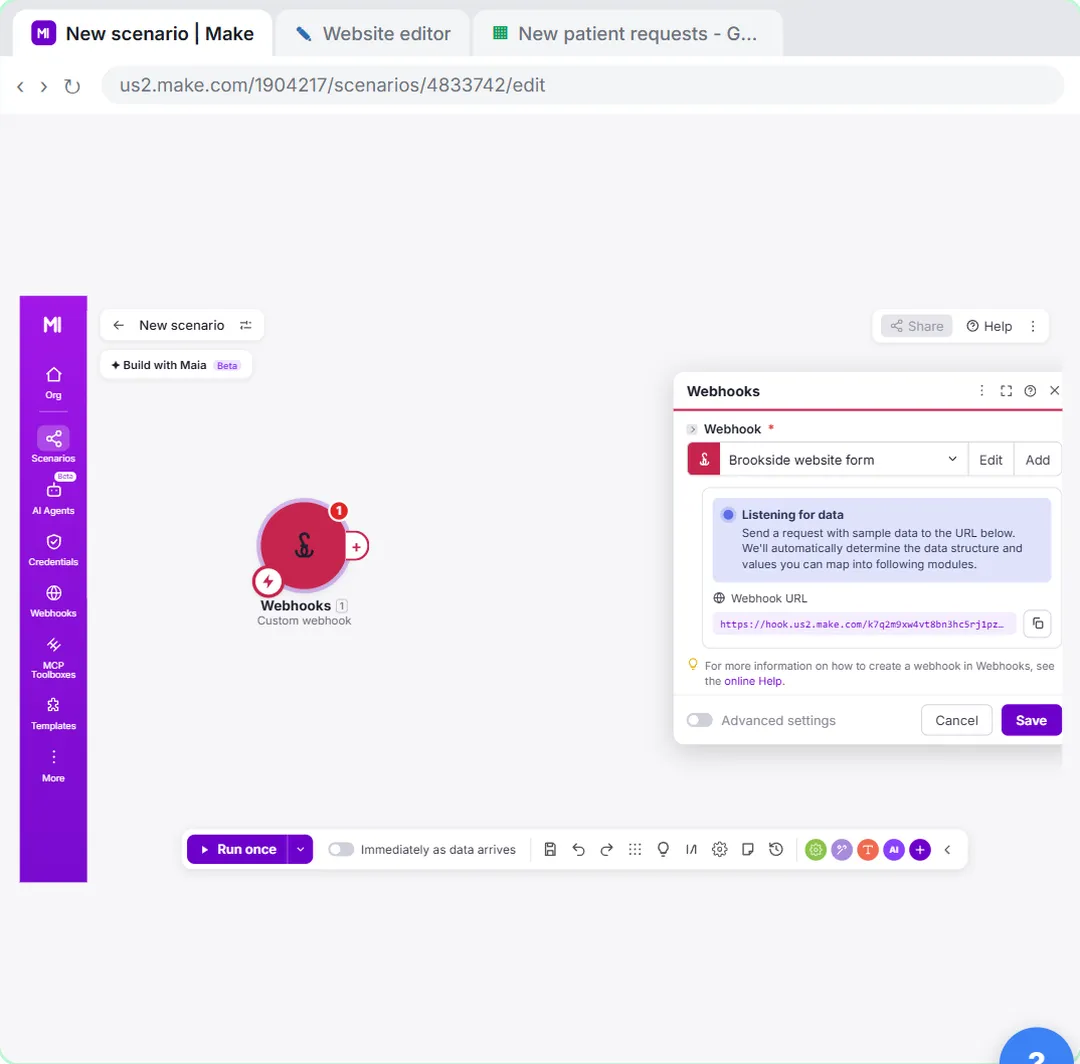
Start a scenario, add Webhooks > Custom webhook, create and name the webhook, and copy its URL.
- Click + Create scenario, then the big +, then Webhooks.
- Under Triggers, click Custom webhook.
- Click Create a webhook. If your account already has webhooks you see a list with Add next to it: click Add.
- Replace the name in Webhook name with something you'll recognise later, like the form it belongs to.
- Leave API Key authentication empty for a simple form and click Save.
- Make shows Listening for data. Click the copy icon next to the Webhook URL.
How do I connect a website form?
Paste the URL into the form's "send submissions to a webhook" setting and publish the site.
In the lesson the website editor has a Request an appointment form. Under Form settings > Integrations, Send submissions to a webhook takes the URL. Click Publish so the live form uses it. Most form builders and site builders have an equivalent setting, often called webhook, integrations or "send data to URL".
How does Make learn the form's fields?
While the module says Listening for data, send one real test submission. Make reads it and shows how many values it found.
In the lesson Make shows 3 values detected and ready to map: name, email and reason. Click Save. From then on those fields appear in the mapping panel for every module after the webhook. If you later add a field to the form, open the webhook module and click Redetermine data structure, then send another test.
How do I map the webhook data into Google Sheets?
Add Google Sheets: Add a Row after the webhook and click each column field, then the matching webhook field.
| Sheet column | Mapped from the webhook |
|---|---|
| Name (A) | name |
| Email (B) | |
| Phone (C) | (empty, the form has no phone) |
| Reason (D) | reason |
Then click Run once. The first test only taught Make the fields, so send one more submission while Make waits. If Make offers Use existing data, you can click that instead. Both modules show a 1, and the row is in the sheet.
Try it free, step by step
Webhooks: Connect a Website Form to Make.com. Start a Make scenario with a Custom webhook, paste its URL into your website form's webhook setting, send a test so Make learns the fields, and save every request to Google Sheets the moment it… You do every step yourself in a practice copy of Make, it checks your work as you go, and “Do it for me” finishes any step you get stuck on. Free, and nothing touches your real accounts.
Start the free lessonHow do I switch it on?
Save the scenario and turn on the switch next to Immediately as data arrives. From then on every form submission runs the scenario within seconds. If it isn't working, Make Webhook Not Working? goes through the usual causes.
Key takeaways
- A Custom webhook is an instant trigger with its own URL.
- Send one test submission while Make is listening, so it can detect the fields.
- Use Redetermine data structure whenever the form's fields change.
- Turn on Immediately as data arrives, or nothing runs after your test.
Frequently asked questions
- Is the Make webhook URL secret?
Treat it like a password. Anyone with the URL can send data to your scenario. Add API Key authentication or a filter on a shared secret field if the URL might leak.
- Can one webhook serve two forms?
It can, but it is clearer to give each form its own webhook and scenario, so the data structure and the sheet columns stay simple.
- What does the webhook reply to the form?
Without a Webhook response module, Make answers with a short "Accepted" message and status 200. Add Webhooks > Webhook response to return your own message.
- Which course is this from?