1. "There is no scenario listening for this webhook"
This reply means the webhook exists but no active scenario uses it. Either the scenario is off, or the webhook was detached from it.
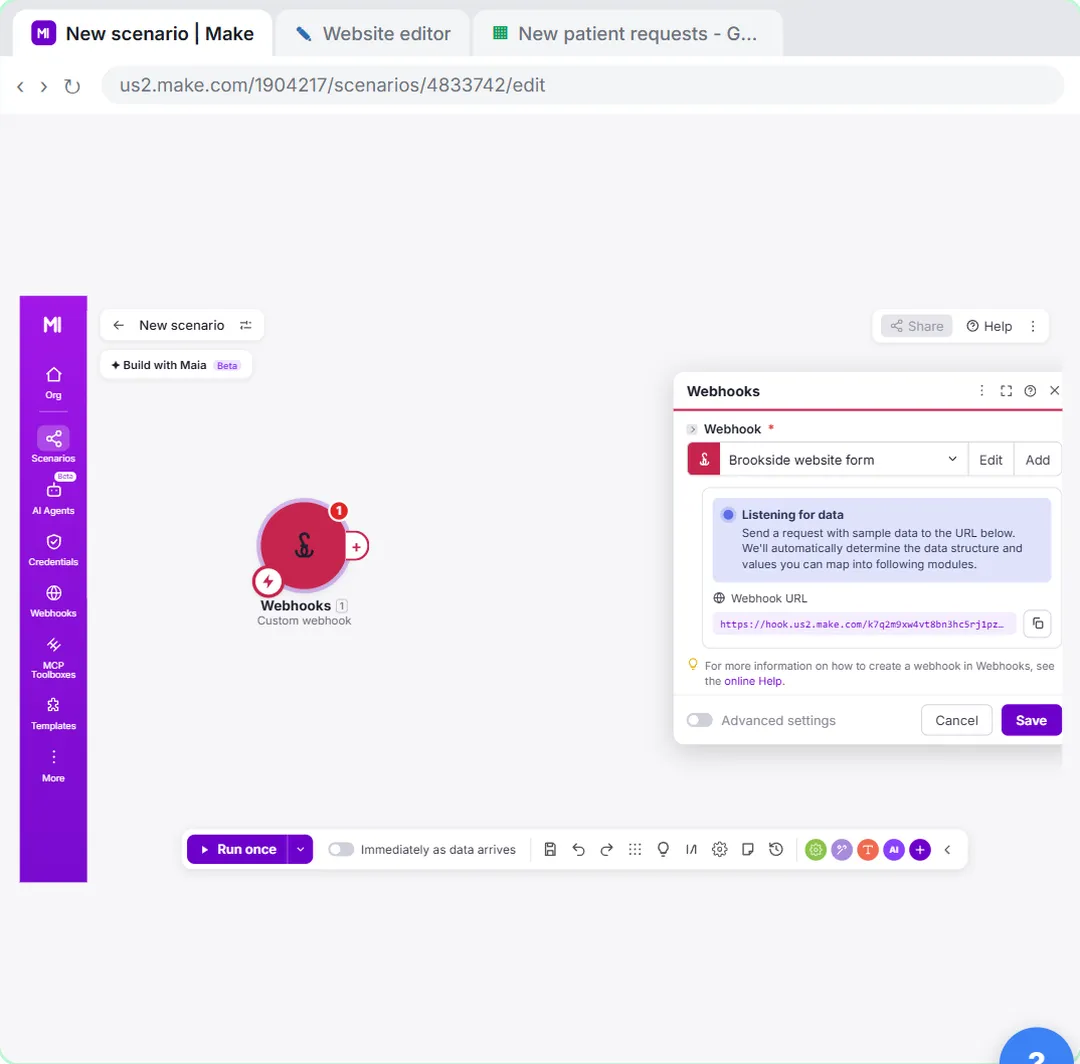
Fix: open the scenario, check that its first module is the Custom webhook with this URL, save, and turn the scenario on. While you build, Run once also listens, but only for that one run.
2. The scenario is still off
Run once is a test. It does not switch anything on. In the lesson, the last steps are to click the Save icon and then the switch next to Immediately as data arrives. Skip that and the form submits fine but nothing happens.
3. The form posts to the wrong URL
Each webhook has its own URL. If you created a second webhook while testing, the form may still point at the first one.
Fix: copy the URL from the webhook module again (the copy icon next to Webhook URL), paste it into the form's webhook setting and publish the site again. In the lesson that is Form settings > Integrations > Send submissions to a webhook, then Publish. An unpublished site keeps sending to the old address.
4. Fields are missing in the mapping panel
Make only knows the fields from the test it received while Listening for data. A field added to the form later isn't there.
Fix: open the webhook module, click Redetermine data structure, and send a test submission that fills every field. In the lesson the test shows 3 values detected and ready to map. If you expected four, the fourth field never reached Make.
5. Values arrive empty
The mapping points at a field name the form no longer sends, or the form sends data in a different shape, such as everything inside one nested object.
Fix: run the scenario once, click the bubble on the webhook module and read the output. Map from what is really there. Field names are case sensitive: Email and email are different.
6. Requests pile up in the queue
When a scenario is off or fails, Make can store incoming webhook requests in the webhook's queue. Turning it back on processes them, which can suddenly add many rows.
Fix: before switching back on, open the webhook's queue and delete test requests you don't want processed. Then switch the scenario on.
7. The scenario turned itself off
If a scenario errors several times in a row, Make can deactivate it. A typical cause after a webhook is a Google Sheets module whose sheet was renamed or whose connection expired.
Fix: open the scenario's history, read the error on the red module, fix it (reconnect, re-pick the sheet), then turn the scenario on again. Make Scenario Errors lists the common messages.
Try it free, step by step
Webhooks: Connect a Website Form to Make.com. Start a Make scenario with a Custom webhook, paste its URL into your website form's webhook setting, send a test so Make learns the fields, and save every request to Google Sheets the moment it… You do every step yourself in a practice copy of Make, it checks your work as you go, and “Do it for me” finishes any step you get stuck on. Free, and nothing touches your real accounts.
Start the free lessonHow do I test a webhook without the form?
Send a test request yourself with any tool that can POST JSON, such as the API client you already use, or the form's own "send test" button. Watch the webhook module's bubble: if the count goes up, Make received it and the problem is further along.
Key takeaways
- "There is no scenario listening for this webhook" means the scenario is off or not using that webhook.
- Run once is a test; the switch next to Immediately as data arrives turns it on.
- Use Redetermine data structure whenever the form's fields change.
- Clear the queue of old test requests before switching a scenario back on.
Frequently asked questions
- Why is my Make webhook not receiving data?
Check, in order: the scenario is on, the form uses this exact webhook URL, and the site with the form was published after you pasted the URL.
- How do I reset a Make webhook's data structure?
Open the Custom webhook module, click Redetermine data structure, then send a new test submission with every field filled.
- Do Make webhooks work while I'm building?
Yes. Click Run once and Make listens for the next request. That single run is all it handles until you switch the scenario on.
- Where do I learn Make webhooks properly?
The free Make & Zapier Jump Start course, module 4. For the general idea, read Webhook vs API.