What is event-driven automation?
Quick answer
Event-driven automation is an automation that starts the moment something happens: a form is submitted, an order is paid, a file is uploaded. The event itself starts the workflow, usually through a webhook, instead of the workflow running on a timer or waiting for someone to press a button.
Last updated
Take the free module →Module 13 of the free AI at Work: Start Here course, about 6 minutes. No account needed.
Updated · By Robert Breen
Why it matters for a small business
Speed is the main reason. A lead who fills in your contact form at 9:02 gets a reply at 9:02, not when the hourly check runs or when someone opens the inbox. It also saves effort: nothing runs when nothing has happened, so there are no empty checks every few minutes.
Automations usually start one of three ways. On a schedule, like a report every Monday at 8. By polling, where the tool checks an app every few minutes for anything new. Or on an event, where the app sends the news straight away. Event-driven is the fastest, but it needs the other app to be able to send that signal, usually by posting to a webhook address you give it.
In a real lesson: What Is a Webhook? Send a Test and Watch the Data Arrive
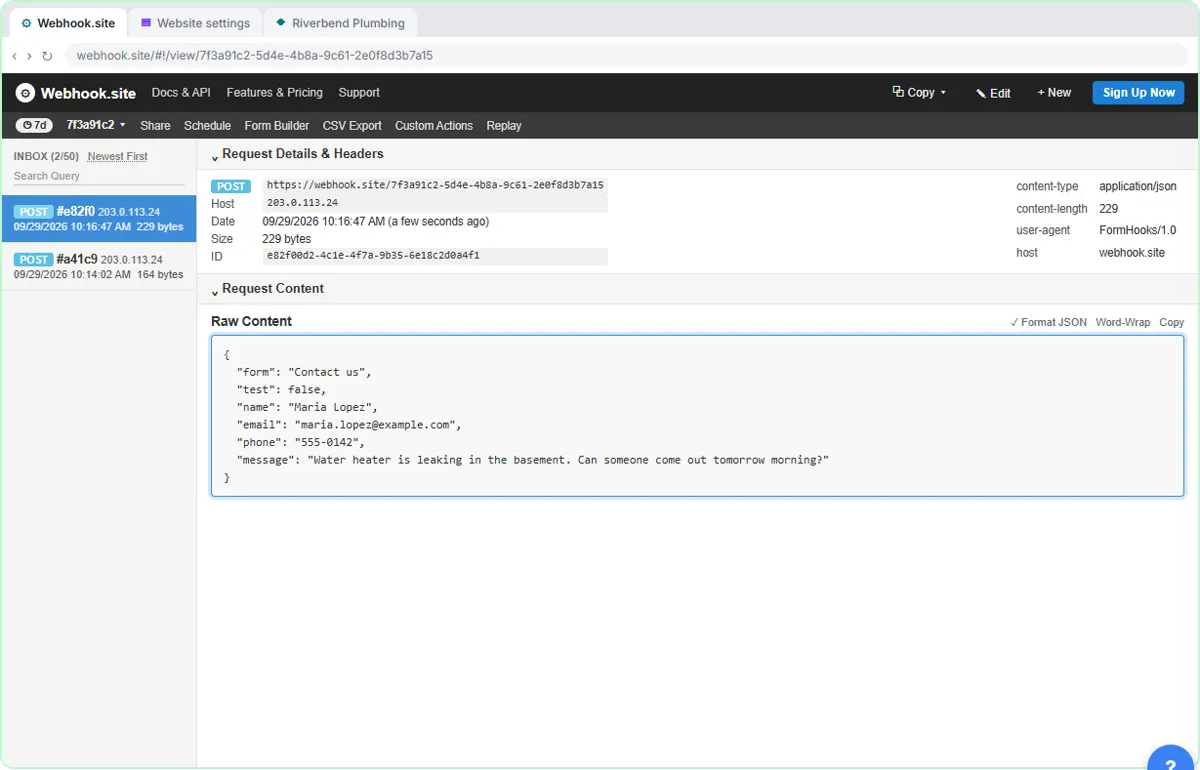
What a Webhook Is, in Plain Words shows the event in action. You copy a listening address from Webhook.site and paste it into Riverbend Plumbing's contact form settings. When Maria Lopez sends a message about a leaking water heater, the form posts her name, email, phone and message to that address right away. Nobody checked for it; the event pushed it.
The Make webhooks lesson takes the next step. Brookside Dental's form sends each request to a Make Custom webhook marked Instant, and you switch the scenario on with Immediately as data arrives. Each appointment request becomes a row in the New patient requests sheet within seconds, with no schedule at all.
Try this lesson free or read the step-by-step guide.
Common confusions
Event-driven vs scheduled
A schedule trigger runs at set times whether or not anything happened. An event-driven workflow runs only when something happens.
Event-driven vs polling
Polling checks an app every few minutes for new data. It feels close to instant but adds a delay and wasted checks. A true event is pushed to you.
Tips
- Use events for anything time-sensitive, like new leads, and schedules for summaries and reports.
- Check the app's settings for a webhook option before settling for a polling trigger.
- Plan for bursts: if 50 forms arrive at once, your workflow runs 50 times.
Related terms
More n8n and automation terms
Where you use it: free lessons
- What Is a Webhook? Send a Test and Watch the Data Arrive (Webhook.site, 6 min)
- Webhooks: Connect a Website Form to Make.com (Make, 12 min)
- n8n: Send Form Answers Straight to Google Sheets (n8n, 10 min)
Frequently asked questions
- Is a Gmail trigger event-driven?
- Usually not in the strict sense. In n8n the Gmail Trigger polls, checking the inbox on a timer such as every minute, so it is close to real time but not instant.
- What counts as an event?
- Anything an app can report as it happens: a form sent, a payment made, a file added, a row changed or a message received.
- Do I need a webhook for event-driven automation?
- Most of the time, yes. Some tools hide it inside an instant trigger, and form triggers like n8n's own form use a webhook behind the scenes.