Stepthrough is free, interactive AI training from Ynteractive for small-business owners and office staff: each lesson shows a step, then you do it yourself in a practice copy of the real tool, like ChatGPT, n8n, Gmail, Google Sheets or Lovable. We're building the largest free AI training there is, and you can try it right now with Prompt Writing 101, which takes about 8 minutes and needs no account.
Most people who want to use AI at work hit the same wall. They watch a video of someone clicking through ChatGPT or n8n, nod along, then open the real tool and have no idea where to start. Stepthrough exists to fix that: you don't watch someone else do it, you do it yourself, one click at a time.
Why is learning by doing better than watching a video?
Learning by doing is better because the hard part of an AI tool is the small stuff a video skips: which menu hides the setting, what to paste where, what the error means. In a Stepthrough lesson you make every click yourself, with help at exactly the moment you get stuck.
You don't learn to drive by watching someone else drive, and AI tools are the same. A video keeps going at full speed whether you're following or not.
So every Stepthrough lesson is built around doing:
- Watch, then do. Each step is shown on the left, with a cursor pointing at exactly where to click and a short voice-over explaining why that setting matters. Then you do the same thing yourself on the right.
- A practice copy of the real tool. The right side is a working copy of ChatGPT, n8n, Gmail, Google Sheets, Lovable or whatever the lesson uses. The buttons, menus and field names match what you'll see when you do it for real.
- It checks your work. Click the right thing and the lesson moves on. Click the wrong thing and it tells you, instead of letting you wander off.
- "Do it for me" when you're stuck. If a step isn't clicking, press Do it for me and the lesson finishes that step so you can keep going.
- Nothing touches your real accounts. No emails get sent, no keys get created and nothing gets billed while you practice. You learn the whole flow first, then build it in your own accounts when you're ready.
What will I build in a Stepthrough lesson?
You build a real piece of work for a realistic, made-up small business, so you can see exactly where your own business fits. Every Stepthrough module is built around a realistic small business with its own details, so you can see exactly where yours will go.
In Daily Job Alerts you're the office at Rapid Flow Plumbing. At 7am, n8n reads today's jobs from a Google Sheet, skips the one nobody is assigned to yet, and emails each tech their own jobs. Six rows go in, five emails go out.
In Reply Faster you answer a tense email thread for Cedar Lane Bakery. ChatGPT's first draft calls a birthday cake "completely nut-free," which the bakery never said. You learn to have ChatGPT check every promise in its own draft before anything goes to the customer.
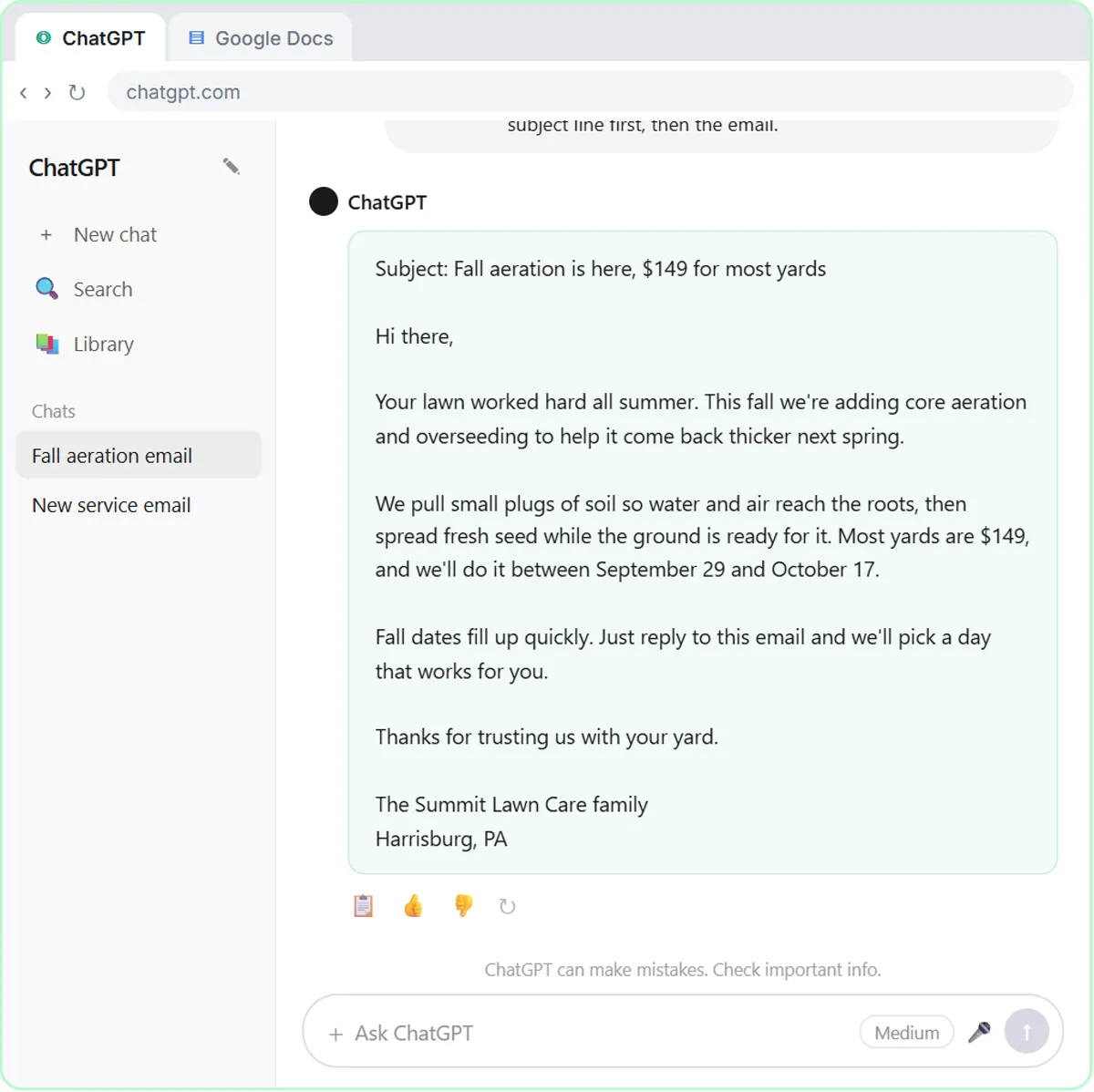
In Prompt Writing 101 you ask ChatGPT for the same customer email twice for Summit Lawn Care, once the vague way and once with four short parts. The first answer is full of blanks like [Your Company Name]. The second has the real price, the real dates and one clear next step.
There are industry versions too, for HVAC, electrical and plumbing companies, accounting firms, law firms, insurance agencies, recruiters, and sales, marketing, operations and finance teams. Same skills, with an example from your own line of work.
Does Stepthrough cost anything?
No. Every Stepthrough module is free, with no trial that runs out and no paid tier that hides the good lessons.
You also don't need to give us an email to read anything. Every lesson has a full written guide on this site, with every step in order, the prompts you paste in and the screenshots. Read as much as you like. The guides are for everyone, including people who just want to look something up.
Two honest notes about cost:
- Practicing is free and needs no accounts. The practice copy runs in your browser.
- The real tools have their own pricing. When you build something for real, you use your own accounts. ChatGPT has a free plan and paid plans. The OpenAI API (what n8n uses to talk to a model) is billed separately, per request. n8n Cloud is a paid service after its trial, though n8n can also be self-hosted. Lovable has its own plans. Each lesson tells you what you'll need, and we'll always say when something costs money.
What lessons are in Stepthrough today?
Stepthrough covers ChatGPT, n8n automations and small apps built with Lovable, in one course plus industry and team versions. Right now there are 36 live modules with 1,760 guided steps between them, and more are added every week. They're organized as one course in order, from your first prompts to automations and small apps, plus industry and team versions.
A few of the things you can build today:
- A structured prompt that gets usable answers, saved as a reusable template.
- A meeting recap from a transcript: decisions, an action items table with owners and due dates, and a follow-up email.
- An n8n workflow that emails each tech their jobs every morning.
- An n8n agent that reads new Gmail messages and saves a reply as a draft, so nothing goes out without you.
- An AI receipt reader that turns a photo into a row in Google Sheets.
- A web form built in Lovable that sends each lead to an n8n agent, which saves it and replies.
Parts on Claude, Gemini, Microsoft Copilot, Zapier, Make and AI voice agents are being built now.
What will the Stepthrough blog cover?
The Stepthrough blog publishes a new practical post every day, each one about a real job and linked to the free lesson where you can build it. Topics include answering customer email, turning meetings into action items and getting receipts into a spreadsheet, explained in plain English.
The first one is up now: how to write better ChatGPT prompts with four simple parts. Next up are emailing each tech their jobs every morning with n8n and AI email replies that wait as Gmail drafts.
Where should I start?
Start with the lesson that matches your biggest headache. Pick the one that sounds most like you:
- "I use ChatGPT but the answers are generic." Start with Prompt Writing 101. It takes about 8 minutes and needs no accounts.
- "I spend too much of my day on email." Start with Reply Faster, then follow the Email on Autopilot path.
- "I want things to happen on their own." Start with Daily Job Alerts, a first n8n automation with no AI at all, then work through the n8n tutorials.
Or just open all the free tutorials and pick whatever looks useful. If a step ever doesn't match what you see in the real tool, or you want a lesson for your industry, email [email protected]. Every lesson on this site came from someone needing it.
Key takeaways
- Stepthrough is free, interactive AI training where you repeat each step yourself in a practice copy of the real tool.
- Practicing in Stepthrough needs no accounts, and nothing is sent, created or billed.
- Every Stepthrough lesson has a free written guide that anyone can read without giving an email.
- The real tools have their own pricing: ChatGPT has free and paid plans, the OpenAI API is billed separately per request, n8n Cloud is paid after a trial, and Lovable has its own plans.
- The Stepthrough blog publishes a new practical post every day, each linked to a free lesson.
Frequently asked questions
- Does Stepthrough cost anything?
No. Every module is free, and the practice copy needs no accounts. To build something for real you use your own accounts in tools like ChatGPT, n8n or Google, and some of those have paid plans.
- Do I need to sign up to read the guides?
No. Every lesson has a full written step-by-step guide on this site, open to anyone, with no email needed.
- Do I need any experience with AI or coding?
No. The lessons are written for small business owners and office staff. Each step shows you where to click and explains why, and "Do it for me" finishes any step you get stuck on.
- How long does a lesson take?
Most take between 8 and 15 minutes. Prompt Writing 101 takes about 8, and the longer n8n builds take about 12 to 15.
- Will practicing touch my real email or accounts?
No. The practice copy is a simulation that runs in your browser. Nothing is sent, created or billed until you build it yourself in your own accounts.




