This guide explains what the key is, how to make one, why it needs credit, and the few rules that keep it safe.
What is an API key, in plain words?
An API key is a secret string that identifies your account when one program talks to another. An API is the doorway a service offers to other software; the API key is what proves the request is yours, so the service knows whom to bill.
When n8n sends a request to OpenAI, it attaches your key. OpenAI checks the key, runs the model and charges the cost to your OpenAI account. Anyone holding the key can do the same, which is why you treat it like a password.
Why does n8n need an OpenAI API key if I already pay for ChatGPT?
Because the OpenAI API is a separate product from ChatGPT, with its own billing. A ChatGPT plan covers chatting at chatgpt.com. An automation calling OpenAI's models from n8n uses the API, which is pay-as-you-go and billed on platform.openai.com.
The lessons put it simply: you pay per request, not per month. OpenAI API vs ChatGPT Plus explains the difference in more detail, and the glossary has a short entry on API usage billing.
How do I create an OpenAI API key?
You add credit first, then create the key, then copy it once. These are the steps from the AI Social Media Idea Agent lesson:
- Go to platform.openai.com, then Billing, and click Add to credit balance. The lesson notes that a key with no credit behind it just errors, and that ten dollars goes a long way.
- Click Continue and add a card. In the practice copy, no card is needed.
- Click API Keys in the left menu.
- Click + Create new secret key.
- Name it after what will use it. The lesson types n8n agent.
- Leave Project and Permissions alone and click Create secret key.
- Click Copy. This is the only time OpenAI shows you the key, so paste it somewhere safe right away.
- Click Done.
Try it free, step by step
n8n AI Agent Tutorial: Save Social Media Ideas to Google Sheets. Build an AI agent for BrightPath Marketing that generates social media post ideas and saves them to Google Sheets — chat trigger, AI Agent, system prompt, model, memory, and the Sheets tool. You do every step yourself in a practice copy of n8n, it checks your work as you go, and “Do it for me” finishes any step you get stuck on. Free, and nothing touches your real accounts.
Start the free lessonHow do I add the API key to n8n?
You paste it into a credential on the OpenAI Chat Model node, and n8n stores it for every future workflow. In the lesson:
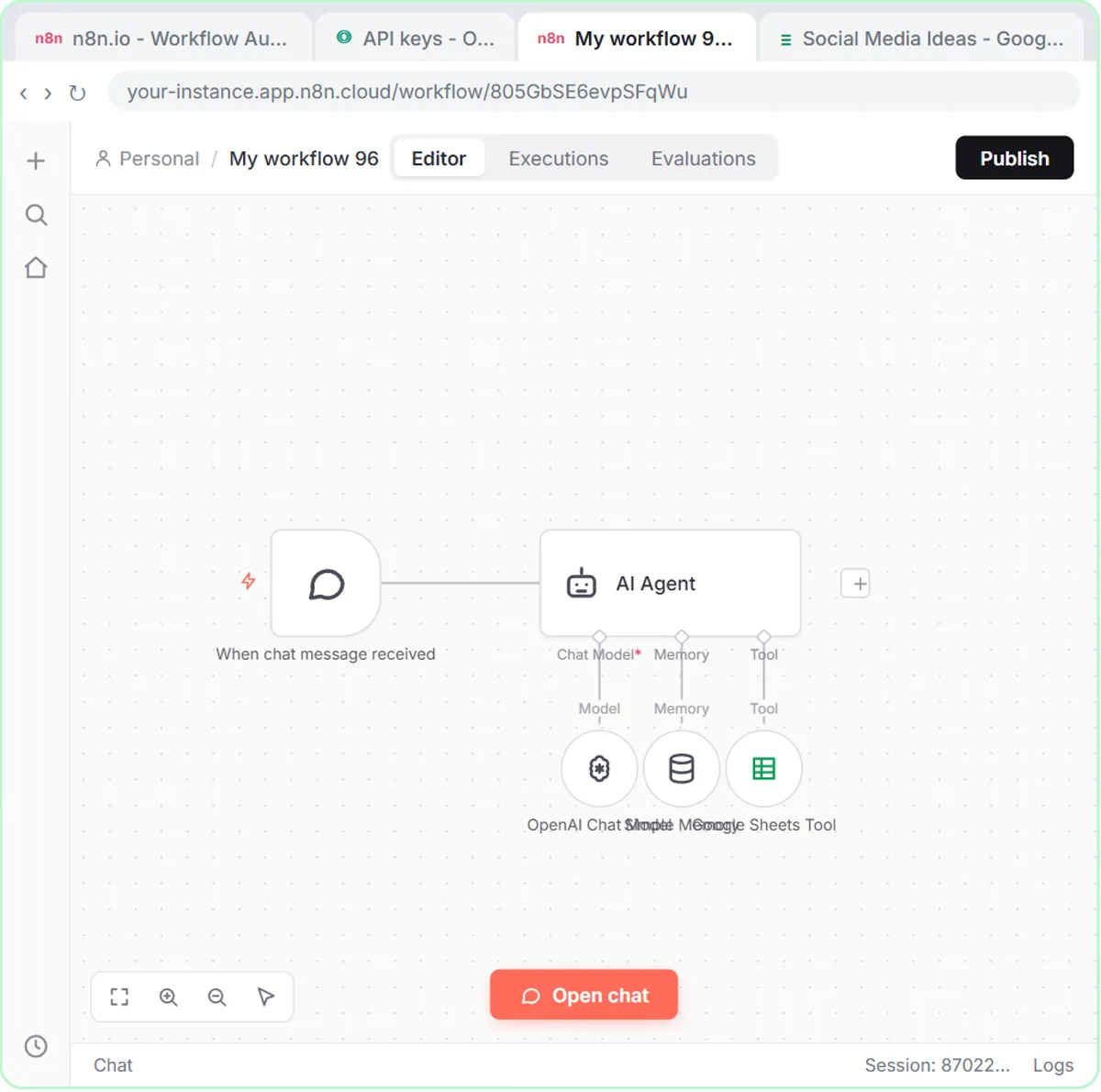
- On the AI Agent, click the + under Chat Model and pick OpenAI Chat Model.
- Open the Credential to connect with dropdown and click + Create new credential.
- Paste the key and click Save. n8n tests the connection and stores the key.
- Open the Model dropdown and pick a model. The lesson uses gpt-5-mini, described as fast and cheap.
A credential in n8n is a saved login for another service. Once it exists, other workflows reuse it: in AI Receipt Extractor, you simply open the Credential dropdown and choose OpenAI account, the key you already saved, instead of pasting it again.
How do I keep an API key safe?
Treat it like a password: store it in one safe place and only paste it where a program needs it. The lesson's rule is short: never paste it into a chat, a repo, or a screen recording.
A few habits that follow from that rule:
- One key per job. Naming the key after what uses it ("n8n agent") makes it easy to see which key to turn off later.
- Keep it out of shared documents. A key in a team Google Doc is a key anyone with the link can use.
- Keep it out of screenshots. Training videos and support tickets are a common way keys leak.
- Delete a key you think was exposed. In the API Keys list on platform.openai.com, you can revoke a key and make a new one, then update the credential in n8n.
Paying per request also means a leaked key can run up charges. Start with a small credit balance, like the lesson's ten dollars, so mistakes stay small.
What happens when the key runs out of credit?
The AI step fails. The workflow can work in testing and then stop once the balance hits zero, because, as the lessons warn, a key with no credit behind it just errors.
If an AI step that used to work suddenly fails, check Billing on platform.openai.com before changing anything in n8n. n8n Workflow Not Running Automatically? has a full checklist for workflows that go quiet.
Is an API key the same as signing in with Google?
No. Google accounts in n8n use OAuth: you click Sign in with Google, pick the account and approve what n8n may do, and you never see a secret code. OpenAI uses an API key you copy and paste. Both end up as saved credentials in n8n, which is why one credential list holds both kinds.
Key takeaways
- An API key is a secret code that lets one program use a service on your account and bills that account.
- The OpenAI API is pay-as-you-go and billed on platform.openai.com, separately from ChatGPT plans.
- OpenAI shows a new secret key only once, so copy it right away and store it somewhere safe.
- n8n saves the key as a credential, so later workflows reuse it from the Credential dropdown.
- Never paste an API key into a chat, a repo or a screen recording, and revoke any key you think was exposed.
Frequently asked questions
- Is an OpenAI API key free?
Creating the key is free, but using it costs money per request. You add credit under Billing on platform.openai.com; the lessons suggest ten dollars to start.
- Can I see my OpenAI API key again after I create it?
No. OpenAI shows the full key only once, when you create it. If you lose it, create a new key and update the credential in n8n.
- Does my ChatGPT Plus subscription cover the API?
No. ChatGPT plans and the OpenAI API are billed separately. An n8n workflow that calls OpenAI uses API credit.
- What should I do if my API key leaked?
Revoke it in the API Keys list on platform.openai.com, create a new one, and paste the new key into the n8n credential.