The quickest way to learn how to use ChatGPT for work is three short, free Stepthrough lessons taken in order: Prompt Writing 101, then meeting notes, then customer replies. Together they take about 26 minutes, need no account to practice, and are built for small-business owners and office staff. Each lesson teaches one habit you'll use every week.
Which ChatGPT lessons should you take first, and in what order?
Take Prompt Writing 101 first, then Summarize a Meeting Transcript, then Reply Faster: Customer Emails. The three lessons build on each other:
- Prompt Writing 101 (8 minutes): how to ask so you get a usable answer.
- Summarize a Meeting Transcript (9 minutes): using that on a long, messy input.
- Reply Faster: Customer Emails (9 minutes): using it on something that goes out to a customer, where mistakes cost you.
Prompt Writing 101 teaches the idea. The meeting lesson applies it to a long, messy input. The reply lesson adds a check before anything leaves your hands. Each Stepthrough lesson is interactive: you watch a step on the left, then do it yourself on the right in a practice copy of ChatGPT, Google Docs or Gmail. No account is needed to practice.
How do you write a better ChatGPT prompt?
Give ChatGPT four parts: Role, Context, Task and Format, the same briefing you'd give a new employee. In Prompt Writing 101 you ask ChatGPT for a customer email twice. First the vague way: "Write an email to my customers about our new service." You get placeholders like [Your Company Name], marketing filler and an emoji in the subject line.
Then you ask again as the owner of Summit Lawn Care, a made-up lawn company, with a prompt built in four parts:
- Role: who is writing.
- Context: the facts ChatGPT can't guess, like the customers, the service, the $149 price and the dates.
- Task: exactly what you want back, with one clear call to action.
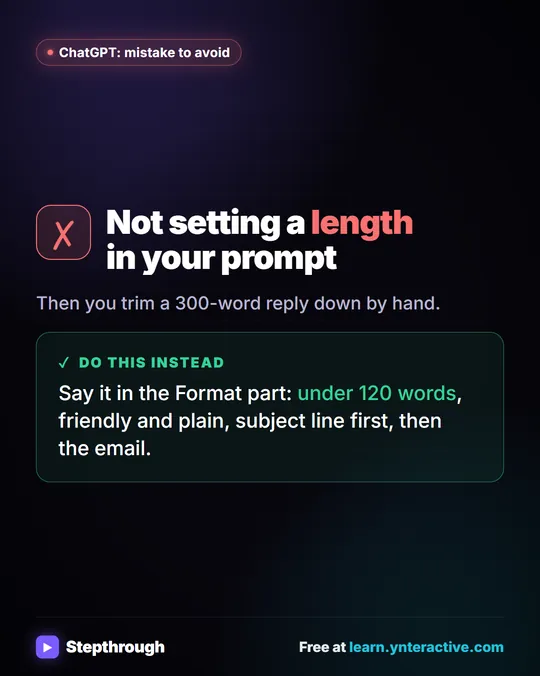
- Format: length, tone and layout, like under 120 words and no emoji.
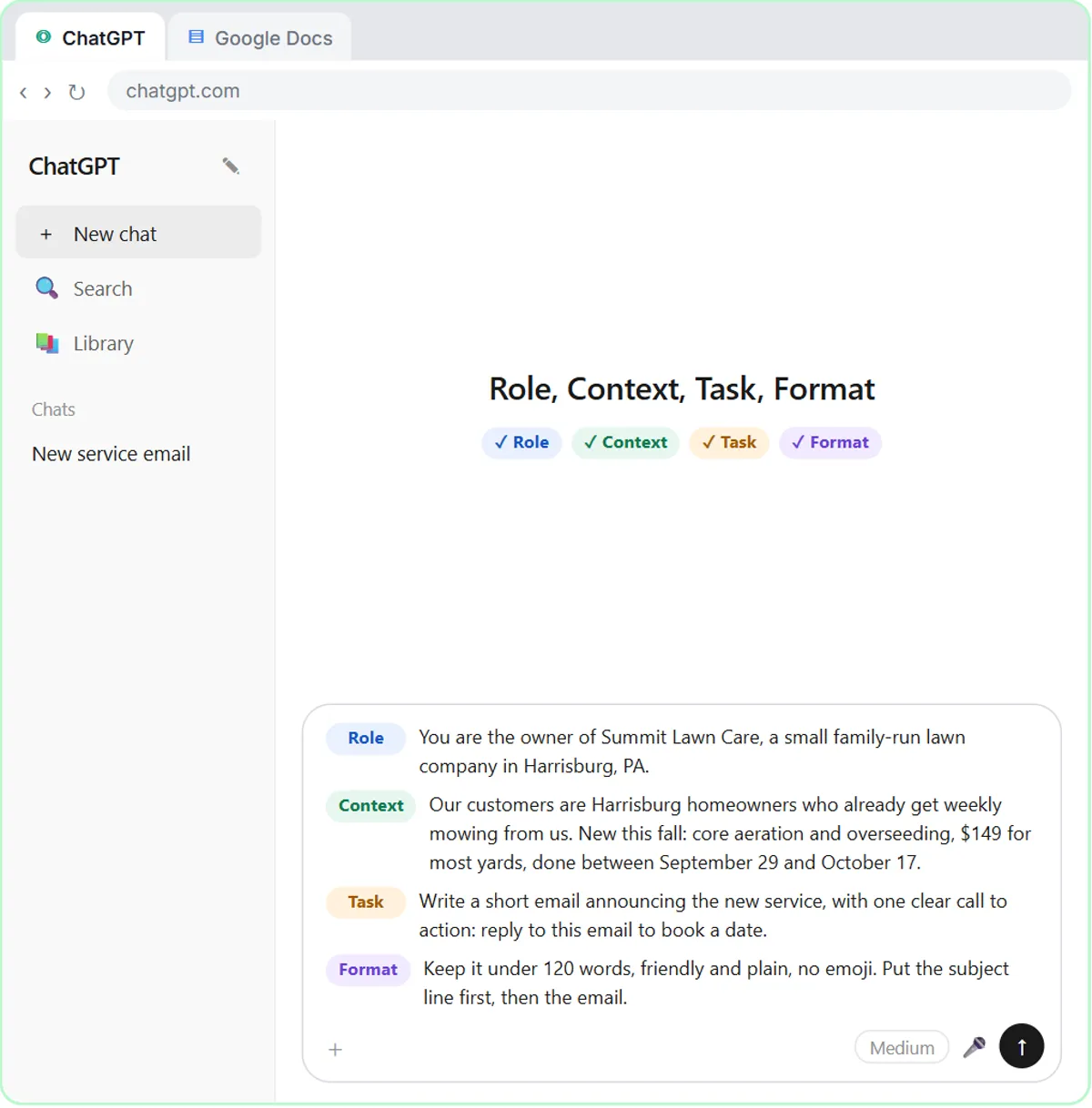
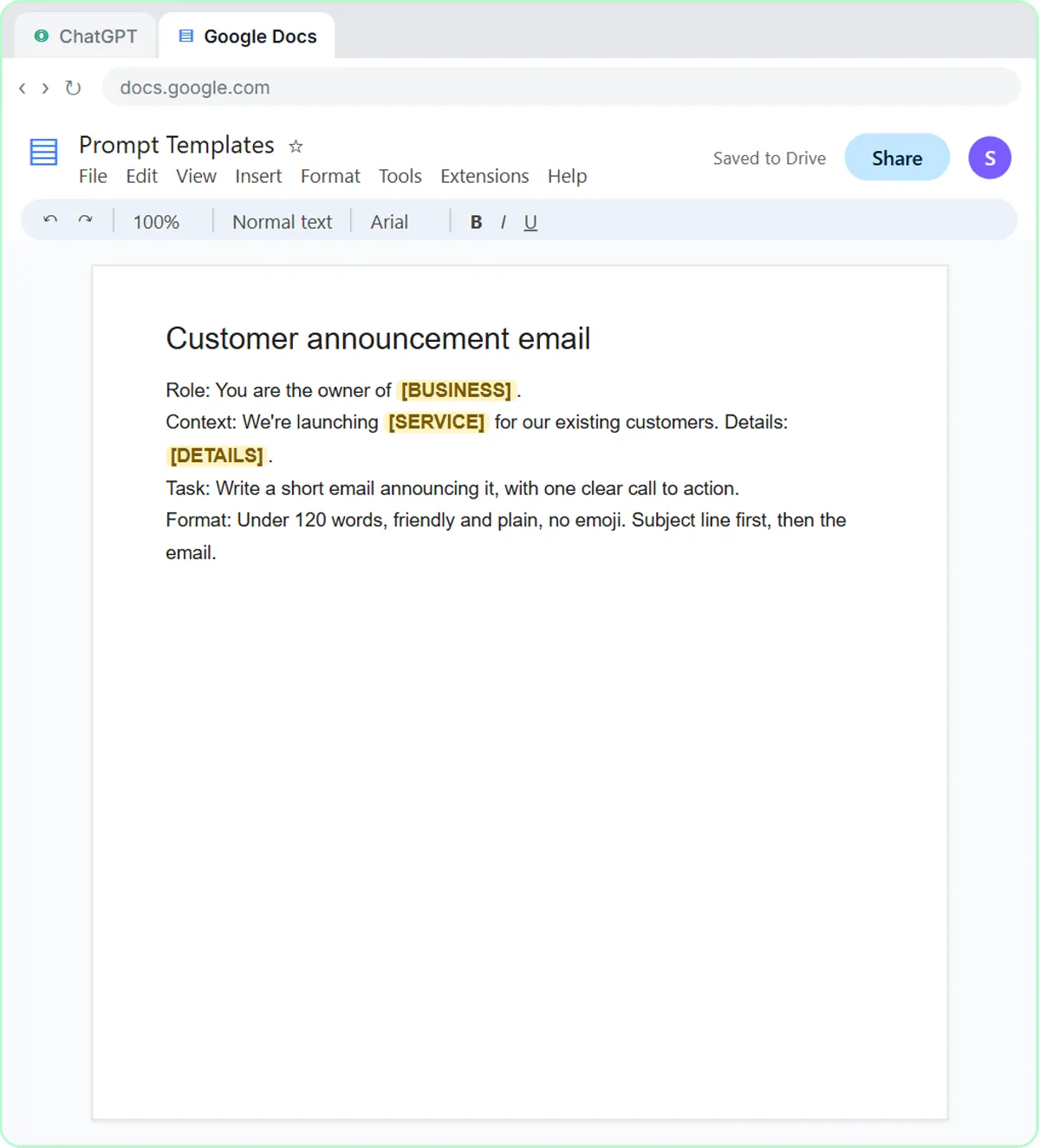
The second answer is an email you could actually send. The lesson ends by saving the prompt as a template in a Google Doc called Prompt Templates, with blanks where the details change.
The habit: give ChatGPT the briefing you'd give a new employee. If an answer comes back weak, check which of the four parts you left out. There's a full walkthrough in how to write better ChatGPT prompts.
How do you use ChatGPT for meeting notes?
Paste the transcript under a request that names exactly what you want back, and tell ChatGPT to write "Not stated" instead of guessing. In Summarize a Meeting Transcript you take the transcript of a Monday team meeting at a made-up bakery and paste it into ChatGPT under a clear request: a three-sentence summary, the decisions, an action items table with task, owner and due date, and open questions.
The request ends with one line that matters most: only use what's in the transcript, and write "Not stated" if an owner or date isn't said. So when two due dates come back as Not stated, you know they're real gaps, and you fill them in with one short message. Then you ask for a follow-up email to the team in the same chat. You also learn to upload a transcript file with the + button and Add photos & files instead of pasting it.
The habit: ask for named sections, tell ChatGPT not to guess, and check the parts that matter before you send. The full example is in turn a meeting transcript into action items.
How do you use ChatGPT to reply to customer emails?
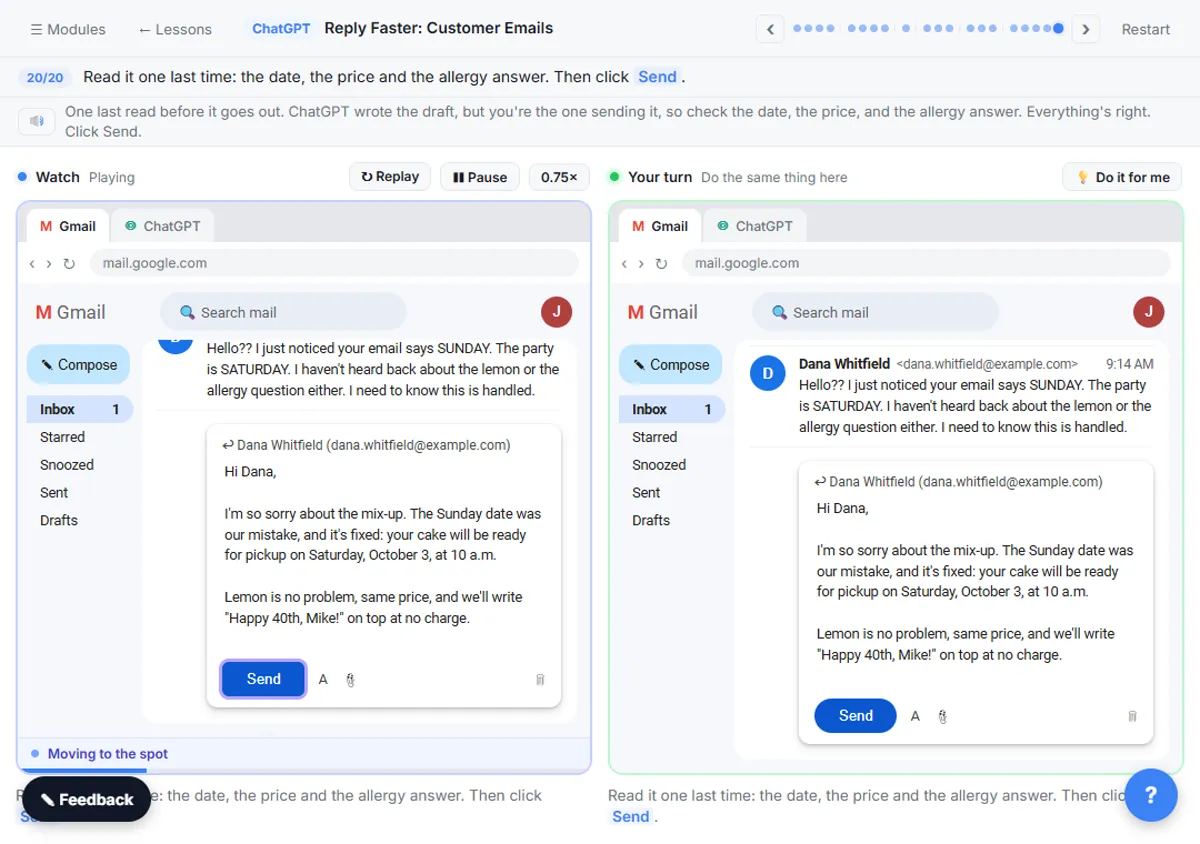
Give ChatGPT the thread, a numbered list of facts you can promise and what a good reply looks like, then have it check every promise against those facts. Reply Faster: Customer Emails starts in Gmail with a messy thread. A customer's cake order has the wrong pickup day, a flavor change and a nut allergy question nobody answered.
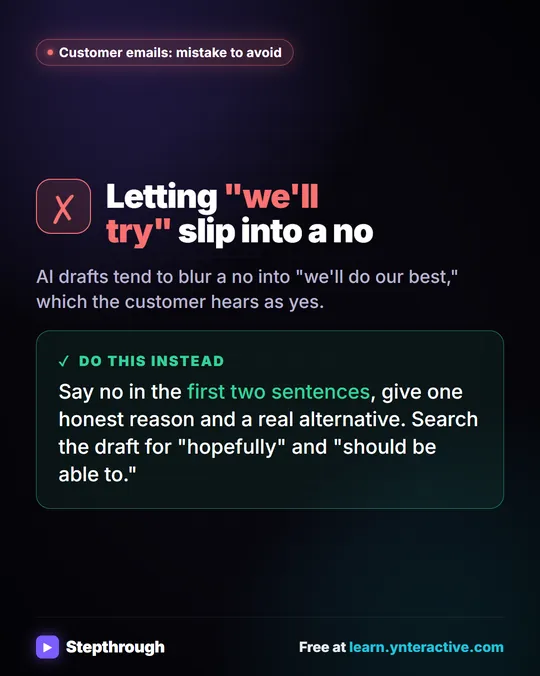
You give ChatGPT three things in one message: the thread, a numbered list of facts you can actually promise, and what a good reply looks like (tone, the questions to answer, a word limit, and a rule not to invent anything). The first draft sounds great, but it promises the cake is completely nut-free, which your facts don't say.
So you ask ChatGPT to make a table of every promise in the reply and the fact behind it. It flags the allergy line and suggests safer wording. You ask for that one specific fix, copy the reply, and send it from Gmail yourself.
The habit: never take the first draft on trust. Match every promise to a fact, especially dates, prices and anything about safety. More on that in check AI drafts for promises.
Try it free, step by step
Prompt Writing 101: Role, Context, Task, Format. Ask ChatGPT for the same customer email twice, once vaguely and once with a four-part prompt, and see exactly why structure gets a better answer. You do every step yourself in a practice copy of ChatGPT, it checks your work as you go, and “Do it for me” finishes any step you get stuck on. Free, and nothing touches your real accounts.
Start the free lessonWhat ChatGPT plan do you need?
You don't need a paid ChatGPT plan: any plan works to start, including the free one, and the Stepthrough practice copies need no account at all. Nothing in the practice copies is sent to OpenAI.
To do it for real, any ChatGPT plan works to start, including the free one. Everything in these three lessons, from structured prompts to pasting a transcript to drafting a reply, should work on the free plan, within its usage limits. ChatGPT's paid plans add more, like higher limits and extra features, and business plans add controls for teams.
If you'll be pasting customer or staff details into ChatGPT, check your company's rules on AI tools first, and remove anything the task doesn't need.
How do you fit the lessons into a normal work week?
You don't need to finish all three lessons in one sitting; spread them over a week and use each habit on real work right away. A simple plan:
- Day 1: do Prompt Writing 101, then write one real email with Role, Context, Task and Format. Save the prompt.
- After your next meeting: do the meeting lesson, then run your own transcript through the same request.
- The next time a tricky email lands: do the reply lesson first, then answer the real one with thread, facts, check and fix.
What comes after the first three ChatGPT lessons?
More ChatGPT lessons are on the way, including working with spreadsheets and using Projects, and they'll be added to the same path when they're ready. These three lessons are the start of the ChatGPT Jump Start path and the ChatGPT for Everyday Work course.
In the meantime, if you want to see the same prompt ideas working inside automations, the n8n tutorials give their AI agents the same kind of briefing in a system prompt.
Key takeaways
- Learning to use ChatGPT for work takes about 26 minutes with three free Stepthrough lessons: Prompt Writing 101 (8 minutes), Summarize a Meeting Transcript (9 minutes) and Reply Faster: Customer Emails (9 minutes).
- A good ChatGPT prompt has four parts: Role, Context, Task and Format.
- For meeting notes, ask ChatGPT for a summary, decisions, an action items table and open questions, and tell it to write "Not stated" when an owner or date is missing.
- For customer replies, give ChatGPT a numbered list of facts and ask it to check every promise in its draft against those facts before you send.
- Any ChatGPT plan works to start, including the free one; paid plans add higher limits and extra features.
Frequently asked questions
- How long does it take to learn to use ChatGPT for work?
The three lessons here take about 26 minutes in total: 8 minutes for prompts and 9 each for meeting notes and customer replies. Using the habits on your own work is what makes them stick.
- Do I need a paid ChatGPT plan?
No. Any plan works to start, including the free one. Paid plans add more, like higher usage limits and extra features.
- Do I need a ChatGPT account to take the lessons?
No. The lessons use a practice copy of ChatGPT, Google Docs and Gmail, so you can learn every step without an account. You'll need your own account to use it on real work.
- What order should I take the lessons in?
Prompt Writing 101 first, then Summarize a Meeting Transcript, then Reply Faster. Each one builds on the habit from the one before.
- Are more ChatGPT lessons coming?
Yes. More are on the way, including spreadsheets and Projects. They'll be added to the ChatGPT Jump Start path as they go live.