It's general information, not accounting advice. Have your accountant review entries before you post them, and follow your firm's policy for client data.
Mistake 1: Do you just type "reconcile this"?
With no balances, ChatGPT has nothing to check its work against, so you can't tell a complete answer from a partial one. Fix: give it the opening balance and both ending balances in the request.
The lesson's request starts with the numbers: both files started September at $48,210.37, the bank ends at $55,205.65 and the ledger at $50,835.15. That gap, $4,370.50, is the target. When the exceptions add up to it, you know nothing is hiding. When they don't, you know to keep looking.
Mistake 2: Do you let it match on descriptions?
The bank and the books describe the same payment differently. "ACH CREDIT BRIGHTWATER DENTAL" in one file can be a client name and an invoice number in the other. Fix: tell ChatGPT to match by amount and date, allowing up to 5 days apart.
The lesson's prompt says this outright, "since the descriptions are worded differently." Matching on words either misses real pairs or invents odd ones. Matching on amount and date is how a person would tick the rows off by hand, just faster.
Mistake 3: Do you let it guess the reason for a row?
If a row could be two things, a confident wrong label is worse than no label. Fix: give it a short list of reasons to choose from, and the rule "Do not guess: if a row could be two things, say Needs review."
The lesson's list is duplicate, timing difference, missing from the books, bank fee, or Needs review. The reconciling item glossary page explains each kind. A Needs review row isn't a failure. It is ChatGPT telling you where your judgment is needed.
Mistake 4: Do you sign off without opening the file?
An exceptions table is a claim about your files. Fix: find each exception in the original file yourself before you accept it.
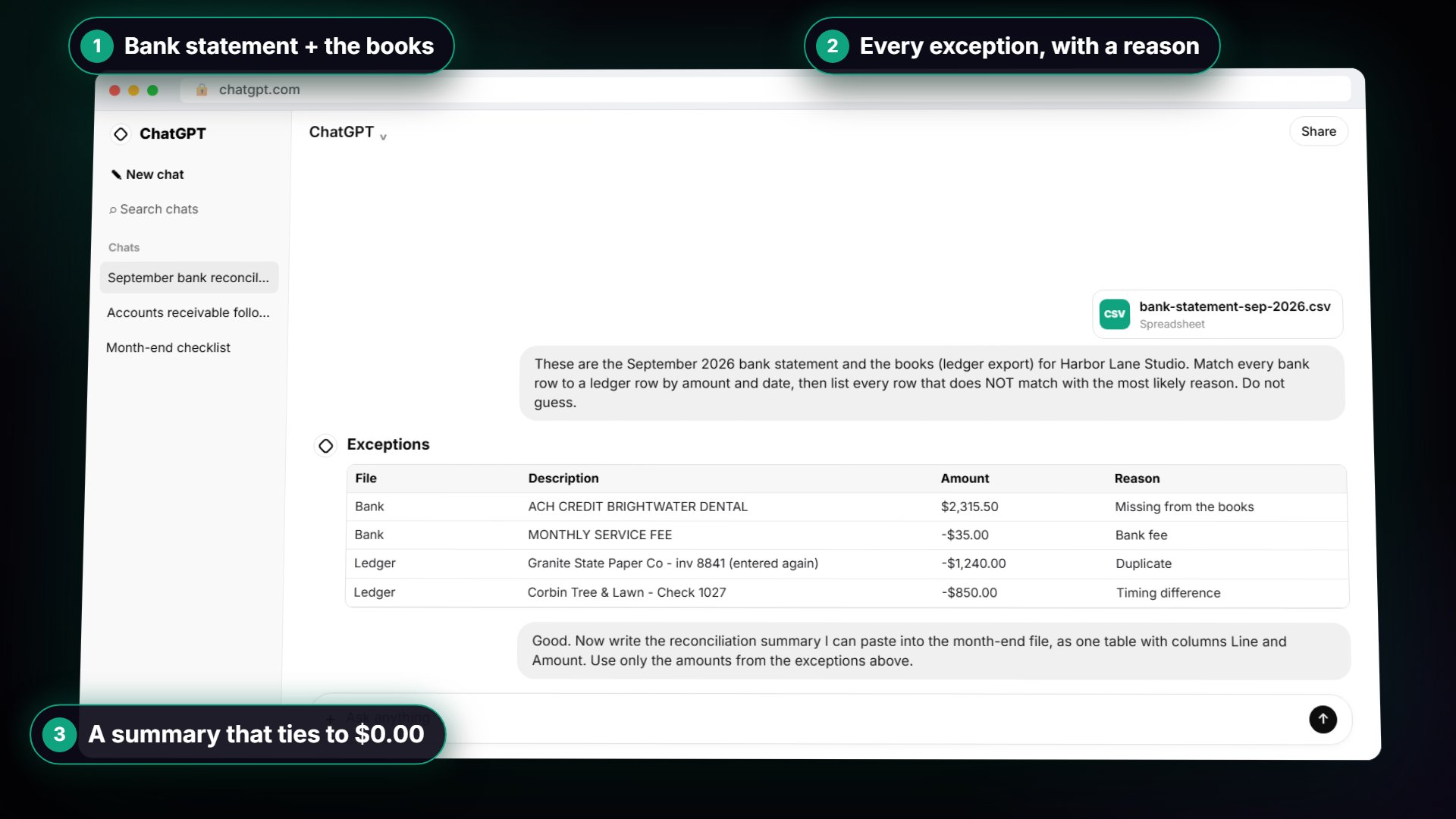
In the lesson you click the ledger file and look. The Granite State Paper Co bill for invoice 8841 is there twice, both -1,240.00, once on 2 September and again on 12 September marked "entered again." The bank only paid it once. ChatGPT was right, and now you know it, rather than hoping. That is a quick look per exception, not 80 rows.
Mistake 5: Do you trust ChatGPT's arithmetic?
AI can add wrong. A summary table that looks tidy can still have a line that doesn't add up. Fix: check both adjusted balances on a calculator before you file the summary.
The lesson walks through it. Bank side: 55,205.65 minus 850.00 is 54,355.65. Books side: 50,835.15 plus 2,315.50, minus 35.00, plus 1,240.00, is the same 54,355.65. The difference is 0.00. The glossary page on AI math errors explains why this happens.
Try it free, step by step
Month-End Bank Reconciliation with ChatGPT: 20 Minutes, Not 3 Hours. Upload the bank statement and the books, let ChatGPT match every row and list the exceptions, then check the answer and paste a reconciliation summary into the month-end file. You do every step yourself in a practice copy of ChatGPT, it checks your work as you go, and “Do it for me” finishes any step you get stuck on. Free, and nothing touches your real accounts.
Start the free lessonMistake 6: Do you book an entry for an outstanding check?
An outstanding check is already in the books. It just hasn't cleared the bank yet. Deleting it or adding it somewhere else creates an error next month. Fix: leave timing differences alone and watch for them to clear.
In the lesson, Check 1027 for $850.00 to Corbin Tree & Lawn is in the books on 29 September and not yet on the statement. The note says "No book adjustment needed; this is an outstanding check, a timing difference." It should clear in October. The other three items are different: record the $2,315.50 deposit, record the $35.00 bank fee, and remove or reverse the $1,240.00 duplicate in your accounting software.
Mistake 7: Do you push the difference to zero?
If the difference isn't 0.00, there's an exception you haven't explained. A plug figure buries a real error. Fix: go back to the exceptions and keep looking, and check the starting balances first.
The lesson's guidance is to note the starting and ending balances on both files, and if the starting balances differ, fix that before anything else. A starting difference usually means something from last month is still open. Forcing this month to agree on top of it only moves the problem.
Mistake 8: Do you upload client files without thinking about privacy?
A bank statement holds account details and a list of everyone the client pays. Fix: follow your firm's policy, use a business plan, and delete full account numbers before you upload.
The lesson says it plainly: for real client files, follow your firm policy and remove account numbers first. You don't need the account number to match rows by amount and date. What staff can paste into ChatGPT and Is It Safe to Paste Client Data into ChatGPT? cover the policy side.
How do you avoid these mistakes as a team?
Turn the fixes into a written close routine everyone follows, and keep the same two prompts in a shared place so nobody improvises.
- Prepare: both files as CSV for the same month, full account numbers removed.
- Start: note the opening and ending balances on both. Starting balances must agree.
- Match: use the team's matching prompt with the balances filled in, including the Needs review rule.
- Confirm: one person opens the file and finds each exception.
- Summarize: use the team's summary prompt, then check both adjusted balances on a calculator.
- Record: make the entries in the accounting software after review. Timing items get none.
- File: save the summary and the exceptions table in the month-end file.
A second person reviewing step 4 and step 5 costs a few minutes and catches most of these mistakes. The ChatGPT bank reconciliation prompts pack has the team prompts, and the lesson is module 7 of AI for Accounting & Bookkeeping Firms.
Key takeaways
- Give ChatGPT the opening and both ending balances, so the exceptions have a target to add up to.
- Match by amount and date, up to 5 days apart, never by description.
- "If a row could be two things, say Needs review" keeps ChatGPT from guessing.
- Open the file for each exception and check both adjusted balances on a calculator.
- Outstanding checks need no entry. Never plug the difference, and strip account numbers before uploading.
Frequently asked questions
- What is the biggest mistake when using ChatGPT for bank reconciliation?
Asking it to reconcile without giving it the balances. Without them, neither you nor ChatGPT can tell whether the exceptions explain the whole gap.
- Can ChatGPT make mistakes in a bank reconciliation?
Yes. It can mismatch a row or add a column wrong. That's why the lesson has you open the file to check each exception and add the adjusted balances yourself.
- Does ChatGPT replace the bookkeeper in a reconciliation?
No. It saves most of the ticking and tying, which is the slow part. Your judgment on each exception and the entries in your accounting software stay with you. There's also a ChatGPT vs Claude for bank reconciliation comparison if you're choosing a tool.
- Is Harbor Lane Studio a real company?
No. Harbor Lane Studio, its clients and vendors, and every figure in the lesson are made up. The two sample CSV files on the lesson page are made-up data you can try in ChatGPT.