It's general information, not accounting advice. Have your accountant review any entry before you post it, and follow your firm's policy for client financial data.
How to use these prompts
- Fill in the [BLANKS] with your month, your business and your real balances. The balances are what let ChatGPT check its own work.
- One prompt per message, in one chat. Attach both files once, at the start. Later prompts refer to the answers before them.
- Prepare the files first. Download the bank statement and export the ledger for the same month as CSV files, and delete full account numbers.
- Check every answer. Open the file, find the row, and add the numbers up yourself. AI can add wrong.
Before you match
1. Check the files are what you think
Before you match anything: for each attached file, tell me the column names, the number of rows, the first and last date, and the total of the amount column. Don't reconcile yet.
This catches the wrong month, a missing page of transactions or a file with the amounts split into two columns. If the row counts look wrong, fix the export before you go on.
2. Confirm the starting balances agree
The bank statement says the opening balance on [START DATE] was [BANK OPENING BALANCE]. The books say [BOOK OPENING BALANCE]. Do they agree? If not, stop and tell me the difference. Don't try to explain it yet.
In the lesson both files start September at $48,210.37. If yours differ, last month's reconciliation has an open item, and that comes first.
Match and explain
3. The matching request
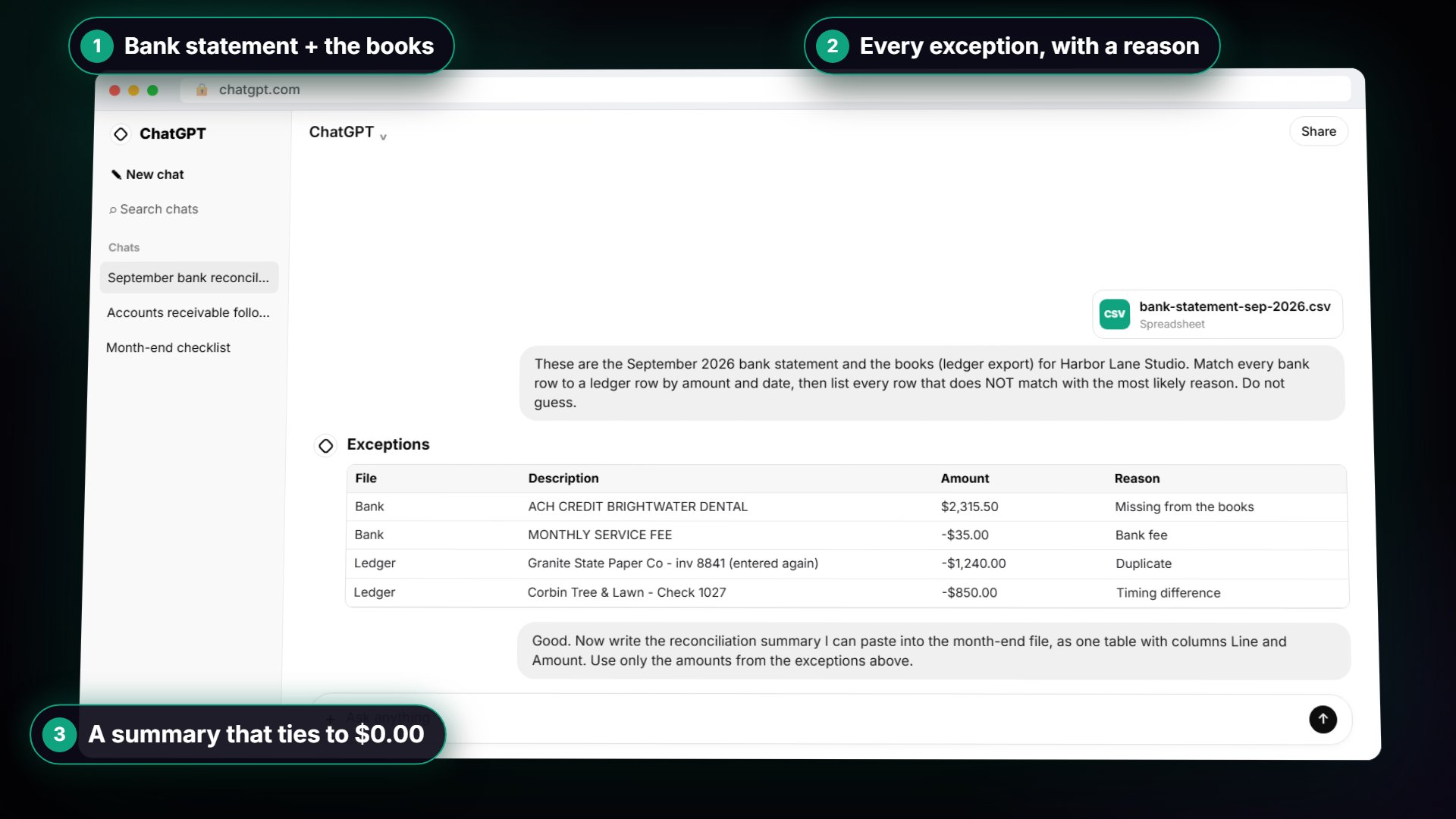
These are the [MONTH YEAR] bank statement and the books (ledger export) for [BUSINESS]. Both started [MONTH] at [OPENING BALANCE]. The bank statement ends at [BANK ENDING BALANCE] and the ledger ends at [BOOK ENDING BALANCE]. Match every bank row to a ledger row by amount and date, allowing up to 5 days apart, since the descriptions are worded differently. Then list every row that does NOT match as a table with these columns: which file, date, description, amount, and the most likely reason (duplicate, timing difference, missing from the books, bank fee, or Needs review if you are not sure). Do not guess: if a row could be two things, say Needs review.
This is the lesson's prompt. In the practice files it matches 38 of 40 rows on each side and leaves four exceptions: a missing $2,315.50 deposit, a $35.00 bank fee, a $1,240.00 duplicate bill and an $850.00 outstanding check.
4. Ask how it matched
Show me how you matched the rows: the rule you used, and a list of every pair you matched more than 2 days apart, with both dates and the amount.
ChatGPT often matches by writing and running a little code on your files. The close pairs are where a wrong match hides, so read that short list rather than all 80 rows.
5. Explain one exception
Explain the [DATE] [AMOUNT] row in plain words: why you think it is a [REASON], what in the files supports that, and what else it could be.
Use this on any exception you don't recognize. If the "what else it could be" answer is convincing, treat the row as Needs review.
6. Work through the Needs review rows
For each row marked Needs review, list the two most likely explanations and the one document or question that would settle it.
The lesson's prompt tells ChatGPT not to guess, so a careful answer may leave some rows open. This turns each one into a short to-do: a receipt to find, a person to ask.
7. Check the exceptions explain the whole gap
The gap between the two ending balances is [BANK ENDING BALANCE] minus [BOOK ENDING BALANCE]. Add up the exceptions you found, showing each number, and tell me whether they explain the whole gap. If not, say how much is left.
In the lesson the gap is $4,370.50 and the four exceptions add to $4,370.50, so nothing is hiding. Still do the sum yourself on a calculator.
Try it free, step by step
Month-End Bank Reconciliation with ChatGPT: 20 Minutes, Not 3 Hours. Upload the bank statement and the books, let ChatGPT match every row and list the exceptions, then check the answer and paste a reconciliation summary into the month-end file. You do every step yourself in a practice copy of ChatGPT, it checks your work as you go, and “Do it for me” finishes any step you get stuck on. Free, and nothing touches your real accounts.
Start the free lessonBuild the summary
8. The reconciliation summary table
Good. Now write the reconciliation summary I can paste into the month-end file, as one table with columns Line and Amount, in this order: Balance per bank statement; Less: outstanding checks; Adjusted bank balance; Balance per books; Add: deposit not yet recorded; Less: bank fee not yet recorded; Add back: duplicate entry; Adjusted book balance; Difference (should be 0.00). Use only the amounts from the exceptions above. Under the table, add a one-line note for each of the four exceptions saying what I need to do in the books (or nothing, if it is only timing).
The lesson's second prompt. Adjust the lines to your own exceptions. In the practice, both adjusted balances come to $54,355.65 and the difference is $0.00.
9. The to-do list for the books
Turn the notes into a checklist of what to record in the books: one line per item with the date, the amount, what it is, and whether it needs an entry, a correction or nothing. Don't write the entries for me.
Only a timing difference needs nothing. The deposit, the fee and the duplicate each need an entry or a correction, which you make in your accounting software. A reconciling item that is timing only should clear next month.
10. Outstanding items to watch next month
List every outstanding check or other timing difference from this reconciliation, with the number, date and amount, as a short table I can check against next month's statement.
In the lesson, Check 1027 for $850.00 to Corbin Tree & Lawn hasn't cleared. It should show up in October. If it doesn't, it needs a follow-up. The glossary has a page on the outstanding check.
11. A short memo for the owner
Write a short memo to [OWNER] about the [MONTH] reconciliation: the adjusted balance, each exception in one plain sentence, what we did about it, and anything that still needs their answer. Under 150 words, no jargon.
Owners rarely want the table. They want to know the month is closed and what, if anything, needs them. Check every amount against your summary before you send it.
Check and follow up
12. Double-check the arithmetic, line by line
Recalculate the summary table step by step, showing each addition and subtraction. Then tell me if the adjusted bank balance and adjusted book balance agree.
Use this as a second look, not as the check itself. The lesson's rule is a calculator: 55,205.65 minus 850.00 is 54,355.65 on the bank side, and the books side must land on the same number.
13. Ask the client about an unknown item
Write a short, polite email to [CLIENT NAME] asking about a [AMOUNT] [DEPOSIT OR PAYMENT] on [DATE] described on the bank statement as "[BANK DESCRIPTION]". Ask what it was for and whether there is a receipt or invoice. Under 80 words. Don't include any account numbers.
For a Needs review row only the client can explain, this saves you composing the same email every month.
14. A note for next month's close
Based on this reconciliation, write three short notes for whoever does next month's close: what to look for first, which items carry over, and anything about these files that slowed us down.
Save it in the month-end file with the summary and the exceptions table. Next month starts faster.
Key takeaways
- Give ChatGPT the opening and both ending balances, so it can check its own work.
- Match by amount and date, a few days apart, not by description.
- Tell it to say Needs review instead of guessing, then work through those rows yourself.
- Open the file to confirm each exception, and add the numbers up on a calculator.
- Only a timing difference needs no entry. Record the rest in your accounting software, after review.
Frequently asked questions
- Can ChatGPT do a bank reconciliation by itself?
It can do most of the matching, which is the slow part. You still check each exception, add the numbers yourself and make the entries in your accounting software.
- Should I use ChatGPT or Claude for bank reconciliation?
Either can work with uploaded CSV files. Stepthrough has tested the ChatGPT version in the lesson. The ChatGPT vs Claude for bank reconciliation page covers what differs.
- Is it safe to upload bank statements to ChatGPT?
Follow your firm's policy, use a business plan, and remove full account numbers first. The lesson's practice copy uploads nothing. What staff can paste into ChatGPT covers setting the rules.
- Is Harbor Lane Studio a real business?
No. Harbor Lane Studio and every figure in the lesson are made up. The lesson is module 7 of AI for Accounting & Bookkeeping Firms and module 4 of AI for Finance Teams.