What is binary data in n8n?
Quick answer
Binary data in n8n means files, such as a PDF, an image or a spreadsheet, carried along with an item next to its JSON fields. A node like Google Drive Download puts the file in a binary property, usually named data, and later nodes, such as Extract from File or a document loader, read it from there.
Last updated
Take the free module →Module 15 of the free AI for Customer Support course, about 14 minutes. No account needed.
Updated · By Robert Breen
Why it matters for a small business
Many office jobs start with a file: an invoice PDF, a receipt photo, a handbook. Text fields alone cannot carry those, so n8n keeps the file as binary data on the item. Knowing where it lives explains a common beginner error: the next node cannot find the file because it is looking in the wrong property name.
Files are also big. A workflow that moves many large files can be slow or hit limits on hosted plans, so it is worth passing only the files you need and extracting the text early when the rest of the workflow only needs words.
Where you'll use it: after a node that downloads or receives a file, the output panel shows a Binary tab with the file's name, type and size, and a view button. Nodes that need a file ask for the Input Binary Field, usually data. Extract from File turns a PDF or spreadsheet into JSON, and Convert to File goes the other way.
In a real lesson: Make Your Handbook Searchable for an AI Helpdesk using Pinecone + n8n
In the free Pinecone + n8n handbook loading lesson, Cedar Ridge Partners (made up) wants its employee handbook searchable. Google Drive downloads the handbook PDF, which arrives as binary data.
In the Default Data Loader you choose Binary as the data type, and the lesson explains that binary just means a file. The loader reads the PDF from the item's binary property, then a Recursive Character Text Splitter cuts it into chunks for embedding.
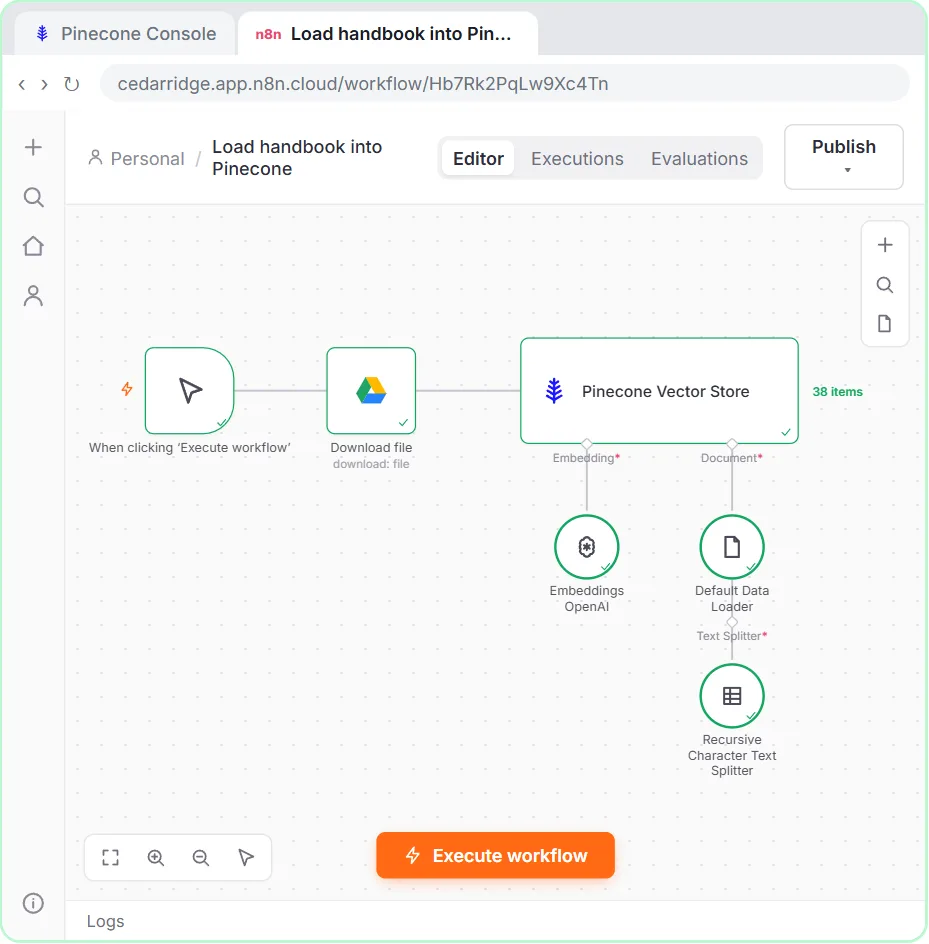
Try this lesson free or read the step-by-step guide.
Common confusions
Binary data vs JSON
JSON holds text, numbers and lists. Binary data holds a file. One n8n item can carry both.
Binary data vs base64
Base64 is a way to write a file as text. Some APIs want it; n8n can convert between the two.
Tips
- Check the Binary tab after a download to confirm the file arrived.
- Match the Input Binary Field name to the property shown, often data.
- Extract text early if later steps only need words.
Related terms
More n8n and automation terms
Where you use it: free lessons
- Make Your Handbook Searchable for an AI Helpdesk using Pinecone + n8n (n8n, 14 min)
- AI Receipt Extractor: Receipts to Google Sheets with n8n (n8n, 12 min)
- Invoices from Your Inbox to Google Sheets, with Approval (n8n, 14 min)
Frequently asked questions
- Why does my node say no binary data found?
- The previous node did not output a file, or the file is under a different property name. Check the Binary tab and the Input Binary Field.
- Can I send a file to an API from n8n?
- Yes. The HTTP Request node can send binary data as a file in the body.