This is a practical guide for drafting, not legal advice. Your firm's policy and your jurisdiction's rules decide where the line sits for you.
What is the difference between legal information and legal advice?
Legal information is general or factual: what happened in the case, what a term means, what a step in the process is. Legal advice is specific and directive: what this client should do, what their chances are, what the outcome will be. The glossary entry adds the key point: only a licensed attorney should give legal advice.
Examples from the kind of update a firm sends:
| Information (fine for staff to send, if accurate) | Advice or prediction (for the attorney) |
|---|---|
| "Their answer is now due Oct 2." | "They'll probably miss the deadline." |
| "A missed deadline isn't an automatic win." | "If they miss it, you'll win by default." |
| "The only date set is a scheduling conference on Nov 17." | "You'll have your money before the holidays." |
| "Attorney Hale can call you Mon or Tue." | "You should settle if they offer half." |
Rules on who may give legal advice vary by jurisdiction, and many firms add their own policy on top. The lesson's made-up firm uses a simple one: no predictions and no legal advice by email.
Why does ChatGPT drift into legal advice?
Because it tries to answer the client's question as asked, and clients ask for predictions. "Are we going to win?" invites a yes. A model asked to be warm and reassuring will often supply one, even when the facts you gave it say nobody can predict the outcome.
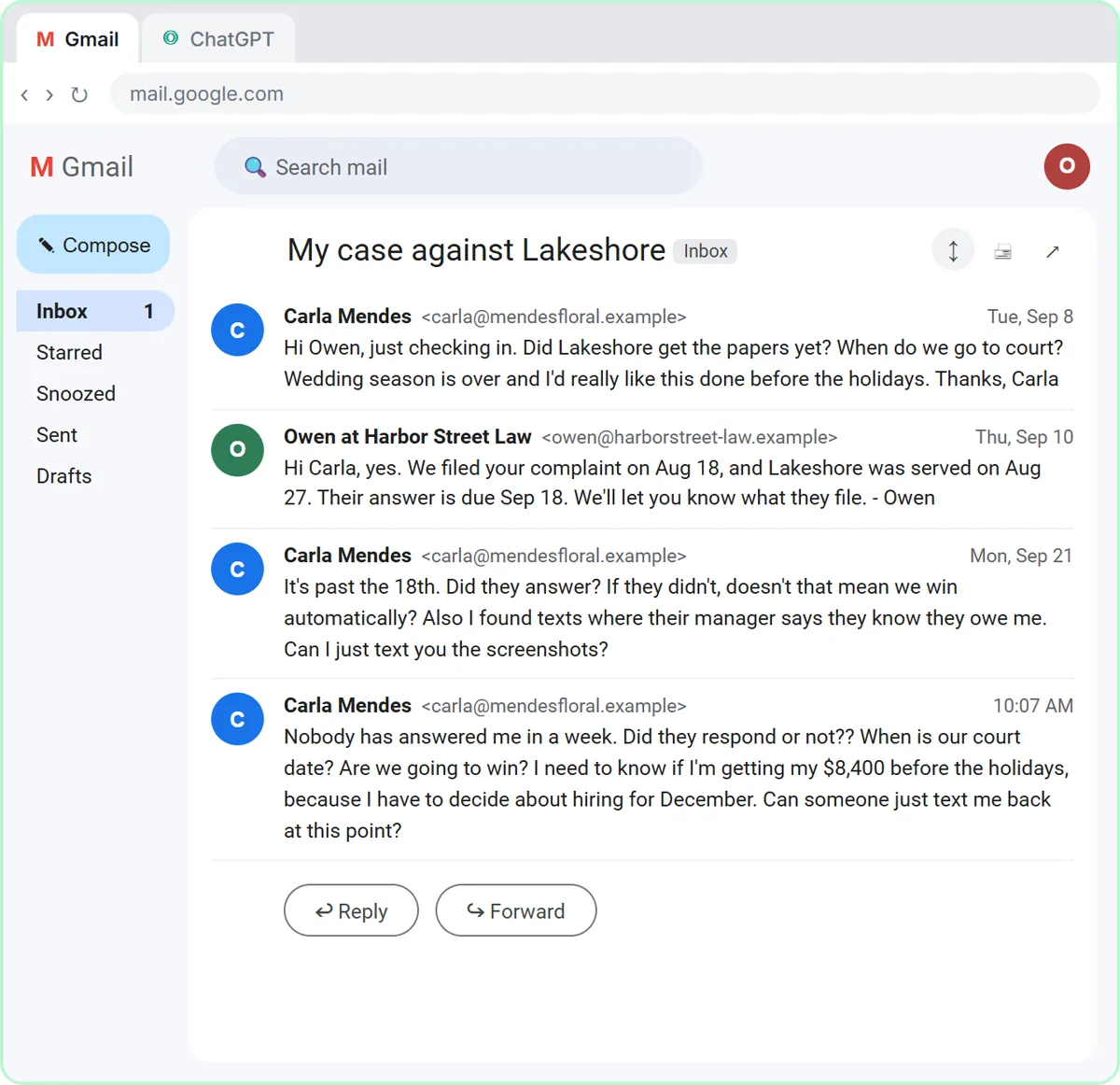
In the lesson, the client, Carla, runs a flower shop suing an event venue over an unpaid $8,400 invoice. She asks whether the other side has responded, when her court date is, and whether she'll win and be paid before the holidays. The first ChatGPT draft "sounds reassuring," and three of its lines go beyond the facts: an automatic win, a "court date" that is really a scheduling hearing, and a prediction about getting paid.
How do I keep a ChatGPT draft to legal information?
Give it the facts it may use, say plainly what it must not do, then make it check its own draft. The lesson's routine has four parts.
- Paste the thread. One line says what it is, then the emails, oldest first.
- Paste the facts. The firm's facts include what was filed and when, the new deadline, what a missed deadline does and doesn't mean, the one date the court has set, and this line: "We can't predict the outcome, whether Lakeshore will settle, or when or whether Carla will be paid."
- Paste the instructions. Tone, the three questions to answer, a word limit, "No legal advice," and "Don't invent details or promise anything that isn't in the facts."
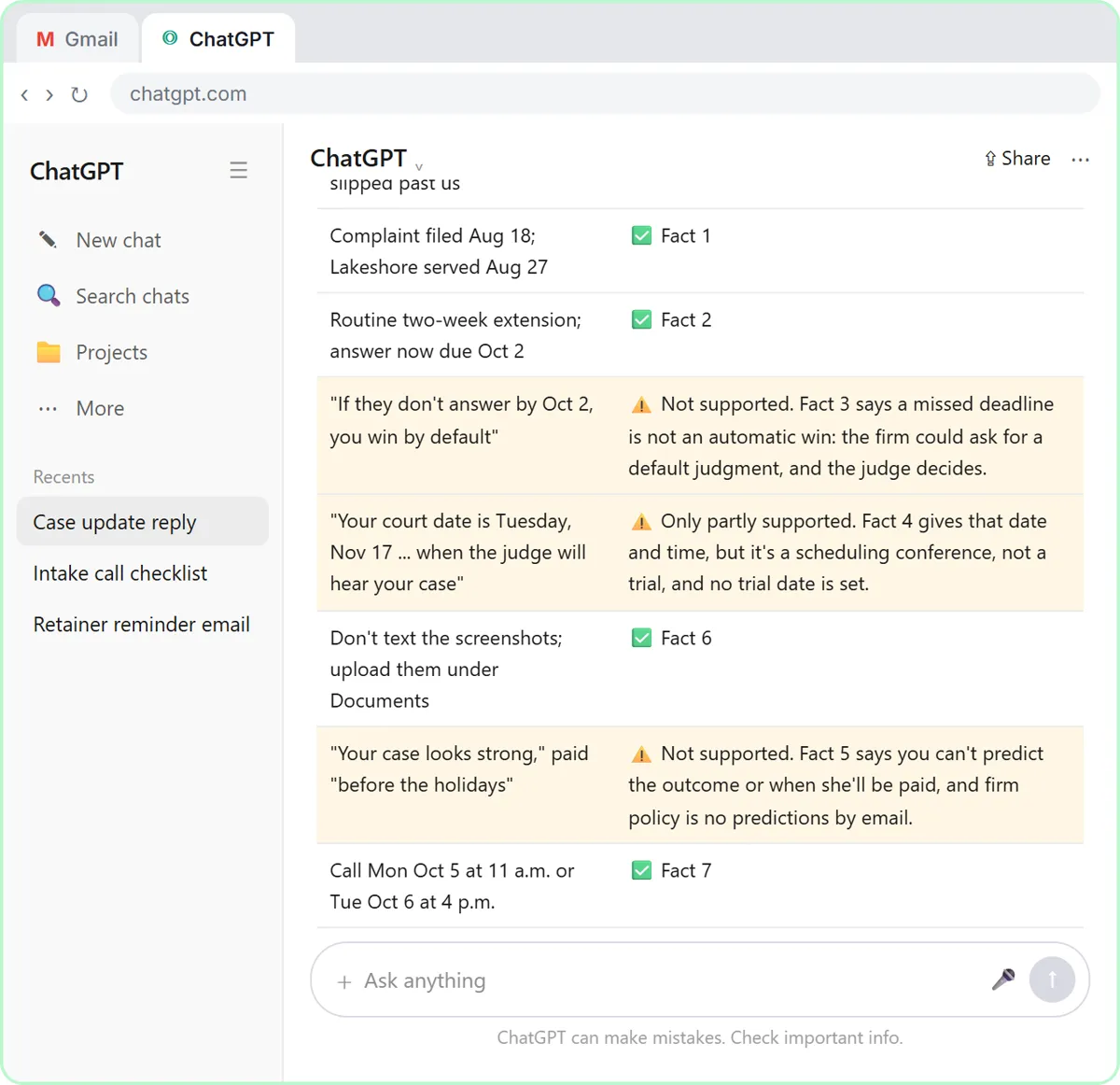
- Check every claim. Ask for a table of every promise or claim and the fact behind it.
The check prompt from the lesson:
Check that reply against my facts. Make a table of every promise or claim in it and the fact that backs it up. Flag anything the facts don't support.
In the lesson, five of the eight claims match a fact and three don't. ChatGPT suggests safer wording for each, and you ask for all three fixes in one message.
Try it free, step by step
Reply Faster to a Client Asking for a Case Update: ChatGPT for Small Law Firms. A client wants a court date and a promise she'll win. Give ChatGPT the thread and your firm's facts, catch the lines that predict an outcome, and send a clear, kind case update from Gmail. You do every step yourself in a practice copy of ChatGPT, it checks your work as you go, and “Do it for me” finishes any step you get stuck on. Free, and nothing touches your real accounts.
Start the free lessonWhat does safe wording look like?
Safe wording states the fact, names who decides, and offers a conversation with the attorney. From the lesson's final reply:
- "Missing that deadline isn't an automatic win. If they don't answer, Attorney Hale will talk with you about next steps, which could include asking the court for a default judgment. The judge decides."
- "It's a scheduling hearing, not a trial, and no trial date is set."
- "We can't predict how the case will turn out or when you'll be paid, but Attorney Hale can call you Mon Oct 5 at 11 a.m. or Tue Oct 6 at 4 p.m."
Each line answers the client's real question honestly and hands the advice part to the person who can give it. A default judgment is mentioned as a possibility the attorney will discuss, not a promise.
What else should a case update avoid?
Keep evidence and case details in the channels your firm allows. In the lesson, Carla wants to text screenshots; the firm's policy is no case details or evidence by text or social media, so the reply asks her to upload them to the client portal under Documents and keep the originals on her phone.
Also follow your firm's rules on AI tools and client confidentiality. Put only what the reply needs into ChatGPT, use a business account that doesn't train on your data, and if your firm has an attorney approve client updates, they read the draft too. ChatGPT for Law Firms and ChatGPT for Paralegals cover more of the day-to-day.
Does this routine work outside law firms?
Yes. Any office that answers questions it can't fully decide has the same problem: an insurance agency can't promise what the carrier will pay, and an accounting firm can't promise when the IRS issues a refund. The same thread, facts, check and fix routine is in Reply Faster: Customer Emails for a general business, and the ChatGPT tool page lists every version.
Key takeaways
- Legal information describes facts and process; legal advice tells a client what to do or predicts what will happen.
- ChatGPT tends to answer "Are we going to win?" with reassurance, which can read as a prediction.
- Give ChatGPT the firm's facts, including what nobody can predict, and the instruction "No legal advice."
- Ask ChatGPT for a table matching every claim in its draft to a fact, and fix every line it flags.
- Safe wording states the fact, names who decides, such as the judge, and offers a call with the attorney.
Frequently asked questions
- Can a paralegal use ChatGPT to draft client updates?
Many firms allow it with rules: follow the firm's AI policy, share only what the update needs, keep drafts to facts and process, and have an attorney review if the firm requires it.
- Is "a missed deadline isn't an automatic win" legal advice?
In the lesson it is one of the firm's own approved facts, which is why the reply may say it. Only send statements like this when your firm has supplied or approved them.
- How do I stop ChatGPT from predicting a case outcome?
Include a fact that says the firm can't predict the outcome, add "No legal advice" to the instructions, and run the check table. Replace any flagged prediction with an offer to talk to the attorney.
- What if a client keeps asking for a prediction?
Answer what you can with facts, say plainly that the firm can't predict the outcome by email, and offer specific times to talk with the attorney, as the lesson's reply does.