What is an always-on agent?
Quick answer
An always-on agent is an AI agent that keeps running after you stop typing. It holds a standing goal, checks for changes on its own or on a schedule, does the next step when it can, and interrupts you only when something needs a decision.
Last updated
Take the free module →Module 11 of the free AI at Work: Start Here course, about 7 minutes. No account needed.
Updated · By Robert Breen
Why it matters for a small business
The value is in the waiting time. A chatbot is idle until you ask, so a task you forget is a task that never happens. An always-on agent turns "remember to check" into a standing job: look at the shared inbox every morning, watch four competitor pages, chase vendors who have not confirmed. For an office, that is the difference between a tool you use and a colleague who keeps an eye on things.
Always-on does not mean unsupervised. The products launching now pair background work with limits. OpenAI's dots, for example, use read-only tools for background research, so they cannot send messages or change content while they look around, and they ask for approval before actions that affect your accounts. Whatever tool you use, the safe pattern is the same: let it watch and draft freely, and keep a human in the loop for anything that goes out.
Three ways an AI tool can wait for work
| Pattern | How it starts work | Office example |
|---|---|---|
| On request | Only when you type | Drafting one client reply |
| On a schedule | At a set time | A Monday price check |
| Always on | When something changes, or it spots a gap | Flagging an invoice that was never sent |
In a real lesson: AI Agent vs Chatbot vs Automation: One Job Done Three Ways
In the free AI Agent vs Chatbot vs Automation lesson, Tara at Oak Hill Pet Grooming, a made-up shop, chases six unpaid invoices three ways. The agent version reads the list, notices that one customer already paid half and holds that invoice for a person.
An always-on agent would run that same check every few days without being asked, and send Tara only the reminders worth approving.
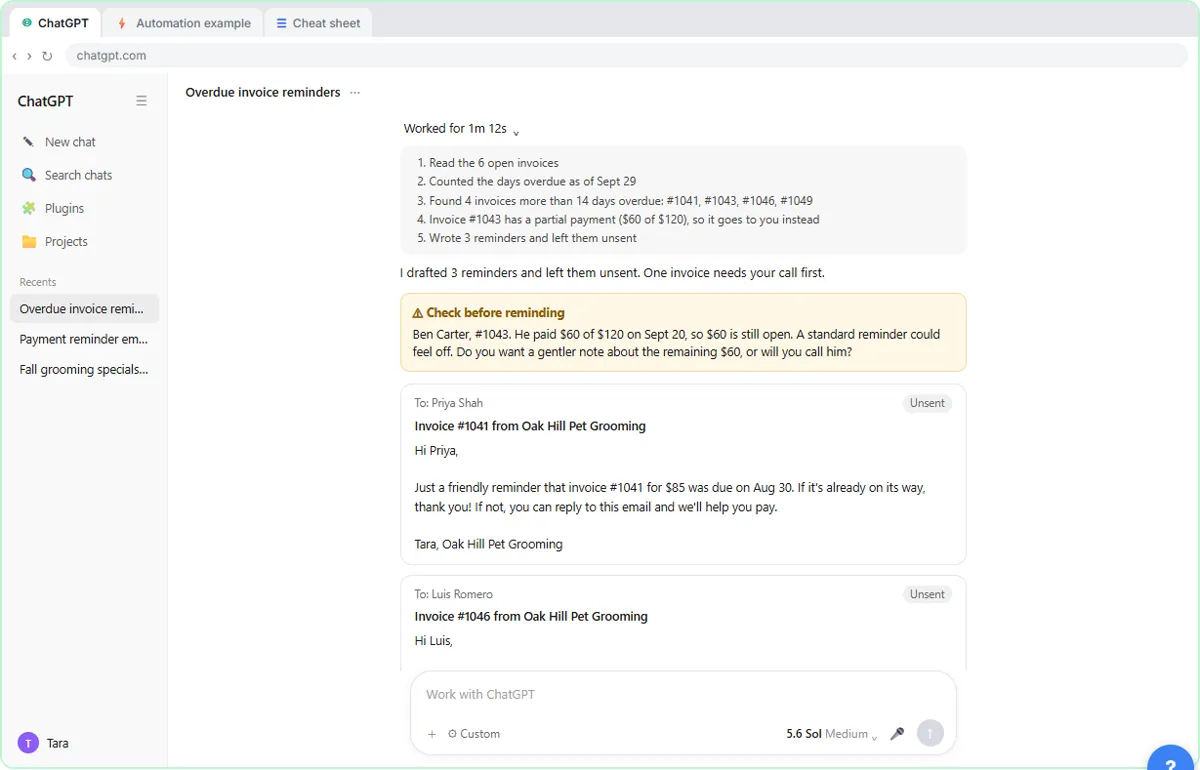
Try this lesson free or read the step-by-step guide.
Common confusions
Always-on agent vs automation
An automation follows fixed rules every time. An always-on agent decides what to do next within limits you set, so it can handle the odd case an automation would get wrong.
Always-on vs persistent
Always-on is about timing: it works without being prompted. Persistent is about memory: it keeps context between sessions. Most new agents are both.
Tips
- Start with a job that ends in a draft or a list, not an action.
- Ask for a short daily summary of what it did, so background work stays visible.
- Pause it when you do not need it; a quiet agent costs nothing to restart.
Related terms
More AI agents terms
Where you use it: free lessons
- AI Agent vs Chatbot vs Automation: One Job Done Three Ways (ChatGPT, 7 min)
- ChatGPT Work: Have ChatGPT Do a Multi-Step Task (ChatGPT, 8 min)
- Get a Morning Invoice Summary in Slack using ChatGPT Dots (ChatGPT, 4 min)
Frequently asked questions
- Is an always-on agent safe to connect to email?
- It can be, with limits. Give it read access first, require approval before it sends anything, and check its first weeks of work closely.
- Which tools offer always-on agents?
- As of October 2026, OpenAI offers dots on some ChatGPT plans, and other vendors offer background or scheduled agents. Plans and limits change quickly, so check each vendor's pages.
- Do I need an always-on agent for a weekly report?
- Usually not. A scheduled task that runs the same job every week is simpler and cheaper. An always-on agent helps when the work depends on noticing changes.