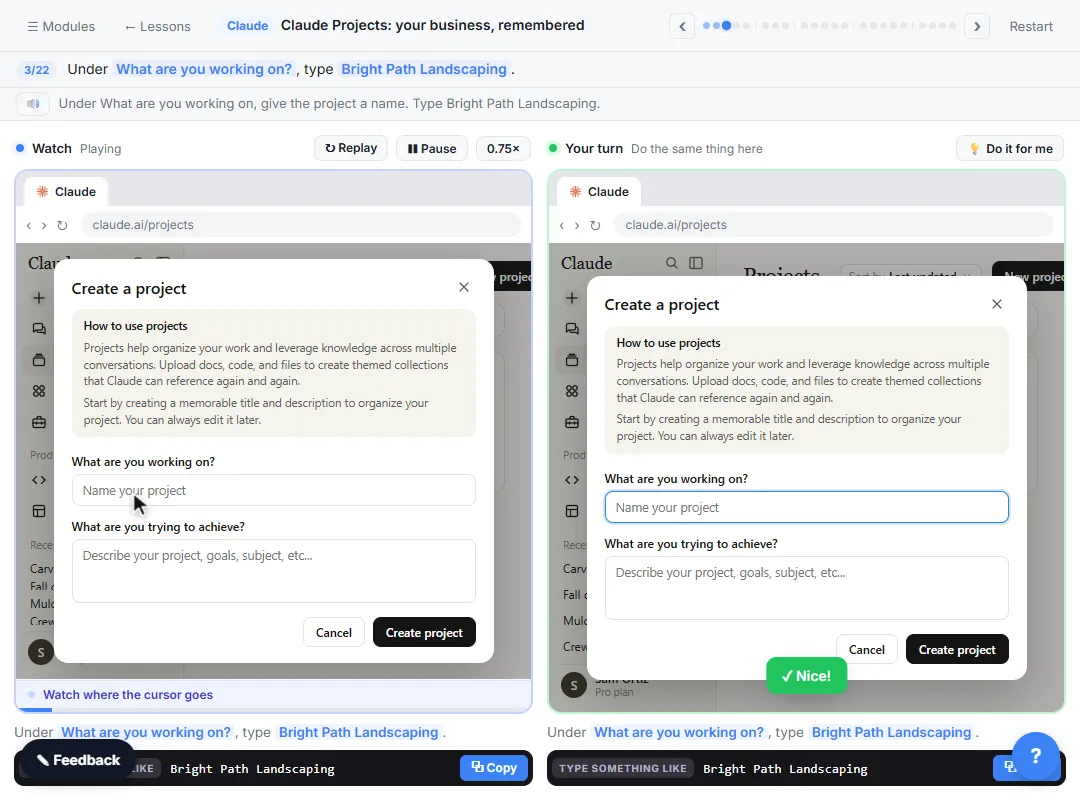
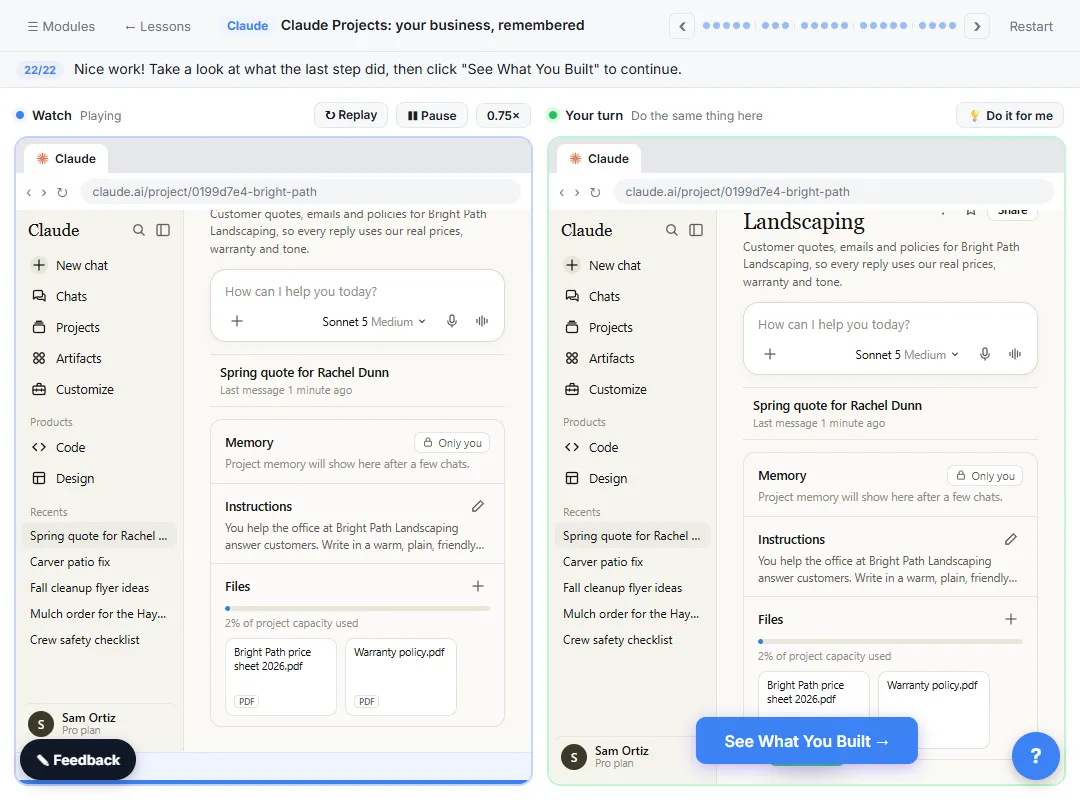
A Claude project has two parts that do different jobs. Instructions tell Claude how to behave in every chat in the project. Context holds the project knowledge: the files and text Claude works from. Most mistakes come from mixing those up.
Mistake 1: Why shouldn't you put your price list in the instructions?
Instructions are for behavior, and a price list buried in a paragraph is hard to keep current. Fix: put facts in files under Context, and keep the instructions for tone and policies.
In the lesson, the made-up Bright Path Landscaping uploads two files, Bright Path price sheet 2026.pdf and Warranty policy.pdf, as project knowledge. The instructions only say how to use them: "Quote only from the price sheet in this project." When prices change next year, you swap one file and the instructions stay the same.
Mistake 2: Why do vague instructions give generic replies?
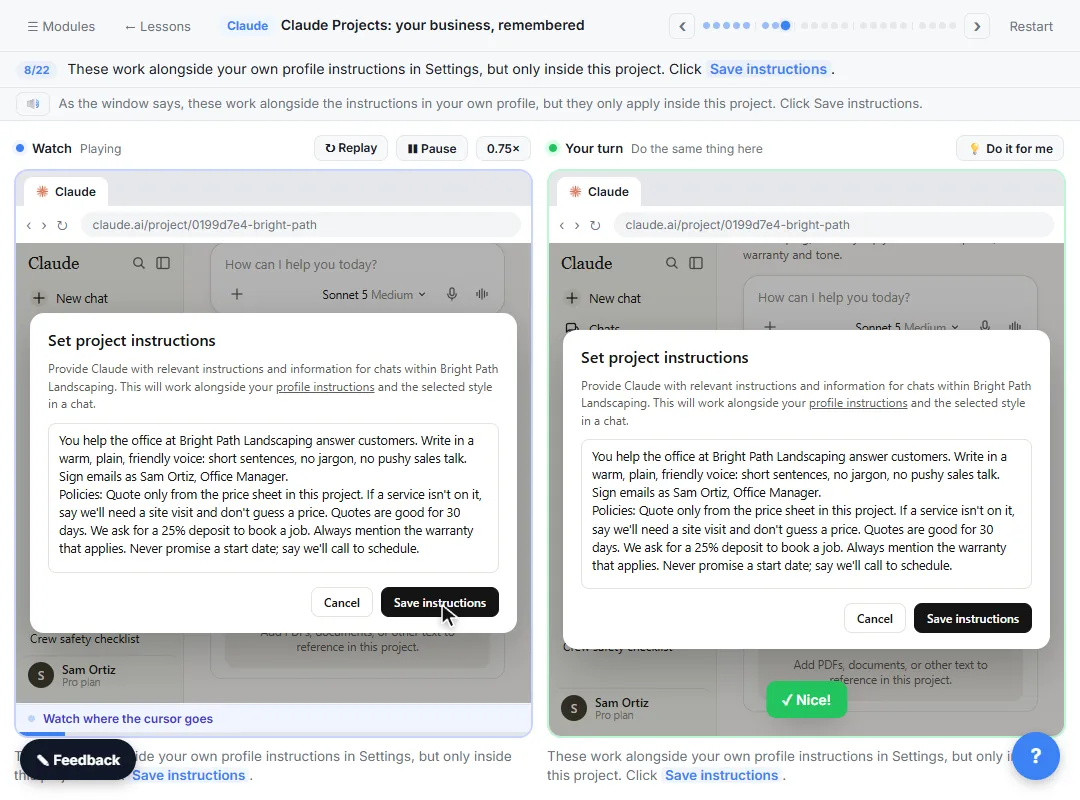
"Be professional and helpful" doesn't tell Claude anything it wouldn't do anyway. Fix: say who Claude is helping, the tone, the sign-off and the actual policies.
The lesson's instructions name the office, ask for "a warm, plain, friendly voice: short sentences, no jargon, no pushy sales talk," give the sign-off (Sam Ortiz, Office Manager) and list the rules: quotes are good for 30 days, a 25% deposit books a job, always mention the warranty that applies, never promise a start date. Each rule shows up in the reply. The project instructions glossary page has more examples.
Mistake 3: Why leave out a "don't guess" rule?
Without one, a missing price can turn into a confident made-up price. Fix: tell Claude what to do when something isn't in the files.
The lesson's rule: "If a service isn't on it, say we'll need a site visit and don't guess a price." The price sheet does the same for patios ("site visit needed"). A project that knows how to say "I don't know" is one you can trust with customers. The hallucination glossary page explains why AI fills gaps.
Mistake 4: Why does it matter which files you upload?
Everything in project knowledge can show up in any chat in the project. Fix: add only the files the work needs.
The file window in the lesson also shows Linda Carver complaint.pdf and October crew schedule.xlsx. You pick only the price sheet and the warranty policy, holding Ctrl (Cmd on a Mac) to select both. A customer complaint has nothing to do with quoting, and a project for customer emails shouldn't carry it.
Mistake 5: Why are you still pasting the price sheet into every chat?
Habit. Fix: start the chat inside the project, and ask the way you'd ask a coworker who already knows the business.
The lesson's request is just the customer's email and "Write my reply with a quote." It doesn't mention prices, the warranty or the tone. The reply prices a spring cleanup ($285), 6 yards of mulch at $95 ($570) and four 3-gallon shrubs at $65 ($260), totals $1,115, asks for a 25% deposit ($278.75), says the quote is good for 30 days and answers the shrub question from the warranty. If you're pasting the same thing into a project chat, it belongs in the project.
Try it free, step by step
Claude Projects for Your Business: Instructions, Knowledge and Quotes. Create a project for your business, give it instructions for tone and policies, add your price sheet and warranty as project knowledge, and get a customer quote that uses all of it. You do every step yourself in a practice copy of Claude, it checks your work as you go, and “Do it for me” finishes any step you get stuck on. Free, and nothing touches your real accounts.
Start the free lessonMistake 6: Why check where the numbers came from?
Because a reply can look right and still use a wrong assumption. Fix: open Claude's reasoning, check the math and read what it flagged.
In the lesson, you click the line above the reply to see how Claude worked out the quote: every price from the price sheet, the shrub answer from the warranty, the 30 days and the deposit from the instructions. Claude also flags that Rachel didn't say what size boxwoods she wants, so it priced the 3-gallon shrubs. Check the math, check the flags, then copy the email.
Mistake 7: Why fix the instructions, not the chat?
Fixing one reply fixes one reply. Fix: when a reply keeps missing something, click Edit next to Instructions and add a rule.
The lesson adds one line, ending every customer email with the office phone number, and saves it. From then on, every new chat in the project follows it. If you've corrected the same thing twice, it's a rule.
How do you avoid these mistakes as a team?
Give each project an owner and a short checklist:
- Instructions cover who, tone, sign-off and policies, plus a "don't guess" rule.
- Facts live in files under Context, one topic per file, current versions only.
- Nothing goes into project knowledge that the work doesn't need, especially private customer details.
- Every quote gets its math checked and its flags read before it's sent.
- Repeated corrections become instructions, and the owner makes the change.
The lesson says projects are on every plan, the Free plan allows up to five, and Team and Enterprise plans can share a project with coworkers. Check with your admin before you put client files into any AI tool. Projects are module 3 of the free Claude Jump Start course, and Claude Projects Prompts has prompts for each part of the setup.
Key takeaways
- Instructions are how Claude behaves; project knowledge is what it knows. Don't mix them.
- Name the tone, the sign-off and the real policies, and add a rule for what to do when something is missing.
- Upload only the files the work needs.
- In a project chat, ask briefly, then check the math and the flags.
- When you fix the same thing twice, edit the instructions instead.
Frequently asked questions
- What is the difference between Claude project instructions and project knowledge?
Instructions tell Claude how to behave in every chat in the project. Project knowledge, under Context, is the files and text it works from.
- Why did my Claude project reply guess a price?
Usually because the instructions don't say what to do when something isn't in the files. Add a rule such as "If a service isn't on the price sheet, say we need a site visit and don't guess."
- How many projects can I have on Claude's Free plan?
The lesson says the Free plan allows up to five projects.
- Is Bright Path Landscaping a real business?
No. Bright Path Landscaping and its customers are made up for the lesson.