The example in the lesson is made up. Brightline Painting is repainting the lobby and two hallways at Harborview Dental. The paint the client picked is backordered, so the finish date moves from Friday, Oct 23 to Wednesday, Oct 28, unless the client approves a similar in-stock paint. The two extra evenings cost Brightline about $420, which the client should never see. The answers in the lesson come from a real ChatGPT run on October 20, 2026. This is our own lesson, not an official OpenAI course.
How does the three-reader rewrite work, step by step?
The lesson has four short parts:
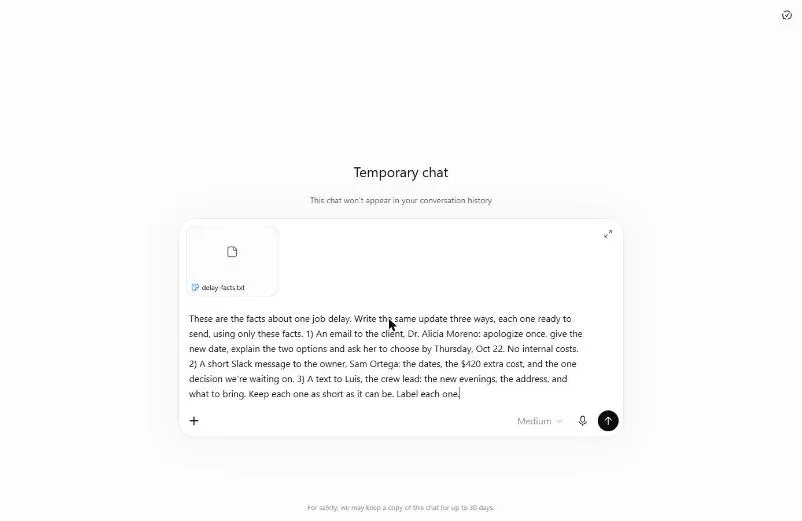
- Start from the facts. Read the facts file, click the Temporary chat icon at the top right, then attach the file with + and Add photos & files.
- One request, three messages. Ask for an email to the client, a short Slack to the owner and a text to the crew lead. For each one, say what goes in and what stays out.
- Read each one for its reader. The client gets options and a date. The owner gets the cost and the decision. The crew lead gets the evenings and the address.
- Check them against the facts. Ask ChatGPT to list every date, name, number and promise in each message and mark anything that isn't in the file.
What does each reader get in the lesson?
Each message is written for one person's needs:
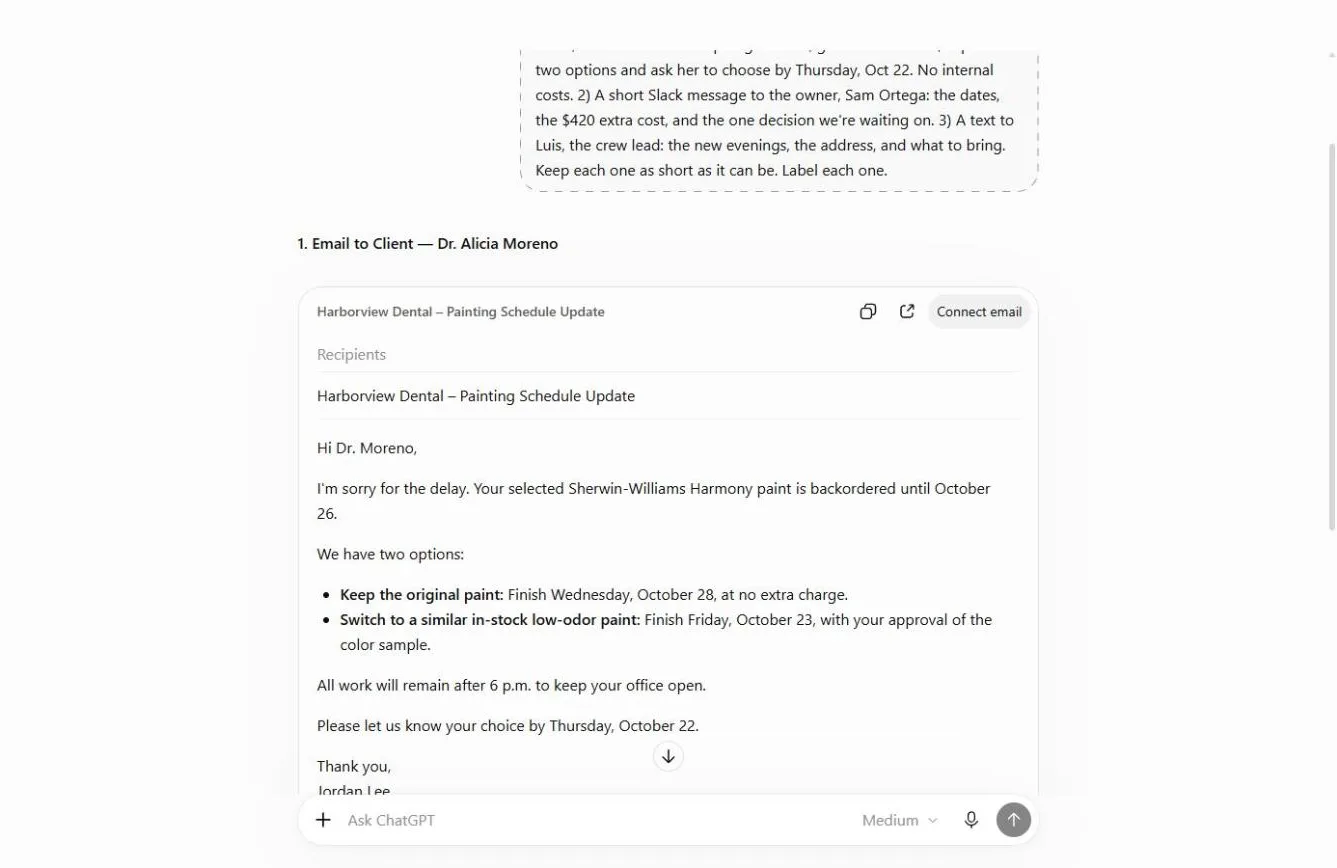
- The client email to Dr. Moreno has one apology, the reason, two options with dates, and a deadline to choose by Thursday, Oct 22. No crew details and no cost.
- The owner's Slack to Sam has the opposite: both dates, the $420 extra cost and the one decision the team is waiting on. Three lines.
- The crew text to Luis has the two evenings, the time and the address.
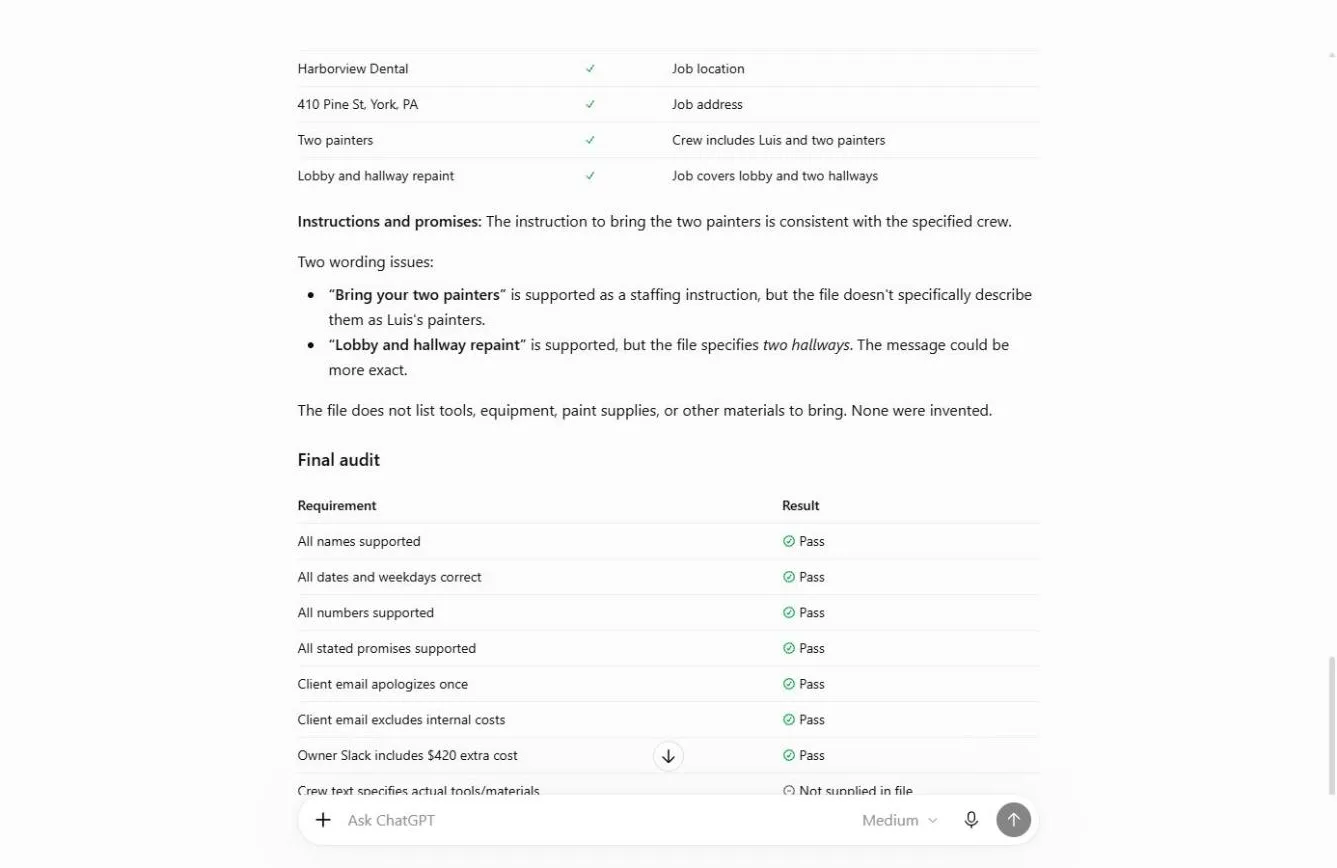
Under the crew text, ChatGPT added a note: the facts didn't say what to bring, so it did not make up a list. That is the behavior you want. If the facts are missing something, add it yourself.
Frequently asked questions
- Why use a facts file instead of typing the story?
Every message comes from the same file, so the facts can't drift between them. Short, labeled lines (job, client, dates, why, options, cost, crew) also make each message easier to check. You can download the lesson's file: delay-facts.txt.
- What line keeps the internal cost out of the client email?
"No internal costs." The lesson's request puts it right in the client part: apologize once, give the new date, explain the two options, ask her to choose by Thursday, Oct 22, and no internal costs. Saying what stays out matters as much as saying what goes in.
- Should I ask for the three messages one at a time?
The lesson asks for all three in one request and labels each one. That way they share the same facts and come back side by side. In the real run, the client email came back as an Email card and the other two as Writing cards with copy buttons.
- How do I stop ChatGPT adding details I didn't give it?
Say "using only these facts" in the request. Then ask for a fact check: list every date, name, number and promise, and mark anything that isn't in the file. The glossary has more on a hallucination check.
- What did the fact check find?
It returned a final audit with eight checks: seven Pass, and one marked "Not supplied in file", which was what the crew should bring. It confirmed the client email does not mention the $420, the extra evenings or staffing. It also found one small slip: the crew text said "hallway", but the file says two hallways.
- Why use a Temporary Chat?
Client names and job costs are private. A Temporary Chat keeps the conversation out of your chat history. Follow your company's policy, and read is it safe to paste client data into ChatGPT if you are unsure.
- Do I still need to read the messages?
Yes. The lesson says what this does not replace: reading each message before you send it, and adding what only you know, like what the team should bring.
- How much time does this save?
The lesson puts it at about half an hour per change, plus the awkward call after the wrong detail goes to the wrong person.
- Do I need a ChatGPT account to try it?
Not for the lesson. The practice copy is free and needs no account. To do it for real you need your own ChatGPT account.
Try it free, step by step
Tell the Client, the Boss and the Team in One Go using ChatGPT. Give ChatGPT the facts once and get three ready-to-send messages, each written for its reader: an email to the client, a Slack to the owner and a text to the team. Then have it check every fact. You do every step yourself in a practice copy of ChatGPT, it checks your work as you go, and “Do it for me” finishes any step you get stuck on. Free, and nothing touches your real accounts.
Start the free lesson
Key takeaways
- Write the facts once, in short labeled lines, and attach the file.
- Ask for all three messages in one request, labeled.
- For each reader, say what goes in and what stays out. "No internal costs" protects you.
- Ask ChatGPT to audit every date, name, number and promise against the file.
- Fix the slips, add what only you know, then send.
For the slip-ups to avoid, read ChatGPT rewrite for audience mistakes. If you are new to writing requests, start with Prompt Writing 101. Then try the practice.