The example in the lesson is made up. Brightline Painting leases a copier from Keystone Office Systems for $389 a month. The agreement started March 1, 2024 for 36 months, and renews for 12 more months unless Keystone receives written notice at least 90 days before the term ends. The answers come from a real ChatGPT run on October 20, 2026. ChatGPT reads contracts well, but it is not a lawyer. This is general information, not legal advice, and this is our own lesson, not an official OpenAI course.
How does the contract review work, step by step?
The lesson has four short parts:
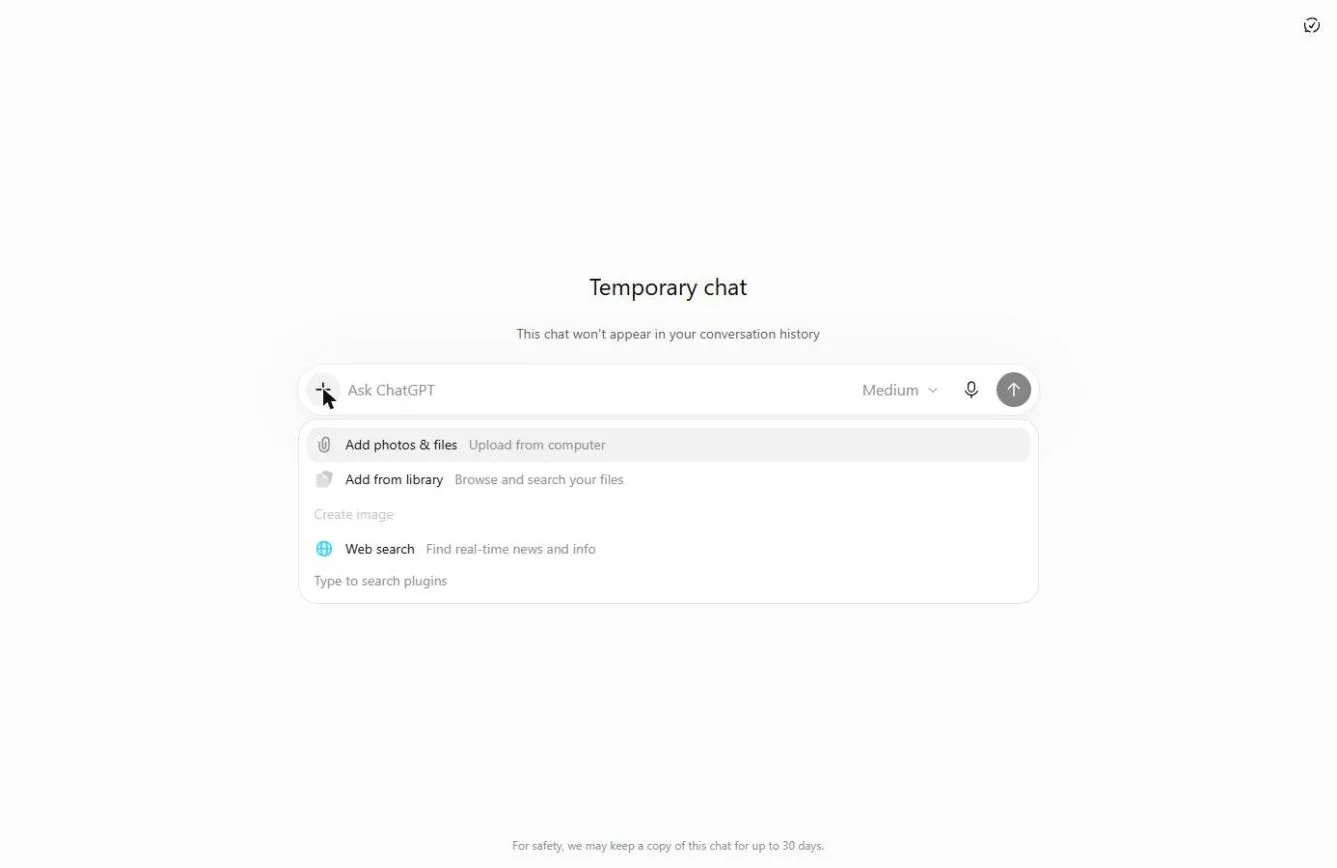
- Open a Temporary Chat. Look at the contract first. Then click the Temporary chat icon at the top right, click +, choose Add photos & files, pick the PDF and click Open.
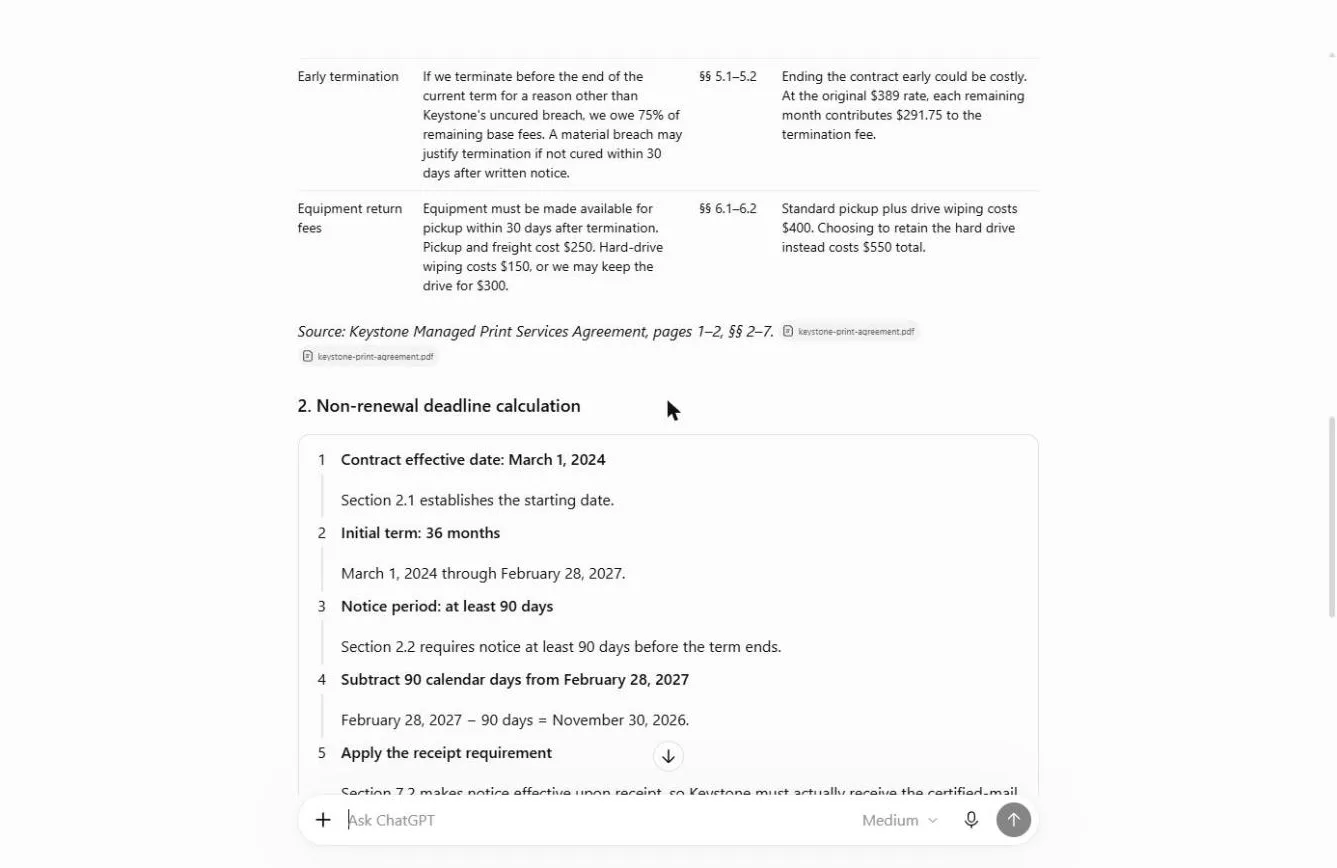
- Ask for the key terms. One request asks for a table with four columns (term, what the contract says, section number, what it means for us), the last day to send a non-renewal notice with the working shown, and "Use only what is in the contract. If something isn't in it, say so."
- Check the dates yourself. Read the deadline, how notice must be sent, what leaving early costs, and the date math.
- Draft the non-renewal letter. A second request gets a letter from the owner, a mailing checklist and a safe mail-by date. You copy the letter with the copy icon.
The terms behind this are explained in the glossary: auto-renewal clause, non-renewal notice and contract key terms.
What did ChatGPT find in the lesson's contract?
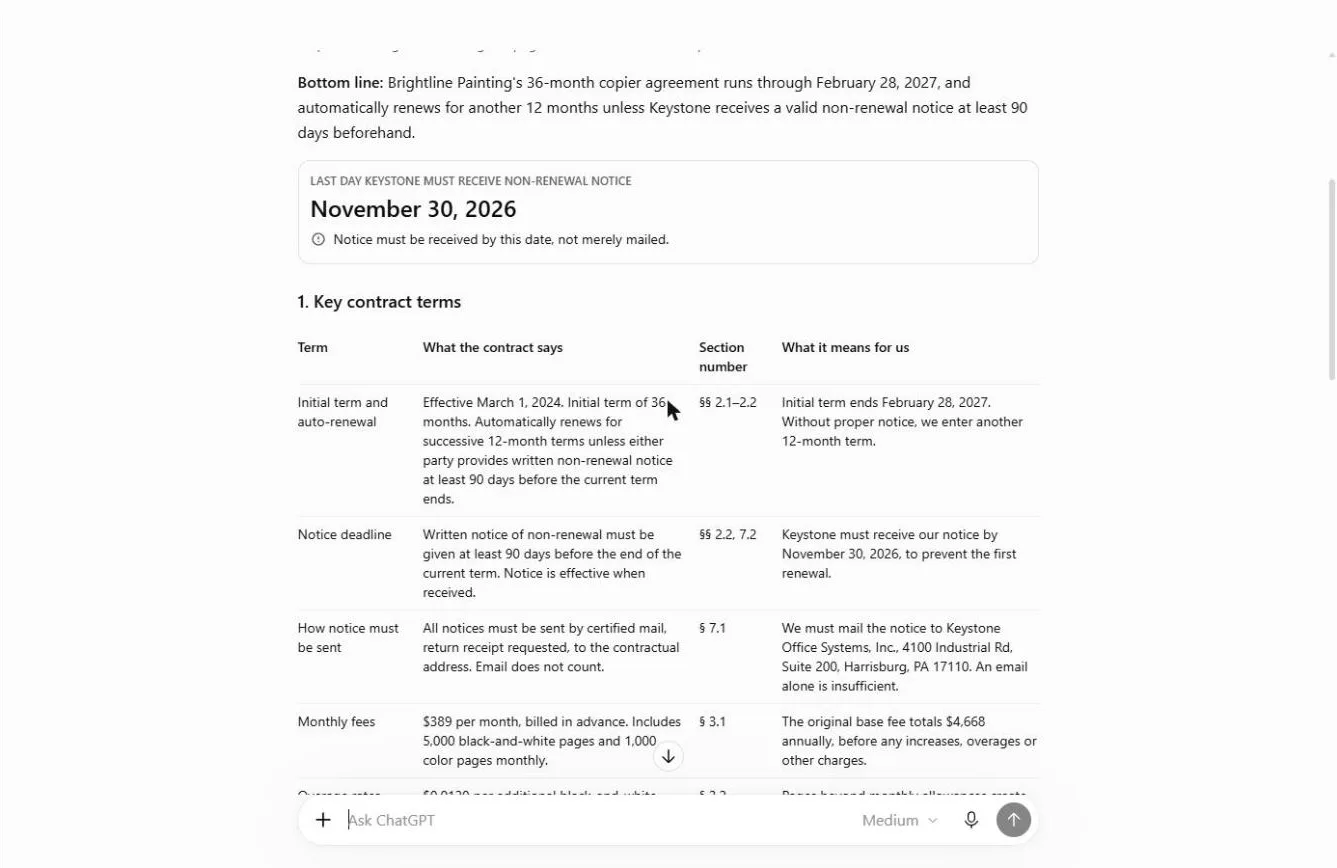
It worked for about 36 seconds and put the answer at the top: November 30, 2026, with the note "Notice must be received by this date, not merely mailed." The table covered eight terms with section numbers. Three of them decide the outcome:
- How notice must be sent (§ 7.1): certified mail, return receipt requested, to the address in the contract. Email does not count.
- Early termination (§ 5.2): leaving before the term ends costs 75% of the remaining base fees. That is why the renewal date matters. It is the free exit.
- Price increases (§§ 4.1–4.2): Keystone may raise prices by up to 7% a year, and renewal terms use its then-current rates.
It also listed what the contract does not say: the current monthly charge after increases, the renewal pricing, and how early certified mail must be sent.
Frequently asked questions
- Can ChatGPT read a contract PDF?
Yes. Click + in the message box, choose Add photos & files, pick the PDF and click Open. The PDF sits above the message box as a small preview. Ask for section numbers on every point so you can check them against the contract yourself.
- How do I work out the auto-renewal deadline?
Find the start date and the term length, then subtract the notice period from the end date. In the lesson: start March 1, 2024, 36 months ends February 28, 2027, minus 90 days is November 30, 2026. Count it on a calendar once. Never trust a date blind.
- What does "notice is effective when received" mean?
The vendor must have the letter by the deadline. Mailing it on the deadline is too late. Under § 7.2 of the sample contract, notice counts when it is received, so ChatGPT treated November 30 as the arrival date.
- Can I just email my sales rep?
Not under this contract. § 7.1 says notices go by certified mail, return receipt requested, and email does not count. Many contracts say something similar, so check yours.
- What should the non-renewal letter include?
The lesson asks for a letter from the owner that quotes the agreement number and the section it relies on, says when the agreement ends, and asks the vendor to confirm in writing and schedule the copier pickup. Check three things against the contract: the agreement number KOS-24-0317, Section 2.2 and the end date February 28, 2027.
- When should I mail it?
ChatGPT suggested mailing by Friday, November 13, 2026, two weeks before the November 30 receipt deadline, with Thanksgiving week in between. Put both dates in your calendar the same day.
- Does ChatGPT send the letter?
No. You copy it with the copy icon, paste it onto your letterhead, print it and get it signed. Then send it the way the contract requires and keep the receipt.
- Is it safe to upload a contract?
Follow your company's policy first. A Temporary Chat doesn't appear in your history, and OpenAI says temporary chats aren't used to train its models. Remove details the task doesn't need, such as bank details. The sample contract in the lesson is made up.
- Can I try it with the same contract?
Yes. Download the made-up sample: keystone-print-agreement.pdf. The practice copy in the lesson needs no account.
Try it free, step by step
Never Miss a Contract Renewal Deadline using ChatGPT. Upload a vendor contract to a Temporary Chat, get every key term in one table with section numbers, check the non-renewal deadline yourself, and draft the letter the contract asks for. You do every step yourself in a practice copy of ChatGPT, it checks your work as you go, and “Do it for me” finishes any step you get stuck on. Free, and nothing touches your real accounts.
Start the free lesson
Key takeaways
- Use a Temporary Chat for contracts, and follow your company's policy.
- Ask for a table with a section number on every line.
- Check the date math yourself, and note whether notice counts when sent or when received.
- Read how notice must be sent. Email often does not count.
- Get the letter out early, keep the receipt, and put both dates in your calendar.
For the slip-ups to avoid, read ChatGPT contract review mistakes. When you need a replacement vendor, the compare vendor quotes lesson puts their offers in one fair table. Then try the contract practice.