The example in the lesson is made up. Brightline Painting needs 6 office laptops and has three quotes, each written a different way: Summit IT at $1,129 a laptop with setup and warranty included, Riverbend Tech at $949 a laptop plus extras, and a Keystone Office Systems lease at $189 a month for all six. Every vendor, person and price is made up. The answers come from a real ChatGPT run on October 20, 2026. This is our own lesson, not an official OpenAI course.
How does the quote comparison work, step by step?
The lesson has four short parts:
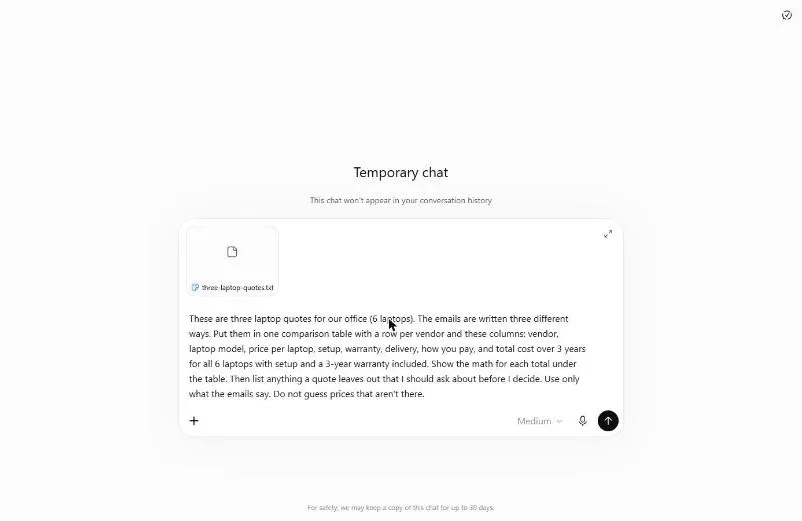
- Collect the quotes. Read the three emails. Click the Temporary chat icon at the top right, then attach the file with + and Add photos & files.
- Ask for one table. The request names every column (vendor, laptop model, price per laptop, setup, warranty, delivery, how you pay) and a total over 3 years for all 6 laptops, with setup and a 3-year warranty included.
- Check the totals. Read the hidden extras, check one total by hand, read the lease as a total, and see what each quote leaves out.
- Ask the vendor what is missing. A short follow-up email asks the open questions and the full total in writing. You copy it from the Email card.
What did the comparison show in the lesson?
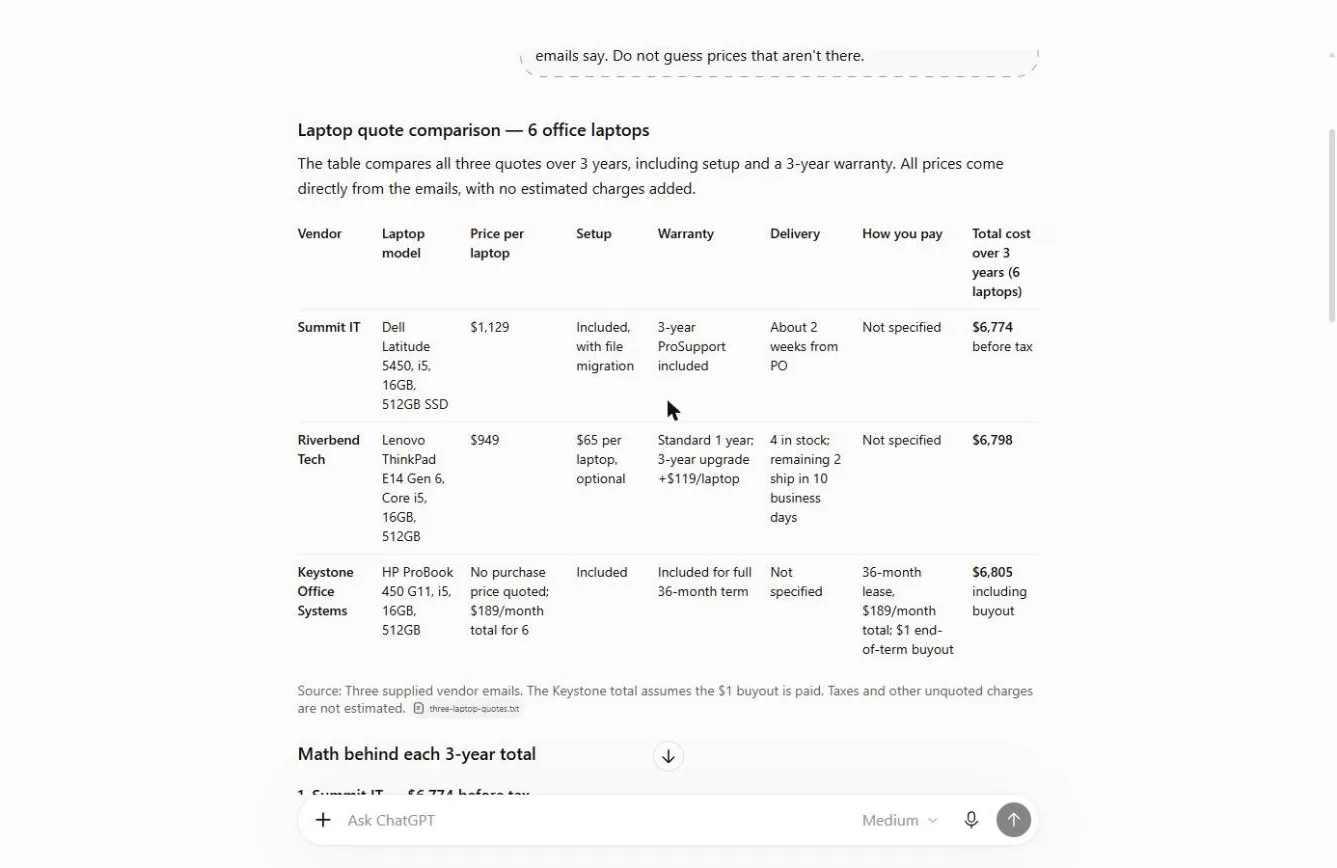
On the same basis, the three quotes landed within $31 of each other:
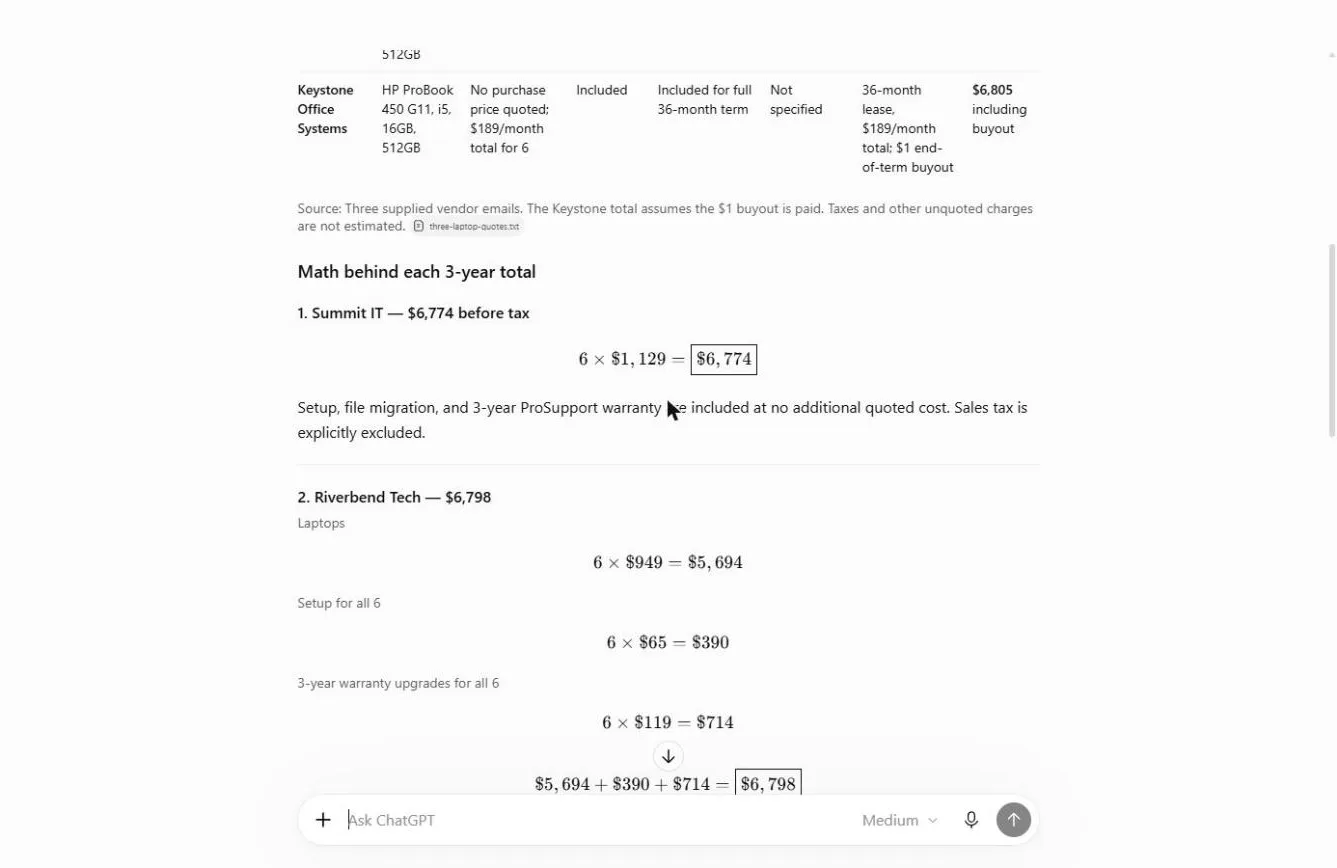
- Summit IT: 6 × $1,129 = $6,774 before tax.
- Riverbend Tech: 6 × $949 = $5,694, plus 6 × $65 setup = $390, plus 6 × $119 for the 3-year warranty = $714. Total $6,798.
- Keystone Office Systems: 36 × $189 = $6,804, plus the $1 buyout. Total $6,805.
The quote that looked cheapest at $949 a laptop was not the cheapest once setup and the warranty were added. ChatGPT's bottom line: Summit IT has the lowest stated total, but the differences are very small and the ranking could change once tax, shipping and payment terms are known. It also drew a bar chart of the three totals.
Frequently asked questions
- What does "the same basis" mean?
The same thing, over the same time. In the lesson it is all 6 laptops, with setup and a 3-year warranty, over 3 years. Without it, "compare these" can give a different answer every time.
- How do I compare a lease with a purchase?
Turn both into a total over the same period. The lease in the lesson is 36 payments of $189 plus a $1 buyout, which is $6,805. Then compare it with the purchase price plus setup and warranty for the same 3 years. Also ask what happens at the end of the lease.
- Why check a total by hand?
If one total is right, the method is right. The lesson has you check Riverbend: $5,694 + $390 + $714 = $6,798. It matches. ChatGPT shows the math under the table so you can do this in a minute.
- What if a quote doesn't mention something?
ChatGPT should say so, not guess. In the real run, it wrote "Not specified" for payment terms on two quotes and delivery on the lease. That is why the request says "Do not guess prices that aren't there."
- What should I ask each vendor?
When totals are this close, the gaps decide it. The lesson's "What to ask each vendor" table covers payment terms, tax, shipping, what setup includes, what the warranty covers, delivery dates and how long the quote is valid. For the lease, it adds upfront fees, early termination and return conditions.
- What does the follow-up email say?
The lesson's email to Marcus at Riverbend states the $6,798 total, asks six open questions and asks for a reply by Friday, October 30. Check that nothing in it promises to buy. Then copy it with the copy icon and send it from your own email. Do the same for the other two vendors.
- Why use a Temporary Chat?
Vendor pricing is business information. A Temporary Chat keeps it out of your chat history. Follow your company's policy too.
- Can I try it with the same quotes?
Yes. Download the made-up sample: three-laptop-quotes.txt. The practice copy in the lesson is free and needs no account.
- Does this replace a written quote?
No. Real quotes can include terms ChatGPT can't see. Get the final price in writing, and use your own judgment on which vendor will support you best.
Try it free, step by step
Compare Vendor Quotes Side by Side using ChatGPT. Turn three quotes written three different ways into one table on the same basis, check the 3-year totals yourself, see what each vendor left out, and send the follow-up questions. You do every step yourself in a practice copy of ChatGPT, it checks your work as you go, and “Do it for me” finishes any step you get stuck on. Free, and nothing touches your real accounts.
Start the free lesson
Key takeaways
- Define the basis: units, what is included and how long.
- Ask for one table, the math under it, and what each quote leaves out.
- Say "Do not guess prices that aren't there."
- Check one total by hand, and turn any lease into a total.
- Send each vendor its open questions and get the final price in writing.
For the slip-ups to avoid, read ChatGPT vendor quote comparison mistakes. For bigger purchases where the vendors are public, the Deep research vendor comparison lesson does the web research for you. Then try the quote practice.