What are the key terms in a contract?
Quick answer
Contract key terms are the handful of clauses that decide what a deal really costs and how you get out of it: the length of the term, the fees, price increases, renewal and notice dates, early termination fees and the liability cap. A key terms summary lists them with section numbers.
Last updated
Take the free module →Module 34 of the free AI Apps Worth Knowing course, about 8 minutes. No account needed.
Updated · By Robert Breen
Why it matters for a small business
Office managers and ops leads sign vendor agreements without a lawyer on staff, often with a call booked the same afternoon. Nobody has an hour to read every clause, so the expensive sentences get skimmed: a renewal notice window, a yearly increase, an exit fee. Missing one can commit the firm to another full year of fees.
A short list of the same six or seven items, pulled from every contract, turns a long read into a quick check. AI PDF tools can draft that list in seconds if you ask for each item and its section number. You then read those sections yourself. This is practical information to help you ask better questions, not legal advice.
Key terms pulled from a sample IT agreement
| Key term | What it says | Section |
|---|---|---|
| Term | 24 months, then 12-month renewals | 3.1, 3.2 |
| Monthly fee | $2,640 (22 users at $120) | 4.1 |
| Price increase | Up to 7% once a year, 60 days' notice | 4.3 |
| Renewal notice | At least 90 days before the term ends | 3.2 |
| Early termination fee | 75% of monthly fees left in the initial term | 6.2 |
| Liability cap | Fees paid in the prior 3 months | 9.2 |
From the made-up Sample Managed IT Services Agreement in the KDAN lesson.
In a real lesson: KDAN: Get a Vendor Contract's Key Terms with AI Chatbot
In the free KDAN contract terms lesson, Dana Whitfield at Linden Row Accounting has a 2:00 PM call about a 4-page agreement from Brightwave IT Solutions. She opens AI Tools, then AI Chatbot, starts with Summarize this document, then asks one specific question: list the term, the monthly fee, price increases, renewal and cancellation deadlines and any early termination fee, with the section number for each.
She then selects section 3.2 and uses Explain This (Beta) to check the non-renewal notice window against the words on the page, because KDAN itself says the chatbot may not be entirely accurate. Finally she copies the answer into a Note on page 1 and saves the PDF, so the deadlines travel with the contract.
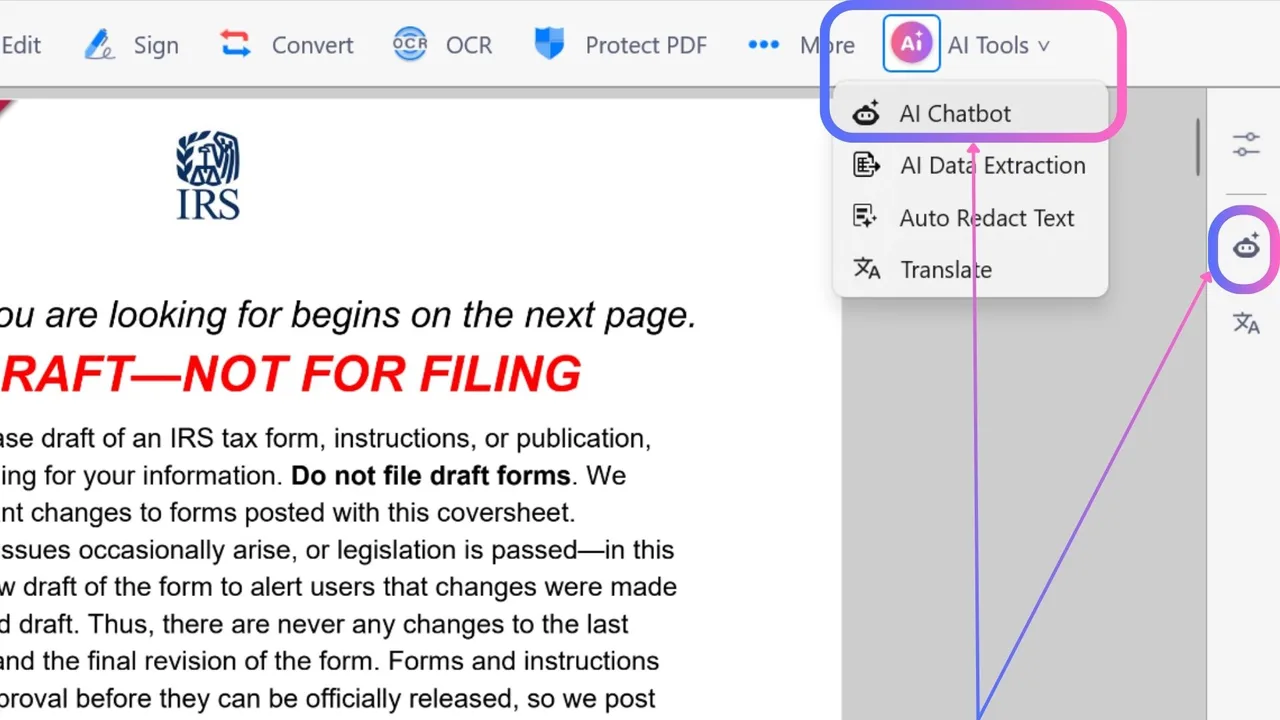
Try this lesson free or read the step-by-step guide.
Common confusions
Key terms summary vs a full AI summary
A general AI PDF summarizer picks what it thinks matters. A key terms summary asks for a fixed list, so the money and exit clauses cannot be left out quietly.
Key terms vs red flags
Key terms are the facts every contract has. Red flags are terms that look unusual or one-sided, such as a three-month liability cap or a large early termination fee.
Tips
- Ask for the section number next to every item, then read those sections.
- Do the money math yourself, not the AI.
- Put the renewal notice deadline in a shared calendar the day you sign.
Related terms
More Business terms
Where you use it: free lessons
- KDAN: Get a Vendor Contract's Key Terms with AI Chatbot (KDAN, 8 min)
- Smallpdf: Get the Key Points of a 25-Page PDF in 5 Minutes (Smallpdf, 10 min)
- AI Contract Review in 10 Minutes using Foxit AI (Foxit, 10 min)
AI tools that use it
Frequently asked questions
- What should a contract key terms summary include?
- At least the term, fees, price increases, renewal and notice dates, early termination fee and liability cap, each with its section number.
- Can AI pull key terms from a contract?
- Yes, tools like KDAN PDF, Smallpdf and Foxit can draft the list. They can also miss or misread a clause, so check each one on the page.
- Is an AI key terms summary legal advice?
- No. It is a first read to help you prepare. For anything large or unusual, ask a lawyer.